 USA
USA UAE
UAESmall Business
Designed for startups and growing businesses


See More





Brand: TeamSense
Simplify attendance tracking with a text-based system that reduces absenteeism, boosts productivity, and improves team communication.
See MoreHave you used TeamSense before?
Share your insights for better experience
Brand: TeamSense
Founded Year: 2020
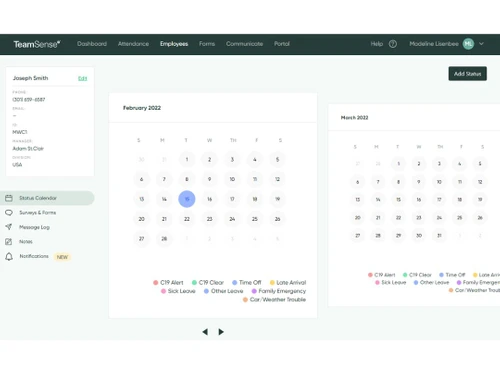
At TeamSense, we're dedicated to revolutionizing attendance in the manufacturing industry by providing a cutting-edge, text-based absence management and communication solution that connects hourly employees with their organizations.
 Leave & Attendance Management Alerts & Notifications Employee Self Service Multi Language Support Reporting & Analytics Integration Employee Communication Time Tracking Real Time Data Forms Management

Watch the demo video to explore key features, real workflows, and how the software fits your business needs.
 Ubuntu
  Windows
  MacOS
MacOS  Linux
Linux  Desktop
  Cloud-Based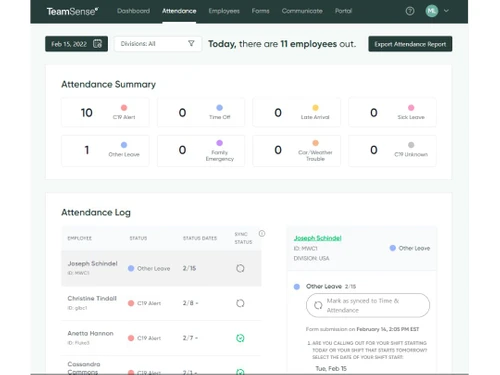
Small Business
Designed for startups and growing businesses
Medium Business
Built for business growth and flexibility
Enterprises
Designed for complex and large-scale business needs
4.3
Out of 5

Overall Rating
Based on
5 Verified Ratings
Rating Breakdown
92% Recommend this Product
Add ReviewTechjockey Trusted Reviews from Verified Users
No reviews are currently available for TeamSense. Discover similar Attendance Management Software reviews

Kent CamAttendance
Whats great - Affordable pricing, robust features, excellent customer support. read more

truMe Attendance Management
Whats great - Rule based configuration help you apply your policy on need basis read more

RollCall Attendance
Whats great - Techjockey was very helpful in taking my listed requirements and narrowing my search to a usable list of providers. Techjocke... read more

TeamSense
Price On Request
Desktop
Mobile
Web based
On Premises
Windows
Mac OS

Truein Face Attendance
Price On Request
Desktop
Mobile
Web based
On Premises
Windows
Mac OS

Nialabs
Price On Request
Desktop
Mobile
Web based
On Premises
Windows
Mac OS

InnBuilt Attendance
Price On Request
Desktop
Mobile
Web based
On Premises
Windows
Mac OS

PagarGuru
₹ 500
Desktop
Mobile
Web based
On Premises
Windows
Mac OS

Spryple
Price On Request
Desktop
Mobile
Web based
On Premises
Windows
Mac OS
Kent CamAttendance
₹ 20999
Desktop
Mobile
Web based
On Premises
Windows
Mac OS

Hajiri
₹ 69
Desktop
Mobile
Web based
On Premises
Windows
Mac OS

Tempus Central
Price On Request
Desktop
Mobile
Web based
On Premises
Windows
Mac OS

AttendHRM – Time Attendance Software
₹ 3800
Desktop
Mobile
Web based
On Premises
Windows
Mac OS

NoQu TAM
Price On Request
Desktop
Mobile
Web based
On Premises
Windows
Mac OS
(0) Product(s) selected
Available
Price on Request
Starting Price:
₹600 /Month
Starting Price:
₹69 /Month
Available
Price on Request

Starting Price:
$3 /Month

Starting Price:
₹25,000 /Year

Starting Price:
₹200 /Month

Available
Price on Request

Available
Price on Request

Available
Price on Request

Available
Price on Request





It is an attendance management software that is used in recording attendance where employees can notify their managers through their text message thus making it easier for the employers to tally their employees.
It can be found on their webpage clickable link ‘Login’ where you insert your account information to sign into the site.
Yes, it supports the multi-channel, and workers are also able to contact the admin via email and receive automated alerts or notifications.
Organizations that adopt this software can expect to record a reduction in the number of days employees are absent from work, an increase in productivity, and reduced time spent on attendance implying cost savings for the organization.
It also does not require the use of the Internet since employees can report their absence using text messages, which are accessible on simple mobile networks.
For data security and privacy protection, it has measures in place to secure employee data and is compliant with industry standards like GDPR.
It doesn’t provide any free version, however, it offers free demos. If you are interested you can always contact them to ask for a free trial.
The pricing is dependent on the number of members in your team and the particular features required. The exact cost will better be explained by requesting at Techjockey.com or can be found on their website.
In regards to attendance, the mobile application enhances enhanced attendance by allowing employees to report any absence through a text message.
20,000+ Software Listed
Best Price Guranteed
Free Expert Consultation
2M+ Happy Customers
Terms and Condtions

Users with registered businesses can purchase goods from merchants on the platform to satisfy their business needs. Users are not permitted to utilize any products acquired through the platform for resale, advertising, business, or further distribution.
For each purchase made, users will receive a Tax Invoice (or 'GST invoice') that includes specific details such as:
the GSTIN of the user associated with their registered business, and
the specified Entity Name for their business.
It should be noted that not all products are eligible for GST Invoice. Only the products displayed by participating sellers with the 'GST-based Invoice Available' callout on the product description page would qualify.
Certain goods and services are not eligible to get a GST Invoice, including items with VAS, i.e., Value Added Services (e.g., Total Mobile Protection/Assured Buyback) and those involving an exchange offer at the time of purchase.
Users must ensure the accuracy of the GSTIN, and business entity name provided for the GST Invoice. Requests for corrections into GST Invoice would not be accommodated by Techjockey.com or any Seller, and any issues arising from user-provided information are the sole responsibility of users.
Techjockey.com is not liable for the GST Invoice or any associated input tax credit. To efficiently claim an input tax credit, users should select the registered place of business address as per the GST authority's data and follow the provisions of the GST Act and rules.
To claim an input tax credit, the delivery and billing addresses must match. Furthermore, input tax credits will not be granted if the delivery address and GSTIN on the invoice are from different states. In case of incorrect GST details provided during the order placement, the order will be canceled automatically.

