linkedin
PivotalTracker logo
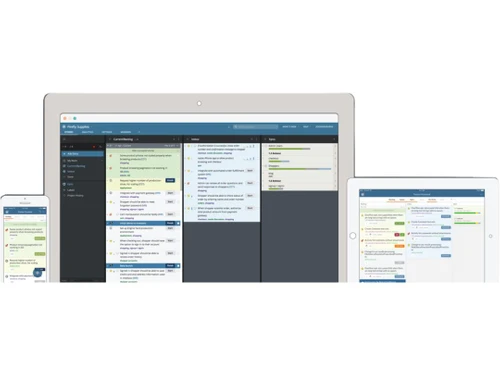
play Intro to the Tracker Interface
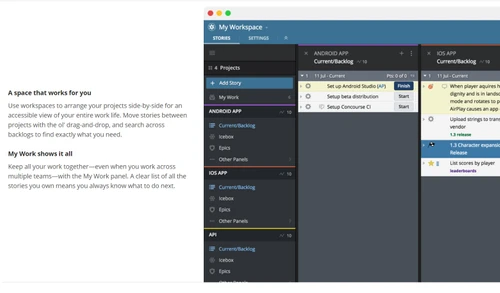
pivotaltracker multi workspace
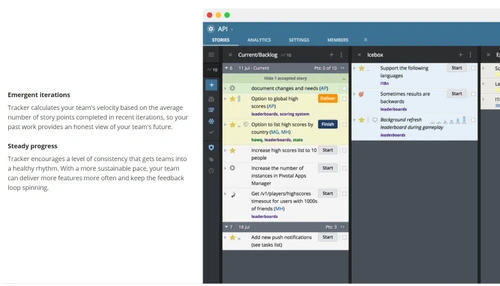
pivotaltracker planning management

PivotalTracker

Brand: VMware

  • 4.4

  • 3 Ratings

PivotalTracker It simplifies workflow management, prioritizes tasks, and provides real-time collaboration for teams. With a focus on agile project management, This Scrum tool helps teams stay organized, improve productivity, and meet deadlines effectively.

See More

Have you used PivotalTracker before?

Share your insights for better experience

Add a Review

Price Available on Request

Questions about pricing or customization? We’re here to help, just a click away.

100% Genuine
Products
Best Price
Guaranteed
Safe & Secure
Payment
  • Description

  • Pricing

  • Features

  • Specification

  • Review

  • Compare

  • Alternatives

  • FAQ

PivotalTracker Software Overview

What is PivotalTracker?

PivotalTracker is a cloud-based business software and project management software designed for teams involved in software development. It is built to simplify the agile project management process by providing a platform where users can collaborate, organize tasks, and track project progress easily.

With features like real-time updates, story blockers, and project tracking, teams can prioritize work, manage resources, and meet deadlines with greater efficiency. This makes PivotalTracker one of the most effective Scrum tools for managing agile projects.

This tool is suitable for small to medium-sized teams and software developers who work in an agile environment. PivotalTracker supports real-time communication, keeping all stakeholders aligned on the project's progress. The platform also integrates well with other tools, providing a seamless experience for users.

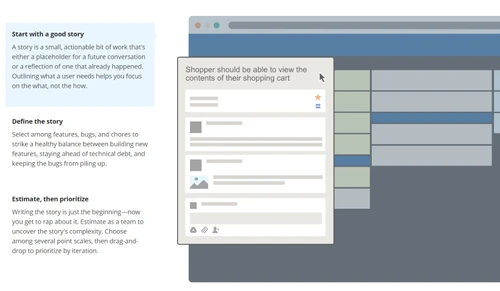
PivotalTracker simplifies planning by offering automated planning features that adjust as projects evolve, ensuring your team stays on track. It enables users to break down larger tasks into smaller stories, which can then be managed more effectively. The platform's intuitive user interface and agile methodology make it easy for both experienced and new users to navigate and contribute effectively.

Why Choose PivotalTracker Scrum Software?

  • Easy Task Management: PivotalTracker makes task management simple by breaking down projects into manageable tasks or stories, which makes it easy to track progress.
  • Real-Time Collaboration: The platform allows teams to collaborate in real-time, ensuring everyone is on the same page and up to date with project developments.
  • Agile Focus: Perfect for teams using agile methodologies, PivotalTracker supports the Scrum framework and provides tools to manage iterations and sprints effectively.
  • Customizable: Users can tailor the platform to fit their project requirements, providing flexibility in how they manage work.
  • Seamless Integration: PivotalTracker integrates with other essential tools, ensuring teams can use their favorite tools while still benefiting from its project management features.

Benefits of PivotalTracker Scrum Tools

  • Improved Productivity: By organizing and streamlining tasks, PivotalTracker helps teams focus on critical tasks, which increases overall productivity.
  • Increased Transparency: All updates and changes are visible in real time, which enhances transparency and reduces miscommunication within teams.
  • Prioritized Work: PivotalTracker helps teams focus on high-priority tasks first, ensuring critical issues are resolved promptly.
  • Agile-Friendly: The platform is optimized for agile workflows, offering tools like sprint planning and story tracking to support agile development.
  • Better Planning: With automated planning and smart prioritization, your team can stay on track with deadlines and manage resources more efficiently.
  • Real-Time Notifications: Get instant updates and notifications about tasks, deadlines, and changes so that no important event is missed.

Pricing Of PivotalTracker Scrum Software

PivotalTracker price is available on request at techjockey.com. The pricing model is based on different parameters, including extra features, deployment type, and the total number of users. For further queries related to the product, you can contact our product team and learn more about the pricing and offers.

Read more

VMware Company Details

Founded Year:  1998

Pivotal Tracker is the story-based product management tool that makes collaboration easy and keeps cross-functional agile teams in sync.

Director/Founders Rob Mee and Sherry Erskine
Company Size 1000+ Employees
Other info This foundation empowers businesses to build, run, manage, connect, and protect applications, anywhere–enabling technology-driven transformation without disruption.

PivotalTracker Pricing & Plans

Looking for The Right Pricing?

Share your requirements and get a plan built around your business.

  • Define your business needs
  • Get customised pricing
  • Choose features that fit your workflow

Price Available on Request

Get personalised PivotalTracker pricing that fits your needs. Our team will connect with you.

PivotalTracker Features

  • icon_check Notification
    Receive real-time updates about changes and progress, ensuring your team is always informed.
  • icon_check File Sharing
    Easily share documents and files within the platform to keep everyone on the same page.
  • icon_check Tasks
    Break down larger projects into manageable tasks or stories to simplify tracking and completion.
  • icon_check Story Blockers
    Identify obstacles that could hinder progress and resolve them before they affect the project timeline.
  • icon_check API
    Use the API to integrate PivotalTracker with other applications and systems, creating a connected workflow.
  • icon_check Integration
    Integrate with other project management tools and software to streamline communication and work processes.
  • icon_check Project Tracking
    Track the status of projects in real-time, ensuring deadlines are met and resources are allocated efficiently.
  • icon_check Automatic Planning
    The system adjusts tasks and deadlines automatically based on project progress, ensuring you stay on course.
PivotalTracker Demo Video play icon

Get PivotalTracker Demo

Watch the demo video to explore key features, real workflows, and how the software fits your business needs.

Understand
Key Features
Personal
Demo Insights
Interactive
Demo Support

PivotalTracker Specifications

Supported Platforms
Windows Windows iOS iOS Android Android
Devices
Desktop Desktop Mobile Mobile Tablet Tablet iPad iPad
Deployment
Cloud-Based Cloud-Based
Suitable For
All Industries
Business Specific
All Businesses
Business Size
Small Business Startups Medium Business Enterprises
Customer Support
Email Communities
Language
English
Integration
API Integration
Training Resources
Videos

Explore the Best Alternative Solutions Similar to Your Business Size and Needs

PivotalTracker Review

4.4

Out of 5

img

Overall Rating

Based on
3 Verified Ratings

Rating Breakdown

  • Features 4.3
  • Value for Money 5
  • Ease of Use 4
  • Customer Support 4.3

93% Recommend this Product

Add Review

Techjockey Trusted Reviews from Verified Users

No reviews are currently available for PivotalTracker. Discover similar Scrum Tools reviews

  • Jira

    4.5

    Whats great - Jira's emphasis on visuals when tracking performance and tickets is something I appreciate. Since our project is a support pr... read more

  • Monday.com

    4.0

    Whats great - monday.com’s design and functionality make it a perfect choice for managing projects. read more

  • Wrike

    4.0

    Whats great - ssions and manage user rights, ensuring that sensitive information is only available to the right people. Further, the two-fa... read more

Compare PivotalTracker With other Scrum Tools

Products
Ratings
Pricing
Device Supported
Deployment
Supported Platforms
  • img

    PivotalTracker

  • 4.4

  • Price On Request

  • Desktop

    Mobile

  • Web based

    On Premises

  • Windows

    Mac OS

  • img

    Zoho Sprints

  • 4.5

  • ₹ 210

  • Desktop

    Mobile

  • Web based

    On Premises

  • Windows

    Mac OS

  • img

    Sprintly

  • 4.5

  • Price On Request

  • Desktop

    Mobile

  • Web based

    On Premises

  • Windows

    Mac OS

  • img

    FlyingDonut

  • 4.3

  • Price On Request

  • Desktop

    Mobile

  • Web based

    On Premises

  • Windows

    Mac OS

  • img

    VivifyScrum

  • 4.3

  • Price On Request

  • Desktop

    Mobile

  • Web based

    On Premises

  • Windows

    Mac OS

  • img

    Scrumwise

  • 4.1

  • Price On Request

  • Desktop

    Mobile

  • Web based

    On Premises

  • Windows

    Mac OS

  • img

    Axosoft

  • 4.3

  • Price On Request

  • Desktop

    Mobile

  • Web based

    On Premises

  • Windows

    Mac OS

  • img

    nTask

  • 4.2

  • Price On Request

  • Desktop

    Mobile

  • Web based

    On Premises

  • Windows

    Mac OS

  • img

    Quickscrum

  • 4.2

  • Price On Request

  • Desktop

    Mobile

  • Web based

    On Premises

  • Windows

    Mac OS

  • img

    Yodiz

  • 4.2

  • Price On Request

  • Desktop

    Mobile

  • Web based

    On Premises

  • Windows

    Mac OS

(0) Product(s) selected

PivotalTracker Alternatives

See All PivotalTracker Alternatives

Starting Price:

$19 /Monthly

Starting Price:

$5 /User/Month

Starting Price:

$9 /Monthly

Available

Price on Request

Articles for PivotalTracker

See All Related Articles

What is PivotalTracker?

PivotalTracker is an agile project management tool that helps software development teams plan, track, and collaborate on projects in real time.

How does PivotalTracker help with project management?

PivotalTracker breaks down projects into manageable tasks, tracks progress in real-time, and provides tools for agile project planning, making it easier for teams to stay on track.

Is PivotalTracker suitable for small teams?

Yes, PivotalTracker is ideal for small and medium-sized teams who need to manage projects and collaborate effectively using agile methodologies.

Can I integrate PivotalTracker with other tools?

Yes, PivotalTracker offers various integrations with other tools, including APIs, to help streamline your workflow.

Does PivotalTracker support agile development?

Yes, PivotalTracker is built specifically for agile project management and supports Scrum frameworks and agile methodologies.

How does the automatic planning feature work in PivotalTracker?

Automatic planning adjusts project tasks and timelines based on real-time progress, helping your team stay on track without manual intervention.

Is there file-sharing functionality in PivotalTracker?

Yes, PivotalTracker allows users to easily share files within the platform to ensure everyone has access to necessary documents.

Can I track the progress of my project in real-time?

Yes, PivotalTracker provides real-time project tracking, allowing you to see the status of tasks, deadlines, and overall project progress instantly.

How are notifications handled in PivotalTracker?

Notifications are sent in real-time, alerting you about task updates, changes, or deadlines to keep everyone on the same page.

Is PivotalTracker suitable for non-technical teams?

While PivotalTracker is designed for software development teams, its simplicity and agile tools can also benefit non-technical teams working on complex projects.

How much does PivotalTracker Scrum Tool Cost?

PivotalTracker price is available on request at techjockey.com.

20,000+ Software Listed

Best Price Guranteed

Free Expert Consultation

2M+ Happy Customers

Terms and Condtions

close

Users with registered businesses can purchase goods from merchants on the platform to satisfy their business needs. Users are not permitted to utilize any products acquired through the platform for resale, advertising, business, or further distribution.

For each purchase made, users will receive a Tax Invoice (or 'GST invoice') that includes specific details such as:

  • the GSTIN of the user associated with their registered business, and

  • the specified Entity Name for their business.

It should be noted that not all products are eligible for GST Invoice. Only the products displayed by participating sellers with the 'GST-based Invoice Available' callout on the product description page would qualify.

Certain goods and services are not eligible to get a GST Invoice, including items with VAS, i.e., Value Added Services (e.g., Total Mobile Protection/Assured Buyback) and those involving an exchange offer at the time of purchase.

Users must ensure the accuracy of the GSTIN, and business entity name provided for the GST Invoice. Requests for corrections into GST Invoice would not be accommodated by Techjockey.com or any Seller, and any issues arising from user-provided information are the sole responsibility of users.

Techjockey.com is not liable for the GST Invoice or any associated input tax credit. To efficiently claim an input tax credit, users should select the registered place of business address as per the GST authority's data and follow the provisions of the GST Act and rules.

To claim an input tax credit, the delivery and billing addresses must match. Furthermore, input tax credits will not be granted if the delivery address and GSTIN on the invoice are from different states. In case of incorrect GST details provided during the order placement, the order will be canceled automatically.