USA
USA UAE
UAESmall Business
Designed for startups and growing businesses


See More


Brand: TopSource
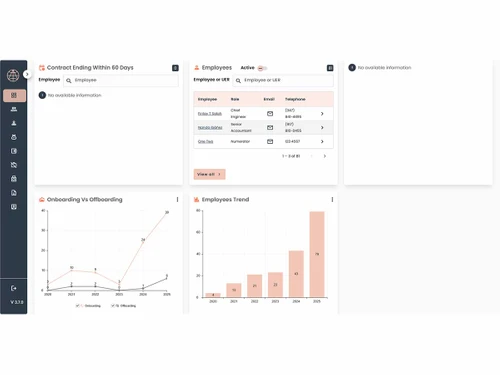
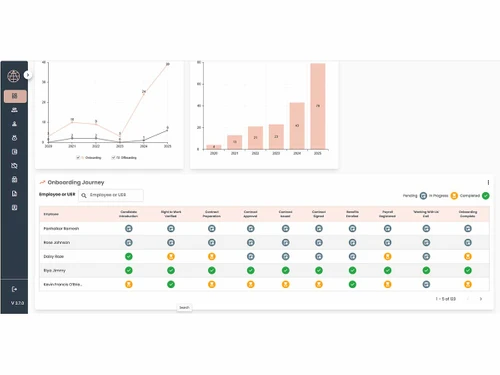
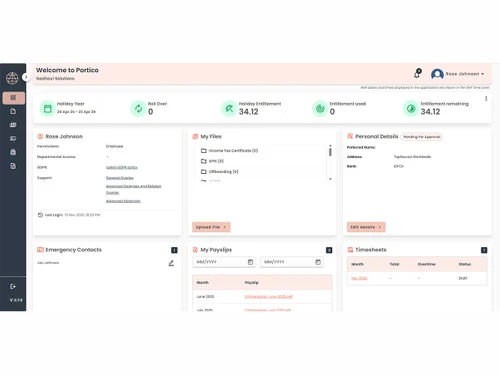
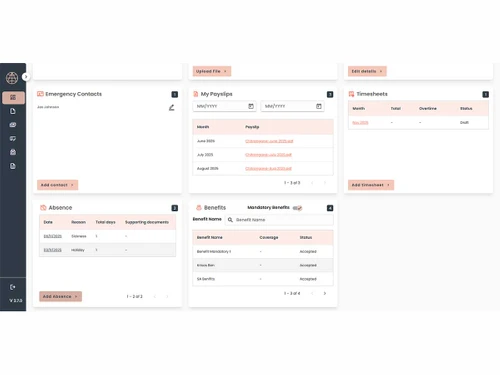
Portico is a cloud-based program that offers integrated HR and Payroll solutions to enterprises. The multi-faceted services offered by the program include data management and tracking, employee evaluation, training, document archiving, monitoring leaves and holidays and calculating IT returns. Further, enterprises get access to a futuristic dashboard, offering a detailed view of archived document...
See MoreHave you used Portico before?
Share your insights for better experience
Brand: TopSource
Founded Year: 2004
TopSource is a global workforce solutions provider supporting mid-market, and enterprise organizations with compliant and scalable payroll and employment services across India and 180 other countries.
Looking for The Right Pricing?
Share your requirements and get a plan built around your business.
Price Available on Request
Get personalised Portico pricing that fits your needs. Our team will connect with you.
Payroll Management
 Automated Payroll Direct Bank Transfers Tax Deductions Employee Benefits Management Off-Cycle Payroll Processing Multiple Pay Rates and Schedules Bonus and Incentive Management Overtime Management Variable Pay & Commission Management Expense Reimbursements Gratuity Calculation
 Compliance Management
Labour Welfare Fund (LWF) Management Income Tax (TDS) Management Provident Fund (PF) Compliance Professional Tax (PT) Compliance Employee State Insurance (ESI) Compliance Time, Attendance & Leave Management
Leave & Absence Management Sick Leave and Vacation Tracking Attendance Tracking Holiday & Leave Calendar Leave Policy Customization Employee Self-Service (ESS)
Income Tax Planner Payslip Access Expense Claims Employee Lifecycle Management
Employee Database Document Management Employee Shift Scheduling F&F Settlement Banking Integration & Payment Processing
Bank Transfer Files Cheque Processing Direct Deposit Scheduling Multi-Bank Support Automation and Customization
Alerts & Notifications Scheduled Payroll Processing Custom Payroll Rules and Policies Configurable Workflows & Approvals API Access Security and Data Privacy
User Access Management Two-Factor Authentication (2FA) Data Backup and Recovery Encrypted Data Transmission Audit Logs and Monitoring Integrations
API Integration Performance Management Payment Gateway Accounting Software HRMS Third Party Integration Biometric Integration Reporting and Analytics
Payroll Reports Leave and Attendance Reports Compliance Reports Employee Master Report  Windows
  iOS
iOS  Android
  Desktop
  Mobile
  Cloud-Based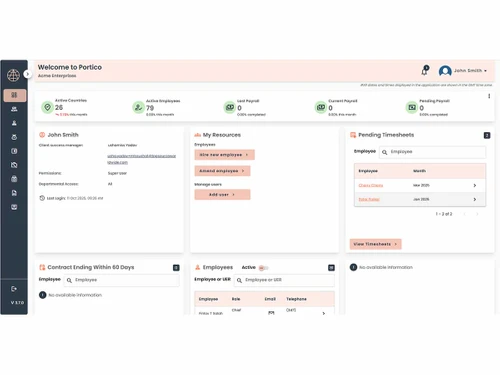
Small Business
Designed for startups and growing businesses
Medium Business
Built for business growth and flexibility
Enterprises
Designed for complex and large-scale business needs
2
Out of 5

Overall Rating
Based on
1 Verified Review
Rating Breakdown
10% Recommend this Product
Add Review
Feb 19, 2024
Techjockey Verified
“Frustrating User Experience Hinders Functionality of Portico Payroll Software”
While Portico Payroll Software may boast an array of features, its usability and user experience fall short of expectations. This review highlights the software's shortcomings and encourages HR teams to prioritize user-friendly solutions. Key Concerns: Unintuitive Interface: The outdated and confusing interface makes navigation and task completion difficult. Misplaced Priorities: Essential functions like income tax and payslip management are overshadowed by less critical features. Confusing Visualizations: Unclear graphs and unnecessary elements clutter the dashboard, hindering information clarity. Limited Functionality: The software opens in a restricted browser window, lacking essential navigation buttons. Outdated Login Process: The login experience feels dated and inconvenient. Steep Learning Curve: The software's complexity necessitates frequent training for employees. Unforgiving Design: Uploading files requires an extra, easily missed upload button, leading to frustration and wasted effort. Recommendation: HR teams should prioritize user-friendliness alongside features when selecting payroll software. Complex and poorly designed tools like Portico can hinder productivity, increase training costs, and potentially lead to errors, especially when dealing with sensitive financial information. Conclusion: Portico Payroll Software has the potential to be a valuable tool, but its usability issues significantly hinder its effectiveness. Choosing user-friendly software can streamline workflow, improve employee satisfaction, and minimize errors.
Pros
Doesn't matter if there are any.
Cons
Poor Usability: Unintuitive and outdated interface: Feels like cheapest software available. Confusing navigation and layout. Unnecessary elements clutter the dashboard, hindering information clarity. Misplaced Priorities: Focuses on less critical features like birthday calendars over essential functionalities like income tax and payslip management. Limited Functionality: Opens in a restricted browser window lacking basic navigation buttons (back, forward, refresh). Outdated Login Process: Feels dated and inconvenient. Steep Learning Curve: Complex design requires frequent training for employees. Unforgiving Design Choices: Easily missed upload button for file uploads leads to confusion and wasted effort. Potential for Errors: Complex design and unintuitiveness can increase the risk of errors, especially when dealing with sensitive financial data. Reduced Productivity: Difficult to use, leading to wasted time and frustration for employees. Increased Training Costs: Steep learning curve necessitates frequent training sessions.

Portico
Price On Request
Desktop
Mobile
Web based
On Premises
Windows
Mac OS
PagarBook
₹ 499
Desktop
Mobile
Web based
On Premises
Windows
Mac OS
PayWise
₹ 300
Desktop
Mobile
Web based
On Premises
Windows
Mac OS

Zoho Payroll
₹ 1250
Desktop
Mobile
Web based
On Premises
Windows
Mac OS
ADP Vista
Price On Request
Desktop
Mobile
Web based
On Premises
Windows
Mac OS

QuickBooks Payroll
Price On Request
Desktop
Mobile
Web based
On Premises
Windows
Mac OS

RazorpayX Payroll
₹ 29988
Desktop
Mobile
Web based
On Premises
Windows
Mac OS

Papaya Global
Price On Request
Desktop
Mobile
Web based
On Premises
Windows
Mac OS

UnboxPayroll
₹ 2000
Desktop
Mobile
Web based
On Premises
Windows
Mac OS

HivePayroll
₹ 1499
Desktop
Mobile
Web based
On Premises
Windows
Mac OS

SPIKYARC Payroll
Price On Request
Desktop
Mobile
Web based
On Premises
Windows
Mac OS
(0) Product(s) selected
Available
Price on Request
Starting Price:
$15
Available
Price on Request

Available
Price on Request
Starting Price:
₹10 /Month

Starting Price:
₹25 /Month

Starting Price:
$25 /Employee/Month

Available
Price on Request

Starting Price:
$39 /Month



Yes, the software is coherent with the secure coding measures, addressing usual software development vulnerabilities.
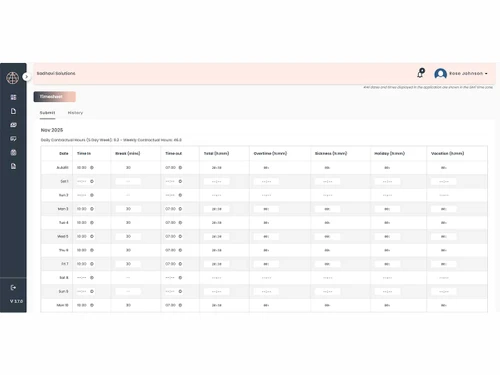
The Timesheet Entry and Capture System of Portico can be customized to capture multiple types of clock-in/out frequencies on a monthly, weekly, or bi-weekly basis.
Yes, you can request an online demo of Portico. Our executives will get in touch with you as per the date and time mentioned in your demo request.
Yes, Portico is compliant with GDPR, and is also a member of EU-US.
Yes, Portico has a dedicated mobile app for Android and iOS users.
20,000+ Software Listed
Best Price Guranteed
Free Expert Consultation
2M+ Happy Customers
Terms and Condtions

Users with registered businesses can purchase goods from merchants on the platform to satisfy their business needs. Users are not permitted to utilize any products acquired through the platform for resale, advertising, business, or further distribution.
For each purchase made, users will receive a Tax Invoice (or 'GST invoice') that includes specific details such as:
the GSTIN of the user associated with their registered business, and
the specified Entity Name for their business.
It should be noted that not all products are eligible for GST Invoice. Only the products displayed by participating sellers with the 'GST-based Invoice Available' callout on the product description page would qualify.
Certain goods and services are not eligible to get a GST Invoice, including items with VAS, i.e., Value Added Services (e.g., Total Mobile Protection/Assured Buyback) and those involving an exchange offer at the time of purchase.
Users must ensure the accuracy of the GSTIN, and business entity name provided for the GST Invoice. Requests for corrections into GST Invoice would not be accommodated by Techjockey.com or any Seller, and any issues arising from user-provided information are the sole responsibility of users.
Techjockey.com is not liable for the GST Invoice or any associated input tax credit. To efficiently claim an input tax credit, users should select the registered place of business address as per the GST authority's data and follow the provisions of the GST Act and rules.
To claim an input tax credit, the delivery and billing addresses must match. Furthermore, input tax credits will not be granted if the delivery address and GSTIN on the invoice are from different states. In case of incorrect GST details provided during the order placement, the order will be canceled automatically.