USA
USA UAE
UAESmall Business
Designed for startups and growing businesses


See More




Brand: PosEase
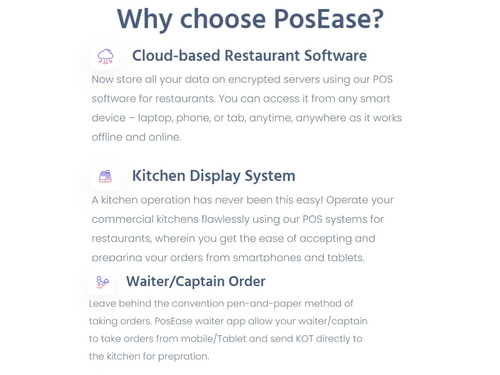
PosEase is one of the best POS software designed for restaurants. It ensures complete control over your restaurant business whenever and wherever you need it. This restaurant management software helps you in managing the entire business with a few clicks. Apart from that, it is a cloud-based restaurant management software that offers modules for recipe & inventory management, kitchen display ...
See MoreHave you used PosEase before?
Share your insights for better experience
Brand: PosEase
Founded Year: 2021
PosEase is a cloud-based POS software for hospitality industries like Restaurants, Bars, cafes, Cloud kitchens, Bakeries. It ensures flawless operations and maximizes profits for your Restaurant Business. Manage Tables, KOTs, & Online with Inventory Management and Analytics.
Looking for The Right Pricing?
Share your requirements and get a plan built around your business.
Price Available on Request
Get personalised PosEase pricing that fits your needs. Our team will connect with you.
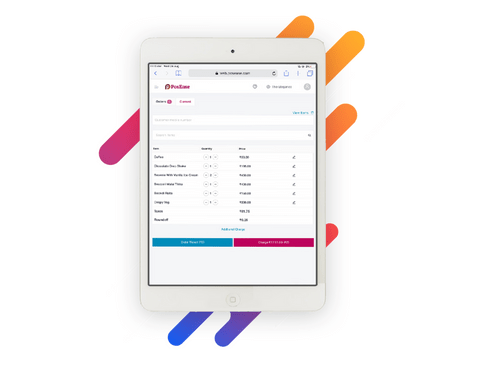
 Table Management Inventory Management Order Management Kitchen Display Multiple Printer Configuration Loyalty Program Integration Bar Stock Management Integrated CRM Detailed Reporting

Watch the demo video to explore key features, real workflows, and how the software fits your business needs.
 Ubuntu
  Windows
  MacOS
MacOS  Linux
Linux  Desktop
  Cloud-Based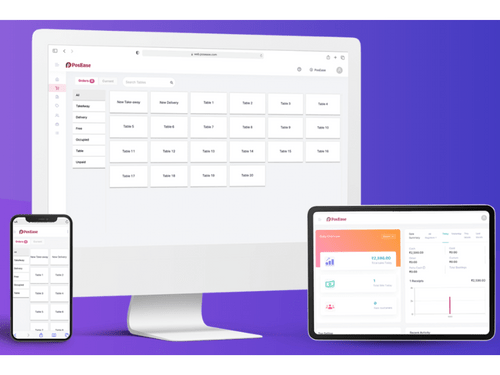
Small Business
Designed for startups and growing businesses
Medium Business
Built for business growth and flexibility
Enterprises
Designed for complex and large-scale business needs
4.7
Out of 5

Overall Rating
Based on
3 Verified Reviews
Rating Breakdown
90% Recommend this Product
Add ReviewUsers generally express high satisfaction with PosEase, highlighting its ease of use and comprehensive features that streamline restaurant management tasks. Many appreciate its ability to enhance operational efficiency and customer service, making it a valuable investment for restaurateurs. Complaints are notably absent, with reviewers indicating no significant drawbacks. Overall, PosEase appears to be a trusted solution for restaurant managers looking to simplify their operations and improve service delivery.

Oct 7, 2022
Techjockey Verified
“A software that every restaurateur can bet on!”
Pros
Being a restaurateur, I needed a solution that would help me get my marketing and operations tasks done. I invested in PoseEase because it has a robust software suite. I’m proud to say that my investment has paid off big time! The software is easy to use, and it is a one-stop solution for all my restaurant requirements.
Cons
As of now, there is nothing negative about it.
Reason to switch
I faced a lot of technical errors while using TMBill POS.
Oct 7, 2022
Techjockey Verified
“Make your restaurant management easy with PosEase software.”
Pros
I'm a manager at a restaurant and we have always been looking for a way to make things run more smoothly. I found PosEase and it really does make things much easier for us. All our orders are processed online, and we never have to worry about the wait getting too long. We also have a lot more flexibility in terms of what we serve, and our customers love it.
Cons
Nothing is a drawback.
Reason to switch
QPOS didn’t seem to have a smooth UI.
Oct 8, 2022
Techjockey Verified
“An all-in-one restaurant management system that has all the features.”
Pros
Posease is the easiest restaurant management system that I have ever used. This system lets you create a menu, take orders, process payments, and even manage your inventory without any hassles. The tools are super easy to use, and it is designed such that it saves you a lot of time.
Cons
Nothing
Reason to switch
Eatlot needs improvement in its live ‘delivery-tracking’.

PosEase
Price On Request
Desktop
Mobile
Web based
On Premises
Windows
Mac OS
Petpooja
₹ 10000
Desktop
Mobile
Web based
On Premises
Windows
Mac OS

Feedo
₹ 899
Desktop
Mobile
Web based
On Premises
Windows
Mac OS

SpotOn
Price On Request
Desktop
Mobile
Web based
On Premises
Windows
Mac OS

SpeedLine POS
Price On Request
Desktop
Mobile
Web based
On Premises
Windows
Mac OS

Rezku POS
Price On Request
Desktop
Mobile
Web based
On Premises
Windows
Mac OS

Track My Table
₹ 399
Desktop
Mobile
Web based
On Premises
Windows
Mac OS

RestoMPOS
Price On Request
Desktop
Mobile
Web based
On Premises
Windows
Mac OS
Solo Billing
₹ 8000
Desktop
Mobile
Web based
On Premises
Windows
Mac OS

TMBill POS
₹ 5999
Desktop
Mobile
Web based
On Premises
Windows
Mac OS

FoodyQueen
₹ 4188
Desktop
Mobile
Web based
On Premises
Windows
Mac OS
(0) Product(s) selected
Starting Price:
$55 /Month
Available
Price on Request
Starting Price:
$49 /Month
Starting Price:
₹399 /Month
Available
Price on Request

Available
Price on Request

Starting Price:
$49 /Month

Starting Price:
₹550 /month

Available
Price on Request
PosEase restaurant management software is compatible with Windows, Linux, macOS, Android, and iOS operating systems.
PosEase app is available for iOS & Android devices.
PosEase restaurant management software supports web-based deployment.
PosEase restaurant management POS software pricing is available on request at techjockey.com.
PosEase software is typically used by cloud kitchens, food trucks, coffee shops, bakeries, pizzeria, quick service restaurants, fine dining restaurants, etc.
PosEase solution demo is available for free with techjockey.com.
PosEase restaurant management software offers a free trial. However, the premium plan with advanced features is available at techjockey.com with exciting deals.
For PosEase installation, insert the given CD/USB flash storage in your system and open the Setup Wizard to get started. The web-based version can be accessed directly through PosEase portal.
PosEase software solution helps with efficiently manage your restaurant business. It helps you in managing online orders, inventory, processing of invoices/bills, planning menu, managing CRM, etc.
PosEase regular updates are available free of cost. There are no hidden software update charges.
PosEase Restaurant Billing Software used for Table Management,Inventory Management,Order Management and Kitchen Display.
You can directly visit PosEase portal and get in touch with PosEase customer support for any software-related query.
Please contact our product experts to get PosEase lifetime deal with exclusive offers.
20,000+ Software Listed
Best Price Guranteed
Free Expert Consultation
2M+ Happy Customers
Terms and Condtions

Users with registered businesses can purchase goods from merchants on the platform to satisfy their business needs. Users are not permitted to utilize any products acquired through the platform for resale, advertising, business, or further distribution.
For each purchase made, users will receive a Tax Invoice (or 'GST invoice') that includes specific details such as:
the GSTIN of the user associated with their registered business, and
the specified Entity Name for their business.
It should be noted that not all products are eligible for GST Invoice. Only the products displayed by participating sellers with the 'GST-based Invoice Available' callout on the product description page would qualify.
Certain goods and services are not eligible to get a GST Invoice, including items with VAS, i.e., Value Added Services (e.g., Total Mobile Protection/Assured Buyback) and those involving an exchange offer at the time of purchase.
Users must ensure the accuracy of the GSTIN, and business entity name provided for the GST Invoice. Requests for corrections into GST Invoice would not be accommodated by Techjockey.com or any Seller, and any issues arising from user-provided information are the sole responsibility of users.
Techjockey.com is not liable for the GST Invoice or any associated input tax credit. To efficiently claim an input tax credit, users should select the registered place of business address as per the GST authority's data and follow the provisions of the GST Act and rules.
To claim an input tax credit, the delivery and billing addresses must match. Furthermore, input tax credits will not be granted if the delivery address and GSTIN on the invoice are from different states. In case of incorrect GST details provided during the order placement, the order will be canceled automatically.