USA
USA UAE
UAESmall Business
Designed for startups and growing businesses

See More




Brand: UG INFOTEK
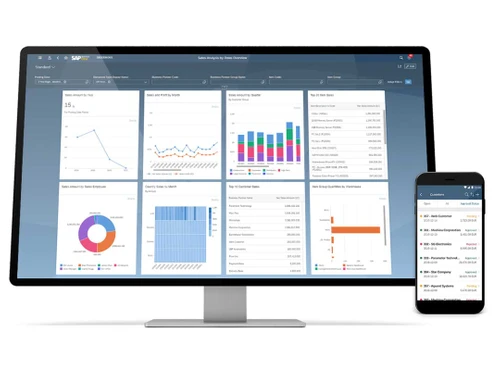
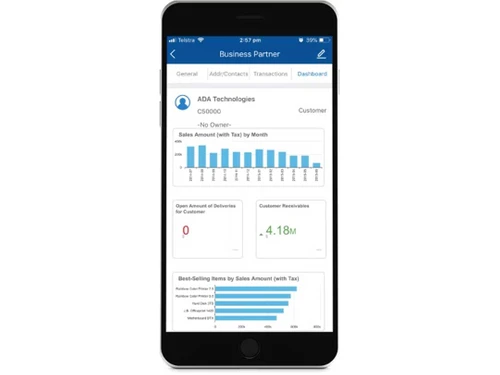
SAP Business One is an ERP solution that helps small businesses manage all major processes, ranging from finance management to inventory, sales, purchase, reporting & analytics and CRM. It ensures complete control over your business processes with smart insights and real-time information. Streamlined processes with Business One ERP result in profitable business growth. SAP B1 is a flexible an...
See MoreHave you used SAP Business One before?
Share your insights for better experience
Brand: UG INFOTEK
Founded Year: 2012
We help SMEs optimize their inventories, improve operations, and increase productivity at all levels which results in better productivity and improved bottom line. It also helps in better compliance and avoid unnecessary penalties.
Looking for The Right Pricing?
Share your requirements and get a plan built around your business.
Price Available on Request
Get personalised SAP Business One pricing that fits your needs. Our team will connect with you.
Financial/Accounts Management
 Tax Management Fixed Asset Management General Ledger Bank Reconciliation Accounts Payable & Accounts Receivable Multi-Currency Support Budgeting And Forecasting
 Human Resource Management (HRM)
Payroll Management Employee Information Management Recruitment and Onboarding Performance Management Time and Attendance Learning Management Supply Chain Management
Inventory Management Procurement and Purchasing Demand Planning Logistics and Distribution Supplier Relationship Management Transportation Management Route Planning Manufacturing
Bill Of Materials (BOM) Production Planning and Scheduling Material Requirement Planning (MRP) Quality Control Management Shop Floor Management Work Order Management Maintenance Management Customer Relationship Management (CRM)
Contact Management Lead Management Sales Pipeline Management Marketing Automation Audience Segmentation Project Management
Collaboration Tools Resource Management Cost Management Task Scheduling Time Tracking Reporting and Analytics
Sales Reports Dashboards Financial Reports Business Intelligence Custom Reports Regulatory Compliance Reports Real Time Reports Predictive Analytics Integrations
Customer Support API Integration Third Party Integration Payment Gateway Integration Ecommerce Integration Security and Compliance
Data Encryption Role-Based Access Control (RBAC) GDPR and Other Compliance Audit Management Disaster Recovery Administrative Features
Workflow Automation Data Import/Export User Access Management Workflow Approval Centralized Database Admin Panel Alerts & Notifications
Email and SMS Notifications Security Alerts Custom Event Alerts Non-Compliance Issues Others
Budgeting Customization Security features Alerts & Notifications 

Watch the demo video to explore key features, real workflows, and how the software fits your business needs.
 Ubuntu
  Windows
  MacOS
MacOS  Linux
Linux  Desktop
  Cloud-Based
  Perpetual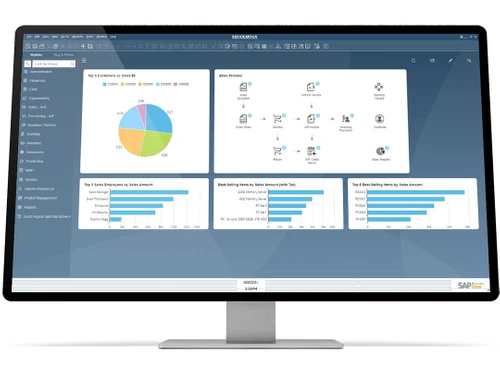
Small Business
Designed for startups and growing businesses
Medium Business
Built for business growth and flexibility
Enterprises
Designed for complex and large-scale business needs
4.2
Out of 5

Overall Rating
Based on
5 Verified Ratings
Rating Breakdown
90% Recommend this Product
Add ReviewTechjockey Trusted Reviews from Verified Users
No reviews are currently available for SAP Business One. Discover similar ERP Software reviews

Dynamics 365 Business Central
Whats great - The capacity to use Excel to mass input data into the system and to extract data. read more

DataNote ERP
Whats great - The most impressive thing with this ERP is the reporting and analytics. I'm daily using the AI reports available in various f... read more

Eazy ERP
Whats great - Real-time data. Better sales tracking. Customizable reports. Since using EAZY ERP, our work and sales tracking have improved ... read more

SAP Business One
Price On Request
Desktop
Mobile
Web based
On Premises
Windows
Mac OS

Presence360
₹ 2999
Desktop
Mobile
Web based
On Premises
Windows
Mac OS
Dynamics 365 Business Central
₹ 665
Desktop
Mobile
Web based
On Premises
Windows
Mac OS
Fablead ERP
₹ 999
Desktop
Mobile
Web based
On Premises
Windows
Mac OS

Odoo ERP
₹ 760
Desktop
Mobile
Web based
On Premises
Windows
Mac OS

iXpert ERP
₹ 19999
Desktop
Mobile
Web based
On Premises
Windows
Mac OS

Bigsun ERP
₹ 6000
Desktop
Mobile
Web based
On Premises
Windows
Mac OS

Deskera All in One
₹ 36000
Desktop
Mobile
Web based
On Premises
Windows
Mac OS
Esarwa Enterprise ERP
Price On Request
Desktop
Mobile
Web based
On Premises
Windows
Mac OS
Axolon ERP
Price On Request
Desktop
Mobile
Web based
On Premises
Windows
Mac OS
MenThee ERP
Price On Request
Desktop
Mobile
Web based
On Premises
Windows
Mac OS
(0) Product(s) selected
Starting Price:
₹999 /Month
Starting Price:
₹6,000 /User/Month
Available
Price on Request
Available
Price on Request

Starting Price:
₹34,944 /User/Month

Starting Price:
$300 /Year

Available
Price on Request
Starting Price:
₹10,000 /Month
Available
Price on Request
Available
Price on Request

Available
Price on Request

Sap Business One ERP Software is compatible with Windows operating systems.
Sap Business One ERP Software supports Web-Based.
Sap Business One ERP Software is typically used in All Industries.
For Sap Business One ERP Software installation, insert the given CD/USB flash storage in your system and open the Setup Wizard to get started.
Sap Business One ERP Software helps with Cost Control and Cost analysis,Budgeting,Increase Revenue,Scalability. It's a complete solution for Sales Management,Purchases,Multi Currency,Mobility.
For the convenience of small businesses across industries, SAP B1 can be deployed both on-premises and on cloud.
SAP B1 price and plans are available on techjockey.com on request.
Small and medium sized businesses can use SAP Business one for financial management, purchase and sales, warehouse & inventory, distribution, and customer relationship management.
SAP Business One installation can be done with the download of its .exe file on a system.
SAP Business One app is available for Android & iOS devices.
Yes, SAP Business One demo is available for free at techjockey.com .
No, it’s not free. However, SAP B1 trial is available for 30 days.
SAP Business One on cloud is hosted in the data centres of the service provider. Businesses don’t need to spend on buying and maintaining servers on-premises. You just have to pay SAP B1 licensing costs as per the need.
0 0
SAP HANA is the computing platform that comes in-memory with SAP B1. It improves the performance of SAP Business One and ensures big data management in real time.
0 0
SAP Business One is an ERP solution designed especially for SMBs to manage finances, purchase and sales, warehouse & inventory, distribution and customer relationship management.
0 0
SAP Business One has received good reviews from the users across small businesses for inventory management, reporting and analytics, finance management and other such exciting features.
0 0
It requires rebuilding the reports in the OZ Designer and connecting it to SAP's data source.
0 0
20,000+ Software Listed
Best Price Guranteed
Free Expert Consultation
2M+ Happy Customers
Terms and Condtions

Users with registered businesses can purchase goods from merchants on the platform to satisfy their business needs. Users are not permitted to utilize any products acquired through the platform for resale, advertising, business, or further distribution.
For each purchase made, users will receive a Tax Invoice (or 'GST invoice') that includes specific details such as:
the GSTIN of the user associated with their registered business, and
the specified Entity Name for their business.
It should be noted that not all products are eligible for GST Invoice. Only the products displayed by participating sellers with the 'GST-based Invoice Available' callout on the product description page would qualify.
Certain goods and services are not eligible to get a GST Invoice, including items with VAS, i.e., Value Added Services (e.g., Total Mobile Protection/Assured Buyback) and those involving an exchange offer at the time of purchase.
Users must ensure the accuracy of the GSTIN, and business entity name provided for the GST Invoice. Requests for corrections into GST Invoice would not be accommodated by Techjockey.com or any Seller, and any issues arising from user-provided information are the sole responsibility of users.
Techjockey.com is not liable for the GST Invoice or any associated input tax credit. To efficiently claim an input tax credit, users should select the registered place of business address as per the GST authority's data and follow the provisions of the GST Act and rules.
To claim an input tax credit, the delivery and billing addresses must match. Furthermore, input tax credits will not be granted if the delivery address and GSTIN on the invoice are from different states. In case of incorrect GST details provided during the order placement, the order will be canceled automatically.