USA
USA UAE
UAESmall Business
Designed for startups and growing businesses
See More





Brand: PhonePe
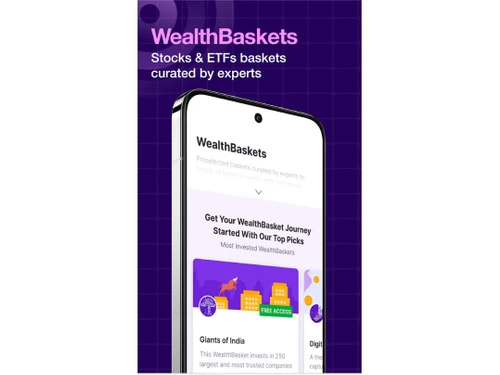
Share.Market makes investing accessible with stocks, ETFs, F&O, IPOs, mutual funds, expert-curated WealthBaskets, and zero account opening and maintenance fees.
See MoreHave you used Share.Market before?
Share your insights for better experience
Brand: PhonePe
Founded Year: 2015
PhonePe was founded in December 2015 and has emerged as India’s largest payments app, enabling digital inclusion for consumers and merchants alike. With 48 crore (480 Million) registered users, one in four Indians are now on PhonePe.
Looking for The Right Pricing?
Share your requirements and get a plan built around your business.
Price Available on Request
Get personalised Share.Market pricing that fits your needs. Our team will connect with you.
Core Features
 Portfolio Management Market Data Watchlist Charting Tools Order Control Order Execution
 Order Execution
Limit Order Market Order Stop (Loss) Order Stop Limit Orders Trailing Stop Order Research and Analysis
Technical Analysis Fundamental Analysis Pattern Recognition Scanning Tools Backtesting and Optimization Smart drawing tools Trading Options
Mutual Funds Intraday Trading Options Trading Futures Trading Automatic Trading Margin Trading (MTF) Algorithm Trading Forex Trading Crypto Trading Paper Trading Stock SIP Account Management
Demat Account Creation Platform Migration Multi-Factor Authentication (MFA) Customizable User Interface Integrations
API Integration Financial Tools Integration Reporting & Analytics
Dashboards Contract Note Financial Transaction Report (CashLedger) Automated Reports Report Customization P&L Report Alerts & Notification
Price Alert Real Time Market Updates News Alerts Volume Alerts 

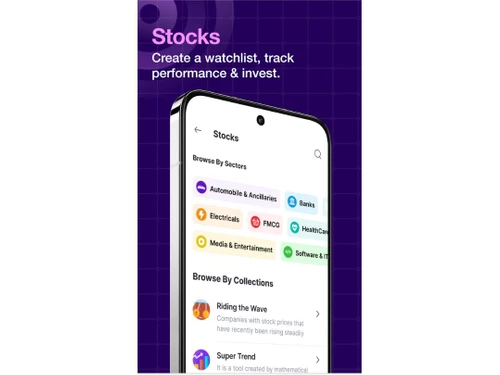
Watch the demo video to explore key features, real workflows, and how the software fits your business needs.
 Ubuntu
  Windows
  iOS
iOS  Android MacOS
  Linux
Linux  Desktop
  Mobile
  Cloud-Based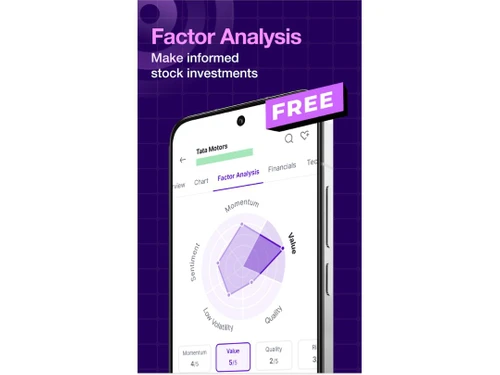
Small Business
Designed for startups and growing businesses
Medium Business
Built for business growth and flexibility
Enterprises
Designed for complex and large-scale business needs
4.3
Out of 5

Overall Rating
Based on
10 Verified Reviews
Rating Breakdown
88% Recommend this Product
Add ReviewPros
"Zero brokerage on F&O and equity trades, easy account opening"
Cons
"No GTT, stop-loss, convert intraday to delivery—advanced traders may miss these "

Mar 10, 2025
Techjockey Verified
“Good for Casual Trading, Not Power Users”
I’m a part-time trader who likes quick orders and live prices, so the app is perfect. But it lacks GTT orders, price alerts, and converting intraday to delivery—so if you want those advanced tools, it’s not for you.
Pros
Simple, no-fuss interface, live price updates
Cons
No GTT, stop-loss, convert intraday to delivery—advanced traders may miss these
Reason to switch
Needed easy trading and basic charts—not deep features.
Mar 28, 2025
Techjockey Verified
“Zero Brokerage Won’t Last Forever”
The zero brokerage offer is fantastic—we saved thousands last month. But unless thing continue post-March, costs will come back—so I’m keeping an eye on that.
Pros
?0 brokerage on delivery/F&O until DecMar 2025
Cons
After promo ends, brokerage reverts
Reason to switch
Wanted short-term zero cost to get started.
Jun 2, 2025
Techjockey Verified
“Zero AMC Is Great—Just Know the Future Fees”
Zero AMC was awesome when I started. But billing kicked in after 12 months, so if you’re done before that, it’s free—but long-term users should be aware.
Pros
No AMC in the first year
Cons
AMC resumes at Rs 15/month from year two
Reason to switch
Wanted free first-year usage even if future charge kicks in.

Share.Market
Price On Request
Desktop
Mobile
Web based
On Premises
Windows
Mac OS

Masterswift 2.0
Price On Request
Desktop
Mobile
Web based
On Premises
Windows
Mac OS

AlgoTest
Price On Request
Desktop
Mobile
Web based
On Premises
Windows
Mac OS

Pocketful
Price On Request
Desktop
Mobile
Web based
On Premises
Windows
Mac OS

StockMock
₹ 349
Desktop
Mobile
Web based
On Premises
Windows
Mac OS

Bajaj Broking
Price On Request
Desktop
Mobile
Web based
On Premises
Windows
Mac OS

Edelweiss TX3
Price On Request
Desktop
Mobile
Web based
On Premises
Windows
Mac OS

Zerodha Kite
Price On Request
Desktop
Mobile
Web based
On Premises
Windows
Mac OS

Bigul
Price On Request
Desktop
Mobile
Web based
On Premises
Windows
Mac OS
Trading Terminal
Price On Request
Desktop
Mobile
Web based
On Premises
Windows
Mac OS

QuantShare
Price On Request
Desktop
Mobile
Web based
On Premises
Windows
Mac OS
(0) Product(s) selected
Available
Price on Request
Available
Price on Request

Available
Price on Request

Available
Price on Request

Available
Price on Request

Available
Price on Request

Available
Price on Request

Available
Price on Request

Available
Price on Request
20,000+ Software Listed
Best Price Guranteed
Free Expert Consultation
2M+ Happy Customers
Terms and Condtions

Users with registered businesses can purchase goods from merchants on the platform to satisfy their business needs. Users are not permitted to utilize any products acquired through the platform for resale, advertising, business, or further distribution.
For each purchase made, users will receive a Tax Invoice (or 'GST invoice') that includes specific details such as:
the GSTIN of the user associated with their registered business, and
the specified Entity Name for their business.
It should be noted that not all products are eligible for GST Invoice. Only the products displayed by participating sellers with the 'GST-based Invoice Available' callout on the product description page would qualify.
Certain goods and services are not eligible to get a GST Invoice, including items with VAS, i.e., Value Added Services (e.g., Total Mobile Protection/Assured Buyback) and those involving an exchange offer at the time of purchase.
Users must ensure the accuracy of the GSTIN, and business entity name provided for the GST Invoice. Requests for corrections into GST Invoice would not be accommodated by Techjockey.com or any Seller, and any issues arising from user-provided information are the sole responsibility of users.
Techjockey.com is not liable for the GST Invoice or any associated input tax credit. To efficiently claim an input tax credit, users should select the registered place of business address as per the GST authority's data and follow the provisions of the GST Act and rules.
To claim an input tax credit, the delivery and billing addresses must match. Furthermore, input tax credits will not be granted if the delivery address and GSTIN on the invoice are from different states. In case of incorrect GST details provided during the order placement, the order will be canceled automatically.