linkedin

Get Free Advice

Get quote

SmartTask logo
Gallery SmartTask Detailed Demo
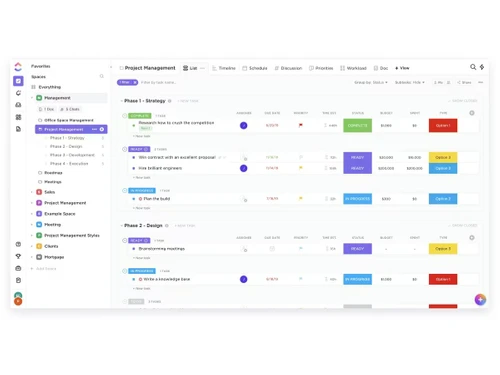
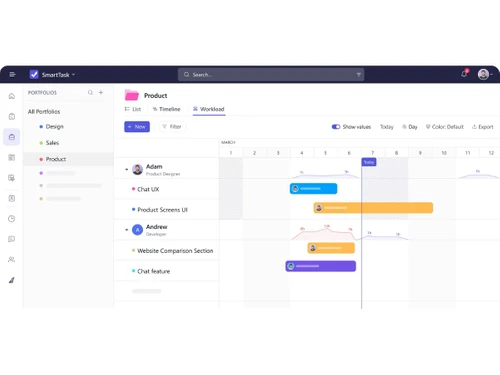
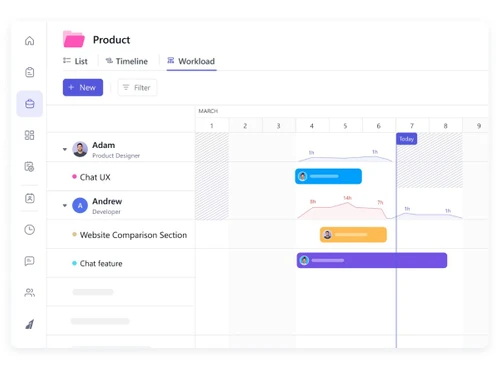
smarttask software -board smarttask software -campaign smarttask software -managment smarttask software -product smarttask software -workload smarttask-software -banner
play SmartTask Detailed Demo
smarttask software -board
smarttask software -campaign
smarttask software -managment
smarttask software -product

SmartTask

Brand : SmartTask

Starting Price:

₹ 700 excl. GST

₹ 826 incl. GST

View plans

Save Extra with 2 Offers

  • offer_icon Save upto 18%, Get GST Invoice on your business purchase |
  • offer_icon Buy Now & Pay Later, Check offer on payment page.

Softronics SmartTask is an online productivity tool that helps an organization track their team's progress. Every communication, files, tasks are easily available with a single click. Softronics SmartTask is available as a web and mobile applications designed to help teams track their work effective...Read more

  • AdviceGet Instant Expert
    Advice
  • PaymentSafe & Secure
    Payment
  • GuaranteedAssured Best Price
    Guaranteed

SmartTask Software Pricing, Features & Reviews

Softronics SmartTask is an online productivity tool that helps an organization track their team's progress. Every communication, files, tasks are easily available with a single click. Softronics SmartTask is available as a web and mobile applications designed to help teams track their work effectively and efficiently as it enables the team with enhanced productivity. Softronics SmartTask provides miscellaneous collaboration tools like task management, file sharing, instant messaging, location tracking, CRM, etc. Softronics SmartTask helps organizations with efficient field force tracking and management on the go.

Product Features
SmartTask is a web and mobile application based project management and collaboration tool which helps team(s)/organization(s) bring in efficiency in their operations by enhancing communication, boosting collaboration by sharing, messaging, etc. Also, the software acts as a tool wherein team(s) can record the various steps undertaken in various business activities and set them as templates for further usage leading to improved productivity. The solution enables location based tracking for on-field executive and helps monitoring attendance for on-field employees. Daily log in and log off report can also be generated using the Reporting feature in the solution. Below are some of the features:

  • Store teamwork - All team related information is stored centrally within the solution for easy and quick access.
  • Collaboration on shared projects - SmartTask is built for collaboration allowing everyone in a team to have a clear overview of the overall progress and tasks assigned to each team member.
  • Be on top of information – SmartTask provides all vital information on fingertips irrespective of any responsibilities at work.
  • Anywhere access - SmartTask mobile app helps users to stay connected with team on the go. Assigning tasks to the teams, sending notifications, commenting and sharing updates have been simplified.
  • Tasks – The solution allows users to assign tasks to any user or project in the organization quickly and effortlessly.
  • Groups and projects – Users ca also organize tasks into shared projects for meetings and initiatives.
  • Instant messaging – A user can add as many details as required using task or project comments and send instant messages.
  • Search - Powerful search features helps find required information quickly.
  • Attachments – It is easy to attach files from computer into any tasks or conversation
  • Powerful recurring tasks – Recurring tasks can be configured seamlessly for automation and reminders such as “every Monday at 1pm”
  • Project templates – Pre-defined project templates simplify implementation of repetitive projects.
  • Email reminders - Email reminders can be set for overdue tasks to allow users take appropriate action.
  • Location tracking Field workforce can be monitored with location tracking features in the system.
  • Tags – Solution allows the use of tags to add more context to tasks.
  • Dates and time – Labelling tasks with date and time ensure tasks get done on time.
  • Notifications – Users get notified about important changes in the project instantly.

About The Company
Softronics Systems is a provider of enterprise cloud computing with a specific focus on making life easy at work.

SmartTask Pricing & Plans

Premium
  • Custom Fields
  • Milestones
  • Reminders
  • Forms
  • Private groups
    • Users
    • Monthly

Calculated Price (Exclusive of all taxes)

700
Business
  • Includes everything in Premium+
  • Timeline View
  • Dashboards
  • Portfolios
  • Time Tracking
  • Budgeting
  • Call recording integration
    • Users
    • Monthly

Calculated Price (Exclusive of all taxes)

900

Get SmartTask Demo

We make it happen! Get your hands on the best solution based on your needs.

Interacted

SmartTask Features

Core Functionalities

  • icon_check Workforce Management Manage team tasks, track time, and monitor availability to optimize overall workforce productivity.
  • icon_check Issue Management Track, manage, and resolve bugs or issues at both the project and task levels.
  • icon_check Pipeline Management Visualize sales stages and deal progress through specialized CRM pipeline views.
  • icon_check Workflow Management Streamline how work moves through different stages from initiation to completion.
  • icon_check Resource Management Balance team workloads, track capacity, and plan resource allocation effectively.
  • icon_check Risk Management Identify potential bottlenecks and use project baselines to mitigate schedule risks.
  • icon_check Task Management Core feature to create, assign, and track tasks from inception to completion.
  • icon_check Backlog Management Move tasks to a backlog to prioritize and schedule them for future sprints.
  • icon_check Sprint Management Support for Agile methodologies to plan and execute work in time-boxed sprints.
  • icon_check Incident Management Manages unforeseen incidents or disruptions within a project, often found in industries requiring high reliability, such as IT or

Task & Workflow Management

  • icon_check Workflow Automation Automate repetitive tasks and standardise project movements with custom workflow rules.
  • icon_check Recurring Tasks Automatically schedule tasks to repeat at daily, weekly, or monthly intervals.
  • icon_check Task Creation & Assignment Quickly create tasks and assign them to individuals or multiple team members.
  • icon_check Task Prioritization Assign priority levels (Low, Medium, High) to focus on the most critical work.
  • icon_check Sub-Task Creation Break down complex tasks into smaller, manageable sub-tasks with their own assignees.
  • icon_check Task Dependencies Link tasks to ensure they are completed in the correct sequence.
  • icon_check Notifications/Reminders Get alerts via email, mobile, or desktop for upcoming deadlines and updates.
  • icon_check Automated Task Assignment Use Resource AI to suggest or assign the best-fit person for a specific task.

Task Views

  • icon_check Gantt Chart Visualize project schedules, timelines, and task dependencies in a Gantt-style layout.
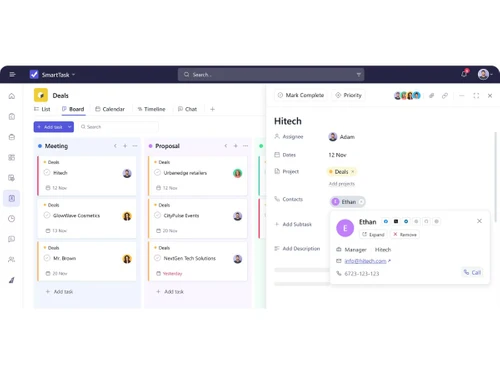
  • icon_check Kanban Boards Organize tasks visually using drag-and-drop cards across different stages.
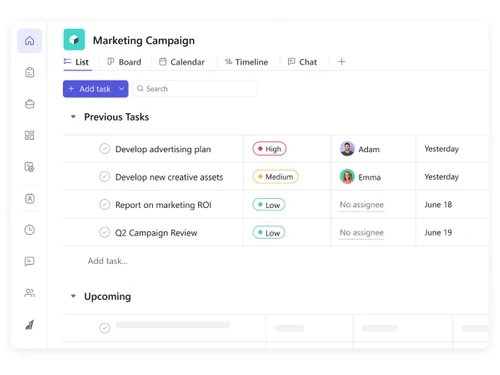
  • icon_check Task List A simple, scannable list view to manage daily to-dos and project items.
  • icon_check Calendar View View all project deadlines and milestones in a traditional calendar format.
  • icon_check Timeline View A Gantt-style view to plan work across a horizontal time-based axis.
  • icon_check Spreadsheet View An Excel-like grid view (Table view) for bulk editing and data organization.
  • icon_check Mind Map Visual representation of tasks and ideas branching out from a central concept.

Progress & Performance Tracking

  • icon_check Time Tracking Log hours manually or via timer to monitor billable hours and project profitability.
  • icon_check Milestone Tracking Mark key checkpoints in a project to measure progress and meet goals.
  • icon_check Team Capacity Tracking Monitor total available hours versus assigned work to prevent team burnout.

Resource & Budget Management

  • icon_check Automated Resource Allocation AI-driven suggestions to match available resources with project requirements.
  • icon_check Budget Planning Set project budgets and track spending against estimated costs.
  • icon_check Dynamic Budgeting Adjust and monitor budgets in real-time as project scopes or resources change.
  • icon_check Workload Distribution Use the Workload view to reassign tasks and balance work across the team.
  • icon_check Risk Scoring System Quantify and score potential project risks based on severity.
  • icon_check Auto Scaling Dynamically scale resources (e.g., team size, server resources) based on project requirements.

Collaboration & Communication

  • icon_check Real-Time Collaboration Features @mentions, instant messaging, and shared views for seamless team interaction.
  • icon_check Integrated Chat & Messaging Built-in instant messaging for real-time discussions within the platform.
  • icon_check File Sharing & Document Collaboration Attach documents to tasks and integrate with Google Drive, Dropbox, and Box.
  • icon_check Version Control Track changes made to documents and files.

Access Control & Security

  • icon_check Multi-Factor Authentication (MFA) Enhanced security feature available via Single Sign-On (SSO) for enterprise users.
  • icon_check User Access Management Control permissions and privacy levels for projects, tasks, and sensitive data.
  • icon_check Activity Logs Full audit trail of every update and action taken on a task or project.
  • icon_check Data Backup and Disaster Recovery Enterprise-grade security with regular automated backups of all workspace data.
  • icon_check Compliance Tracking Ensure adherence to relevant data and security compliance (e.g., GDPR, CCPA).

Customization

  • icon_check Templates Access over 100+ ready-made project and task templates to standardize processes and save time.
  • icon_check Custom Fields Add unique data points like dropdowns, numbers, or text to tasks for specialized tracking.
  • icon_check Task Customization Tailor tasks with custom fields, tags, and status updates to fit your workflow.
  • icon_check Custom Layouts Customize how project data is displayed using different views and columns.
  • icon_check Custom Views Create and save filtered views to focus on specific segments of data.

Integrations

  • icon_check CRM Integration Built-in CRM features and integrations to manage leads, contacts, and deal pipelines.
  • icon_check API Integration Offers Enterprise API access to connect with external tools and automate data flow.
  • icon_check ERP Integration Can connect with ERPs via Zapier or API to sync business operations data.
  • icon_check Communication and Collaboration Tools Includes chat, comments, @mentions, and email integration for team alignment.
  • icon_check File Storage and Sharing Store project-related files directly on the platform with version history.
  • icon_check Time Tracking Tools Native timer and timesheet management tools built into the workspace.
  • icon_check Issue Tracking Tools Dedicated features to capture and resolve project-related bugs or issues.
  • icon_check Automation Tools Rules-based engine to automate status changes and task notifications.
  • icon_check AI-Based Integrations Resource AI for smart planning and upcoming AI features for task generation.
  • icon_check Third Party Integrations Connects with Slack, Zapier, Google Apps, and more than 1000+ other tools.

Reporting & Analytics

  • icon_check Predictive Analytics Uses Resource AI to suggest allocations and predict project outcomes based on data trends.
  • icon_check Dashboards Create customizable charts to monitor KPIs and project progress in real-time.
  • icon_check Benchmarking Set project baselines to compare actual progress against original planned timelines.
  • icon_check Automated Reports Generate recurring reports on task status, time logs, and team performance automatically.
  • icon_check Project Progress Reports Automated reports showing the completion percentage and status of projects.
  • icon_check Resource Reports Analyze team utilization and productivity across different projects.
  • icon_check Risk Reports View bottleneck reports to identify tasks that are delaying project completion.
  • icon_check Workload Reports Detailed insights into individual and team capacity vs. actual work assigned.
  • icon_check Timesheet Reports Comprehensive summaries of all logged time for payroll or client billing.
  • icon_check Sprint Reports Track velocity and completion rates for Agile sprint cycles.
  • icon_check Bottleneck Reports Identify tasks or resources causing delays in the overall project flow.
  • icon_check Real-Time Reporting Dashboards update instantly as tasks are completed or time is logged.
  • icon_check Report Customization Use filters and custom charts to create reports tailored to specific needs.
  • icon_check Burndown & Burnup Charts Track progress towards sprint goals to manage progress and respond accordingly.

SmartTask Specifications

  • Supported Platforms :
  • Device:
  • Deployment :
  • Suitable For :
  • Business Specific:
  • Business Size:
  • Customer Support:
  • Integration:
  • Training:
  • Language:
  • AI Features:
  • Ubuntu Windows iOS Android MacOS Linux
  • DesktopMobileTabletiPad
  • Web-Based, Perpetual
  • All Industries
  • All Businesses
  • Small Business, Medium Business, SMBs
  • Email, Live Chat, Forums
  • API Integration
  • Documentation, Videos
  • English
  • AI Integrated

SmartTask Reviews and Ratings

banner

Would you like to review this product?

Submit Reviews

SmartTask Company Details

Brand Name SmartTask
Information SmartTask.io is the best online work management and collaboration software for productive and efficient teamwork.
Founded Year 2017
Director/Founders Shyamal Parikh
Company Size 1-100 Employees

SmartTask FAQ

A SmartTask Productivity Software is compatible with Windows, IOS and Android operating systems.
A SmartTask Productivity Software app is available for and Mobile.
A SmartTask Productivity Software supports Web-Based.
A SmartTask Productivity Software pricing starts at Rs.175.00.
A SmartTask Productivity Software is typically used in All Industries.
A SmartTask Productivity Software demo is available for free with Techjockey.com
A SmartTask Productivity Software offers a free trial. However, the premium plan with advanced features available at Techjockey .
A For SmartTask Productivity Software installation, insert the given CD/USB flash storage in your system and open the Setup Wizard to get started.
A SmartTask Productivity Software helps with Collaboration,Project Templates,Status Tracking and Budgeting. It's a complete solution for Project Management,Task Management and Chats & Discussion.

SmartTask Alternatives

See All
Why Choose Techjockey?

Software icon representing 20,000+ Software Listed 20,000+ Software Listed

Price tag icon for best price guarantee Best Price Guaranteed

Expert consultation icon Free Expert Consultation

Happy customer icon representing 2 million+ customers 2M+ Happy Customers