USA
USA UAE
UAESmall Business
Designed for startups and growing businesses


See More





Brand: Tata Class Edge
Tata ClassEdge is an instructional e-learning software solution created for Indian schools. It focuses on improving school working and student interaction. It is built with 25 years of international experience in the e-learning landscape. This learning software has been in the market since 2011 to improve and innovate schooling with the use of technology and interactive learning. Tata ClassEdge o...
See MoreHave you used TATA Classedge before?
Share your insights for better experience
Brand: Tata Class Edge
Founded Year: 2011
Tata ClassEdge, a division of Tata Industries, was created with 25 years of international experience in the space of e-learning. Tata ClassEdge entered the space of school education with the aim of innovatively using technology to improve learning outcomes for children.
Looking for The Right Pricing?
Share your requirements and get a plan built around your business.
Price Available on Request
Get personalised TATA Classedge pricing that fits your needs. Our team will connect with you.
 Support Administration Increase Productivity Learning Management Mobile App Worksheet Screens Timeline Management Parent/ Student Portal Application Academic Real Time Information Effectively categorize interactions Rich, scalable functionality

Watch the demo video to explore key features, real workflows, and how the software fits your business needs.
 Windows
  Android
  Desktop
  Mobile
  Cloud-Based
Small Business
Designed for startups and growing businesses
Medium Business
Built for business growth and flexibility
Enterprises
Designed for complex and large-scale business needs
4.4
Out of 5

Overall Rating
Based on
6 Verified Reviews
Rating Breakdown
86% Recommend this Product
Add ReviewUsers of TATA Classedge generally express satisfaction with its effectiveness in enhancing online learning, particularly appreciating the quality of study materials and the expertise of trained teachers. The cloud-based deployment is also highlighted as a significant advantage, allowing easy access to resources. However, some users have reported challenges with the iOS version and expressed a desire for a macOS-compatible version. Additionally, there are concerns regarding unsolicited marketing calls from the company. Overall, the product receives a favorable sentiment, with room for improvement in specific areas.
Pros
"High-end digital learning products by tata class edge is really making difference in online learning space."
"Really trained teacher for who are working with tecchnology advancement to make learning effective."
"The best thing I have seen in this software is the cloud-based deployment which makes it secure and allows me to easily access study material and other files from anywhere."
Cons
"Need to get rid of marketing calls from tata classedge, other than this don't have any issue."
"I want a version of the software for my macOS, which is currently not available. I hope the developers come up with updated versions for Mac users. "
"The one thing that needs improvement is its iOS version, as I have been personally facing a lot of issues operating it. "


Jan 5, 2021
Techjockey Verified
“Seen continuous improvement in my child”
Pros
High-end digital learning products by tata class edge is really making difference in online learning space.
Cons
Need to get rid of marketing calls from tata classedge, other than this don't have any issue.
Reason to switch
Simple yet Impactful
Nov 12, 2020
Techjockey Verified
“Best E-Learning Platform for K-12”
Pros
Really trained teacher for who are working with tecchnology advancement to make learning effective.
Cons
NO CONS
Reason to switch
Advanced standard of learning
Feb 6, 2020
Techjockey Verified
“Cloud-based deployment”
Pros
The best thing I have seen in this software is the cloud-based deployment which makes it secure and allows me to easily access study material and other files from anywhere.
Cons
I want a version of the software for my macOS, which is currently not available. I hope the developers come up with updated versions for Mac users.

TATA Classedge
Price On Request
Desktop
Mobile
Web based
On Premises
Windows
Mac OS

Classplus
₹ 19999
Desktop
Mobile
Web based
On Premises
Windows
Mac OS

Graphy
₹ 24999
Desktop
Mobile
Web based
On Premises
Windows
Mac OS
Diwo
Price On Request
Desktop
Mobile
Web based
On Premises
Windows
Mac OS
Nrich LMS
₹ 26118
Desktop
Mobile
Web based
On Premises
Windows
Mac OS
Kviden
Price On Request
Desktop
Mobile
Web based
On Premises
Windows
Mac OS
Wayvida
₹ 2999
Desktop
Mobile
Web based
On Premises
Windows
Mac OS

Vidyalaya LMS
₹ 1000
Desktop
Mobile
Web based
On Premises
Windows
Mac OS

eGurukul
₹ 2499
Desktop
Mobile
Web based
On Premises
Windows
Mac OS

Green LMS
Price On Request
Desktop
Mobile
Web based
On Premises
Windows
Mac OS

Edsby
Price On Request
Desktop
Mobile
Web based
On Premises
Windows
Mac OS
(2) Product(s) selected
Available
Price on Request
Starting Price:
₹1,000 /Year
Available
Price on Request
Available
Price on Request

Available
Price on Request

Available
Price on Request

Available
Price on Request

Starting Price:
₹100,000 /Year

Starting Price:
₹3,000 /month


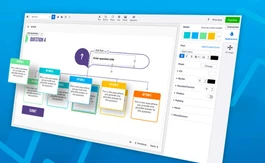




Tata ClassEdge is jam packed with features that ease the learning procs; like After School study material, interactive modeling, school management, et cetera.
Tata ClassEdge is available for demo and all you need to do is share your request with u. Our sales expert team will get in touch with you shortly.
Tata ClassEdge is accessible for both Android and iPhone.
Tata ClassEdge is a fully cloud-based software that provides easy accessibility on any device.
Tata ClassEdge can be used by education organization i.e., schools, coaching classes, colleges, et cetera.
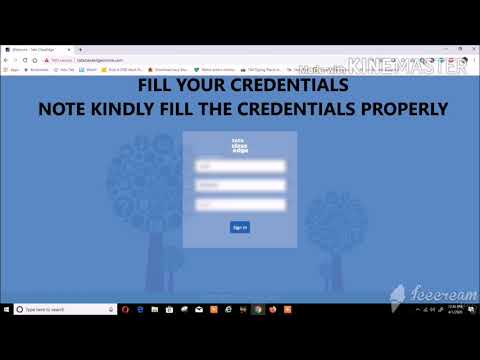
To use Tata Class Edge, first login to Tata ClassEdge Online server, > Enter your details, > Click login, > Select your class and subjects. > Click on ellipsis, > and get additional options like flash quality, keyboard, mouse, joystick, and return to main window. Media is ready to be played in full screen.
Go to Google Play Store, > install Puffin web browser, > click open, > click on ellipsis, > select settings, > login to Tata ClassEdge online server, > enter school name, > user ID, > and password, > press login. After login, you will get homepage to select your class and subject.
To login on Tata ClassEdge, first go to www.tataclassedgeonline.com, type in your school name, > your username, > password, > and click “Sign In” to login.
To create an account in Tata ClassEdge, log on to www.tataclassedgeonline.com. Now enter your school name, > Put “User ID” based on which class your child is, > “tata” in Password, and then click “Sign In” to register.
20,000+ Software Listed
Best Price Guranteed
Free Expert Consultation
2M+ Happy Customers
Terms and Condtions

Users with registered businesses can purchase goods from merchants on the platform to satisfy their business needs. Users are not permitted to utilize any products acquired through the platform for resale, advertising, business, or further distribution.
For each purchase made, users will receive a Tax Invoice (or 'GST invoice') that includes specific details such as:
the GSTIN of the user associated with their registered business, and
the specified Entity Name for their business.
It should be noted that not all products are eligible for GST Invoice. Only the products displayed by participating sellers with the 'GST-based Invoice Available' callout on the product description page would qualify.
Certain goods and services are not eligible to get a GST Invoice, including items with VAS, i.e., Value Added Services (e.g., Total Mobile Protection/Assured Buyback) and those involving an exchange offer at the time of purchase.
Users must ensure the accuracy of the GSTIN, and business entity name provided for the GST Invoice. Requests for corrections into GST Invoice would not be accommodated by Techjockey.com or any Seller, and any issues arising from user-provided information are the sole responsibility of users.
Techjockey.com is not liable for the GST Invoice or any associated input tax credit. To efficiently claim an input tax credit, users should select the registered place of business address as per the GST authority's data and follow the provisions of the GST Act and rules.
To claim an input tax credit, the delivery and billing addresses must match. Furthermore, input tax credits will not be granted if the delivery address and GSTIN on the invoice are from different states. In case of incorrect GST details provided during the order placement, the order will be canceled automatically.