USA
USA UAE
UAESmall Business
Designed for startups and growing businesses
See More





Brand: AmyGB
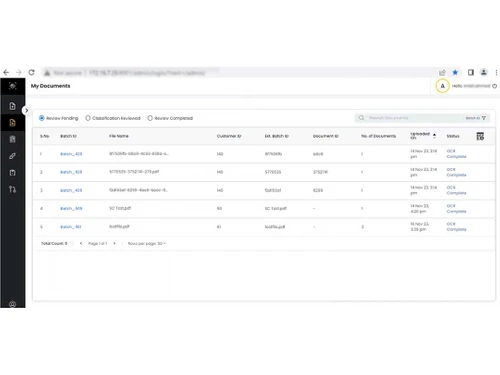
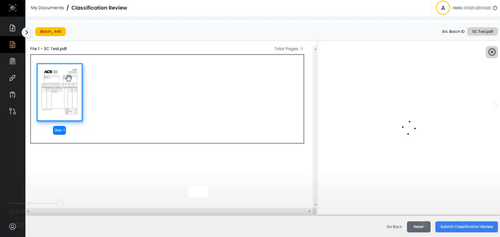
VisionERA is an AI-powered document processing platform that simplifies analyzing and managing various documents efficiently and accurately.
See MoreHave you used VisionERA before?
Share your insights for better experience
Brand: AmyGB
Founded Year: 2016
A hard core AI research company at heart, we have always believed in building products that solve real world problems using advanced technology such as Computer Vision, Machine Learning and Natural Language processing.
Looking for The Right Pricing?
Share your requirements and get a plan built around your business.
Price Available on Request
Get personalised VisionERA pricing that fits your needs. Our team will connect with you.
 Document Processing Outcome Based Pricing Zero 3rd-Party Dependency Industry Agnostic Workflows & Integrations Insight Board Smarter AI Engine

Watch the demo video to explore key features, real workflows, and how the software fits your business needs.
 Windows
  iOS
iOS  Android MacOS
  Desktop
  Mobile
  Tablet
  iPad
iPad  Cloud-Based
  Perpetual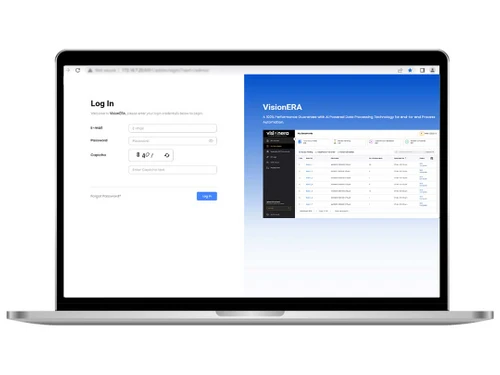
Small Business
Designed for startups and growing businesses
Medium Business
Built for business growth and flexibility
Enterprises
Designed for complex and large-scale business needs
4.1
Out of 5

Overall Rating
Based on
5 Verified Ratings
Rating Breakdown
96% Recommend this Product
Add ReviewTechjockey Trusted Reviews from Verified Users
No reviews are currently available for VisionERA. Discover similar OCR Software reviews

ABBYY FineReader Engine
Whats great - It is easy to use, with the simplified interface, one can work fast, through materials. read more

Adobe Acrobat Pro DC for teams
Whats great - The best thing about Acrobat Pro DC is that it is a Portable Documents Format Software which allows me to carry my creations ... read more

Adobe Acrobat Standard DC for teams
Whats great - I never knew there were so many different software systems out there, or where to start when I was looking for a system for ... read more

VisionERA
Price On Request
Desktop
Mobile
Web based
On Premises
Windows
Mac OS
ABBYY FineReader Engine
Price On Request
Desktop
Mobile
Web based
On Premises
Windows
Mac OS

Invoice OCR Software
Price On Request
Desktop
Mobile
Web based
On Premises
Windows
Mac OS

Snoh Fusion
₹ 243750
Desktop
Mobile
Web based
On Premises
Windows
Mac OS
Algodocs
Price On Request
Desktop
Mobile
Web based
On Premises
Windows
Mac OS

TextSnap
Price On Request
Desktop
Mobile
Web based
On Premises
Windows
Mac OS

DAN - Data AI Ninja
Price On Request
Desktop
Mobile
Web based
On Premises
Windows
Mac OS

Readiris
Price On Request
Desktop
Mobile
Web based
On Premises
Windows
Mac OS

CamScanner
Price On Request
Desktop
Mobile
Web based
On Premises
Windows
Mac OS

Microsoft Office Lens
Price On Request
Desktop
Mobile
Web based
On Premises
Windows
Mac OS

Nanonets OCR
Price On Request
Desktop
Mobile
Web based
On Premises
Windows
Mac OS
(0) Product(s) selected
Starting Price:
$29 /Month
Starting Price:
$69 /License $99
VisionERA Software is compatible with Windows, and MacOS.
Yes, VisionERA Software app is available for Android and iOS app users.
No, it supports web-based deployment.
VisionERA price details are available on request at techjockey.com.
VisionERA Software is typically used by all industries for automating document processing tasks across various industries, including logistics, BFSI (banking, financial services, and insurance), healthcare, retail, and manufacturing.
Yes,a demo of VisionERA is available at techjockey.com.
VisionERA Software is not available for free. You can connect with our product experts to learn more about the pricing plans.
Yes, VisionERA Software offers a free trial.
VisionERA Software installation is not required, as it is web-based. Just open the Setup Wizard to get started.
VisionERA uses AI-powered Intelligent Document Processing (IDP) to analyze and extract data from various documents, such as invoices, receipts, and forms, simplifying document management and streamlining business processes.
20,000+ Software Listed
Best Price Guranteed
Free Expert Consultation
2M+ Happy Customers
Terms and Condtions

Users with registered businesses can purchase goods from merchants on the platform to satisfy their business needs. Users are not permitted to utilize any products acquired through the platform for resale, advertising, business, or further distribution.
For each purchase made, users will receive a Tax Invoice (or 'GST invoice') that includes specific details such as:
the GSTIN of the user associated with their registered business, and
the specified Entity Name for their business.
It should be noted that not all products are eligible for GST Invoice. Only the products displayed by participating sellers with the 'GST-based Invoice Available' callout on the product description page would qualify.
Certain goods and services are not eligible to get a GST Invoice, including items with VAS, i.e., Value Added Services (e.g., Total Mobile Protection/Assured Buyback) and those involving an exchange offer at the time of purchase.
Users must ensure the accuracy of the GSTIN, and business entity name provided for the GST Invoice. Requests for corrections into GST Invoice would not be accommodated by Techjockey.com or any Seller, and any issues arising from user-provided information are the sole responsibility of users.
Techjockey.com is not liable for the GST Invoice or any associated input tax credit. To efficiently claim an input tax credit, users should select the registered place of business address as per the GST authority's data and follow the provisions of the GST Act and rules.
To claim an input tax credit, the delivery and billing addresses must match. Furthermore, input tax credits will not be granted if the delivery address and GSTIN on the invoice are from different states. In case of incorrect GST details provided during the order placement, the order will be canceled automatically.