linkedin
Visor logo
play Visor: Spreadsheet & Gantt Chart for Jira
Visor-track progress
Visor-roadmap

Visor

Brand: RocketVisor

  • No Ratings & Reviews

Have you used Visor before?

Share your insights for better experience

Add a Review
Starting Price
$24

View plans

100% Genuine
Products
Best Price
Guaranteed
Safe & Secure
Payment
  • Description

  • Pricing

  • Features

  • Specification

  • Review

Starting at $24

Visor Software Overview

RocketVisor Company Details

Founded Year:  2016

Visor is a collaboration platform that syncs data from tools like Jira, Asana, and Salesforce to create roadmaps, dashboards, and reports.

Director/Founders Michael Yaroshefsky
Company Size 1-100 Employees

Visor Pricing & Plans

Starter
Starting at $24
    • Users

      Users
      Users
    • Monthly

      Monthly
      Monthly

Key Features

  • Gantt, Timeline & Dashboard views

  • Milestones on Gantt & Table views

  • Jira Dependencies in Gantt views

  • Up to 500 records per workbook

  • 50k shared sync credits / month

  • Up to 5 reports per Dashboard

Team
Starting at $32
    • Users

      Users
      Users
    • Monthly

      Monthly
      Monthly

Key Features

  • Everything in the Starter plan, plus

  • Unlimited free viewers

  • Unlimited workbooks

  • Up to 1,000 records per workbook

  • External embedding

  • Up to 10 reports per Dashboard

Business
Starting at $1000
    • Users

      Users
      Users
    • Monthly

      Monthly
      Monthly

Key Features

  • Everything in the Team plan, plus

  • Flat rate for up to 100 editors

  • Unlimited free viewers

  • 2,000,000 shared sync credits / month

  • White glove premium support

  • Unlimited reports per Dashboard

Visor Features

Core Functionalities

  • icon_check Issue Management
    Identifies, tracks, and resolves problems or issues that arise during project execution
  • icon_check Workflow Management
    Manages and automates the flow of tasks and processes, ensuring that the right people or systems handle tasks at the right time?
  • icon_check Resource Management
    Allocate and manage team members effectively.
  • icon_check Task Management
    Central to all project management software, allowing users to create, assign, prioritize, and track tasks
  • icon_check Backlog Management
    Manage the product and sprint backlogs with prioritized tasks
  • icon_check Risk Management
    Proactively identify and address potential project risks.
  • icon_check Pipeline Management
    Tracks the flow of tasks, processes, or projects through various stages to ensure smooth progression.
  • icon_check Sprint Management
    Plan, track, and manage sprints (short, time-boxed iterations)
  • icon_check Workforce Management
    Involves managing and optimizing team member workloads, schedules, and productivity?
  • icon_check Incident Management
    Manages unforeseen incidents or disruptions within a project, often found in industries requiring high reliability, such as IT or

Task & Workflow Management

  • icon_check Task Creation & Assignment
    Create, assign, and manage tasks.
  • icon_check Task Prioritization
    Assign priority levels to tasks to ensure the most critical activities are addressed first.
  • icon_check Sub-Task Creation
    Break down complex tasks into smaller, manageable sub-tasks for better tracking and execution.
  • icon_check Task Dependencies
    Define and monitor task dependencies to manage the sequence and impact of task completion.
  • icon_check Notifications/Reminders
    Set up automated alerts and reminders to keep team members informed about task deadlines and updates.
  • icon_check Recurring Tasks
    Schedule tasks to repeat at regular intervals to streamline ongoing project activities.
  • icon_check Workflow Automation
    Design and automate workflows to enhance efficiency and ensure consistent task execution.
  • icon_check Automated Task Assignment
    Automatically assigns tasks to team members based on workload, availability, and skill sets, helping to distribute work evenly as

Task Views

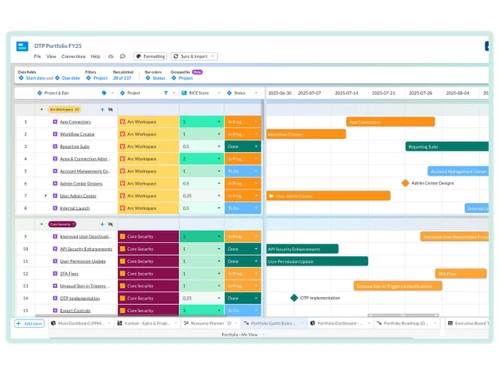
  • icon_check Gantt Chart
    Provides a visual timeline of the project with their durations and dependencies.
  • icon_check Kanban Boards
    Tasks are represented as cards that move across the columns.
  • icon_check Task List
    A simple list view of all tasks, including details such as due dates, assignees, and statuses.
  • icon_check Calendar View
    Displays tasks and deadlines on a calendar.
  • icon_check Timeline View
    Provides an overview of tasks and milestones over time.
  • icon_check Spreadsheet View
    Tasks are displayed in a table format similar to a spreadsheet.
  • icon_check Mind Map
    Visual representation of tasks and ideas branching out from a central concept.

Progress & Performance Tracking

  • icon_check Milestone Tracking
    Set and track key project benchmarks.
  • icon_check Time Tracking
    Record the time spent on tasks for better project budgeting.
  • icon_check Team Capacity Tracking
    Shows the distribution of tasks among team members for balancing workload and avoiding overburdening

Resource & Budget Management

  • icon_check Workload Distribution
    Distributes tasks and processes across team members or systems to prevent overloading any resource, ensuring balanced workloads
  • icon_check Automated Resource Allocation
    Automatically adjusts resource allocation, such as server capacity, storage, or bandwidth, based on current project needs during
  • icon_check Budget Planning
    Set a spending plan for your project based on data insights.
  • icon_check Dynamic Budgeting
    Tracks project expenses and scales budget management features dynamically based on the project's financial requirements.
  • icon_check Risk Scoring System
    Quantify and score potential project risks based on severity.
  • icon_check Auto Scaling
    Dynamically scale resources (e.g., team size, server resources) based on project requirements.

Collaboration & Communication

  • icon_check Real-Time Collaboration
    Work simultaneously on tasks, leave comments, and share feedback.
  • icon_check Integrated Chat & Messaging
    Real-time communication with team members.
  • icon_check File Sharing & Document Collaboration
    Upload, share, and edit documents.
  • icon_check Version Control
    Track changes made to documents and files.

Access Control & Security

  • icon_check User Access Management
    Control access to project information based on user roles.
  • icon_check Activity Logs
    Track user activity within the project management software
  • icon_check Data Backup and Disaster Recovery
    Ensure data security with regular backups and recovery plans.
  • icon_check Compliance Tracking
    Ensure adherence to relevant data and security compliance (e.g., GDPR, CCPA).
  • icon_check Multi-Factor Authentication (MFA)
    Enhance login security through MFA.

Customization

  • icon_check Templates
    Use pre-defined project and timeline structures to save time.
  • icon_check Custom Fields
    Add specific data fields to track unique project information.
  • icon_check Task Customization
    Modify tasks to include custom fields, tags, and properties to fit specific project needs.
  • icon_check Custom Layouts
    Design the software interface to fit your workflow.
  • icon_check Custom Views
    Create personalized views of project data.

Integrations

  • icon_check CRM Integration
    Sync with CRM systems to align customer relationships and sales data with project tasks and deliverables.
  • icon_check API Integration
    Allow for custom integrations through APIs
  • icon_check Communication and Collaboration Tools
    Integrate with various collaboration tools to streamline real-time communication and collaboration within project workflows.
  • icon_check Issue Tracking Tools
    Link issue tracking software to manage and resolve bugs and issues alongside your project management processes.
  • icon_check AI-Based Integrations
    Use AI for predictive analysis and workflow suggestions.
  • icon_check Third Party Integrations
    Connect your system to external applications such as CRMs, payment gateways, and analytics tools for seamless data exchange.
  • icon_check File Storage and Sharing
    Connect cloud storage solutions to enable seamless file sharing and document management within projects.
  • icon_check Time Tracking Tools
    Integrate time tracking tools to monitor work hours and resource allocation directly in your project management system.
  • icon_check Automation Tools
    Use automation platforms to create workflows that automatically handle repetitive tasks across multiple apps.
  • icon_check ERP Integration
    Connect ERP systems to unify project management with broader business operations, including finance, HR, and procurement.

Reporting & Analytics

  • icon_check Dashboards
    Interactive dashboards that can be customized for different user roles.
  • icon_check Project Progress Reports
    Track progress against the baseline plan, identify deviations in schedule or budget.
  • icon_check Real-Time Reporting
    Live dashboards that update as data changes.
  • icon_check Report Customization
    Ability to create and customize reports based on specific project needs.
  • icon_check Benchmarking
    Compare project performance against industry standards or internal benchmarks.
  • icon_check Resource Reports
    Allocation and utilization of resources (people, equipment, materials).
  • icon_check Risk Reports
    Identify, assess, and propose mitigation strategies for potential project risks.
  • icon_check Workload Reports
    Analyze workload distribution among team members, identify potential imbalances.
  • icon_check Timesheet Reports
    Track time spent on tasks by team members, assess project efficiency and billing accuracy.
  • icon_check Sprint Reports
    Track progress within development sprints.
  • icon_check Burndown & Burnup Charts
    Track progress towards sprint goals to manage progress and respond accordingly.
  • icon_check Bottleneck Reports
    Identification of task dependencies and potential bottlenecks.
  • icon_check Predictive Analytics
    Forecasting tools to predict future project outcomes based on historical data.
  • icon_check Automated Reports
    Scheduling and automatic generation of regular reports. Email notifications with report summaries.
Visor Demo Video play icon

Get Visor Demo

Watch the demo video to explore key features, real workflows, and how the software fits your business needs.

Understand
Key Features
Personal
Demo Insights
Interactive
Demo Support

Visor Specification

Supported Platforms
Windows Windows MacOS MacOS Linux Linux
Devices
Desktop Desktop
Deployment
Web-Based Web-Based
Suitable For
All Industries
Business Specific
All Businesses
Business Size
Individual Small Business Startups Medium Business Enterprises SMBs SMEs MSMBs MSMEs Freelancers
Customer Support
Email Live Chat
Language
English
Integration
API Integration
Training Resources
Live Online Documentation Videos
AI Features
AI Integrated
Technology
Next Generation

Visor Review

Techjockey Trusted Reviews from Verified Users

No reviews are currently available for Visor. Discover similar Project Management Software reviews

  • Jira

    4.5

    Whats great - Jira's emphasis on visuals when tracking performance and tickets is something I appreciate. Since our project is a support pr... read more

  • Notion

    4.3

    Whats great - The feature of status buttons in Notion is great, especially with the vibrant color-coding that makes it as stand out option.... read more

  • Swit

    4.4

    Whats great - Swit has made it easier for managing my task. The platform manages everything from cross workspace sharing to custom projects... read more

Articles for Visor

See All Related Articles

20,000+ Software Listed

Best Price Guranteed

Free Expert Consultation

2M+ Happy Customers

Terms and Condtions

close

Users with registered businesses can purchase goods from merchants on the platform to satisfy their business needs. Users are not permitted to utilize any products acquired through the platform for resale, advertising, business, or further distribution.

For each purchase made, users will receive a Tax Invoice (or 'GST invoice') that includes specific details such as:

  • the GSTIN of the user associated with their registered business, and

  • the specified Entity Name for their business.

It should be noted that not all products are eligible for GST Invoice. Only the products displayed by participating sellers with the 'GST-based Invoice Available' callout on the product description page would qualify.

Certain goods and services are not eligible to get a GST Invoice, including items with VAS, i.e., Value Added Services (e.g., Total Mobile Protection/Assured Buyback) and those involving an exchange offer at the time of purchase.

Users must ensure the accuracy of the GSTIN, and business entity name provided for the GST Invoice. Requests for corrections into GST Invoice would not be accommodated by Techjockey.com or any Seller, and any issues arising from user-provided information are the sole responsibility of users.

Techjockey.com is not liable for the GST Invoice or any associated input tax credit. To efficiently claim an input tax credit, users should select the registered place of business address as per the GST authority's data and follow the provisions of the GST Act and rules.

To claim an input tax credit, the delivery and billing addresses must match. Furthermore, input tax credits will not be granted if the delivery address and GSTIN on the invoice are from different states. In case of incorrect GST details provided during the order placement, the order will be canceled automatically.