linkedin
SigningHub logo
play SigningHub Lite - Quick Demo
signinghub software-documents
signinghub software-sales

SigningHub

Brand: Ascertia

  • 4.3

  • 3 Ratings

SigningHub is a digital signature software that can be used to review and sign documents in a secure manner. The software comes equipped with a complete PKI (public key infrastructure) system, besides providing both local and remote signing facilities. SigningHub software customisable interface comprises a robust workflow engine accompanied by multi-language compatibility and enterprise-level pol...

See More

Have you used SigningHub before?

Share your insights for better experience

Add a Review
Starting Price
$21

View plans

100% Genuine
Products
Best Price
Guaranteed
Safe & Secure
Payment
  • Description

  • Pricing

  • Features

  • Specification

  • Review

  • Compare

  • Alternatives

  • FAQ

Starting at $21

SigningHub Software Overview

What is SigningHub?

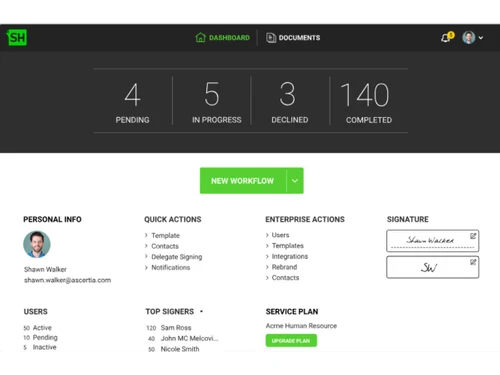
SigningHub is a digital signature software that can be used to review and sign documents in a secure manner. The software comes equipped with a complete PKI (public key infrastructure) system, besides providing both local and remote signing facilities. SigningHub software customisable interface comprises a robust workflow engine accompanied by multi-language compatibility and enterprise-level policy controls.

Moreover, users can even integrate the SigningHub software with a mobile or web app, besides adopting completely private or on-premise public/in-country cloud services. For adequate security, SigningHub’s inbuilt security engine is certified under EU standards.

Why Use SigningHub eSignature Software?

  • Multi-file compatibility: SigningHub is compatible with a variety of file types like Word, PDF, Excel, Text, PowerPoint, graphics and more. It can also be used to convert nonPDF files into secure and long term PDF/A format to streamline different signing purposes.
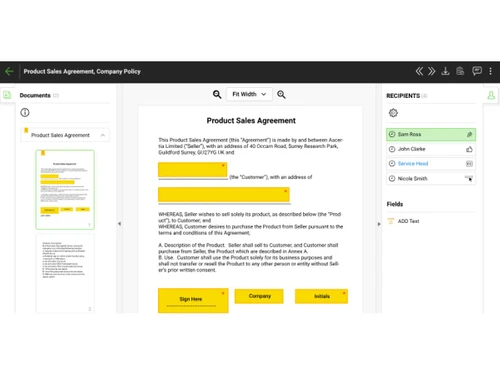
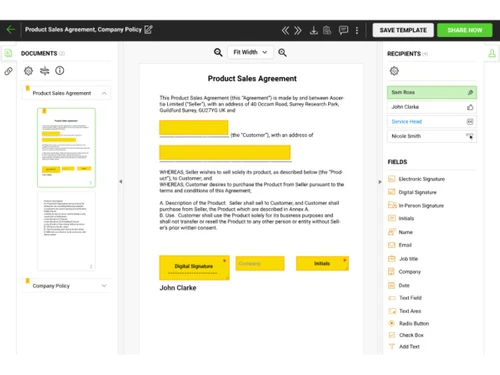
  • Add in signature fields: Users can add in multiple signature fields at any position of their choice. They can even resize the signature box without any hassle.
  • Generate intelligent forms: The software recognizes existing form fields automatically. Thus enabling users to assign these particular form fields to specific signers on the go. Companies can even mark out the mandatory fields according to the purpose served by each form.
  • Assign accurate access rights: Owners can configure designation wise access rights to individual docs. Inclusive of abilities like print, download and comment.
  • Legal compliance: Owners can set legal notice for individual signers before they continue with the e-signing part. This notice can be created in different languages.

What are the Benefits of SigningHub Software?

  • Enforceable: Documents signed with SigningHub are legally enforceable, besides being compliant with international regulatory authorities like EU eIDAS.
  • Secure: Once done with the signing part, users are provided access to a legally enforceable and long term signature backed by a trusted timestamp.
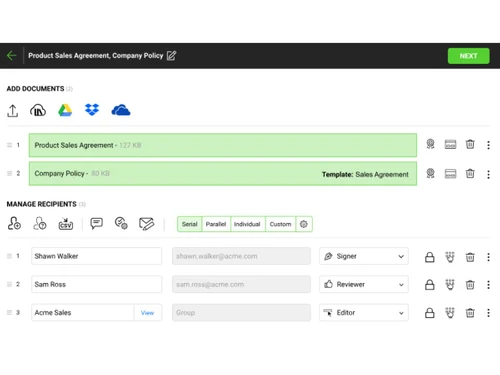
  • Flexible: Companies are provided access to parallel, serial and individual workflows, manual & automated reminders. It also supports 20+ languages, bulk signing facilities and a variety of rebranding options.
  • Multiple deployment options: SigningHub digital signature software is available as an on-premise system or through a private or public cloud.

How Does SigningHub Software Work?

The latest version of SigningHub is primarily used for document preparation, legal compliance, user authentication, and more. It has an intuitive interface and is simple to use. SigningHub can be easily integrated with your existing systems to ensure a smooth workflow. For more information, you can also refer to user manuals and take an online SigningHub demo at Techjockey.com.

How to Use SigningHub Software?

Get started with SigningHub software in 5 simple steps:

Step 1: Buy SigningHub installation key from techjockey.com

Step 2: Directly login through the official website (web based), or install Digirestro on your device (on-premise)

Step 3: Sign up & create your account

Step 4: Add users & assign permissions

Step 5: Get started with SigningHub

SigningHub Pricing

The pricing of SigningHub starts from USD 21 per user month at techjockey.com. For more information and SigningHub demo, please request a call back.

Read more

Ascertia Company Details

Founded Year:  2001

Ascertia

Director/Founders Yasir khan
Company Size 101-500 Employees

SigningHub Pricing & Plans

User Plan
Starting at $21
    • Users

      Users
      Users
    • Monthly

      Monthly
      Monthly

Key Features

  • API Integration

  • Templates

  • Compliance Management

  • Multi-Factor Authentication (MFA)

  • Bulk Processing

  • Workflow Automation

  • Data Encryption

  • Audit Trail

Signature Plan
Starting at $399
    • Licenses (signature)

      Licenses (signature)
      Licenses (signature)
    • Yearly

      Yearly
      Yearly

Key Features

  • API Integration

  • Templates

  • Compliance Management

  • Multi-Factor Authentication (MFA)

  • Bulk Processing

  • Workflow Automation

  • Data Encryption

  • Audit Trail

SigningHub Features

  • icon_check Compliance Management
    Adheres to European Regulation 910/2014 standards for Advanced and Qualified Electronic Signatures across various jurisdictions.
  • icon_check Multi-Factor Authentication (MFA)
    Requires secondary verification via SMS, email, or TOTP before a user can access or apply a signature to a sensitive document.
  • icon_check Bulk Processing
    Enables the automated processing and signing of large volumes of documents simultaneously to optimize high-scale workflows.
  • icon_check Workflow Automation
    Defines sequential or parallel signing orders, allowing administrators to automate the routing of documents between parties.
  • icon_check Data Encryption
    Applies AES 256-bit encryption to files at rest and TLS protocols for data in transit to prevent unauthorized data access.
  • icon_check Audit Trail
    Generates detailed logs capturing every user action, timestamp, and IP address to maintain a complete chain of custody report.
  • icon_check Templates
    Allows users to create and store reusable document layouts with predefined form fields to standardize repetitive processes.
  • icon_check API Integration
    Offers RESTful and SOAP APIs to embed digital signing capabilities directly into third-party CRM, ERP, or CMS applications.
  • icon_check Custom Branding
    Permits organizations to apply custom logos and color schemes to the signing interface for a consistent professional appearance.
  • icon_check Document Versioning
    Tracks and stores all revisions of a file during the signing process to ensure all parties review the most recent iteration.
  • icon_check Form Field Overlay
    Supports the placement of text boxes, checkboxes, and radio buttons to capture structured data during the signing process.
  • icon_check Timestamping Service
    Integrates with RFC 3161 compliant Trust Service Providers to provide independent proof of time for every signature applied.
SigningHub Demo Video play icon

Get SigningHub Demo

Watch the demo video to explore key features, real workflows, and how the software fits your business needs.

Understand
Key Features
Personal
Demo Insights
Interactive
Demo Support

SigningHub Specifications

Supported Platforms
Ubuntu Ubuntu Windows Windows iOS iOS Android Android MacOS MacOS Linux Linux
Devices
Desktop Desktop Mobile Mobile Tablet Tablet iPad iPad
Deployment
Cloud-Based Cloud-Based
Suitable For
Healthcare Real Estate Legal Pharmaceutical Corporations Governments Construction BFSI
Business Specific
All Businesses
Business Size
Individual Medium Business Enterprises SMBs MSMEs Freelancers
Customer Support
Phone Email
Language
English
Integration
API Integration
Training Resources
Videos
Compliance Regulation
HIPAA CCPA CPRA

Explore the Best Alternative Solutions Similar to Your Business Size and Needs

SigningHub Review

4.3

Out of 5

img

Overall Rating

Based on
3 Verified Ratings

Rating Breakdown

  • Features 4.6
  • Value for Money 4
  • Ease of Use 4.6
  • Customer Support 4.1

90% Recommend this Product

Add Review

Techjockey Trusted Reviews from Verified Users

No reviews are currently available for SigningHub. Discover similar Digital Signature Software reviews
  • Adobe Acrobat Sign

    4.3

    Whats great - Professional, widely accepted. read more
  • Cygnature

    4.9

    Whats great - It is excellent software and very easy to use. It works great to create E-signatures for your documents. So I have recommend... read more

  • DocuSign

    4.6

    Whats great - Easy-to-use interface with robust functionality. read more
Compare SigningHub With other Digital Signature Software

Products
Ratings
Pricing
Device Supported
Deployment
Supported Platforms
  • img

    SigningHub

  • 4.3

  • Price On Request

  • Desktop

    Mobile

  • Web based

    On Premises

  • Windows

    Mac OS

  • img

    RSign

  • 4.5

  • Price On Request

  • Desktop

    Mobile

  • Web based

    On Premises

  • Windows

    Mac OS

  • img

    Dropbox Sign

  • 4.3

  • Price On Request

  • Desktop

    Mobile

  • Web based

    On Premises

  • Windows

    Mac OS

  • img

    Cygnature

  • 4.8

  • Price On Request

  • Desktop

    Mobile

  • Web based

    On Premises

  • Windows

    Mac OS

  • img

    Zoho Sign

  • 4.2

  • ₹ 800

  • Desktop

    Mobile

  • Web based

    On Premises

  • Windows

    Mac OS

  • img

    InstaSigner

  • 4.5

  • Price On Request

  • Desktop

    Mobile

  • Web based

    On Premises

  • Windows

    Mac OS

  • img

    BulkSigner

  • 4.4

  • ₹ 3500

  • Desktop

    Mobile

  • Web based

    On Premises

  • Windows

    Mac OS

  • img

    Certinal eSign

  • 4.4

  • Price On Request

  • Desktop

    Mobile

  • Web based

    On Premises

  • Windows

    Mac OS

  • img

    GreenSign

  • 4.1

  • Price On Request

  • Desktop

    Mobile

  • Web based

    On Premises

  • Windows

    Mac OS

  • img

    eSignly

  • 4.2

  • Price On Request

  • Desktop

    Mobile

  • Web based

    On Premises

  • Windows

    Mac OS

(0) Product(s) selected

SigningHub Alternatives

See All SigningHub Alternatives

Starting Price:

$1 /Envelope

Starting Price:

$15 /User/Month

Available

Price on Request

Starting Price:

₹799 /Month
Starting Price:

€11 /User/Month

Available

Price on Request

Articles for SigningHub

See All Related Articles

Which operating system does SigningHub support?

SigningHub digital signature software is compatible with Windows, Mac, iOS and Android operating systems.

Is there any SigningHub app?

SigningHub app is available for iOS and Android.

What is deployment type of SigningHub?

SigningHub software supports web-based and on-premise deployment.

How much does SigningHub cost?

The pricing of SigningHub starts from USD 21 per user month at techjockey.com.

Who are the potential users of SigningHub?

SigningHub digital signature software is typically used in financial, healthcare, manufacturing and the government sector.

Is there any free trial or demo for SigningHub?

SigningHub digital signature software demo is available for free with techjockey.com.

Is SigningHub free?

SigningHub digital signature software offers a free trial. However, the premium plan with advanced features starts at ?39,5489.

How can you download SigningHub?

For SigningHub software installation, insert the given CD/USB flash storage in your system and open the Setup Wizard to get started.

How does SigningHub work?

SigningHub digital signature software helps with document access, user workflow and forms management. It's a complete solution for adding signatures, initials fields and in-person fields.

20,000+ Software Listed

Best Price Guranteed

Free Expert Consultation

2M+ Happy Customers

Terms and Condtions

close

Users with registered businesses can purchase goods from merchants on the platform to satisfy their business needs. Users are not permitted to utilize any products acquired through the platform for resale, advertising, business, or further distribution.

For each purchase made, users will receive a Tax Invoice (or 'GST invoice') that includes specific details such as:

  • the GSTIN of the user associated with their registered business, and

  • the specified Entity Name for their business.

It should be noted that not all products are eligible for GST Invoice. Only the products displayed by participating sellers with the 'GST-based Invoice Available' callout on the product description page would qualify.

Certain goods and services are not eligible to get a GST Invoice, including items with VAS, i.e., Value Added Services (e.g., Total Mobile Protection/Assured Buyback) and those involving an exchange offer at the time of purchase.

Users must ensure the accuracy of the GSTIN, and business entity name provided for the GST Invoice. Requests for corrections into GST Invoice would not be accommodated by Techjockey.com or any Seller, and any issues arising from user-provided information are the sole responsibility of users.

Techjockey.com is not liable for the GST Invoice or any associated input tax credit. To efficiently claim an input tax credit, users should select the registered place of business address as per the GST authority's data and follow the provisions of the GST Act and rules.

To claim an input tax credit, the delivery and billing addresses must match. Furthermore, input tax credits will not be granted if the delivery address and GSTIN on the invoice are from different states. In case of incorrect GST details provided during the order placement, the order will be canceled automatically.