USA
USA UAE
UAESmall Business
Designed for startups and growing businesses

See More




Brand: Bookipi
Bookipi Invoice is an intuitive invoicing software designed for freelancers, small business owners, and entrepreneurs. It allows users to create and send professional invoices in seconds, manage payments, and track expenses effortlessly.
See MoreHave you used Bookipi Invoice before?
Share your insights for better experience
Brand: Bookipi
Founded Year: 2016
Our vision is to provide small businesses with the opportunity to not only succeed but thrive. Bookipi helps to keep track of income/expenses and generate invoices with ease so our users can spend more time doing what matters to them.
 Invoicing Quotation & Estimates Dashboard Credit Notes Payment Reminders Reports Invoice Template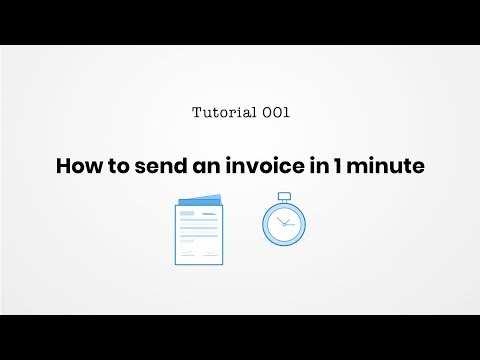

Watch the demo video to explore key features, real workflows, and how the software fits your business needs.
 Ubuntu
  Windows
  iOS
iOS  Android MacOS
  Desktop
  Mobile
  Tablet
  iPad
iPad  Cloud-Based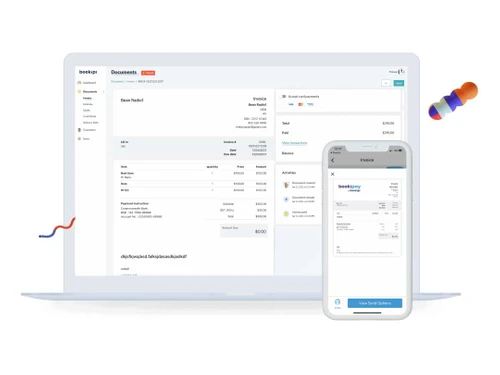

Small Business
Designed for startups and growing businesses
Medium Business
Built for business growth and flexibility
Enterprises
Designed for complex and large-scale business needs
4.0
Out of 5

Overall Rating
Based on
10 Verified Reviews
Rating Breakdown
82% Recommend this Product
Add ReviewOverall, users appreciate Bookipi Invoice for its simplicity and efficiency in managing invoices and expenses across multiple devices. Many find it a significant improvement over traditional methods, such as spreadsheets, allowing for quick invoice creation and easy payment tracking. However, common complaints include occasional slow performance, especially with larger datasets, and a desire for more customization options in invoice templates. Some users also noted limitations in the free plan and syncing issues between devices.

Sep 13, 2024
Techjockey Verified
“Bookipi Invoice has taken the stress out of billing my clients.”
Bookipi Invoice has been a solid tool for my freelance work. It’s easy to set up and has made sending invoices much faster than what I was used to. I like how everything is laid out simply, and the templates are neat, though I wish they were more customizable. Tracking payments is straightforward, and I feel more in control of my income now. Switching to this app has really helped streamline the way I handle invoicing.
Pros
I can generate an invoice in minutes, and sending it to clients is really easy. It’s great for keeping things organized, and I don’t have to worry about keeping track of payments manually. The notifications I get when a client views or pays the invoice are super helpful, so I know exactly what’s going on.
Cons
While Bookipi does most things well, I’ve noticed that the app tends to slow down occasionally. This isn’t a huge issue, but it can be a little annoying when I’m trying to send out invoices quickly. Also, some of the reports could be more detailed. I would love to see more insights about my finances over time.
Reason to switch
FreshBooks had too many features I didn’t need, and I wanted something simpler just for invoicing.
Sep 11, 2024
Techjockey Verified
“I switched to Bookipi Invoice, and it’s making invoicing so much easier!”
Bookipi Invoice has been a game changer for me in managing my small business invoices. I can easily send out invoices to clients, and it’s a relief knowing everything is organized in one place. Before switching, I was using spreadsheets, which was such a hassle. Bookipi allows me to create invoices in just a few taps, saving me a lot of time. Now, I can spend more time focusing on my business rather than chasing down payments.
Pros
One thing I really love about Bookipi Invoice is how it simplifies invoicing for me. It’s a lot easier to create and send invoices, and the templates are really useful. I can also keep track of payments, which is a huge plus because it helps me stay on top of things without much effort. The app is pretty straightforward, and I didn’t need to spend much time learning it.
Cons
I do wish there were more customization options for the invoices. Sometimes I feel like the templates are a bit too basic, and I’d like to add my own flair to them. Also, the app could work better offline. I find it a bit frustrating when I can’t access it without an internet connection.
Reason to switch
I needed something more focused on invoicing, without the added accounting features that were overwhelming me in Wave.
Jun 24, 2024
Techjockey Verified
“Bookipi Invoice: Manage Your Financial Records with Ease”
Bookipi Invoice is an online tool designed for managing invoices and tracking expenses. It is available on the web, iOS, and Android, so you can use it on various devices. The app supports multiple currencies and keeps your data secure. It allows you to create invoices, track expenses, and set payment reminders.
Pros
Bookipi Invoice has been very effective in handling my invoicing needs. The app is simple to use, and I can access it from any device. The customization features for invoices are helpful, and the free version provides everything I need to manage my small business’s finances.
Cons
The app can be slow, especially when dealing with large amounts of data. Additionally, the free plan lacks some advanced features, and there have been occasional syncing issues between my devices.
Reason to switch
I was looking for a change.

Bookipi Invoice
Price On Request
Desktop
Mobile
Web based
On Premises
Windows
Mac OS

Vyapar Billing Software
Price On Request
Desktop
Mobile
Web based
On Premises
Windows
Mac OS
Raseed
Price On Request
Desktop
Mobile
Web based
On Premises
Windows
Mac OS

InvoiceZy
₹ 99
Desktop
Mobile
Web based
On Premises
Windows
Mac OS

KaroSauda
₹ 1999
Desktop
Mobile
Web based
On Premises
Windows
Mac OS

Billing Fast
₹ 3588
Desktop
Mobile
Web based
On Premises
Windows
Mac OS

Apna Billbook
₹ 6998
Desktop
Mobile
Web based
On Premises
Windows
Mac OS

Swipe - Billing Software
₹ 2542
Desktop
Mobile
Web based
On Premises
Windows
Mac OS

Petpooja Invoice
₹ 5000
Desktop
Mobile
Web based
On Premises
Windows
Mac OS

Billing Buddy
₹ 5000
Desktop
Mobile
Web based
On Premises
Windows
Mac OS

Asli Bill
₹ 7000
Desktop
Mobile
Web based
On Premises
Windows
Mac OS
(0) Product(s) selected





Bookipi Invoice allows users to create professional invoices using customizable templates. You can add your business details, client information, and itemized charges. Once the invoice is generated, you can send it directly to your clients via email or download it for offline use.
Bookipi offers a free version with basic features. There are also paid plans available that offer advanced features such as additional customization options, payment tracking, and integration with other financial tools.
The free plan includes essential features such as invoice creation, client management, and basic reporting. It allows you to generate and send invoices without any cost.
Paid plans include advanced features such as payment tracking, recurring invoices, multi-currency support, and integration with accounting software. The plans also offer enhanced customization options and priority customer support.
Yes, Bookipi allows you to customize your invoices with your company logo, colours, and preferred fonts.
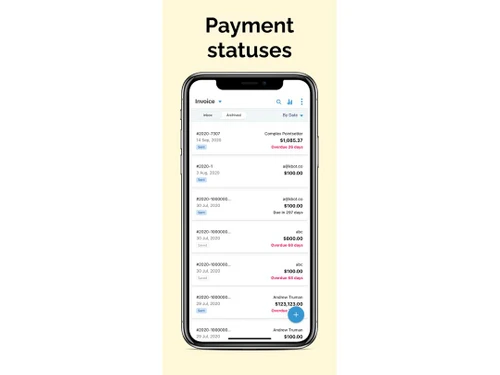
Bookipi provides tools to track payment status, set up reminders for overdue payments, and view detailed reports on your income and expenses. You can also link your Bookipi account with payment gateways for real-time payment tracking.
Yes, Bookipi uses encryption to protect your data and ensure that your information remains secure. The platform is designed to comply with industry-standard security protocols.
Yes, Bookipi Invoice is available as a mobile app for both iOS and Android devices.
Bookipi provides integration options with various accounting and payment tools. Check the integrations section on their website or within the app to see which services are compatible.
To create a new category in Bookipi, follow the steps given below:
0 0
To record a partial payment in Bookipi, follow the steps given below:
0 0
To connect your bank to a wallet in Bookipi, follow the steps given below:
0 0
To record a payment and send a receipt Bookipi, follow the steps given below:
0 0
To convert an estimate to an invoice on Bookipi, follow the steps given below:
0 0
20,000+ Software Listed
Best Price Guranteed
Free Expert Consultation
2M+ Happy Customers
Terms and Condtions

Users with registered businesses can purchase goods from merchants on the platform to satisfy their business needs. Users are not permitted to utilize any products acquired through the platform for resale, advertising, business, or further distribution.
For each purchase made, users will receive a Tax Invoice (or 'GST invoice') that includes specific details such as:
the GSTIN of the user associated with their registered business, and
the specified Entity Name for their business.
It should be noted that not all products are eligible for GST Invoice. Only the products displayed by participating sellers with the 'GST-based Invoice Available' callout on the product description page would qualify.
Certain goods and services are not eligible to get a GST Invoice, including items with VAS, i.e., Value Added Services (e.g., Total Mobile Protection/Assured Buyback) and those involving an exchange offer at the time of purchase.
Users must ensure the accuracy of the GSTIN, and business entity name provided for the GST Invoice. Requests for corrections into GST Invoice would not be accommodated by Techjockey.com or any Seller, and any issues arising from user-provided information are the sole responsibility of users.
Techjockey.com is not liable for the GST Invoice or any associated input tax credit. To efficiently claim an input tax credit, users should select the registered place of business address as per the GST authority's data and follow the provisions of the GST Act and rules.
To claim an input tax credit, the delivery and billing addresses must match. Furthermore, input tax credits will not be granted if the delivery address and GSTIN on the invoice are from different states. In case of incorrect GST details provided during the order placement, the order will be canceled automatically.