linkedin
Buddy Punch logo
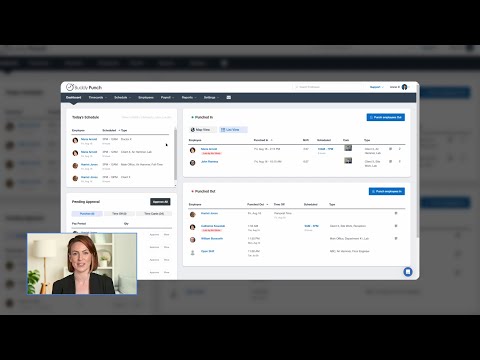
play Buddy Punch Demo
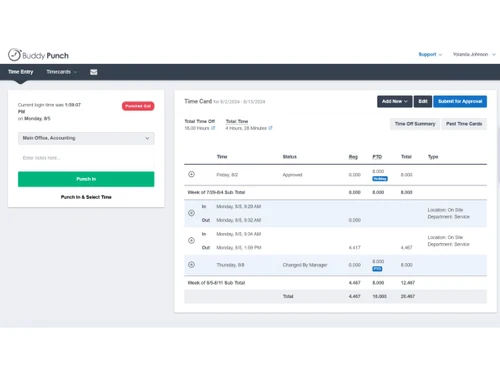
buddy punch-timecard
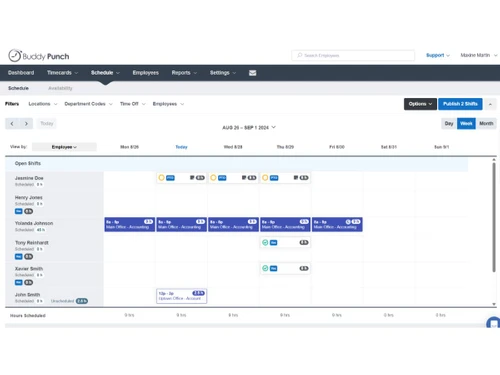
buddy punch-views

Buddy Punch

Brand: Buddy Punch

  • 3.8

  • 5 Ratings

Buddy Punch is a time-tracking software for employee working time tracking, scheduling, and payroll integration.

See More

Have you used Buddy Punch before?

Share your insights for better experience

Add a Review
Starting Price
$5

View plans

100% Genuine
Products
Best Price
Guaranteed
Safe & Secure
Payment
  • Description

  • Pricing

  • Features

  • Specification

  • Review

  • Compare

  • Alternatives

  • FAQ

Starting at $5

Buddy Punch Software Overview

What is Buddy Punch?

Buddy Punch is an employee time-tracking software that helps to track employee working hours, attendance, and scheduling and simplify payroll. It has an intuitive platform that provides access to employees for marking attendance using smartphones, computers, QR codes, or kiosks. For remote employees, it supports GPS tracking and geofencing. The administrator of the employer interface comes with drag-and-drop scheduling options, an overview of employee attendance, push notifications, and report generation options.

Buddy Punch supports built-in integrations with payroll systems like QuickBooks and Paychex for accurate payroll operations. It automates time tracking and payroll processes, reducing manual errors and saving time. The Time-off Tracking feature helps in the management of paid and unpaid leave. It supports overtime monitoring that gives real-time insights into the working hours of employees to prevent excessive work hours. Remote employee monitoring also supports IP address locking to track remote employees' locations to get accurate attendance records. In this way, this software tracks employee time and ensures accurate payroll.

Why choose Buddy Punch Time Tracking Software?

  • Time Tracking: Accurately track employee work hours, overtime, and breaks across multiple locations using GPS and geofencing.
  • Payroll Management: Automate payroll calculations with detailed timesheet reports and seamless integration with payroll systems like QuickBooks or Paychex.
  • Scheduling: Create, update, and share employee schedules quickly with drag-and-drop tools and instant push notifications for changes.
  • PTO Management: Simplify vacation, sick leave, and holiday tracking with automated accruals and a built-in calendar for requests and approvals.
  • Remote Employee Monitoring: Track employees' locations using geofencing or IP address locking for reliable attendance data.

Benefits of Buddy Punch Time Tracking Software

  • Accurate Attendance: Ensures precise time tracking of employees at office and remotely reducing errors and discrepancies in employee hours.
  • Efficient Scheduling: Helps employers to smoothly schedule employee working load processes, saving time and minimizing conflicts.
  • Time-off Management: Simplifies handling leave requests to help maintain balanced workloads and employee satisfaction.
  • Payroll Accuracy: Syncs the attendance and working hours data with payroll systems, ensuring timely and error-free salary processing.
  • Employee Transparency: Keeps employees informed with push notifications and access to schedules and time-off summaries.
  • Customizable Reporting: Generates detailed reports on hours, overtime, and labor costs for better decision-making.
  • Attendance Flexibility: Allows employees to clock in/out using smartphones, kiosks, or QR codes for convenience.

Pricing of Buddy Punch Time Tracking Software

Buddy Punch price in India starts at $ 5.49 per month per user at techjockey.com. Buddy Punch comes with multiple pricing plans and caters to the diverse customer base.

For subscription-related details and offers on premium packages, please request a call back from our product experts.

Read more

Buddy Punch Company Details

Founded Year:  2013

Buddy Punch offers businesses peace of mind with an online time clock that focuses on ease of use. Employees can punch in online or use our smartphone apps.

Director/Founders Eric Czerwonka
Company Size 1-100 Employees

Buddy Punch Pricing & Plans

Standard
Starting at $5
    • Users

      Users
      Users
    • Monthly

      Monthly
      Monthly

Key Features

  • Free Administrator Users

  • GPS on Punches

  • Mobile Apps

  • Time Off Tracking

  • Alerts & Reminders

  • Job Tracking

  • Payroll Integrations

  • Reporting

Pro
Starting at $7
    • Users

      Users
      Users
    • Monthly

      Monthly
      Monthly

Key Features

  • Includes everything in Starter, plus:

  • Scheduling Add-On

  • Basic Geofencing

  • QR Code Scanning

  • Webcam on Punches

Premium
Starting at $12
    • Users

      Users
      Users
    • Monthly

      Monthly
      Monthly

Key Features

  • Includes everything in Pro, plus:

  • Advanced GPS Add-On

  • Dedicated Enterprise Support

  • API Access

  • Single Sign On (SSO)

Buddy Punch Features

  • icon_check Job Card Management
    Organize tasks and track progress efficiently, providing clear job assignments and monitoring completion.
  • icon_check PTO Tracking
    Simplify the tracking of paid time off, ensuring accurate accruals and balance visibility.
  • icon_check Reports
    Generate comprehensive reports to gain insights into employee attendance, productivity, and overall performance.
  • icon_check Geofences
    Set virtual boundaries to monitor employee locations, ensuring compliance and accurate attendance records.
  • icon_check Facial Recognition
    Enhance security and prevent buddy punching with reliable and quick biometric authentication.
  • icon_check Scheduling
    Easily create, update, and manage employee schedules, reducing conflicts and improving shift coverage.
  • icon_check Time Off Tracking
    Manage employee leave requests efficiently, ensuring accurate records and maintaining workforce balance.
  • icon_check Single Sign On
    Simplify access with a single login for multiple applications, enhancing user convenience and security.
  • icon_check Alerts & Reminders
    Stay informed with notifications for important events, such as clock-in/out times and schedule changes.
  • icon_check Integrations
    Seamlessly connect with other software systems, ensuring smooth data flow and improving operational efficiency.
  • icon_check Mobile App
    Access all features on-the-go, allowing employees to clock in/out and managers to monitor remotely.
Buddy Punch Demo Video play icon

Get Buddy Punch Demo

Watch the demo video to explore key features, real workflows, and how the software fits your business needs.

Understand
Key Features
Personal
Demo Insights
Interactive
Demo Support

Buddy Punch Specifications

Supported Platforms
Windows Windows iOS iOS Android Android
Devices
Desktop Desktop Mobile Mobile Tablet Tablet iPad iPad
Deployment
Cloud-Based Cloud-Based
Suitable For
All Industries
Business Specific
All Businesses
Business Size
Small Business Startups Medium Business Enterprises
Customer Support
Email Communities
Language
English

Explore the Best Alternative Solutions Similar to Your Business Size and Needs

Buddy Punch Review

3.8

Out of 5

img

Overall Rating

Based on
5 Verified Ratings

Rating Breakdown

  • Features 3.9
  • Value for Money 4.1
  • Ease of Use 3.6
  • Customer Support 3.8

90% Recommend this Product

Add Review

Techjockey Trusted Reviews from Verified Users

No reviews are currently available for Buddy Punch. Discover similar Time Tracking Software reviews

  • Desklog

    4.6

    Whats great - It's really a good time slot to have the demo version for 40 days. It is more than enough to understand all the features and ... read more

  • Ontime Employee Manager

    4.3

    Whats great - I needed to schedule regular meetings with employees to evaluate performance and also to chart out the future plan of action.... read more

  • Webwork Time Tracker

    5.0

    Whats great - Screenshot capturing, app/website usage monitoring and activity level recording are my favorite features since it gives you d... read more

Compare Buddy Punch With other Time Tracking Software

Products
Ratings
Pricing
Device Supported
Deployment
Supported Platforms
  • img

    Buddy Punch

  • 3.8

  • Price On Request

  • Desktop

    Mobile

  • Web based

    On Premises

  • Windows

    Mac OS

  • img

    Hubstaff

  • 4.3

  • Price On Request

  • Desktop

    Mobile

  • Web based

    On Premises

  • Windows

    Mac OS

  • img

    ADP SecurTime

  • 4.0

  • Price On Request

  • Desktop

    Mobile

  • Web based

    On Premises

  • Windows

    Mac OS

  • img

    Time Doctor

  • 4.4

  • Price On Request

  • Desktop

    Mobile

  • Web based

    On Premises

  • Windows

    Mac OS

  • img

    TopTracker

  • 4.4

  • Price On Request

  • Desktop

    Mobile

  • Web based

    On Premises

  • Windows

    Mac OS

  • img

    DeskViu

  • 4.1

  • ₹ 100

  • Desktop

    Mobile

  • Web based

    On Premises

  • Windows

    Mac OS

  • img

    TimeChart

  • 4.1

  • Price On Request

  • Desktop

    Mobile

  • Web based

    On Premises

  • Windows

    Mac OS

  • img

    OnTheClock

  • 4.4

  • Price On Request

  • Desktop

    Mobile

  • Web based

    On Premises

  • Windows

    Mac OS

  • img

    Beebole

  • 4.3

  • Price On Request

  • Desktop

    Mobile

  • Web based

    On Premises

  • Windows

    Mac OS

(0) Product(s) selected

Buddy Punch Alternatives

See All Buddy Punch Alternatives

Available

Price on Request

Available

Price on Request

Starting Price:

€9 /User/Month

Starting Price:

$50 /Month

Starting Price:

$28 /Month

Starting Price:

$12 /Month

Starting Price:

$4 /Month

Starting Price:

$14 /Seat/Month

Articles for Buddy Punch

See All Related Articles

What reporting options are available in Buddy Punch?

Buddy Punch provides detailed reports on employee hours, overtime, locations, and labor costs for analysis.

Can Buddy Punch detect unauthorized punch-ins or changes to timesheets?

Yes, it offers real-time monitoring and can require manager approval for any changes to timesheets.

Does Buddy Punch support biometric authentication for clock-ins?

Yes, Buddy Punch offers facial recognition to ensure employees clock in accurately and securely.

On which operating systems can Buddy Punch run Time Tracking Software?

Buddy Punch runs on web browsers, iOS, and Android devices.

Who can benefit most from using Buddy Punch?

Buddy Punch is useful for business owners, HR teams, and managers across industries like healthcare, construction, and retail can benefit from managing employee workloads and attendances.

Can I request a demo for Buddy Punch Time Tracking Software?

Yes, Buddy Punch offers a free demo at www.techjockey.com so users can explore its features.

What options Buddy Punch uses for remote employee location accuracy employees?

Buddy Punch uses GPS tracking and geofencing to verify employee locations during clock-ins.

Can a user restrict clock-ins to specific devices or locations in Buddy Punch Time Tracking Software?

Yes, Buddy Punch allows restrictions via IP address locking, geofencing, or device locks.

Can Buddy Punch send alerts and reminders to employees?

Yes, Buddy Punch can send notifications for clock-in/out times, schedule changes, and important events.

How can administrators manage job cards in Buddy Punch Time Tracking Software?

Administrators can create, assign, and track job cards to monitor task progress and completion.

20,000+ Software Listed

Best Price Guranteed

Free Expert Consultation

2M+ Happy Customers

Terms and Condtions

close

Users with registered businesses can purchase goods from merchants on the platform to satisfy their business needs. Users are not permitted to utilize any products acquired through the platform for resale, advertising, business, or further distribution.

For each purchase made, users will receive a Tax Invoice (or 'GST invoice') that includes specific details such as:

  • the GSTIN of the user associated with their registered business, and

  • the specified Entity Name for their business.

It should be noted that not all products are eligible for GST Invoice. Only the products displayed by participating sellers with the 'GST-based Invoice Available' callout on the product description page would qualify.

Certain goods and services are not eligible to get a GST Invoice, including items with VAS, i.e., Value Added Services (e.g., Total Mobile Protection/Assured Buyback) and those involving an exchange offer at the time of purchase.

Users must ensure the accuracy of the GSTIN, and business entity name provided for the GST Invoice. Requests for corrections into GST Invoice would not be accommodated by Techjockey.com or any Seller, and any issues arising from user-provided information are the sole responsibility of users.

Techjockey.com is not liable for the GST Invoice or any associated input tax credit. To efficiently claim an input tax credit, users should select the registered place of business address as per the GST authority's data and follow the provisions of the GST Act and rules.

To claim an input tax credit, the delivery and billing addresses must match. Furthermore, input tax credits will not be granted if the delivery address and GSTIN on the invoice are from different states. In case of incorrect GST details provided during the order placement, the order will be canceled automatically.