 USA
USA UAE
UAESmall Business
Designed for startups and growing businesses

See More





Brand: Cozy
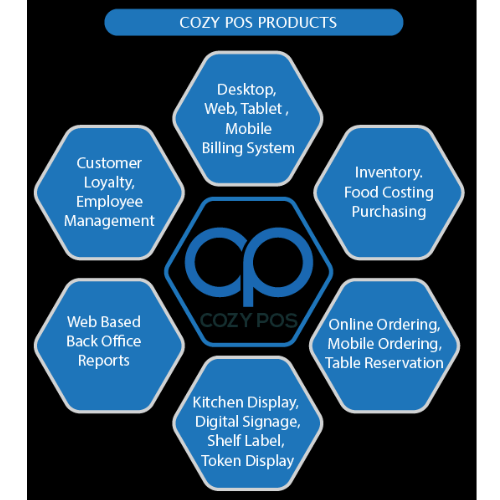
Cozy POS is an optimally designed Point of Sale Software for Retail, Restaurant, and other businesses. This POS system software has well-designed features that help managers run their stores and restaurants efficiently. The simple user interface, quick updates, and seamless integration make Cozy POS a great POS system in today's competitive marketplace. Cozy POS solution offers one-touch billing,...
See MoreHave you used Cozy POS before?
Share your insights for better experience
Brand: Cozy
Founded Year: 2007
Cozy POS is a comprehensive restaurant / retail / salon outlet management software solution
Looking for The Right Pricing?
Share your requirements and get a plan built around your business.
Price Available on Request
Get personalised Cozy POS pricing that fits your needs. Our team will connect with you.
 Loyalty Management Purchase Management Order Management SMS integration & Notification Email Integration Admin Panel Multi Payment Tax Management RFID Integration Analytics & Reporting Sales Management Supplier Management Schemes & Offers Inventory Management Barcode GST Report Billing & Invoicing Accounting Payment Gateway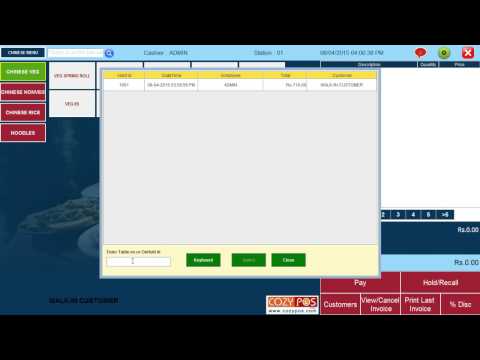

Watch the demo video to explore key features, real workflows, and how the software fits your business needs.
 Ubuntu
  Windows
  iOS
iOS  Android
  Desktop
  Mobile
  Perpetual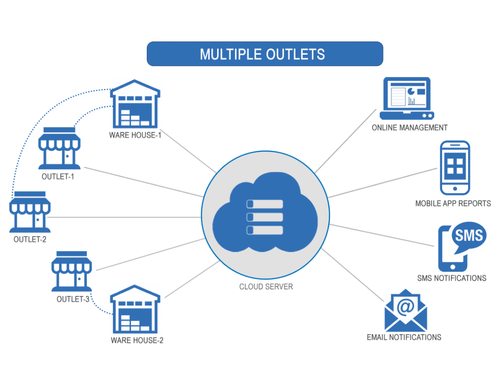
Small Business
Designed for startups and growing businesses
Medium Business
Built for business growth and flexibility
Enterprises
Designed for complex and large-scale business needs
4.7
Out of 5

Overall Rating
Based on
7 Verified Reviews
Rating Breakdown
98% Recommend this Product
Add ReviewCustomers express high satisfaction with Cozy POS, highlighting its seamless setup, high-quality hardware, and exceptional customer service. Users appreciate the system's efficiency in checkout processes and overall operational support, often recommending it for its comprehensive coverage. While there are few criticisms, some users suggest the addition of features like a small HRMS module and shelf label functionality as standard offerings. Overall, Cozy POS is viewed as a reliable and user-friendly solution for businesses.
Pros
"The setup they provide is near perfect and as of now I have used cozy for quite some time and I can say that the hardware equipment is of high quality as well."
"AS I FEEL THIS IS THE BEST POS SOFTWARE IN THE MARKET. SUPPORT AND FUNCTIONALITY are VERY FAST AND END USER-FRIENDLY. "
"They responded right away after I contacted them via their website. Had access to many software packages I had never heard of!"
Cons
"There are no major cons that actually cause an operational hindrance. Cozy POS is about 5 out of 5 as it gets."
"The shelf label feature is an add-on, for someone like me who is a retail operator it would be great to have it as a standard instead of an add-on."
"Have been using Cozy POS from a long time bust still hasn't found any con."

Oct 2, 2021
Techjockey Verified
“Cozy POS comes with a full Hardware and Software setup which I wanted.”
Pros
Cozy POS helped us in digitalization of our storefront. We purchased the whole package and it did not disappoint. From bill printing to navigating the store digitally to fast checkout, our storefront has benefitted a lot from Cozy POS.
Cons
There are no major cons that actually cause an operational hindrance. Cozy POS is about 5 out of 5 as it gets.
Reason to switch
I was searching for hardware and Software integrated pre-built.
May 16, 2021
Techjockey Verified
“Best POS Software I have used – Cozy POS”
Pros
They offer a hardware and software system. Fully configured and already installed which is a breeze. And working with Cozy POS is a breeze too. Instant checkouts, clear inventory visibility, and quick customer responses.
Cons
The shelf label feature is an add-on, for someone like me who is a retail operator it would be great to have it as a standard instead of an add-on.
Reason to switch
We wanted to upscale our business. As a part of renovation, we included Cozy POS.
Jan 17, 2021
Techjockey Verified
“Instant responses from the customer service.”
Pros
The servicing team at Cozy is proactive at solving queries. We never had to wait for long hours to get our problems solved. Cozy POS offers a barcode reader which has fastened our checkout procedure. We highly recommend Cozy POS as it gives a complete coverage and is very responsive for servicing requests. I couldn’t have asked for a better deal.
Cons
There aren’t many criticisms about Cozy POS system. The software can use a small HRMS module. It would improve the way we manage payroll and wouldn’t make us depend on multiple applications.
Reason to switch
We wanted a fully furnished system with hardware equipment in place. We got it with Cozy POS.

Cozy POS
Price On Request
Desktop
Mobile
Web based
On Premises
Windows
Mac OS

VPOS
Price On Request
Desktop
Mobile
Web based
On Premises
Windows
Mac OS

Invoay SimplePOS
₹ 8988
Desktop
Mobile
Web based
On Premises
Windows
Mac OS

Bharat ZupPOS
Price On Request
Desktop
Mobile
Web based
On Premises
Windows
Mac OS

Raho Free
₹ 2999
Desktop
Mobile
Web based
On Premises
Windows
Mac OS

Tally Shoper 9
Price On Request
Desktop
Mobile
Web based
On Premises
Windows
Mac OS

Zilicius POS
Price On Request
Desktop
Mobile
Web based
On Premises
Windows
Mac OS

Peddle Plus One ERP
₹ 8474
Desktop
Mobile
Web based
On Premises
Windows
Mac OS

Rain POS
Price On Request
Desktop
Mobile
Web based
On Premises
Windows
Mac OS

LiquorPOS
Price On Request
Desktop
Mobile
Web based
On Premises
Windows
Mac OS

Bravo POS
Price On Request
Desktop
Mobile
Web based
On Premises
Windows
Mac OS
(0) Product(s) selected
Starting Price:
₹7,200 /Year
Available
Price on Request
Available
Price on Request
Available
Price on Request
Available
Price on Request

Available
Price on Request

Available
Price on Request
Starting Price:
$89 /Month

Available
Price on Request
Available
Price on Request
Available
Price on Request


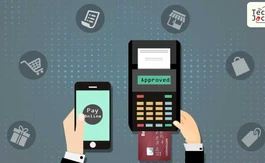
Cozy POS software is compatible with Windows, Linux, Android, and iOS operating systems.
Cozy POS software helps with point of sales, order processing, inventory, and kitchen management. It's a complete solution for billing, inventory and multi-channel order management.
Cozy POS app is available for Android and iOS devices.
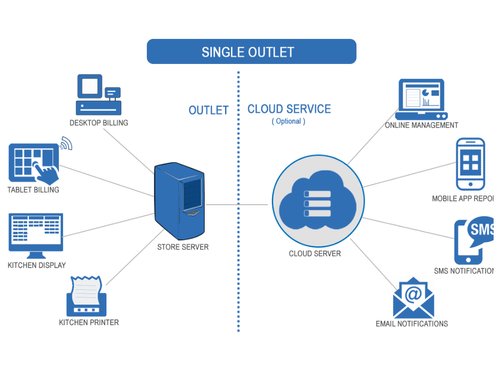
Cozy POS system supports both offline and cloud deployment.
Some of the benefits of a Cozy POS system are increased efficiency, expanded payment capabilities, greater accuracy.
Cozy POS pricing varies as per the needs of your retail store or restaurant. Please request a call back for more details.
Cozy POS is an advanced POS solution designed mainly for retailers and food outlets, both single stores and chains.
Cozy POS demo is available for free with techjockey.com.
No, Cozy POS is not free. However, you can get a free Cozy POS demo from the sales team of Techjockey.com
For Cozy POS software installation, download the application file from the official website in your system and open the Setup Wizard to get started.
20,000+ Software Listed
Best Price Guranteed
Free Expert Consultation
2M+ Happy Customers
Terms and Condtions

Users with registered businesses can purchase goods from merchants on the platform to satisfy their business needs. Users are not permitted to utilize any products acquired through the platform for resale, advertising, business, or further distribution.
For each purchase made, users will receive a Tax Invoice (or 'GST invoice') that includes specific details such as:
the GSTIN of the user associated with their registered business, and
the specified Entity Name for their business.
It should be noted that not all products are eligible for GST Invoice. Only the products displayed by participating sellers with the 'GST-based Invoice Available' callout on the product description page would qualify.
Certain goods and services are not eligible to get a GST Invoice, including items with VAS, i.e., Value Added Services (e.g., Total Mobile Protection/Assured Buyback) and those involving an exchange offer at the time of purchase.
Users must ensure the accuracy of the GSTIN, and business entity name provided for the GST Invoice. Requests for corrections into GST Invoice would not be accommodated by Techjockey.com or any Seller, and any issues arising from user-provided information are the sole responsibility of users.
Techjockey.com is not liable for the GST Invoice or any associated input tax credit. To efficiently claim an input tax credit, users should select the registered place of business address as per the GST authority's data and follow the provisions of the GST Act and rules.
To claim an input tax credit, the delivery and billing addresses must match. Furthermore, input tax credits will not be granted if the delivery address and GSTIN on the invoice are from different states. In case of incorrect GST details provided during the order placement, the order will be canceled automatically.



