linkedin
Desktime logo
play What is Desktime? The Time Tracking and Productivity App - 2020
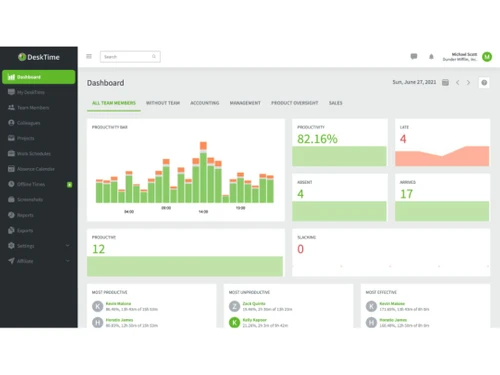
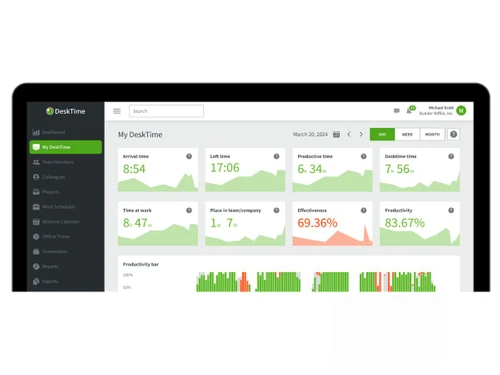
Desktime dashboard
Desktime desktime

Desktime

Brand: DeskTime

  • 5

  • 1 Rating & 1 Review

DeskTime is a time-tracking and productivity solution that automatically monitors for enterprises and freelancers to track working hours, projects, and work efficiency.

See More

Have you used Desktime before?

Share your insights for better experience

Add a Review
Starting Price
₹400 excl.GST
₹ 472 incl. GST

View plans

offer Save upto 18%, Get GST Invoice on your business purchase T&C
offer Buy Now & Pay Later, Check offer on payment page.
Buy Now
100% Genuine
Products
Best Price
Guaranteed
Safe & Secure
Payment
  • Description

  • Pricing

  • Features

  • Specification

  • Review

  • Compare

  • Alternatives

  • FAQ

Starting at ₹400
Buy Now

Desktime Software Overview

What is DeskTime?

DeskTime is a time-tracking and productivity tool that has been created to allow companies and freelancers to monitor their work efficiency. It automatically logs how much time is utilized on tasks, categorizes activities, and provides detailed reports on productivity levels. DeskTime includes project tracking, employee planning, and team management among its features, thereby qualifying it as a useful software for workflow improvement and better time management.

Important Features of DeskTime

  • Pomodoro Timer: DeskTime has a built-in Pomodoro timer to cultivate a productivity-friendly environment by scheduling breaks and “on” periods to enhance focus and prevent burnout. This method improves concentration by dividing tasks into manageable intervals, leading to better completion.
  • Private Time Mode: Users can shift to private mode while attending to personal matters so that their activities can’t be tracked, ensuring work-life balance. This feature ensures employees feel comfortable knowing their private browsing or sensitive work-related tasks will not be disclosed.
  • Real-Time Productivity Alerts: Managers receive notifications in real-time when employees come in late or leave early, as well as when they spend a lot of time on non-work-related activities so they can manage proactively. These alerts empower businesses to safeguard responsibility and work efficiency across teams.
  • Cost Calculation for Projects: Businesses can analyze project costs by monitoring and reporting billable hours while assigning expense estimates to specific tasks, which aids accurate invoicing and client budget estimates. This helps organizations make educated financial decisions and makes the budget simpler.

Major Benefits of Using DeskTime

  • Increased Productivity & Efficiency: DeskTime improves focus and efficiency for employees by tracking the time they spend on each task. With automatic tracking, team members are able to analyse their distractors and adjust their working behaviours accordingly.
  • Accurate Project Time Estimation: Companies can utilize their previous data to better plan and allocate resources for future projects that need to be completed. This is especially helpful in virtually guaranteeing realistic deadlines and avoiding project delays.
  • Seamless Remote Work Management: DeskTime provides remote employees with the flexibility of working whenever they want, which improves productivity, accountability, and activity levels without supervision. This is beneficial for companies that operate in a hybrid and fully remote environment.
  • Transparent Employee Performance Tracking: DeskTime provides managers with valuable insights about worked hours, turning into useful data about activity, absence, and productivity so that managers can identify underperformers and aid them better. Such reports help in enhanced decision making in team relations.
  • Better Work-Life Balance: Supervising working hours and overtime incurred, DeskTime enables organizations to stave off the risk of employee burnout through balancing workloads and keeping productivity within healthier limits. As a result, employees also enjoy a better work-life harmony.
  • Simplified Payroll & Client Billing: With DeskTime, invoicing is performed automatically by tracking billable hours, making it simpler for companies to compute salaries of employees appropriately. This minimises discrepancies during pay periods and improves accuracy in payment procedures.

DeskTime Pricing

The pricing of DeskTime starts from Lite, which is free to use. However, Pro plan starts from ₹400 per user, per month.

Pricing Plans:

  • Pro: ₹400 per user, per month
  • Premium: ₹560 per user, per month

Pricing may differ based on various factors like customization, functionalities, and more.

Read more

DeskTime Company Details

Founded Year:  2010

DeskTime is an easy-to-use automatic employee productivity monitoring software that allows managers to keep an eye on their team’s work without micromanaging every aspect of their employees’ day.

Director/Founders Agris Tamanis, Lauris Liberts
Company Size 1-100 Employees

Desktime Pricing & Plans

Pro

Calculated Price

₹ 400 Exclusive of all taxes
    • Users

      Users
      Users
    • Monthly

      Monthly
      Monthly

Key Features

  • App-tracked time

  • Idle time

  • Web timer

  • Mobile time

  • Offline time

  • Calendar time

  • Private time

  • URL & App tracking

  • Project tracking

  • Document title tracking

  • Productivity calculation

Premium

Calculated Price

₹ 560 Exclusive of all taxes
    • Users

      Users
      Users
    • Monthly

      Monthly
      Monthly

Key Features

  • Screenshots

  • Integrations & API

  • Shift scheduling

  • URL & App tracking

  • Document title tracking

  • Project tracking

  • Productivity calculations

Desktime Features

  • icon_check Time Tracking
    They assist users in tracking productivity by automatically identifying and executing workload automation.
  • icon_check Offline Time Tracking
    Allows users to log away from the computer and allows users to add time spent on meetings, calls, and offline tasks manually.
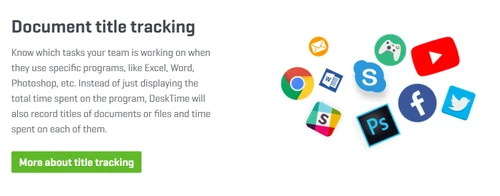
  • icon_check Document Title Tracking
    Helps to focus and workflow in context to the presented tasks by capturing the title of documents and files users work on.
  • icon_check Invoicing
    Helps in invoice generation based on billable hours tracked, which helps in client invoicing and makes the financials easier.
  • icon_check Custom Reports
    Enables users to construct customized reports by giving detailed analytics about work hours, productivity and efficiency.
  • icon_check Absence Calendar
    Simplifies workforce management by displaying employee leaves, vacations, and sick days in a shared calendar.
  • icon_check Third Party Integration
    Gives easy integration with the most widely used tools such as Asana, Trello, Slack, etc., enabling better workflow.
  • icon_check Shift Scheduling
    Enables managers to makeshift assignments, track attendance, and organize team schedules.
  • icon_check Mobile App
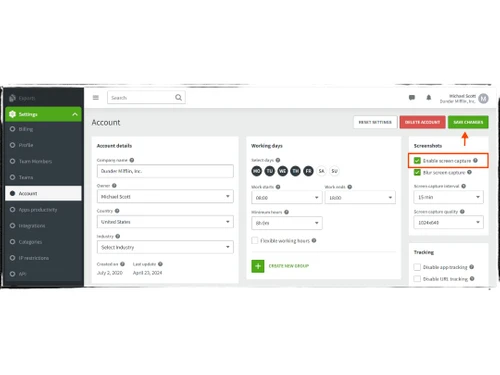
  • icon_check Screenshots
    Screenshots are provided at intervals to monitor workflows for remote teams and therefore provide transparency.
  • icon_check Project Tracking
    Helps in tracking productivity and meeting deadlines by allowing teams to track time per individual project.
Desktime Demo Video play icon

Get Desktime Demo

Watch the demo video to explore key features, real workflows, and how the software fits your business needs.

Understand
Key Features
Personal
Demo Insights
Interactive
Demo Support

Desktime Specifications

Supported Platforms
Ubuntu Ubuntu Windows Windows iOS iOS Android Android MacOS MacOS Linux Linux
Devices
Desktop Desktop Mobile Mobile
Deployment
Cloud-Based Cloud-Based
Suitable For
All Industries
Business Specific
All Businesses
Business Size
Small Business Medium Business SMBs SMEs
Customer Support
Phone Email Live Chat Forums
Language
English Español
Integration
API Integration

Explore the Best Alternative Solutions Similar to Your Business Size and Needs

Desktime Review

5

Out of 5

img

Overall Rating

Based on
1 Verified Review

Rating Breakdown

  • Features 5
  • Value for Money 5
  • Ease of Use 5
  • Customer Support 5

100% Recommend this Product

Add Review

Sayan Dhali linkedin_verify

Software Engineer

Industry: IT User since: 1-2 years

5

Reviewed on: Apr 15, 2023

Techjockey Verified

“I can track my daily, weekly, and monthly data on a single screen”

Pros

I like the fact that it is effortless to use and less complicated to understand the process. It solves my problem to monitor the activity of each and every employee and now I can track all the employees in a very simple manner, I can also see the data of multiple users at once.

Cons

Although the process is straightforward to use still there is the scope for improvement also in terms of clarity of the data. It can be more specific in terms of showing data to a particular user.

Compare Desktime With other Time Tracking Software

Products
Ratings
Pricing
Device Supported
Deployment
Supported Platforms
  • img

    Desktime

  • 5

  • ₹ 400.00 excl. GST

  • Desktop

    Mobile

  • Web based

    On Premises

  • Windows

    Mac OS

  • img

    Hubstaff

  • 4.3

  • Price On Request

  • Desktop

    Mobile

  • Web based

    On Premises

  • Windows

    Mac OS

  • img

    ADP SecurTime

  • 4.0

  • Price On Request

  • Desktop

    Mobile

  • Web based

    On Premises

  • Windows

    Mac OS

  • img

    Time Doctor

  • 4.4

  • Price On Request

  • Desktop

    Mobile

  • Web based

    On Premises

  • Windows

    Mac OS

  • img

    TopTracker

  • 4.4

  • Price On Request

  • Desktop

    Mobile

  • Web based

    On Premises

  • Windows

    Mac OS

  • img

    OnTheClock

  • 4.4

  • Price On Request

  • Desktop

    Mobile

  • Web based

    On Premises

  • Windows

    Mac OS

  • img

    DeskViu

  • 4.1

  • ₹ 100

  • Desktop

    Mobile

  • Web based

    On Premises

  • Windows

    Mac OS

  • img

    TimeChart

  • 4.1

  • Price On Request

  • Desktop

    Mobile

  • Web based

    On Premises

  • Windows

    Mac OS

  • img

    QuickBooks Time

  • 4.4

  • Price On Request

  • Desktop

    Mobile

  • Web based

    On Premises

  • Windows

    Mac OS

(0) Product(s) selected

Desktime Alternatives

See All Desktime Alternatives

Available

Price on Request

Available

Price on Request

Starting Price:

€9 /User/Month

Starting Price:

$50 /Month

Starting Price:

$28 /Month

Starting Price:

$12 /Month

Starting Price:

$14 /Seat/Month

Starting Price:

$4 /Month

Articles for Desktime

See All Related Articles

What is DeskTime used for?

It precisely monitors and analyses how people use their time during work hours, boosting productivity and encouraging work-life balance.

Does DeskTime record your screen?

DeskTime does not monitor your screen but will automatically take screenshots at regular intervals to monitor your productivity.

How do I start DeskTime?

To begin DeskTime, install and download the app, log in using your credentials, and it will record time in the background automatically.

How do I stop DeskTime?

To leave DeskTime, you can log out or close the app, or, if you are an administrator, switch off the tracking for specific users or teams in settings.

Does DeskTime record keystrokes?

DeskTime has a feature of optional screenshots but doesn't record keystrokes or video capture.

How do I delete DeskTime?

To remove DeskTime, you either cancel your subscription (which prevents future charges) or uninstall the app on your device.

What is private time in DeskTime?

Private time is an excellent option for brief or medium breaks like gazing at social sites, bill paying, viewing personal email, news, etc.

What is the offline time on DeskTime?

Offline?hours?added?to?your day?spent?not?being?on?the computer.

How much does DeskTimecost?

The starting price of 400 per user, per month. However, there is a free plan also available with limited features.

How does DeskTime work?

DeskTime tracks time spent on tasks, apps, and websites automatically, offering productivity insights. It operates in the background, creating reports for more effective workflow management.

Is DeskTime available for free?

Yes, DeskTime is available for free with limited features and capabilities.

Is a free demo available in DeskTime?

Yes, there is a demo available in DeskTime.

Who can use DeskTime?

The major users of DeskTime are freelancers, remote teams, businesses, and enterprises.

Is there any mobile app for DeskTime?

Yes, the mobile app is available on DeskTime.

20,000+ Software Listed

Best Price Guranteed

Free Expert Consultation

2M+ Happy Customers

Terms and Condtions

close

Users with registered businesses can purchase goods from merchants on the platform to satisfy their business needs. Users are not permitted to utilize any products acquired through the platform for resale, advertising, business, or further distribution.

For each purchase made, users will receive a Tax Invoice (or 'GST invoice') that includes specific details such as:

  • the GSTIN of the user associated with their registered business, and

  • the specified Entity Name for their business.

It should be noted that not all products are eligible for GST Invoice. Only the products displayed by participating sellers with the 'GST-based Invoice Available' callout on the product description page would qualify.

Certain goods and services are not eligible to get a GST Invoice, including items with VAS, i.e., Value Added Services (e.g., Total Mobile Protection/Assured Buyback) and those involving an exchange offer at the time of purchase.

Users must ensure the accuracy of the GSTIN, and business entity name provided for the GST Invoice. Requests for corrections into GST Invoice would not be accommodated by Techjockey.com or any Seller, and any issues arising from user-provided information are the sole responsibility of users.

Techjockey.com is not liable for the GST Invoice or any associated input tax credit. To efficiently claim an input tax credit, users should select the registered place of business address as per the GST authority's data and follow the provisions of the GST Act and rules.

To claim an input tax credit, the delivery and billing addresses must match. Furthermore, input tax credits will not be granted if the delivery address and GSTIN on the invoice are from different states. In case of incorrect GST details provided during the order placement, the order will be canceled automatically.