linkedin
Gomsu POS logo
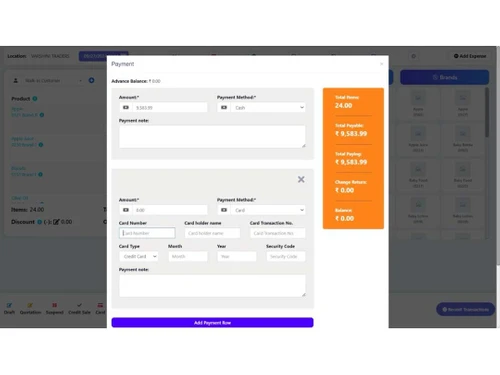
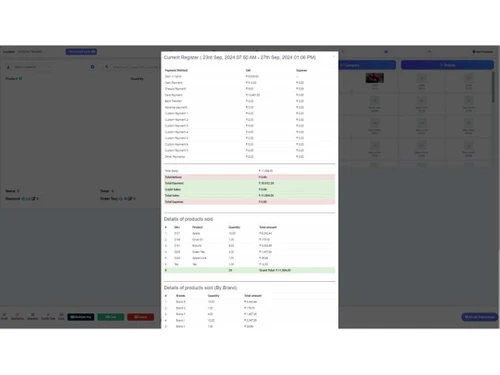
Gomsu pos payment
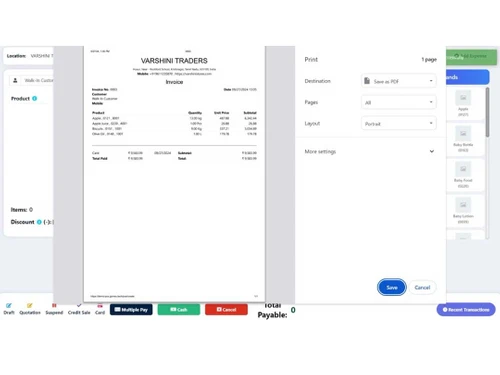
Gomsu invoices
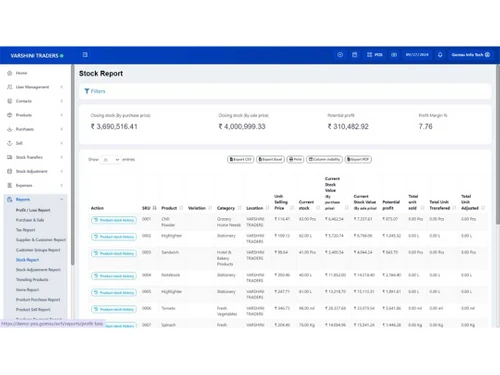
Gomsu stock report

Gomsu POS

Brand: Gomsu Information Technologies

  • 4.2

  • 6 Ratings

GOMSU POS is a cloud-based POS software that helps in managing inventory, sales, and billing for businesses.

See More

Have you used Gomsu POS before?

Share your insights for better experience

Add a Review
Starting Price
₹12,000 excl.GST
₹ 14,160 incl. GST

View plans

100% Genuine
Products
Best Price
Guaranteed
Safe & Secure
Payment
  • Description

  • Pricing

  • Features

  • Specification

  • Review

  • Compare

  • Alternatives

  • FAQ

Starting at ₹12,000

Gomsu POS Software Overview

What is Gomsu POS?

GOMSU POS is a cloud-based point-of-sale software designed for retail and wholesale businesses. It simplifies inventory management, sales tracking, and billing processes, making operations efficient and user-friendly. Users can access the software from any device with an internet connection, eliminating the need for downloads. It has an intuitive and easy-to-navigate interface, allowing users to create documents, generate reports, and manage stock with minimal training.

GOMSU POS functionalities include real-time inventory tracking, automatic stock adjustments from invoices, multi-store management, comprehensive reporting, and secure data storage. It supports multiple payment methods, barcode tracking, and expense management, making it easy to manage daily transactions and maintain accurate records. Additionally, it offers billing support with various payment options and also provides detailed reports and analytics to help businesses make informed decisions.

Why choose Gomsu POS Software?

  • Inventory Management: Efficiently track stock levels, manage reorders, and prevent stockouts, ensuring optimal inventory control.
  • Billing: Streamline the billing process with quick, accurate invoice generation, supporting multiple payment methods.
  • Reporting and Analytics: Generate detailed sales and performance reports, providing insights for informed business decisions.
  • Multiple Store Management: Manage and monitor multiple store locations from a single dashboard, simplifying operations.
  • Sales and Order Management: Easily handle sales transactions and order processing, improving customer service and transaction accuracy.

Benefits of Gomsu POS

  • Easy to Use: Simplifies sales processes, allowing quick adoption and seamless daily operations.
  • Secure: Ensures data protection with advanced security measures, safeguarding sensitive business information.
  • Cloud-Based: Offers access from anywhere, eliminating the need for installations, and providing flexibility and real-time updates.
  • Maximize Business: Enhances efficiency and productivity, driving business growth and customer satisfaction.
  • Multiple Location Management: Streamlines operations across various stores, improving control and coordination.
  • Better Inventory Management: Optimizes stock levels, reducing waste and preventing stockouts.

Pricing of Gomsu POS

Gomsu POS price in India starts at INR 12,000 excl. GST. Gomsu POS comes with multiple pricing plans and caters to the diverse customer base.

For subscription-related details and offers on premium packages, please request a call back from our product experts.

Read more

Gomsu Information Technologies Company Details

Founded Year:  2019

Streamline Your Individual or Multi-Branch Business Operations with Our All-in-One POS/Billing Software

Director/Founders Rajesh
Company Size 1-100 Employees

Gomsu POS Pricing & Plans

Gomsu POS
Key Features
  • Stock Management
  • Barcode Tracking
  • Reports
  • Multiple Payment Methods
  • Expense management

Calculated Price

12000 Exclusive of all taxes
    • Licenses

      Licenses
      Licenses
    • Yearly

      Yearly
      Yearly

Key Features

  • Stock Management

  • Barcode Tracking

  • Reports

  • Multiple Payment Methods

  • Expense management

Gomsu POS Features

  • icon_check Stock Management
    Efficiently track stock levels in real-time to prevent shortages and ensure optimal inventory turnover for profitability.
  • icon_check Barcode Tracking
    Streamline inventory processes by scanning barcodes, reducing manual entry errors, and speeding up stock management tasks.
  • icon_check Reports
    Generates detailed sales, inventory, and financial reports, enabling informed decisions and effective business strategies.
  • icon_check Multiple Payment Methods
    Supports credit cards and digital wallets, boosting customer satisfaction and convenience during transactions.
  • icon_check Expense Management
    Monitor expenses effectively by categorizing costs, allowing for better budgeting and financial planning for future growth.
  • icon_check Purchase Order
    Simplify the purchasing process by creating, tracking, and managing purchase orders seamlessly to ensure timely restocking.
  • icon_check Order Management
    Streamlines order processing to fulfillment, ensuring timely, accurate deliveries and improved customer satisfaction.
  • icon_check Balance Sheet
    Generates real-time balance sheets for assessing financial health and managing assets, liabilities, and equity effectively.
  • icon_check Receivable and Payable
    Manage accounts receivable and payable efficiently, ensuring timely payments and optimizing cash flow for business operations.
  • icon_check E-Way Bill Generation
    Automates e-way bill creation for smooth goods transport, ensuring compliance and reducing delays.

Gomsu POS Specifications

Supported Platforms
Windows Windows iOS iOS Android Android MacOS MacOS
Devices
Desktop Desktop Mobile Mobile Tablet Tablet iPad iPad
Deployment
Cloud-Based Cloud-Based
Suitable For
Retail Wholesale
Business Specific
All Businesses
Business Size
Small Business Startups Medium Business Enterprises SMBs SMEs MSMBs MSMEs
Customer Support
Phone Email
Language
English
Training Resources
In Person

Explore the Best Alternative Solutions Similar to Your Business Size and Needs

Gomsu POS Review

4.2

Out of 5

img

Overall Rating

Based on
6 Verified Ratings

Rating Breakdown

  • Features 4.0
  • Value for Money 4.5
  • Ease of Use 4.1
  • Customer Support 4.3

86% Recommend this Product

Add Review

Techjockey Trusted Reviews from Verified Users

No reviews are currently available for Gomsu POS. Discover similar POS Software reviews

  • Logic ERP - POS Software

    4.8

    Whats great - Cloud-based SaaS platform with a modern, intuitive UI/UX that is easy to adopt and access from anywhere. read more

  • VPOS

    4.7

    Whats great - I like very most thing in this product are inventory management and stocks management. i loved it because it is very fast in ... read more

  • Peddle Plus One ERP

    4.5

    Whats great - Peddle Plus One ERP is fully loaded with features, has an easy-to-use interface, and is economically priced. The standout is ... read more

Compare Gomsu POS With other POS Software

Products
Ratings
Pricing
Device Supported
Deployment
Supported Platforms
  • img

    Gomsu POS

  • 4.2

  • ₹ 12000.00 excl. GST

  • Desktop

    Mobile

  • Web based

    On Premises

  • Windows

    Mac OS

  • img

    VPOS

  • 4.7

  • Price On Request

  • Desktop

    Mobile

  • Web based

    On Premises

  • Windows

    Mac OS

  • img

    Invoay SimplePOS

  • 4.5

  • ₹ 8988

  • Desktop

    Mobile

  • Web based

    On Premises

  • Windows

    Mac OS

  • img

    Bharat ZupPOS

  • 5

  • Price On Request

  • Desktop

    Mobile

  • Web based

    On Premises

  • Windows

    Mac OS

  • img

    Raho Free

  • 5

  • ₹ 2999

  • Desktop

    Mobile

  • Web based

    On Premises

  • Windows

    Mac OS

  • img

    Tally Shoper 9

  • 4.1

  • Price On Request

  • Desktop

    Mobile

  • Web based

    On Premises

  • Windows

    Mac OS

  • img

    Zilicius POS

  • 5

  • Price On Request

  • Desktop

    Mobile

  • Web based

    On Premises

  • Windows

    Mac OS

  • img

    Rain POS

  • 4.3

  • Price On Request

  • Desktop

    Mobile

  • Web based

    On Premises

  • Windows

    Mac OS

  • img

    LiquorPOS

  • 4.2

  • Price On Request

  • Desktop

    Mobile

  • Web based

    On Premises

  • Windows

    Mac OS

  • img

    Bravo POS

  • 4.2

  • Price On Request

  • Desktop

    Mobile

  • Web based

    On Premises

  • Windows

    Mac OS

(0) Product(s) selected

Gomsu POS Alternatives

See All Gomsu POS Alternatives

Available

Price on Request

Available

Price on Request

Available

Price on Request

Available

Price on Request

Available

Price on Request

Available

Price on Request

Available

Price on Request
Articles for Gomsu POS

See All Related Articles

How does Gomsu POS handle multiple store management?

Gomsu POS allows users to manage multiple store locations from a single, unified dashboard.

How much does Gomsu POS software cost?

The Gomsu POS Software pricing starts at INR 12000.

What are the primary uses of Gomsu POS?

Gomsu POS is used for billing, invoicing, inventory management, sales reporting, and expense tracking.

Can Gomsu POS generate purchase orders?

Yes, Gomsu POS can create and manage purchase orders, streamlining the procurement process.

Does Gomsu POS support multi-currency transactions?

Yes, Gomsu POS can handle multi-currency transactions, making it ideal for businesses with international customers.

How secure is Gomsu POS for handling transactions?

Gomsu POS employs advanced security protocols to ensure safe and secure transaction processing.

Can Gomsu POS generate detailed sales reports?

Yes, Gomsu POS provides comprehensive sales reporting to offer insights into business performance.

Can Gomsu POS handle barcode scanning?

Yes, Gomsu POS supports barcode scanning for quick and accurate inventory management and sales transactions.

Who are the potential users of Gomsu POS?

Potential users include small to medium-sized businesses looking to streamline their sales and inventory processes.

Is there a demo available for Gomsu POS?

Yes, Gomsu POS offers a free demo to showcase its features and capabilities.

20,000+ Software Listed

Best Price Guranteed

Free Expert Consultation

2M+ Happy Customers

Terms and Condtions

close

Users with registered businesses can purchase goods from merchants on the platform to satisfy their business needs. Users are not permitted to utilize any products acquired through the platform for resale, advertising, business, or further distribution.

For each purchase made, users will receive a Tax Invoice (or 'GST invoice') that includes specific details such as:

  • the GSTIN of the user associated with their registered business, and

  • the specified Entity Name for their business.

It should be noted that not all products are eligible for GST Invoice. Only the products displayed by participating sellers with the 'GST-based Invoice Available' callout on the product description page would qualify.

Certain goods and services are not eligible to get a GST Invoice, including items with VAS, i.e., Value Added Services (e.g., Total Mobile Protection/Assured Buyback) and those involving an exchange offer at the time of purchase.

Users must ensure the accuracy of the GSTIN, and business entity name provided for the GST Invoice. Requests for corrections into GST Invoice would not be accommodated by Techjockey.com or any Seller, and any issues arising from user-provided information are the sole responsibility of users.

Techjockey.com is not liable for the GST Invoice or any associated input tax credit. To efficiently claim an input tax credit, users should select the registered place of business address as per the GST authority's data and follow the provisions of the GST Act and rules.

To claim an input tax credit, the delivery and billing addresses must match. Furthermore, input tax credits will not be granted if the delivery address and GSTIN on the invoice are from different states. In case of incorrect GST details provided during the order placement, the order will be canceled automatically.