USA
USA UAE
UAESmall Business
Designed for startups and growing businesses


See More


Brand: Hinote Systems
Hinote Payroll Software simplifies payroll management by automating complex calculations and ensuring compliance with statutory requirements.
See MoreHave you used Hinote before?
Share your insights for better experience
Looking for The Right Pricing?
Share your requirements and get a plan built around your business.
Price Available on Request
Get personalised Hinote pricing that fits your needs. Our team will connect with you.
Payroll Management
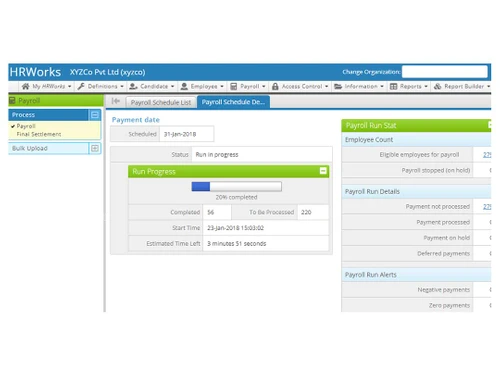
 Overtime Management Automated Payroll Expense Reimbursements Tax Deductions Direct Bank Transfers Off-Cycle Payroll Processing Multiple Pay Rates and Schedules Bonus and Incentive Management Variable Pay & Commission Management Employee Benefits Management Gratuity Calculation
 Compliance Management
Income Tax (TDS) Management Employee State Insurance (ESI) Compliance Provident Fund (PF) Compliance Professional Tax (PT) Compliance Labour Welfare Fund (LWF) Management Time, Attendance & Leave Management
Leave & Absence Management Attendance Tracking Leave Policy Customization Holiday & Leave Calendar Sick Leave and Vacation Tracking Employee Self-Service (ESS)
Payslip Access Expense Claims Income Tax Planner Employee Lifecycle Management
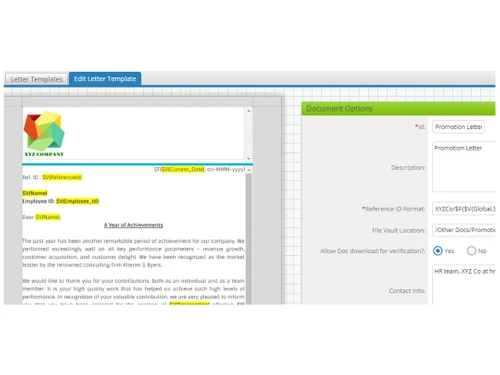
Employee Database Document Management Employee Shift Scheduling F&F Settlement Banking Integration & Payment Processing
Bank Transfer Files Cheque Processing Direct Deposit Scheduling Multi-Bank Support Automation and Customization
Custom Payroll Rules and Policies Configurable Workflows & Approvals Alerts & Notifications Scheduled Payroll Processing API Access Security and Data Privacy
User Access Management Data Backup and Recovery Encrypted Data Transmission Two-Factor Authentication (2FA) Audit Logs and Monitoring Integrations
Performance Management Payment Gateway Biometric Integration Third Party Integration Accounting Software HRMS API Integration Reporting and Analytics
Payroll Reports Compliance Reports Leave and Attendance Reports Employee Master Report  Ubuntu
  Windows
  MacOS
MacOS  Linux
Linux  Desktop
  Cloud-Based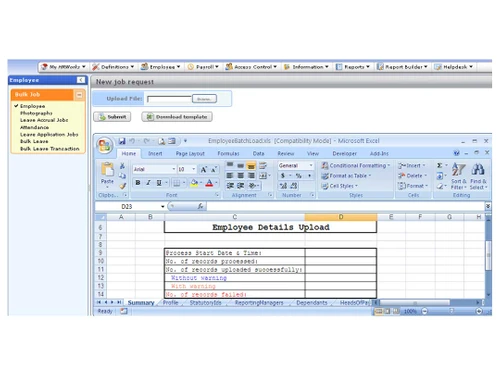
Small Business
Designed for startups and growing businesses
Medium Business
Built for business growth and flexibility
Enterprises
Designed for complex and large-scale business needs
3.9
Out of 5

Overall Rating
Based on
10 Verified Reviews
Rating Breakdown
83% Recommend this Product
Add ReviewHinote Payroll Software has received generally positive feedback from users, particularly for its ability to automate payroll calculations and manage compliance efficiently, which significantly reduces manual workload. The employee self-service feature is frequently praised for enhancing accessibility to pay and tax information. However, users have noted challenges with initial setup, especially regarding biometric integrations, and some find the reporting features complex and not user-friendly. Overall, the software is viewed as a valuable tool for streamlining payroll processes, though some aspects could benefit from improved usability.
Pros
"I appreciate that Hinote Payroll automates the compliance process for us. Things like PF and TDS filings are done automatically, which saves me a lot of time and stress."
Cons
"It was a bit of a challenge to integrate the biometric system for tracking attendance. It wasn’t very straightforward, and it took longer than I expected to set it up properly. "
"The initial setup process was a bit challenging, especially when it came to integrating with our biometric devices. It took a bit of time to get it working correctly. "
" I find the reporting interface a bit cluttered, especially when trying to focus on specific data points. It’s useful, but it could be more organized for quicker access. "

Sep 18, 2024
Techjockey Verified
“Hinote Payroll Software Has Simplified Payroll for Our Team”
Hinote Payroll Software has made managing payroll and compliance much easier for our company. It automatically calculates salaries, tracks attendance, and ensures that all statutory filings are done on time. The employee self-service feature has been helpful for our team, as it allows them to access their own pay and tax information without needing to ask me. The cloud-based platform means that our data is secure and accessible from anywhere, which has been great.
Pros
I appreciate that Hinote Payroll automates the compliance process for us. Things like PF and TDS filings are done automatically, which saves me a lot of time and stress.
Cons
The reporting features are useful, but they took me some time to understand. Once you get the hang of it, it’s helpful, but the initial learning process was a bit slow for me.
Reason to switch
Pagaar didn’t offer the level of automation and compliance management that Hinote does, which is why we made the switch.
Oct 3, 2024
Techjockey Verified
“Payroll and Compliance Are Much Easier to Manage With Hinote Payroll Software”
Hinote Payroll has been very helpful in automating payroll and managing compliance for our business. It automatically calculates salaries and tracks attendance, so I no longer have to worry about manual payroll processing. The system also handles compliance filings, which has been a huge time-saver. Employees can access their pay details and tax information on their own, which cuts down on the number of queries I receive. The cloud-based storage is a big plus, as we can access our data from anywhere and know that it’s safe.
Pros
What I like most about Hinote Payroll is how it manages all the compliance filings for us. We no longer have to manually keep track of deadlines for PF, ESIC, or TDS filings, which used to take up a lot of time.
Cons
The analytics feature is useful, but it took me a while to figure out how to use it effectively. It’s not the easiest feature to get the hang of, but once you do, it’s quite helpful.
Reason to switch
Pagaar didn’t offer the compliance features or the automation that we needed, so we decided to switch to Hinote.
Oct 3, 2024
Techjockey Verified
“Hinote Payroll Software Is a Great Choice for Managing Payroll in Our Business”
Hinote Payroll Software has been a great help in managing our payroll and employee attendance. The software automates salary calculations and makes sure that all compliance filings are handled on time. The employee self-service feature is also very useful, allowing our team to access their payslips and tax information without needing to ask. The cloud-based storage ensures that our data is safe and accessible from anywhere.
Pros
I really like how Hinote Payroll helps us stay on top of payroll and compliance. The automation features mean that I don’t have to worry about keeping track of TDS and PF filings, and the payroll calculations are all done automatically.
Cons
It was a bit of a challenge to integrate the biometric system for tracking attendance. It wasn’t very straightforward, and it took longer than I expected to set it up properly.
Reason to switch
ADP didn’t have the advanced compliance features or the employee self-service option that we needed, so we decided to switch to Hinote.

Hinote
Price On Request
Desktop
Mobile
Web based
On Premises
Windows
Mac OS
PagarBook
₹ 499
Desktop
Mobile
Web based
On Premises
Windows
Mac OS
PayWise
₹ 300
Desktop
Mobile
Web based
On Premises
Windows
Mac OS

Zoho Payroll
₹ 1250
Desktop
Mobile
Web based
On Premises
Windows
Mac OS
ADP Vista
Price On Request
Desktop
Mobile
Web based
On Premises
Windows
Mac OS

QuickBooks Payroll
Price On Request
Desktop
Mobile
Web based
On Premises
Windows
Mac OS

RazorpayX Payroll
₹ 29988
Desktop
Mobile
Web based
On Premises
Windows
Mac OS

Papaya Global
Price On Request
Desktop
Mobile
Web based
On Premises
Windows
Mac OS

UnboxPayroll
₹ 2000
Desktop
Mobile
Web based
On Premises
Windows
Mac OS

HivePayroll
₹ 1499
Desktop
Mobile
Web based
On Premises
Windows
Mac OS

SPIKYARC Payroll
Price On Request
Desktop
Mobile
Web based
On Premises
Windows
Mac OS
(0) Product(s) selected
Available
Price on Request
Starting Price:
$15
Available
Price on Request

Available
Price on Request
Starting Price:
₹10 /Month

Starting Price:
₹25 /Month

Starting Price:
$25 /Employee/Month

Available
Price on Request

Starting Price:
$39 /Month





Hinote provides cloud-based payroll software, HRWorks, designed to automate payroll management, including compliance, reporting, and employee self-service.
Yes, it ensures compliance with statutory regulations like TDS, PF, ESIC, and PT calculations, as well as timely filings.
Yes, Hinote’s payroll software offers cloud-based storage, allowing access to payroll data anytime, from anywhere.
Hinote provides customizable payroll reports and trend analysis to support decision-making.
Hinote caters to a wide range of industries, from startups to large organizations with thousands of employees.
The system integrates with attendance tracking tools and provides leave management functionalities.
The software supports various payment frequencies such as weekly, bi-weekly, and monthly payrolls.
Yes, Hinote also offers payroll outsourcing services for organizations that prefer external management.
You can reach out to Hinote via their website to request a demo or consultation for your business.
20,000+ Software Listed
Best Price Guranteed
Free Expert Consultation
2M+ Happy Customers
Terms and Condtions

Users with registered businesses can purchase goods from merchants on the platform to satisfy their business needs. Users are not permitted to utilize any products acquired through the platform for resale, advertising, business, or further distribution.
For each purchase made, users will receive a Tax Invoice (or 'GST invoice') that includes specific details such as:
the GSTIN of the user associated with their registered business, and
the specified Entity Name for their business.
It should be noted that not all products are eligible for GST Invoice. Only the products displayed by participating sellers with the 'GST-based Invoice Available' callout on the product description page would qualify.
Certain goods and services are not eligible to get a GST Invoice, including items with VAS, i.e., Value Added Services (e.g., Total Mobile Protection/Assured Buyback) and those involving an exchange offer at the time of purchase.
Users must ensure the accuracy of the GSTIN, and business entity name provided for the GST Invoice. Requests for corrections into GST Invoice would not be accommodated by Techjockey.com or any Seller, and any issues arising from user-provided information are the sole responsibility of users.
Techjockey.com is not liable for the GST Invoice or any associated input tax credit. To efficiently claim an input tax credit, users should select the registered place of business address as per the GST authority's data and follow the provisions of the GST Act and rules.
To claim an input tax credit, the delivery and billing addresses must match. Furthermore, input tax credits will not be granted if the delivery address and GSTIN on the invoice are from different states. In case of incorrect GST details provided during the order placement, the order will be canceled automatically.