USA
USA UAE
UAESmall Business
Designed for startups and growing businesses

See More





Brand: Invoice Simple
Invoice Simple is a versatile and user-friendly invoicing tool designed for freelancers, small businesses, and entrepreneurs who need a straightforward way to create and manage invoices.
See MoreHave you used Invoice Simple before?
Share your insights for better experience
Brand: Invoice Simple
Founded Year: 2014
Invoice Simple saves small business's time by enabling them to invoice on the go and run their business from their phone.
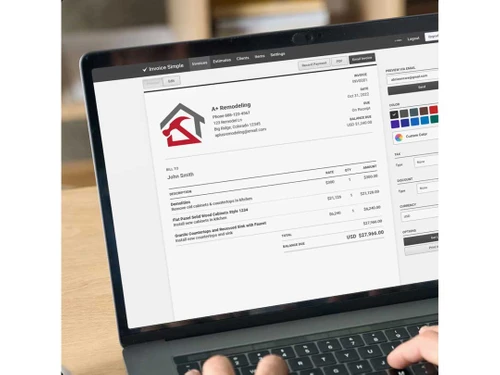
 Estimates & Invoices Branding Invoice Payments Invoice Management Saved Invoices Secure Access Mobile Invoices Business Expense Tracker

Watch the demo video to explore key features, real workflows, and how the software fits your business needs.
 Ubuntu
  Windows
  iOS
iOS  Android MacOS
  Linux
Linux  Desktop
  Cloud-Based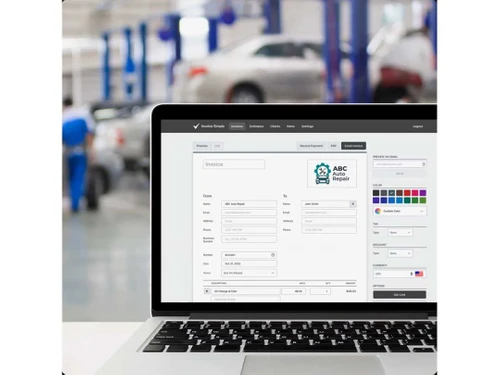
Small Business
Designed for startups and growing businesses
Medium Business
Built for business growth and flexibility
Enterprises
Designed for complex and large-scale business needs
4
Out of 5

Overall Rating
Based on
10 Verified Reviews
Rating Breakdown
84% Recommend this Product
Add ReviewInvoice Simple is generally well-received for its ease of use and efficiency in generating basic invoices, making it suitable for small businesses and freelancers. Users appreciate its straightforward interface and mobile accessibility, which streamline the invoicing process. However, many reviews highlight limitations in customization options and reporting features, with some expressing frustration over account management issues, particularly regarding account deactivation. Overall, while it meets basic invoicing needs, those seeking advanced functionalities may find it lacking.
Pros
"The software is simple, and I was able to start using it without any hassle. I really like the fact that I can email invoices directly to clients, which saves me a lot of time."
"Invoice Simple is very user-friendly, and I didn’t have to spend a lot of time figuring it out."
"The software provides just the right number of features to create professional invoices without any difficulty."
Cons
"One thing that bugs me is that when I change the currency for one client, it ends up changing the currency for all the invoices in the system. "
"The big problem I have is with their account management. I tried to cancel my account, but they won’t let me. It is so time-consuming. "

Sep 28, 2024
Techjockey Verified
“Great for Basic Invoicing but Limited Features”
Invoice Simple is designed for easy invoicing with minimal effort. It’s great for quickly generating and sending invoices, and it works well on mobile devices too. While it’s efficient for basic needs, it lacks some customization and reporting features, so if you need something more advanced, you may find it limited.
Pros
Using Invoice Simple has made my invoicing process faster. It’s really handy for basic invoicing needs, and I can reuse client information with no hassle. Plus, it’s mobile-friendly, so I can handle invoicing tasks when I’m not at my desk.
Cons
I feel that the software could offer more options when it comes to customizing invoices. There are only a few templates, and none of them offer much flexibility for personalization. Also, if you need in-depth reporting, this might not be the best tool.
Reason to switch
I switched to Invoice Simple because I wanted a more simplified invoicing system that wouldn’t require too much time or effort to learn.
Sep 26, 2024
Techjockey Verified
“Straightforward Invoicing Without the Extras”
Invoice Simple is a no-frills invoicing software that’s ideal for people who just want to send invoices quickly. It allows you to store client details and use pre-made templates for easy invoicing. But if you’re looking for customization or more financial tracking, it’s not going to give you everything you need. It’s perfect for basic invoicing tasks.
Pros
I appreciate how straightforward Invoice Simple is. It’s easy to navigate, and I don’t have to spend a lot of time figuring out where everything is. It’s great for sending quick invoices, and I can store client info for future use, which speeds things up even more.
Cons
The main limitation is that it doesn’t offer much in terms of advanced features. If you want to do anything beyond sending basic invoices, like adding more branding elements or in-depth analytics, you might feel like something’s missing.
Reason to switch
I made the switch because I wanted something less complicated and easier to manage, without all the unnecessary features.
Sep 20, 2024
Techjockey Verified
“Quick and Easy but Limited Customization”
Invoice Simple is a great tool for sending invoices fast. It’s simple, mobile-friendly, and allows you to manage client information easily. However, if you want to make your invoices look more unique or track your financials in detail, you might feel the lack of customization and reporting features. For basic invoicing, it works very well.
Pros
Invoice Simple makes invoicing a quick task. The layout is clean and easy to understand, which makes it perfect for creating and sending invoices fast. The ability to save client details and reuse them saves a lot of time, and I love that it’s all mobile-friendly too, so I can send invoices on the go.
Cons
On the downside, there’s not a lot of room for customization. If you’re looking to make the invoices more personalized or branded, you might find the limited templates frustrating. Also, I wish there were more advanced features for tracking finances.
Reason to switch
I chose Invoice Simple because I wanted something fast and easy to use, without needing all the extras that other invoicing tools offer.

Invoice Simple
Price On Request
Desktop
Mobile
Web based
On Premises
Windows
Mac OS

Vyapar Billing Software
Price On Request
Desktop
Mobile
Web based
On Premises
Windows
Mac OS
Raseed
Price On Request
Desktop
Mobile
Web based
On Premises
Windows
Mac OS

InvoiceZy
₹ 99
Desktop
Mobile
Web based
On Premises
Windows
Mac OS

KaroSauda
₹ 1999
Desktop
Mobile
Web based
On Premises
Windows
Mac OS

Billing Fast
₹ 3588
Desktop
Mobile
Web based
On Premises
Windows
Mac OS

Apna Billbook
₹ 6998
Desktop
Mobile
Web based
On Premises
Windows
Mac OS

Swipe - Billing Software
₹ 2542
Desktop
Mobile
Web based
On Premises
Windows
Mac OS

Petpooja Invoice
₹ 5000
Desktop
Mobile
Web based
On Premises
Windows
Mac OS

Billing Buddy
₹ 5000
Desktop
Mobile
Web based
On Premises
Windows
Mac OS

Asli Bill
₹ 7000
Desktop
Mobile
Web based
On Premises
Windows
Mac OS
(0) Product(s) selected



Invoice Simple offers a free version with basic features. For access to advanced features and additional functionality, paid plans are available.
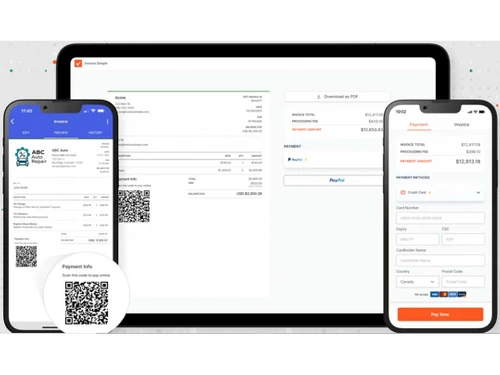
Invoice Simple has mobile apps available for iOS and Android devices, allowing you to manage your invoices on the go.
Invoice Simple allows users to set up tax rates and automatically calculates the tax amount on invoices based on these rates.
Yes, Invoice Simple provides customizable templates that allow you to add your business logo, adjust colors, and personalize the layout to match your branding.
Clients can pay invoices online through various payment methods, including credit/debit cards and other supported payment gateways.
Since Invoice Simple's basic plan does not currently support multiple users, you might need to provide your login information in order to grant someone else access to your account.
0 0
To change the quantity and cost labels on my invoices in Invoice Simple, follow the steps given below:
0 0
To generate a statement of invoices for a client in Invoice Simple, follow the steps given below:
0 0
To export a spreadsheet of my invoices or expenses in Invoice Simple, follow the steps given below:
0 0
To convert an Estimate into an Invoice in Invoice Simple, follow the steps given below:
0 0
20,000+ Software Listed
Best Price Guranteed
Free Expert Consultation
2M+ Happy Customers
Terms and Condtions

Users with registered businesses can purchase goods from merchants on the platform to satisfy their business needs. Users are not permitted to utilize any products acquired through the platform for resale, advertising, business, or further distribution.
For each purchase made, users will receive a Tax Invoice (or 'GST invoice') that includes specific details such as:
the GSTIN of the user associated with their registered business, and
the specified Entity Name for their business.
It should be noted that not all products are eligible for GST Invoice. Only the products displayed by participating sellers with the 'GST-based Invoice Available' callout on the product description page would qualify.
Certain goods and services are not eligible to get a GST Invoice, including items with VAS, i.e., Value Added Services (e.g., Total Mobile Protection/Assured Buyback) and those involving an exchange offer at the time of purchase.
Users must ensure the accuracy of the GSTIN, and business entity name provided for the GST Invoice. Requests for corrections into GST Invoice would not be accommodated by Techjockey.com or any Seller, and any issues arising from user-provided information are the sole responsibility of users.
Techjockey.com is not liable for the GST Invoice or any associated input tax credit. To efficiently claim an input tax credit, users should select the registered place of business address as per the GST authority's data and follow the provisions of the GST Act and rules.
To claim an input tax credit, the delivery and billing addresses must match. Furthermore, input tax credits will not be granted if the delivery address and GSTIN on the invoice are from different states. In case of incorrect GST details provided during the order placement, the order will be canceled automatically.