 USA
USA UAE
UAESmall Business
Designed for startups and growing businesses

See More


Brand: IObit
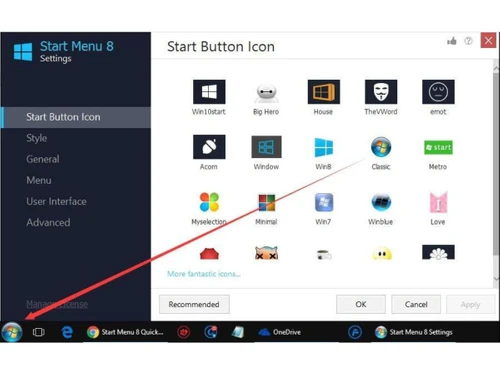
IOBit Start Menu 8 is a utility software that is intended to provide customers with innovative system utilities to enhance their PC performance. The customized tools present in the software is specifically designed to bring back the familiar Classic Start Menu for Windows 8, 8.1 and 10. The top utility software offers a convenient and simple solution to toggle between Windows 10 Start Menu and th...
See MoreHave you used IObit Start Menu 8 before?
Share your insights for better experience
Brand: IObit
Founded Year: 2004
IObit provides consumers with innovative system utilities and security software for superior PC performance and security.
 Pin to Start Menu Recent History Display Hot Corner Disabling Auto Shutdown High DPI Support Customization Easy to Use • File Search-and-Restore Wizard Save Time Customized Start Icons Fast Search Engine Group Management
  Windows
  Desktop
  Cloud-Based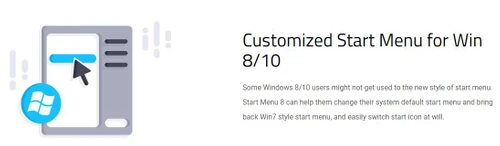

Small Business
Designed for startups and growing businesses
Medium Business
Built for business growth and flexibility
Enterprises
Designed for complex and large-scale business needs
4.5
Out of 5

Overall Rating
Based on
2 Verified Reviews
Rating Breakdown
90% Recommend this Product
Add Review
Dec 11, 2018
Techjockey Verified
“Good work”
Pros
iobit-begin menu-8 Convincingly replaces the missing Windows 8 Begin menu
Cons
NO CONS
Aug 29, 2018
Techjockey Verified
“awesome service”
Pros
Using Techjockey saved me a lot of time. I worked with Brittany Walther. She called me back after what seemed like only a few minutes. From asking a few key questions, she sent me a list of 5 vendors that were appropriate for the size of my organization and were familiar with higher education. Within a day or two I had calls scheduled with all the vendors. It really cut down on the work I had to do. We are still evaluating products but I would not have progress this fast without the help of Techjockey.
Cons
N/A
IObit Start Menu 8
Price On Request
Desktop
Mobile
Web based
On Premises
Windows
Mac OS

Iobit Driver Booster 13 Pro
Price On Request
Desktop
Mobile
Web based
On Premises
Windows
Mac OS

Iobit Protected folder
Price On Request
Desktop
Mobile
Web based
On Premises
Windows
Mac OS

Iobit Uninstaller 15 PRO
Price On Request
Desktop
Mobile
Web based
On Premises
Windows
Mac OS

Iobit Smart Defrag 6
Price On Request
Desktop
Mobile
Web based
On Premises
Windows
Mac OS
Nero Platinum Suite
₹ 4065
Desktop
Mobile
Web based
On Premises
Windows
Mac OS

Truecaller
₹ 84
Desktop
Mobile
Web based
On Premises
Windows
Mac OS

WizTree
Price On Request
Desktop
Mobile
Web based
On Premises
Windows
Mac OS

RestoreX360
₹ 1499
Desktop
Mobile
Web based
On Premises
Windows
Mac OS

Xplorer
Price On Request
Desktop
Mobile
Web based
On Premises
Windows
Mac OS
CHIRP
Price On Request
Desktop
Mobile
Web based
On Premises
Windows
Mac OS
(2) Product(s) selected
Starting Price:
$19 /Year
Available
Price on Request
Starting Price:
₹4,065 /PC/Year ₹5,350
Starting Price:
₹84 /Month
Starting Price:
$25 /Quantity
Available
Price on Request
Available
Price on Request
Starting Price:
$12 /License

Starting Price:
$20 /Month

Starting Price:
$60 /Year

Available
Price on Request







The minimum system requirements for IOBit Start Menu 8 are: ? Processor: 1 GHz or Higher ? OS: Exclusively Windows (Windows 7, XP, Vista, 8, 8.1 and 10) ? RAM: A minimum of 512 MB memory ? Hard Drive Space: 50 MB of free hard drive space.
You can simply drag and drop programs to the Start button or add them to the Start menu directly. You can also follow this step: Right Click on a program > Choose Pin to Start Menu to add your program(s).
Right click Start button->choose Settings-> click User Interface->choose Small or Large font according to your reference->click Apply button.
Yes, Techjockey provides an online demo for IOBit Start Menu 8 as per your preferred date and time.
To change the font size in IOBit Start Menu 8, consider the following procedure: Right Click on the Start Button > Choose Settings > Click User Interface > Choose Large or Small Font as per your needs > Apply.
Since the software runs only over the web and is completely supported on Windows, there isn’t any mobile app for IOBit Start Menu 8.
20,000+ Software Listed
Best Price Guranteed
Free Expert Consultation
2M+ Happy Customers
Terms and Condtions

Users with registered businesses can purchase goods from merchants on the platform to satisfy their business needs. Users are not permitted to utilize any products acquired through the platform for resale, advertising, business, or further distribution.
For each purchase made, users will receive a Tax Invoice (or 'GST invoice') that includes specific details such as:
the GSTIN of the user associated with their registered business, and
the specified Entity Name for their business.
It should be noted that not all products are eligible for GST Invoice. Only the products displayed by participating sellers with the 'GST-based Invoice Available' callout on the product description page would qualify.
Certain goods and services are not eligible to get a GST Invoice, including items with VAS, i.e., Value Added Services (e.g., Total Mobile Protection/Assured Buyback) and those involving an exchange offer at the time of purchase.
Users must ensure the accuracy of the GSTIN, and business entity name provided for the GST Invoice. Requests for corrections into GST Invoice would not be accommodated by Techjockey.com or any Seller, and any issues arising from user-provided information are the sole responsibility of users.
Techjockey.com is not liable for the GST Invoice or any associated input tax credit. To efficiently claim an input tax credit, users should select the registered place of business address as per the GST authority's data and follow the provisions of the GST Act and rules.
To claim an input tax credit, the delivery and billing addresses must match. Furthermore, input tax credits will not be granted if the delivery address and GSTIN on the invoice are from different states. In case of incorrect GST details provided during the order placement, the order will be canceled automatically.



