linkedin
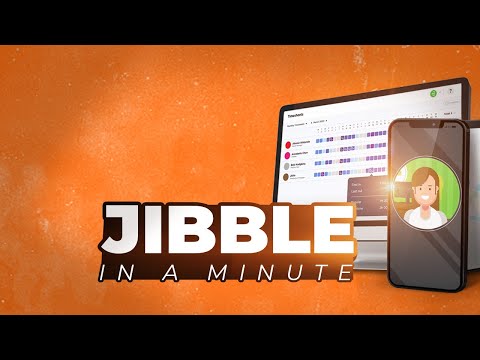
Jibble logo
play Jibble demo
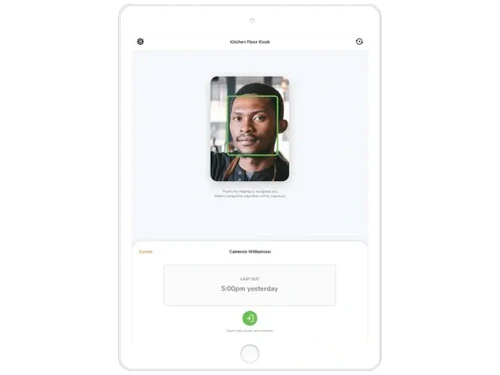
jibble face recognition
jibble timesheets

Jibble

Brand: Jibble

  • 4.1

  • 5 Ratings & 1 Review

Helps businesses manage employee hours and project time efficiently, offering features like automatic timesheets, real-time data access, and integrations with popular apps.

See More

Have you used Jibble before?

Share your insights for better experience

Add a Review
Starting Price
$6

View plans

100% Genuine
Products
Best Price
Guaranteed
Safe & Secure
Payment
  • Description

  • Pricing

  • Features

  • Specification

  • Review

  • Compare

  • Alternatives

  • FAQ

Starting at $6

Jibble Software Overview

What is Jibble?

Jibble is a time tracking software designed to help businesses efficiently manage employee hours and project time. It offers automatic timesheets that calculate total hours, overtime, and breaks, simplifying payroll processes. Users can easily track time using a user-friendly interface, making it accessible for all team members.

Jibble supports various industries and integrates with popular apps like Xero and QuickBooks for seamless workflow management. The software also includes advanced features such as GPS tracking and facial recognition for enhanced accuracy. Best of all, Jibble is completely free for unlimited users, making it an attractive option for businesses of all sizes looking to improve their time management practices.

Why Choose Jibble Software?

  • Accurate Time Tracking: Easily track employee work hours with GPS, facial recognition, and biometric features.
  • Seamless Integration: Integrates with payroll, project management, and HR systems for smoother operations.
  • Real-Time Insights: Offers detailed reports and analytics for better decision-making and productivity monitoring.
  • Mobile-Friendly: Allows on-the-go access via mobile apps, perfect for remote and field teams.
  • Customizable Notifications: It sends reminders and nudges to employees, encouraging them to track their time effectively without being intrusive.
  • Automatic Timesheets: The software automatically generates detailed timesheets, calculating total hours, overtime, and breaks, which saves time and ensures accuracy.
  • Cost-Effective Solution: Provides competitive pricing with essential features tailored for businesses of all sizes.
  • Outstanding Customer Support: Users benefit from responsive customer support that assists with any questions or issues, ensuring a smooth experience with the software.

Benefits of Jibble Software

  • Enhanced Productivity: Tracks employee work hours, projects, and tasks to boost efficiency and accountability.
  • Accurate Attendance: Eliminates manual errors with biometric and GPS-enabled attendance tracking.
  • Streamlined Payroll: Simplifies payroll processing with automated timesheet integrations.
  • Customizable Features: Adapts to diverse industries with tailored settings for tracking and reporting.
  • Improved Compliance: Ensures adherence to labor regulations with detailed records and audits.
  • Real-Time Monitoring: Provides live insights into workforce performance for informed decision-making.
  • Remote Accessibility: Supports mobile apps for easy time tracking, even for remote and field teams.

Pricing of Jibble

Jibble pricing starts from USD 6 per month per user at techjockey.com.

The pricing model is based on different parameters, including extra features, deployment type, and the total number of users. For further queries related to the product, you can contact our product team and learn more about the pricing and offers.

Read more

Jibble Company Details

Founded Year:  2016

Jibble Group builds HR SaaS products. We are a 100% remote company.

Director/Founders Asim Qureshi, Fawad Akram, Mikhail Kafanov, Sani Gouw, Toine Vaessen
Company Size 101-500 Employees

Jibble Pricing & Plans

Premium
Starting at $6
    • Users

      Users
      Users
    • Monthly

      Monthly
      Monthly

Key Features

  • Group management

  • Unlimited admins & managers

  • Unlimited geofences

  • Unlimited work schedules

  • Leave accruals and balances

Ultimate
Starting at $11
    • Users

      Users
      Users
    • Monthly

      Monthly
      Monthly

Key Features

  • Everything in Premium, plus:

  • Custom individual permissions

  • Live location tracking

  • Attendance insights report

  • Prioritized support

Jibble Features

  • icon_check Kiosk Mode
    Use a shared tablet or device as a central clock-in point (PIN/NFC/face) for multiple employees on-site.
  • icon_check Geofencing
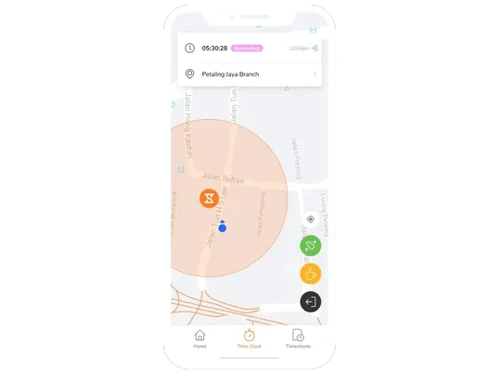
    Monitor mobile users’ location and restrict clock-ins to defined job-site zones using GPS and geofences.
  • icon_check Facial Recognition Attendance
    Use selfie/face-recognition at clock-in/out to verify identity and prevent buddy punching.
  • icon_check Offline Time Entry
    Mobile users can record time even when offline; data syncs automatically when connectivity returns.
  • icon_check Shift Management
    Define and manage employee schedules, assign shifts, breaks, and overtime rules.
  • icon_check Payroll Integration
    Export timesheet data (CSV/XLS) or integrate with payroll/HR systems to streamline payments.
  • icon_check Role-Based Access Control (RBAC)
    Define roles, permissions and access controls so admins manage who sees/does what in the system.
  • icon_check Multi-Device Support
    Use the platform seamlessly across web browsers, desktop (Windows/Mac), mobile, kiosk and browser extension.
  • icon_check Alerts & Reminders
    Automatically trigger reminders for users who forget to clock in/out or to prompt compliance with time-policies.
  • icon_check Task Tagging
    Tag time entries by activity, task or client to provide breakdowns of where time was spent.
  • icon_check Audit Trail
    Maintain logs of changes, edits and approvals to support compliance and review of time entries.
  • icon_check Customization
    Configure flexible, moderate or strict policies for clock-in rules (device type, location, identity) according to company needs.
Jibble Demo Video play icon

Get Jibble Demo

Watch the demo video to explore key features, real workflows, and how the software fits your business needs.

Understand
Key Features
Personal
Demo Insights
Interactive
Demo Support

Jibble Specifications

Supported Platforms
Windows Windows iOS iOS Android Android MacOS MacOS
Devices
Desktop Desktop Mobile Mobile Tablet Tablet iPad iPad
Deployment
Cloud-Based Cloud-Based Perpetual Perpetual
Suitable For
All Industries
Business Specific
All Businesses
Customer Support
Email Communities
Language
English
Integration
API Integration
Training Resources
Documentation Videos

Explore the Best Alternative Solutions Similar to Your Business Size and Needs

Jibble Review

4.1

Out of 5

img

Overall Rating

Based on
1 Verified Review

Rating Breakdown

  • Features 3.9
  • Value for Money 4.3
  • Ease of Use 4
  • Customer Support 4.4

86% Recommend this Product

Add Review

Jibble Video Review

youtubeVideoId

4.1

“Jibble Review 2025: What You Need to Know Before Using It”

Review by: Paired Recruiting

Compare Jibble With other Time Tracking Software

Products
Ratings
Pricing
Device Supported
Deployment
Supported Platforms
  • img

    Jibble

  • 4.1

  • Price On Request

  • Desktop

    Mobile

  • Web based

    On Premises

  • Windows

    Mac OS

  • img

    Hubstaff

  • 4.3

  • Price On Request

  • Desktop

    Mobile

  • Web based

    On Premises

  • Windows

    Mac OS

  • img

    ADP SecurTime

  • 4.0

  • Price On Request

  • Desktop

    Mobile

  • Web based

    On Premises

  • Windows

    Mac OS

  • img

    Time Doctor

  • 4.4

  • Price On Request

  • Desktop

    Mobile

  • Web based

    On Premises

  • Windows

    Mac OS

  • img

    TopTracker

  • 4.4

  • Price On Request

  • Desktop

    Mobile

  • Web based

    On Premises

  • Windows

    Mac OS

  • img

    DeskViu

  • 4.1

  • ₹ 100

  • Desktop

    Mobile

  • Web based

    On Premises

  • Windows

    Mac OS

  • img

    TimeChart

  • 4.1

  • Price On Request

  • Desktop

    Mobile

  • Web based

    On Premises

  • Windows

    Mac OS

  • img

    OnTheClock

  • 4.4

  • Price On Request

  • Desktop

    Mobile

  • Web based

    On Premises

  • Windows

    Mac OS

  • img

    Beebole

  • 4.3

  • Price On Request

  • Desktop

    Mobile

  • Web based

    On Premises

  • Windows

    Mac OS

(2) Product(s) selected

Jibble Alternatives

See All Jibble Alternatives

Available

Price on Request

Available

Price on Request

Starting Price:

€9 /User/Month

Starting Price:

$50 /Month

Starting Price:

$28 /Month

Starting Price:

$12 /Month

Starting Price:

$4 /Month

Starting Price:

$14 /Seat/Month
Articles for Jibble

See All Related Articles

What is the cost of Jibble Software?

The pricing starts from INR 37.99 per month per user at Techjockey.com.

Does Jibble Software have a mobile app?

Yes, Jibble provides a mobile app for Android and iOS devices.

Which operating systems are supported by Jibble Software?

Jibble is compatible with Windows, Android, and iOS.

Does Jibble Software offer a free trial?

Yes, Jibble offers a free trial for its premium features.

How does Jibble Software function?

Jibble tracks time, attendance, and productivity using tools like timesheets and GPS.

Who can benefit from using Jibble Software?

Businesses of all sizes, including remote teams and field workers, benefit from Jibble.

Is there a free demo available for Jibble Software?

Yes, Jibble provides a free demo for users to explore its features.

Is Jibble Software available for free?

Yes, Jibble has a free version with basic features.

Can Jibble Software track remote employee attendance?

Yes, Jibble tracks remote attendance through GPS and mobile app check-ins.

Is Jibble suitable for small businesses?

Yes, Jibble is ideal for small businesses with its free plan and affordable upgrades.

Does Jibble support project tracking?

Yes, Jibble allows time tracking for specific projects and tasks.

20,000+ Software Listed

Best Price Guranteed

Free Expert Consultation

2M+ Happy Customers

Terms and Condtions

close

Users with registered businesses can purchase goods from merchants on the platform to satisfy their business needs. Users are not permitted to utilize any products acquired through the platform for resale, advertising, business, or further distribution.

For each purchase made, users will receive a Tax Invoice (or 'GST invoice') that includes specific details such as:

  • the GSTIN of the user associated with their registered business, and

  • the specified Entity Name for their business.

It should be noted that not all products are eligible for GST Invoice. Only the products displayed by participating sellers with the 'GST-based Invoice Available' callout on the product description page would qualify.

Certain goods and services are not eligible to get a GST Invoice, including items with VAS, i.e., Value Added Services (e.g., Total Mobile Protection/Assured Buyback) and those involving an exchange offer at the time of purchase.

Users must ensure the accuracy of the GSTIN, and business entity name provided for the GST Invoice. Requests for corrections into GST Invoice would not be accommodated by Techjockey.com or any Seller, and any issues arising from user-provided information are the sole responsibility of users.

Techjockey.com is not liable for the GST Invoice or any associated input tax credit. To efficiently claim an input tax credit, users should select the registered place of business address as per the GST authority's data and follow the provisions of the GST Act and rules.

To claim an input tax credit, the delivery and billing addresses must match. Furthermore, input tax credits will not be granted if the delivery address and GSTIN on the invoice are from different states. In case of incorrect GST details provided during the order placement, the order will be canceled automatically.