 USA
USA UAE
UAESmall Business
Designed for startups and growing businesses

See More



Brand: Karya Keeper
Karya Keeper is a project management platform with task tracking, Kanban boards, Gantt charts, time logging, and resource management.
See MoreHave you used Karya Keeper before?
Share your insights for better experience
Brand: Karya Keeper
Founded Year: 2024
Karya Keeper is a powerful yet easy-to-use project and task management platform designed to help teams plan, track, and deliver projects with clarity and efficiency. By uniting project setup, task tracking, time logging, and resource management under one intuitive interface
Core Functionalities
 Workforce Management Incident Management Issue Management Pipeline Management Workflow Management Resource Management Risk Management Task Management Backlog Management Sprint Management
 Task & Workflow Management
Workflow Automation Recurring Tasks Task Creation & Assignment Task Prioritization Sub-Task Creation Task Dependencies Notifications/Reminders Automated Task Assignment Task Views
Gantt Chart Kanban Boards Task List Calendar View Timeline View Spreadsheet View Mind Map Progress & Performance Tracking
Time Tracking Milestone Tracking Team Capacity Tracking Resource & Budget Management
Auto Scaling Automated Resource Allocation Budget Planning Dynamic Budgeting Risk Scoring System Workload Distribution Collaboration & Communication
Real-Time Collaboration Integrated Chat & Messaging File Sharing & Document Collaboration Version Control Access Control & Security
Multi-Factor Authentication (MFA) User Access Management Compliance Tracking Activity Logs Data Backup and Disaster Recovery Customization
Templates Custom Fields Task Customization Custom Layouts Custom Views Integrations
CRM Integration API Integration ERP Integration Communication and Collaboration Tools File Storage and Sharing Time Tracking Tools Issue Tracking Tools Automation Tools AI-Based Integrations Third Party Integrations Reporting & Analytics
Predictive Analytics Dashboards Benchmarking Automated Reports Project Progress Reports Resource Reports Risk Reports Workload Reports Timesheet Reports Sprint Reports Burndown & Burnup Charts Bottleneck Reports Real-Time Reporting Report Customization  Windows
  iOS
iOS  Android MacOS
  Linux
Linux  Desktop
  Mobile
  Tablet
  iPad
iPad  Cloud-Based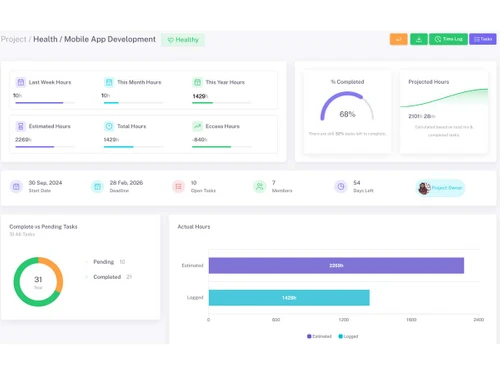
Small Business
Designed for startups and growing businesses
Medium Business
Built for business growth and flexibility
Enterprises
Designed for complex and large-scale business needs
Techjockey Trusted Reviews from Verified Users
No reviews are currently available for Karya Keeper. Discover similar Project Management Software reviews

Jira
Whats great - Jira's emphasis on visuals when tracking performance and tickets is something I appreciate. Since our project is a support pr... read more

Notion
Whats great - The feature of status buttons in Notion is great, especially with the vibrant color-coding that makes it as stand out option.... read more

Swit
Whats great - Swit has made it easier for managing my task. The platform manages everything from cross workspace sharing to custom projects... read more

Karya Keeper
₹ 1349.00 excl. GST
Desktop
Mobile
Web based
On Premises
Windows
Mac OS
Jira
Price On Request
Desktop
Mobile
Web based
On Premises
Windows
Mac OS
TrackPM
Price On Request
Desktop
Mobile
Web based
On Premises
Windows
Mac OS

Swatle
Price On Request
Desktop
Mobile
Web based
On Premises
Windows
Mac OS

Birdview PMS
Price On Request
Desktop
Mobile
Web based
On Premises
Windows
Mac OS

Forecast
Price On Request
Desktop
Mobile
Web based
On Premises
Windows
Mac OS

Favro
Price On Request
Desktop
Mobile
Web based
On Premises
Windows
Mac OS

Zoho Projects
₹ 3360
Desktop
Mobile
Web based
On Premises
Windows
Mac OS

Clickup
Price On Request
Desktop
Mobile
Web based
On Premises
Windows
Mac OS

SmartSuite
Price On Request
Desktop
Mobile
Web based
On Premises
Windows
Mac OS

Dart
Price On Request
Desktop
Mobile
Web based
On Premises
Windows
Mac OS
(0) Product(s) selected
Starting Price:
$9 /User/Month
Available
Price on Request
Starting Price:
$12 /Month
Starting Price:
$10 /User/Month
Starting Price:
$10 /User/Month

Starting Price:
$19 /Month

Starting Price:
$13 /Month

Starting Price:
$179 /Month

Starting Price:
$35 /Month

Starting Price:
$10 /User/Month
Starting Price:
$2 /Monthly






Karya Keeper price starts at INR 1,349 at techjockey.com.
You break projects into phases and tasks, assign ownership with deadlines, track progress via Kanban or Gantt views, log time for accurate billing, and monitor real-time dashboards for project health.
It is used by small and medium enterprises, IT teams, remote and distributed teams, and client-based agencies needing structured project tracking.
Drag-and-drop visual boards providing instant visibility into task statuses, priorities, and blockers.
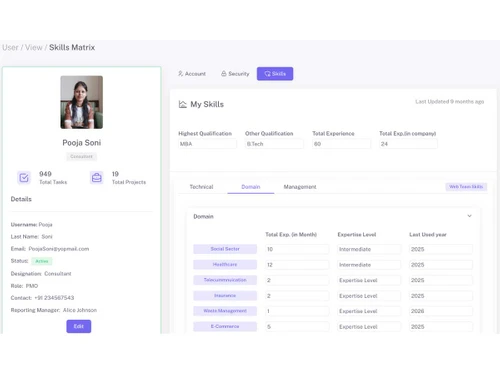
Real-time visibility into who is overloaded and who is free, enabling better balancing of team workloads.
Yes, with sprint planning, tracking, retrospectives, and backlog management for agile teams.
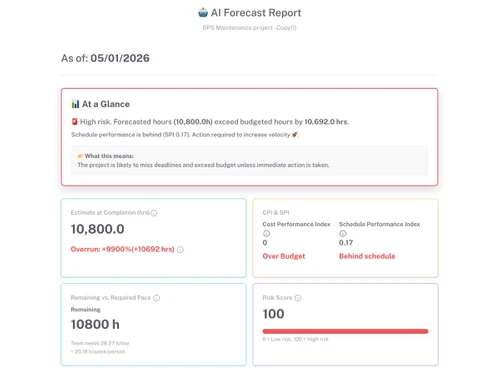
AI Forecast for timeline prediction, Smart Time Entries, and Voice Entries for faster task updates.
Visualizes task dependencies and timelines across project phases and deliverables.
Yes, live dashboards displaying project health, milestones, and team metrics that update as data changes.
Yes, custom workflows, fields, layouts, and views adapt the platform to specific business processes.
20,000+ Software Listed
Best Price Guranteed
Free Expert Consultation
2M+ Happy Customers
Terms and Condtions

Users with registered businesses can purchase goods from merchants on the platform to satisfy their business needs. Users are not permitted to utilize any products acquired through the platform for resale, advertising, business, or further distribution.
For each purchase made, users will receive a Tax Invoice (or 'GST invoice') that includes specific details such as:
the GSTIN of the user associated with their registered business, and
the specified Entity Name for their business.
It should be noted that not all products are eligible for GST Invoice. Only the products displayed by participating sellers with the 'GST-based Invoice Available' callout on the product description page would qualify.
Certain goods and services are not eligible to get a GST Invoice, including items with VAS, i.e., Value Added Services (e.g., Total Mobile Protection/Assured Buyback) and those involving an exchange offer at the time of purchase.
Users must ensure the accuracy of the GSTIN, and business entity name provided for the GST Invoice. Requests for corrections into GST Invoice would not be accommodated by Techjockey.com or any Seller, and any issues arising from user-provided information are the sole responsibility of users.
Techjockey.com is not liable for the GST Invoice or any associated input tax credit. To efficiently claim an input tax credit, users should select the registered place of business address as per the GST authority's data and follow the provisions of the GST Act and rules.
To claim an input tax credit, the delivery and billing addresses must match. Furthermore, input tax credits will not be granted if the delivery address and GSTIN on the invoice are from different states. In case of incorrect GST details provided during the order placement, the order will be canceled automatically.

