USA
USA UAE
UAESmall Business
Designed for startups and growing businesses

See More


Brand: Laverna
Laverna is a free, open-source note-taking application. It's a web-based and desktop application designed for secure note-taking and organisation. Laverna supports Markdown formatting.
See MoreHave you used Laverna before?
Share your insights for better experience
Looking for The Right Pricing?
Share your requirements and get a plan built around your business.
Price Available on Request
Get personalised Laverna pricing that fits your needs. Our team will connect with you.
Primary Features
 Templates Text Formatting Search Functionality File Attachments Offline Access Version History Web Clipper To-do lists Reminders Hierarchy Management Tagging and Labelling Voice Notes Annotations Bookmarks
 Search and Retrieval
Full-Text Search with Filters Activity History OCR (Optical Character Recognition) NLP-based Search Collaboration
Real Time Editing Note Sharing Commenting and Feedback Permissions Control Customization & Personalization
End-to-End Encryption Themes and Colour Options Custom Fonts and Styles Quick Access Widgets Security and Privacy
Note Recovery Password Protection Biometric Login Version Control Alerts & Notifications
Customizable Reminders Due Date Notifications Snooze Reminders Event Reminders Push Notifications Email Notifications Calendar Alerts Administrative Features
User Access Management Export Notes Import Notes Access Logs Auto Backup Integrations
Third Party Integration API Access Calendar Integration Add-Ons API Integration AI Capabilities
Summarisation Smart Recommendations Voice-to-Text Image Recognition Content Generation  Ubuntu
  Windows
  MacOS
MacOS  Linux
Linux  Desktop
  Cloud-Based
  Perpetual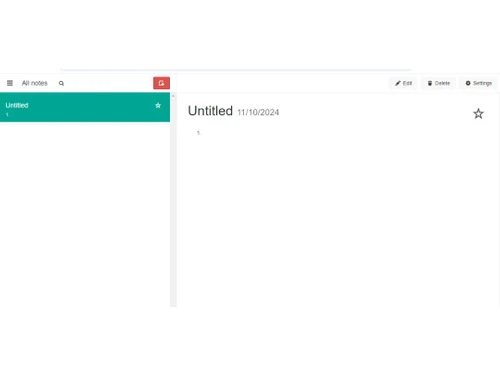
Small Business
Designed for startups and growing businesses
Medium Business
Built for business growth and flexibility
Enterprises
Designed for complex and large-scale business needs
4.1
Out of 5

Overall Rating
Based on
3 Verified Ratings
Rating Breakdown
96% Recommend this Product
Add ReviewTechjockey Trusted Reviews from Verified Users
No reviews are currently available for Laverna. Discover similar Note Taking Software reviews

Apple Notes
Whats great - The best part is that it is free to use. One of the best apps that Apple has put out there. read more

Microsoft OneNote
Whats great - I like how it offers cross-device synchronization. My notes can effortlessly sync across my laptop, phone, and tablet. read more

Amplenote
Whats great - The open API is great for developers. It gave me the freedom to integrate Roam with other tools. read more

Laverna
Price On Request
Desktop
Mobile
Web based
On Premises
Windows
Mac OS

GoodNotes
Price On Request
Desktop
Mobile
Web based
On Premises
Windows
Mac OS

Evernote
₹ 449
Desktop
Mobile
Web based
On Premises
Windows
Mac OS

Turbo AI
₹ 339
Desktop
Mobile
Web based
On Premises
Windows
Mac OS

Notability
Price On Request
Desktop
Mobile
Web based
On Premises
Windows
Mac OS

Obsidian
Price On Request
Desktop
Mobile
Web based
On Premises
Windows
Mac OS
Microsoft OneNote
Price On Request
Desktop
Mobile
Web based
On Premises
Windows
Mac OS

Notein
Price On Request
Desktop
Mobile
Web based
On Premises
Windows
Mac OS

Joplin
Price On Request
Desktop
Mobile
Web based
On Premises
Windows
Mac OS

Zoho Notebook
₹ 99
Desktop
Mobile
Web based
On Premises
Windows
Mac OS
Apple Notes
Price On Request
Desktop
Mobile
Web based
On Premises
Windows
Mac OS
(0) Product(s) selected
Starting Price:
€3 /Month
Available
Price on Request

Available
Price on Request
Starting Price:
$6 /Month

Starting Price:
$5 /Seat/Month

Starting Price:
$15 /Month

Available
Price on Request

Starting Price:
$63 /Year

Starting Price:
$2 /Month
Contact techjockey.com for detailed pricing information on Laverna. Pricing is customised based on specific business needs.
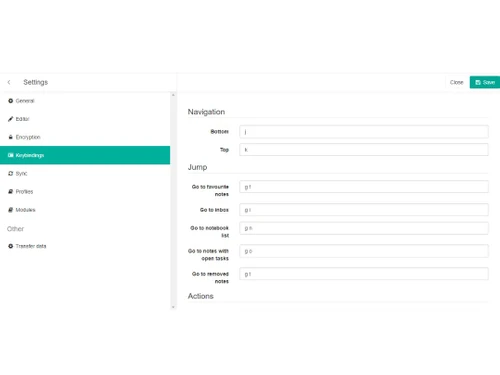
Laverna offers live Markdown editing, encryption for secure data storage, cross-device availability for syncing, task creation and management, a distraction-free writing mode, and support for embedding files. You can contact our product experts for more information.
Laverna is a versatile note-taking application suitable for freelancers, students, and anyone needing a secure and efficient way to organise their thoughts and ideas. Its Markdown editor and encryption features make it ideal for tasks requiring privacy and data security.
Yes, Laverna can be beneficial for small businesses looking for a streamlined note-taking solution. It can help teams document project ideas, track task lists, and collaborate effectively. Its cross-platform sync capabilities allow employees to access notes from any location and device.
Laverna is a free application, with no subscription fees or costs. Contact techjockey.com to explore trial options for Laverna. They can provide information about available testing periods.
Laverna uses encryption for secure data storage, ensuring that sensitive notes and information remain protected. This feature is vital for users who need to manage confidential data. Laverna's focus on user privacy and data control makes it a secure option.
Laverna supports Ubuntu, Windows, macOS, and Linux operating systems.
Laverna is available as an app at the Google Play Store for Android devices and at the Apple App Store for iOS devices.
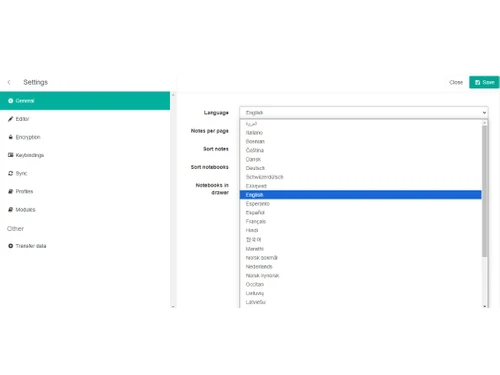
Laverna is a web-based application that allows users to create and organise notes using Markdown format. With a user-friendly interface, it facilitates live Markdown editing, ensuring easy note-taking across multiple devices. Laverna supports encryption, improving data security and privacy.
20,000+ Software Listed
Best Price Guranteed
Free Expert Consultation
2M+ Happy Customers
Terms and Condtions

Users with registered businesses can purchase goods from merchants on the platform to satisfy their business needs. Users are not permitted to utilize any products acquired through the platform for resale, advertising, business, or further distribution.
For each purchase made, users will receive a Tax Invoice (or 'GST invoice') that includes specific details such as:
the GSTIN of the user associated with their registered business, and
the specified Entity Name for their business.
It should be noted that not all products are eligible for GST Invoice. Only the products displayed by participating sellers with the 'GST-based Invoice Available' callout on the product description page would qualify.
Certain goods and services are not eligible to get a GST Invoice, including items with VAS, i.e., Value Added Services (e.g., Total Mobile Protection/Assured Buyback) and those involving an exchange offer at the time of purchase.
Users must ensure the accuracy of the GSTIN, and business entity name provided for the GST Invoice. Requests for corrections into GST Invoice would not be accommodated by Techjockey.com or any Seller, and any issues arising from user-provided information are the sole responsibility of users.
Techjockey.com is not liable for the GST Invoice or any associated input tax credit. To efficiently claim an input tax credit, users should select the registered place of business address as per the GST authority's data and follow the provisions of the GST Act and rules.
To claim an input tax credit, the delivery and billing addresses must match. Furthermore, input tax credits will not be granted if the delivery address and GSTIN on the invoice are from different states. In case of incorrect GST details provided during the order placement, the order will be canceled automatically.