linkedin
MSQUARE logo
play HRFAST HRMS
msquare hr software
msquare organization

MSQUARE

Brand: Adnac Group

  • 4.7

  • 1 Rating & 1 Review

MSQUARE is an HR management software that allows companies of all sizes to perform at their full capacity. It helps companies streamline their daily tasks and supervision of those tasks for a simplified HR processing. This HRMS software facilitates the growth of organizations through automation of various HR-related workflow. It helps with the standardization of all HR processes and empowers emp...

See More

Have you used MSQUARE before?

Share your insights for better experience

Add a Review
Starting Price
₹25,999 excl.GST
₹ 30,679 incl. GST

View plans

offer Save upto 18%, Get GST Invoice on your business purchase T&C
offer Buy Now & Pay Later, Check offer on payment page.
Buy Now
100% Genuine
Products
Best Price
Guaranteed
Safe & Secure
Payment
  • Description

  • Pricing

  • Features

  • Specification

  • Review

  • Compare

  • Alternatives

  • FAQ

Starting at ₹25,999
Buy Now

MSQUARESoftware Overview

What is MSQUARE? 

MSQUARE is an HR management software that allows companies of all sizes to perform at their full capacity. It helps companies streamline their daily tasks and supervision of those tasks for a simplified HR processing. This HRMS software facilitates the growth of organizations through automation of various HR-related workflow. It helps with the standardization of all HR processes and empowers employees with useful inputs and information.

Along with making HR an independent process with efficient and compelling supervision, MSQUARE helps with payroll processing. The software has an integrated attendance and payroll module that integrates employee’s attendance data with salary calculation. The payroll module of this HR management software also helps manage: 

  1. Deductions 
  2. Advance salary 
  3. Salary adjustments 
  4. Bonus, incentives, commissions
  5. Payslip generation 
  6. Overtime calculations
  7. IT declaration forms filled by the workforce, etc. 

Why companies use MSQUARE for human resource management? 

MSQUARE encourages companies to perform at a much faster pace. The software is developed by professionals who have been bridging the gap between humans and technology in HR space for over 12 years. HR teams can access employee and process-related data remotely from any location. Moreover, this software for HR teams helps complete the entire payroll processing quickly and efficiently. Companies can store their handbook in MSQUARE and share with new joiners at the time of onboarding. 

What are the features offered by MSQUARE HR management software? 

Here is a quick overview of the features offered by MSQUARE HRMS software: 

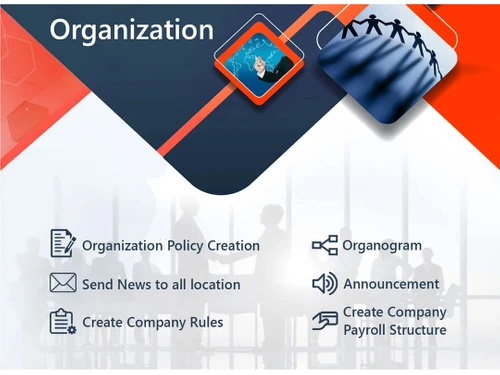
  1. Organization management system 
  2. Letter management 
  3. Live employee monitoring 
  4. Payroll management 
  5. Calculation of employee ROI 
  6. Training for new joiners 
  7. Report Management system

What is the price of MSQUARE HRMS software?

The price of MSQUARE starts at INR 25999/Year for 50 employees at techjockey.com. For more detail, please request a call back from our product experts. 

Read more

Adnac Group Company Details

Founded Year:  2016

MSQUARE management system helps to encourage the performance of Business. MSQUARE is created by a team of HR and Software professionals with the idea of bridging the gap between a human being and technology.

Director/Founders Chintan Parekh & Debjani Ghosh
Company Size 1-100 Employees

MSQUARE Pricing & Plans

MSQUARE
Key Features
  • Task Management
  • Asset Management
  • Transfer Management
  • Statutory Compliances
  • TDS Projection & Calculation
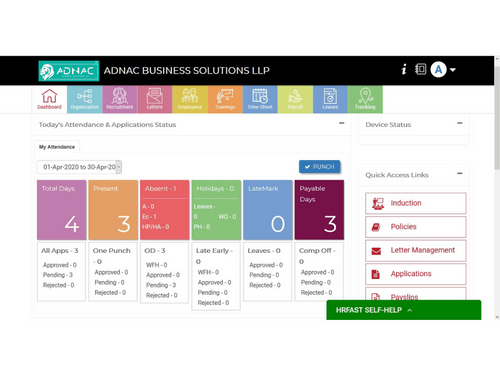
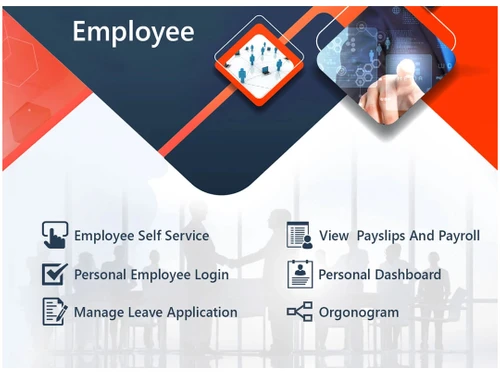
  • Employee Self service
  • Mobile App
  • Employee Exit Management
  • Document Management

Calculated Price

25999 Exclusive of all taxes
  • Options

    • Employees

      Employees
      Employees
    • Yearly

      Yearly
      Yearly

Key Features

  • Task Management

  • Asset Management

  • Transfer Management

  • Statutory Compliances

  • TDS Projection & Calculation

  • Employee Self service

  • Mobile App

  • Employee Exit Management

  • Document Management

MSQUARE Features

  • icon_check Task Management
    This HRMS software enables HR teams to accurately track daily tasks performed by individuals to calculate their ROI and
  • icon_check Asset Management
    Companies can use this HR management software to enlist their assets and assign the task of managing them to employees.
  • icon_check Transfer Management
    Employees can be transferred from one branch to the another as per the organization’s operational requirements seamlessly.
  • icon_check Statutory Compliances
    The software meets all the regulatory guidelines required for payroll and HR management activities.
  • icon_check TDS Projection & Calculation
    This HR management software allows employees to do their TDS projection and calculation.
  • icon_check Employee Self Service
    Employees are provided with a self-service platform to file taxes and leaves. This module also allows employees to access the
  • icon_check Mobile App
    HRFAST offers a mobile application for the HR to manage employee-related details from their phone.
  • icon_check Employee Exit Management
    The software provides easy exit management features to facilitate effective offboarding processes.
  • icon_check Document Management
    This HR management software allows HR teams to store all the documents online for easy access at any time.
  • icon_check On-Boarding & Induction
    HRFAST facilitates instant onboarding and conducts induction program for new joiners.
  • icon_check Organization Management
    This module allows users to add and monitor multiple companies, branches, and departments. It helps in the proper division of
  • icon_check Employee Management
    The software facilitates employee profiling as per their designations and hiring (contractual and full-time). This module also
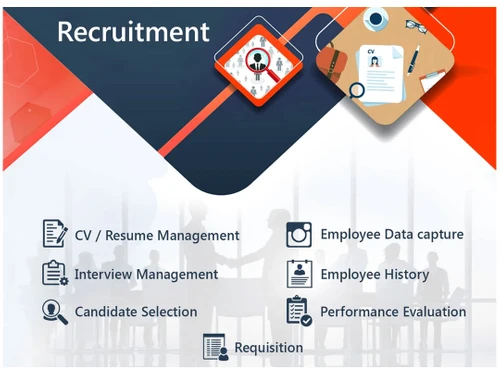
  • icon_check Recruitment Management
    HR teams can create multiple job posts that are required to be filled through HRFAST. It also allows them to take candidate
  • icon_check Payroll Management
    The payroll management system of HRFAST software allows users to process the monthly salary of the entire workforce quickly.
  • icon_check Timesheet Management
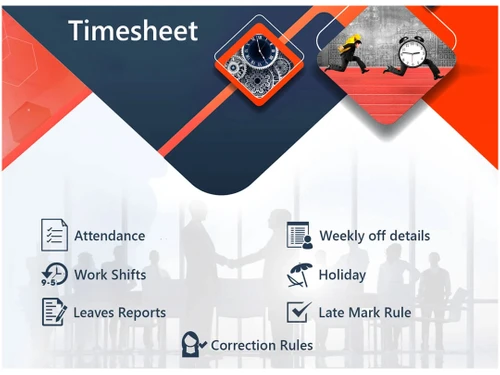
    HRFAST offers a timesheet to record the attendance of the entire employee base. HR teams can also create time shifts for
  • icon_check Training Management
    The training management module enables HR teams to organize training events for new joiners and existing employees.
  • icon_check Performance Management
    This HRMS solution enables HR teams to monitor the performance of the workforce in real-time.
  • icon_check Leave Management
    Employees can file for leaves and check their leave summaries. HR teams can set leave regulations in the software and work
  • icon_check Letter Management
    The software offers multiple pre-loaded letter formats for different purposes. Employees can just fill the templates and track
  • icon_check Reporting
    HRFAST is a report management software that provides detailed insights regarding HR workflow, employee, payroll activity, log
  • icon_check Field Sales Management
    It has a GPS-enabled module that allows companies to track their filed force and schedule their meetings.
MSQUARE Demo Video play icon

Get MSQUARE Demo

Watch the demo video to explore key features, real workflows, and how the software fits your business needs.

Understand
Key Features
Personal
Demo Insights
Interactive
Demo Support

MSQUARE Specification

Supported Platforms
Windows Windows Android Android MacOS MacOS
Devices
Desktop Desktop Mobile Mobile
Deployment
Web-Based Web-Based
Suitable For
All Industries
Business Specific
All Businesses
Business Size
Small Business Startups Medium Business SMBs SMEs MSMBs MSMEs
Customer Support
Phone Email Live Chat Communities
Language
English
Integration
API Integration
Training Resources
Webinars Documentation Videos

Explore the Best Alternative Solutions Similar to Your Business Size and Needs

MSQUARE Review

4.7

Out of 5

img

Overall Rating

Based on
1 Verified Review

Rating Breakdown

  • Features 5
  • Value for Money 5
  • Ease of Use 4
  • Customer Support 5

100% Recommend this Product

Add Review

Debjani

Administrator

User since: 1-2 years

4.7

Reviewed on: Mar 13, 2022

Techjockey Verified

“The Best Solution providers in a longtime.”

Pros

It is easy to use and within budget, there are multiple options to take attendance and have multiple organizations. I liked the way i can handle the payroll and time and attendance so quickly and the reports are so detailed and multifold. The letters are helpful and entire automation of software is helping my team to manage very well

Cons

Everything is available online and through chat mode, although this makes things faster for us, i get my solutions but never know whom to thank

Compare MSQUARE With other HR Software

Products
Ratings
Pricing
Device Supported
Deployment
Supported Platforms
  • img

    MSQUARE

  • 4.7

  • ₹ 25999.00 excl. GST

  • Desktop

    Mobile

  • Web based

    On Premises

  • Windows

    Mac OS

  • img

    Spine HR

  • 4.3

  • Price On Request

  • Desktop

    Mobile

  • Web based

    On Premises

  • Windows

    Mac OS

  • img

    ClusterHR

  • 5

  • ₹ 40

  • Desktop

    Mobile

  • Web based

    On Premises

  • Windows

    Mac OS

  • img

    Fix HR

  • 4.9

  • ₹ 600

  • Desktop

    Mobile

  • Web based

    On Premises

  • Windows

    Mac OS

  • img

    Zfour HRMS

  • 4.9

  • ₹ 45

  • Desktop

    Mobile

  • Web based

    On Premises

  • Windows

    Mac OS

  • img

    WeekMate

  • 4.7

  • ₹ 3999

  • Desktop

    Mobile

  • Web based

    On Premises

  • Windows

    Mac OS

  • img

    SignalHRM

  • 4.6

  • ₹ 648

  • Desktop

    Mobile

  • Web based

    On Premises

  • Windows

    Mac OS

  • img

    WoCo

  • 4.8

  • ₹ 50

  • Desktop

    Mobile

  • Web based

    On Premises

  • Windows

    Mac OS

  • img

    Presence360

  • 4.9

  • ₹ 2999

  • Desktop

    Mobile

  • Web based

    On Premises

  • Windows

    Mac OS

  • img

    TruHR

  • 4.9

  • ₹ 2200

  • Desktop

    Mobile

  • Web based

    On Premises

  • Windows

    Mac OS

  • img

    Keka HR

  • 4.4

  • Price On Request

  • Desktop

    Mobile

  • Web based

    On Premises

  • Windows

    Mac OS

(0) Product(s) selected

MSQUARE Alternatives

See All MSQUARE Alternatives

Starting Price:

₹600 /Month ₹900

SAVE UPTO 33%

Starting Price:

₹2,200 /Month

Starting Price:

₹49 /Month

Starting Price:

₹890 /Month
Starting Price:

₹1,499 /Month

Starting Price:

$49 /Month

Available

Price on Request

Starting Price:

₹5,000 /Month

Articles for MSQUARE

See All Related Articles

What are the system requirements for MSQUARE?

MSQUARE is a web application that can be accessed through internet browser on a desktop or mobile.

Can I restrict data visibility rights for employees in MSQUARE?

Yes, HR teams can restrict the access to data for employees based on their designation.

Where does MSQUARE save all the information?

MSQUARE uses cloud storage services to save all the office information.

Will I be able to access MSQUARE on my iPhone?

MSQUARE is not available for iPhone devices.

Can I get a demo for MSQUARE?

Techjockey offers a demo for MSQUARE. Please request a call to get your demo scheduled.

20,000+ Software Listed

Best Price Guranteed

Free Expert Consultation

2M+ Happy Customers

Terms and Condtions

close

Users with registered businesses can purchase goods from merchants on the platform to satisfy their business needs. Users are not permitted to utilize any products acquired through the platform for resale, advertising, business, or further distribution.

For each purchase made, users will receive a Tax Invoice (or 'GST invoice') that includes specific details such as:

  • the GSTIN of the user associated with their registered business, and

  • the specified Entity Name for their business.

It should be noted that not all products are eligible for GST Invoice. Only the products displayed by participating sellers with the 'GST-based Invoice Available' callout on the product description page would qualify.

Certain goods and services are not eligible to get a GST Invoice, including items with VAS, i.e., Value Added Services (e.g., Total Mobile Protection/Assured Buyback) and those involving an exchange offer at the time of purchase.

Users must ensure the accuracy of the GSTIN, and business entity name provided for the GST Invoice. Requests for corrections into GST Invoice would not be accommodated by Techjockey.com or any Seller, and any issues arising from user-provided information are the sole responsibility of users.

Techjockey.com is not liable for the GST Invoice or any associated input tax credit. To efficiently claim an input tax credit, users should select the registered place of business address as per the GST authority's data and follow the provisions of the GST Act and rules.

To claim an input tax credit, the delivery and billing addresses must match. Furthermore, input tax credits will not be granted if the delivery address and GSTIN on the invoice are from different states. In case of incorrect GST details provided during the order placement, the order will be canceled automatically.