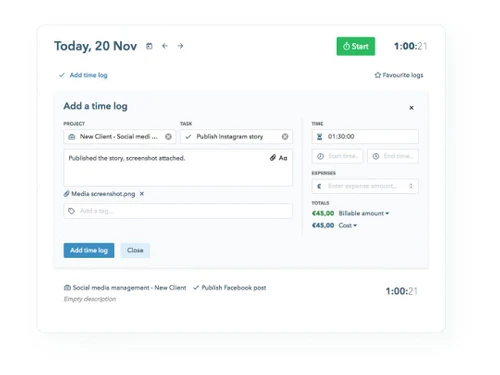
linkedin
My Hours logo
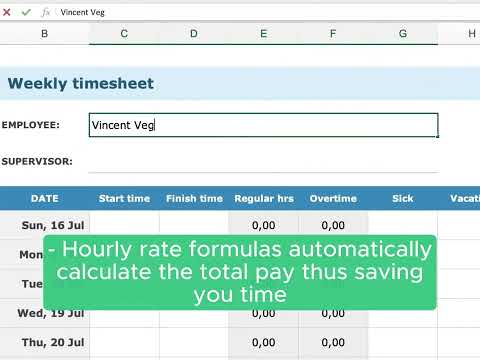
play Weekly Timesheet Template
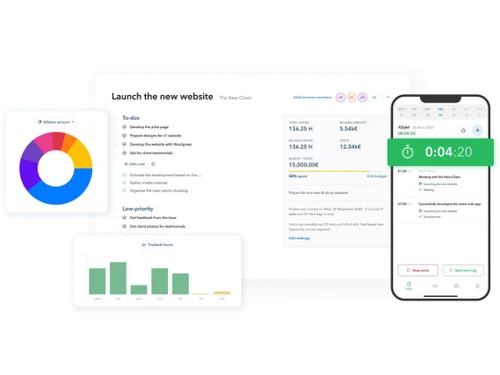
my hours launch
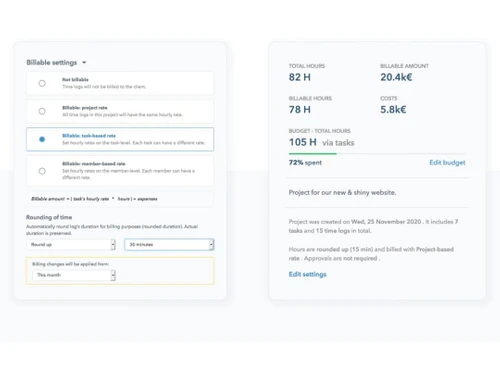
my hours settings

My Hours

Brand: My Hours

  • 4.3

  • 3 Ratings

My Hours is a time-tracking platform that helps teams track work, manage projects, and analyze profitability for payroll and client billing.

See More

Have you used My Hours before?

Share your insights for better experience

Add a Review
Starting Price
$5

View plans

100% Genuine
Products
Best Price
Guaranteed
Safe & Secure
Payment
  • Description

  • Pricing

  • Features

  • Specification

  • Review

  • Compare

  • Alternatives

  • FAQ

Starting at $5

My Hours Software Overview

What is My Hours?

My Hours is a comprehensive and user-friendly time tracking software designed for teams and freelancers. Established in 2002, it provides a reliable platform to monitor how time is spent on various projects and tasks, with the goal of enhancing profitability, streamlining billing processes, and supporting payroll workflows. The software is built to be intuitive, ensuring high adoption rates among team members without being intrusive.

A key differentiator of My Hours is its commitment to user privacy and trust. The platform explicitly does not include any employee monitoring or surveillance features, focusing instead on collaborative and transparent project management. It allows users to organize work by creating clients, projects, and tasks, which can then be assigned to team members. With flexible billing settings and budget monitoring capabilities, businesses can maintain clear oversight of project profitability and resource allocation.

Why Choose My Hours?

  • User-Centric Design: The software is engineered to be simple and non-intrusive. While time tracking can be a tedious task, My Hours aims to make the process as seamless as possible, whether users prefer a stopwatch timer or manual entry at the end of the day or week.
  • Privacy and Trust: My Hours is fundamentally against employee monitoring. This ethical stance builds trust with users and ensures the focus remains on productivity and project progress, not surveillance.
  • Enterprise-Grade Security: My Hours is based in the EU and follows established data security and privacy practices, including ISO 27001 certification and GDPR compliance. Customer data is hosted on Microsoft Azure servers in Europe.
  • Versatile Use Cases: The platform is highly adaptable and supports a wide range of business needs, including accurate time reporting, client billing, project profitability analysis, expense management, and payroll support.
  • Robust Support: My Hours is backed by a world-class, 24/7 support team ready to assist users with any inquiries, ensuring a smooth and productive experience.
  • Seamless Integrations: It offers powerful integrations with existing ERP, CRM, and project management systems, allowing for a unified workflow and eliminating the need for double data entry.

Advanced Features of My Hours

  • Project Profitability Analysis: Gain a clear understanding of which projects are most valuable. This feature allows you to track labor rates, log project-related expenses, set detailed budgets, and calculate the overall profitability of each engagement.
  • Timesheet Approvals & Audit Logs: Implement a structured and flexible approval workflow. Managers can review, approve, or reject timesheets, while an audit log tracks changes. This helps maintain data accuracy and accountability across the team.
  • Expense Tracking: Effortlessly manage and invoice project expenses. Users can log costs, attach receipts, and include them directly on client invoices, ensuring no billable expense is overlooked.
  • Customizable Reporting: Generate insightful reports tailored to your needs. Filter and summarize time and cost data across different periods, projects, tasks, or teams. Reports can be exported to PDF and XLS formats for further analysis or sharing.
  • Flexible Billing Methods: Accommodate diverse client agreements with multiple billing options. Set hourly rates per project, user, or task, or use fixed fees and monthly retainers. The system also clearly distinguishes between billable and non-billable hours.

Key Capabilities of My Hours

  • Organize: The foundation of the system is its organizational structure. You can create clients, projects, and tasks. Assign projects to specific users or teams, set budgets (in hours or cost), and define billing parameters to establish a clear framework for your work.
  • Track: The platform offers flexible time tracking methods. Users can utilize a real-time stopwatch timer for precise logging or add hours manually via a weekly or daily timesheet view. Mobile apps and tracking reminders help ensure that all work hours are captured accurately and promptly.
  • Review: Managers have tools to oversee team activity. They can review submitted timesheets, compare tracked time against target hours and budgets, and use an optional approval workflow with comments to maintain clear communication and data accuracy before billing or payroll.
  • Analyze: The reporting engine transforms raw time data into actionable business intelligence. A central dashboard provides a high-level overview, while detailed reports allow you to drill down into specifics. You can analyze team performance, project costs, and overall profitability with ease.

How to Use My Hours?

  1. Create Your Structure: Begin by setting up your clients, projects, and the specific tasks associated with each project. Assign these projects to your team members so everyone knows their responsibilities. Configure billing settings (e.g., hourly rates, fixed fees) and establish project budgets to monitor financial health from the start.
  2. Track Your Time: Team members can log their hours using the method that best suits their workflow. The stopwatch timer is ideal for real-time tracking, while manual entry at the end of the day or week is perfect for those who prefer to log time in blocks. Tracking reminders can be set up to prevent forgotten entries.
  3. Review and Approve Timesheets: Managers can easily review the timesheets submitted by their team. The system helps identify discrepancies or incomplete entries. If the approval workflow is enabled, managers can formally approve or reject time logs, ensuring all data is vetted and accurate.
  4. Analyze and Report: Utilize the reporting tools to analyze your team's tracked hours. Filter data by project, task, or team member to create summaries for billing, payroll, or internal review. Export these reports to PDF or Excel to integrate with other business processes.

My Hours Pricing

My Hours price starts at USD 5 at techjockey.com.

The pricing model is based on different parameters, including extra features, deployment type, and the total number of users. For further queries related to the product, you can contact our product team and learn more about the pricing and offers.

Read more

My Hours Company Details

Founded Year:  2002

My Hours

Director/Founders My Hours
Company Size 1-100 Employees

My Hours Pricing & Plans

Basic
Starting at $5
    • Users

      Users
      Users
    • Monthly

      Monthly
      Monthly

Key Features

  • Unlimited projects and clients

  • Track time on projects & tasks

  • Set basic billable rate

  • Generate detailed reports

Pro
Starting at $9
    • Users

      Users
      Users
    • Monthly

      Monthly
      Monthly

Key Features

  • Timer or add manually

  • Timesheet - weekly tracking

  • Timer - daily tracking

  • Timeline view

  • Favorites

  • Expenses

  • Detailed description and attachments

  • Daily tracking reminder (mobile app)

  • Bulk edit or delete logs

  • Track custom fields (numeric)

My Hours Features

  • icon_check Multi-Currency Support
    Manage invoices and billing in multiple currencies for international clients and projects.
  • icon_check Task Management
    Break projects into tasks, assign to team members, and monitor progress with customizable task lists.
  • icon_check Timesheet Management
    Record, review, and edit weekly or daily timesheets for accurate reporting and payroll calculation.
  • icon_check Billing Management
    Define hourly or fixed rates, track billable hours, and calculate client invoices automatically.
  • icon_check Expense Tracking
    Record expenses linked to projects, attach receipts, and manage reimbursements or client billing.
  • icon_check Approval Workflow
    Enable submission and approval of timesheets, lock approved periods, and maintain compliance.
  • icon_check Budget Management
    Set time or financial limits for projects, track remaining budgets, and receive overage alerts.
  • icon_check Team Management
    Manage team roles, assign permissions, monitor performance, and track user productivity.
  • icon_check Custom Fields
    Add custom fields to time logs or projects for flexible data entry and better project organization.
  • icon_check Data Import/Export
    Export time logs, reports, and invoices in Excel or PDF formats for further analysis or backup.
  • icon_check Alerts & Notifications
    Receive reminders for deadlines, approvals, and budget thresholds to ensure timely action.
My Hours Demo Video play icon

Get My Hours Demo

Watch the demo video to explore key features, real workflows, and how the software fits your business needs.

Understand
Key Features
Personal
Demo Insights
Interactive
Demo Support

My Hours Specifications

Supported Platforms
Ubuntu Ubuntu Windows Windows iOS iOS Android Android MacOS MacOS Linux Linux
Devices
Desktop Desktop Mobile Mobile Tablet Tablet iPad iPad
Deployment
Cloud-Based Cloud-Based
Suitable For
All Industries
Business Specific
All Businesses
Business Size
Small Business Startups Medium Business Enterprises
Customer Support
Email Live Chat Communities
Language
English
Integration
API Integration
Training Resources
Videos
AI Features
AI Integrated

Explore the Best Alternative Solutions Similar to Your Business Size and Needs

My Hours Review

4.3

Out of 5

img

Overall Rating

Based on
3 Verified Ratings

Rating Breakdown

  • Features 3.6
  • Value for Money 4.6
  • Ease of Use 4.6
  • Customer Support 4.3

80% Recommend this Product

Add Review

Techjockey Trusted Reviews from Verified Users

No reviews are currently available for My Hours. Discover similar Time Tracking Software reviews

  • Desklog

    4.6

    Whats great - It's really a good time slot to have the demo version for 40 days. It is more than enough to understand all the features and ... read more

  • Ontime Employee Manager

    4.3

    Whats great - I needed to schedule regular meetings with employees to evaluate performance and also to chart out the future plan of action.... read more
  • Webwork Time Tracker

    5.0

    Whats great - Screenshot capturing, app/website usage monitoring and activity level recording are my favorite features since it gives you d... read more

Compare My Hours With other Time Tracking Software

Products
Ratings
Pricing
Device Supported
Deployment
Supported Platforms
  • img

    My Hours

  • 4.3

  • Price On Request

  • Desktop

    Mobile

  • Web based

    On Premises

  • Windows

    Mac OS

  • img

    Hubstaff

  • 4.3

  • Price On Request

  • Desktop

    Mobile

  • Web based

    On Premises

  • Windows

    Mac OS

  • img

    ADP SecurTime

  • 4.0

  • Price On Request

  • Desktop

    Mobile

  • Web based

    On Premises

  • Windows

    Mac OS

  • img

    Time Doctor

  • 4.4

  • Price On Request

  • Desktop

    Mobile

  • Web based

    On Premises

  • Windows

    Mac OS

  • img

    TopTracker

  • 4.4

  • Price On Request

  • Desktop

    Mobile

  • Web based

    On Premises

  • Windows

    Mac OS

  • img

    OnTheClock

  • 4.4

  • Price On Request

  • Desktop

    Mobile

  • Web based

    On Premises

  • Windows

    Mac OS

  • img

    Timeular

  • 4.3

  • Price On Request

  • Desktop

    Mobile

  • Web based

    On Premises

  • Windows

    Mac OS

  • img

    QuickBooks Time

  • 4.4

  • Price On Request

  • Desktop

    Mobile

  • Web based

    On Premises

  • Windows

    Mac OS

  • img

    DeskViu

  • 4.1

  • ₹ 100

  • Desktop

    Mobile

  • Web based

    On Premises

  • Windows

    Mac OS

(0) Product(s) selected

My Hours Alternatives

See All My Hours Alternatives

Available

Price on Request

Starting Price:

$9 /Month

Available

Price on Request
Starting Price:

€9 /User/Month

Starting Price:

$50 /Month

Starting Price:

$28 /Month

Starting Price:

$12 /Month

Starting Price:

$14 /Seat/Month
Starting Price:

$4 /Month

Articles for My Hours

See All Related Articles

Is My Hours free?

My Hours offers a free plan for teams with up to 5 active users, providing core time tracking functionalities. Paid plans are available for larger teams or those requiring advanced features like approval workflows and budgeting.

How do I use My Hours?

You use My Hours by first creating clients, projects, and tasks, then tracking time against them either manually or with a stopwatch. Managers can then review submitted timesheets and analyze reports for billing, payroll, and project profitability.

What is My Hours used for?

My Hours is used for comprehensive project time tracking, enabling teams to monitor how time is spent, increase profitability, streamline payroll and billing, manage expenses, and ensure compliance with timesheet approvals.

How much does My Hours cost?

My Hours price starts at USD 5 at techjockey.com.

How do I track time in My Hours?

You can track time in My Hours either by manually logging hours at the end of the day or week, or by using a precise stopwatch timer for real-time tracking. The software also offers tracking reminders to help users remember to submit their hours.

Who can use My Hours?

My Hours is designed for a wide range of users, including freelancers, small teams, and large organizations, helping businesses of all sizes manage project time, billing, payroll, and profitability effectively.

Does My Hours include employee monitoring features?

No, My Hours explicitly states that its software does not include any employee monitoring features and is committed to maintaining user privacy.

Can My Hours help with expense tracking and payroll?

Yes, My Hours allows users to track expenses, attach files, and include them in invoicing, while also supporting payroll and absence management by tracking attendance and exporting data for accurate processing.

What kind of integrations does My Hours offer?

My Hours integrates with existing systems like project management, ERP, and CRM tools, allowing users to pull objects into My Hours and push logged time into accounting or ERP systems, with specific support for Zapier, API, and Jira two-way sync.

Does My Hours offer timesheet approval workflows?

Yes, My Hours provides flexible timesheet approval workflows, allowing managers to review submitted timesheets, find errors, and ensure data accuracy and compliance through comments and email notifications.

20,000+ Software Listed

Best Price Guranteed

Free Expert Consultation

2M+ Happy Customers

Terms and Condtions

close

Users with registered businesses can purchase goods from merchants on the platform to satisfy their business needs. Users are not permitted to utilize any products acquired through the platform for resale, advertising, business, or further distribution.

For each purchase made, users will receive a Tax Invoice (or 'GST invoice') that includes specific details such as:

  • the GSTIN of the user associated with their registered business, and

  • the specified Entity Name for their business.

It should be noted that not all products are eligible for GST Invoice. Only the products displayed by participating sellers with the 'GST-based Invoice Available' callout on the product description page would qualify.

Certain goods and services are not eligible to get a GST Invoice, including items with VAS, i.e., Value Added Services (e.g., Total Mobile Protection/Assured Buyback) and those involving an exchange offer at the time of purchase.

Users must ensure the accuracy of the GSTIN, and business entity name provided for the GST Invoice. Requests for corrections into GST Invoice would not be accommodated by Techjockey.com or any Seller, and any issues arising from user-provided information are the sole responsibility of users.

Techjockey.com is not liable for the GST Invoice or any associated input tax credit. To efficiently claim an input tax credit, users should select the registered place of business address as per the GST authority's data and follow the provisions of the GST Act and rules.

To claim an input tax credit, the delivery and billing addresses must match. Furthermore, input tax credits will not be granted if the delivery address and GSTIN on the invoice are from different states. In case of incorrect GST details provided during the order placement, the order will be canceled automatically.