USA
USA UAE
UAESmall Business
Designed for startups and growing businesses


See More


Brand: SunSmart
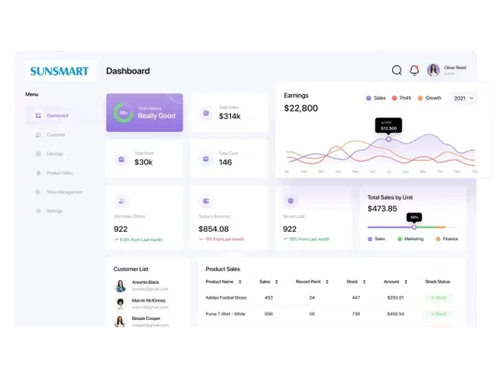
nTirePMS Further, majority of the ERP systems that are implemented a decade ago (SAP, Oracle etc.) are still Client Server in nature and are restricted to the internal usage due to Higher Licensing Cost, Security reasons etc. Most of the ERP applications are Data Entry Based systems specific to SCM,...
See MoreHave you used nTirePMS before?
Share your insights for better experience
Brand: SunSmart
Founded Year: 2005
SunSmart Global Inc (SSG Technologies LLC, SunSmart Technologies Private Limited) is a niche Product Company with smart products in the spectrum of Artificial Intelligence, Mobility and Enterprise Software Solutions.
Looking for The Right Pricing?
Share your requirements and get a plan built around your business.
Price Available on Request
Get personalised nTirePMS pricing that fits your needs. Our team will connect with you.
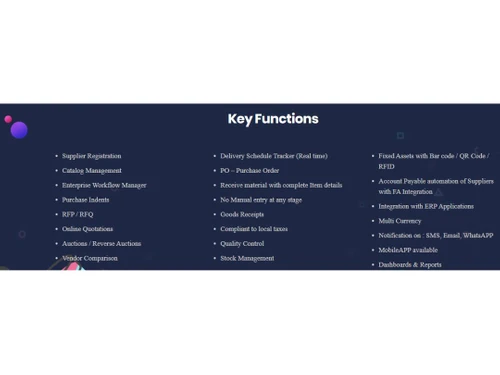
 Audit Logs Automated Workflow Optimization User Management Reports Invoices Purchase Management Vendor Management Support Integration Production Inventory Warehouse Management
  Windows
  iOS
iOS  Android MacOS Windows(Phone)
  Desktop
  Mobile
  Cloud-Based
  Perpetual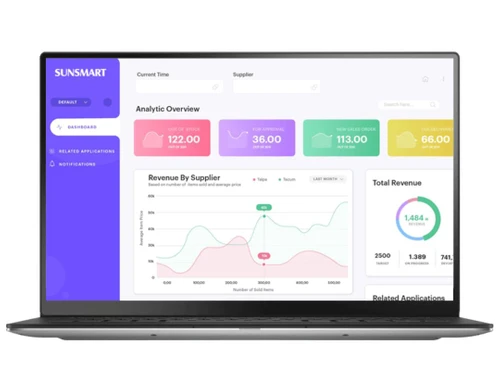
Small Business
Designed for startups and growing businesses
Medium Business
Built for business growth and flexibility
Enterprises
Designed for complex and large-scale business needs
4.6
Out of 5

Overall Rating
Based on
3 Verified Reviews
Rating Breakdown
93% Recommend this Product
Add ReviewOverall, users express high satisfaction with nTirePMS, highlighting its ability to streamline procurement processes and enhance supplier relationships through automation and centralized data management. The software is praised for improving efficiency and reducing costs, particularly through features like supplier self-service portals. However, some users note potential challenges with initial implementation costs and a learning curve that may impact productivity. Despite these concerns, the positive feedback underscores its value for organizations of varying sizes.

May 7, 2024
Techjockey Verified
“Streamline Your Procurement Process with Procurement Management Software”
Procurement management software is a powerful tool designed to streamline and optimize the procurement process for businesses of all sizes. By automating manual tasks, centralizing data, and providing real-time insights, this software enables organizations to improve efficiency, reduce costs, and enhance supplier relationships.
Pros
Efficiency: Automates manual procurement tasks such as purchase order creation, supplier management, and invoice processing, saving time and reducing errors. Cost Savings: Helps identify cost-saving opportunities through spend analysis, contract management, and supplier performance evaluation. Centralized Data: Centralizes procurement-related data, making it easily accessible for decision-making, reporting, and compliance purposes.
Cons
Title: "Streamline Your Procurement Process with Procurement Management Software" Description: Procurement management software is a powerful tool designed to streamline and optimize the procurement process for businesses of all sizes. By automating manual tasks, centralizing data, and providing real-time insights, this software enables organizations to improve efficiency, reduce costs, and enhance supplier relationships. Below are some key features, pros, and cons of procurement management software: Pros: Efficiency: Automates manual procurement tasks such as purchase order creation, supplier management, and invoice processing, saving time and reducing errors. Cost Savings: Helps identify cost-saving opportunities through spend analysis, contract management, and supplier performance evaluation. Centralized Data: Centralizes procurement-related data, making it easily accessible for decision-making, reporting, and compliance purposes. Supplier Collaboration: Facilitates communication and collaboration with suppliers, leading to better relationships and improved negotiation outcomes. Compliance: Ensures compliance with regulatory requirements and internal policies by enforcing approval workflows and tracking procurement activities. Cons: Initial Investment: Implementation and customization costs can be significant, especially for smaller businesses with limited budgets. Learning Curve: Users may require training to fully utilize the software's features, which can temporarily impact productivity. Integration Challenges: Integrating procurement software with existing systems (e.g., ERP, accounting software) can be complex and time-consuming.
Apr 11, 2024
Techjockey Verified
“Supplier Self-Service”
Provides suppliers with self-service portals where they can access information, submit invoices, update their profiles, and communicate with the procurement team. It improves efficiency and reduces administrative overhead for both parties.
Pros
Enables organizations to assess and mitigate risks associated with suppliers, such as financial stability, geopolitical factors, compliance issues, and supply chain disruptions. It helps identify high-risk suppliers and implement risk mitigation strategies.
Cons
nothing
Reason to switch
Allows organizations to track supplier performance metrics such as on-time delivery, quality, and responsiveness. Performance data can be used to evaluate suppliers, identify areas for improvement, and make informed sourcing decisions.
Sep 25, 2017
Techjockey Verified
“very cooperative & helpful”
Pros
Fast, Attentive, and Thorough Help in Sorting Software Options!
Cons
N/A

nTirePMS
Price On Request
Desktop
Mobile
Web based
On Premises
Windows
Mac OS

TYASuite Procurement to Pay
₹ 1250
Desktop
Mobile
Web based
On Premises
Windows
Mac OS

ezAtlas S2P
Price On Request
Desktop
Mobile
Web based
On Premises
Windows
Mac OS

TenderWizard
Price On Request
Desktop
Mobile
Web based
On Premises
Windows
Mac OS

Procol Bid
Price On Request
Desktop
Mobile
Web based
On Premises
Windows
Mac OS

Zycus Procurement Software Suite
Price On Request
Desktop
Mobile
Web based
On Premises
Windows
Mac OS

Mapol Vendor Management Software
Price On Request
Desktop
Mobile
Web based
On Premises
Windows
Mac OS

Onex Spend Management
Price On Request
Desktop
Mobile
Web based
On Premises
Windows
Mac OS

e-Procurement suite
Price On Request
Desktop
Mobile
Web based
On Premises
Windows
Mac OS

Scoutbee
Price On Request
Desktop
Mobile
Web based
On Premises
Windows
Mac OS

Eyvo eProcurement Solutions
₹ 500
Desktop
Mobile
Web based
On Premises
Windows
Mac OS
(2) Product(s) selected
Available
Price on Request
Available
Price on Request
Available
Price on Request
Available
Price on Request
Available
Price on Request
Starting Price:
₹500

Available
Price on Request
Available
Price on Request

Starting Price:
€2,000 /Month

Available
Price on Request
Available
Price on Request
nTirePMS is compatible with Windows, IOS, Android, MacOS and Windows(Phone) operating systems.
nTirePMS app is available for and Mobile.
nTirePMS Procurement Management Software supports Web-Based and Perpetual.
nTirePMS is typically used in All Industries.
nTirePMS demo is available for free at Techjockey.com.
nTirePMS Procurement Management Software offers a free trial. However, the premium plan with advanced features available at Techjockey.
For nTirePMS installation, insert the given CD/USB flash storage in your system and open the Setup Wizard to get started. The web-based version can be accessed directly through nTirePMS portal.
nTirePMS helps with Audit Logs,Workflow,User Management and Reports. It's a complete solution for Invoices,Purchase Management,Vendor Management and Support.
nTirePMS regular updates are available free of cost. There are no hidden software update charges.
nTirePMS Procurement Management Software used for Audit Logs,Workflow,User Management and Reports.
You can directly visit nTirePMS portal and get in touch with nTirePMS customer support for any software-related query.
Please contact our product experts to get nTirePMS lifetime deal with exclusive offers.
20,000+ Software Listed
Best Price Guranteed
Free Expert Consultation
2M+ Happy Customers
Terms and Condtions

Users with registered businesses can purchase goods from merchants on the platform to satisfy their business needs. Users are not permitted to utilize any products acquired through the platform for resale, advertising, business, or further distribution.
For each purchase made, users will receive a Tax Invoice (or 'GST invoice') that includes specific details such as:
the GSTIN of the user associated with their registered business, and
the specified Entity Name for their business.
It should be noted that not all products are eligible for GST Invoice. Only the products displayed by participating sellers with the 'GST-based Invoice Available' callout on the product description page would qualify.
Certain goods and services are not eligible to get a GST Invoice, including items with VAS, i.e., Value Added Services (e.g., Total Mobile Protection/Assured Buyback) and those involving an exchange offer at the time of purchase.
Users must ensure the accuracy of the GSTIN, and business entity name provided for the GST Invoice. Requests for corrections into GST Invoice would not be accommodated by Techjockey.com or any Seller, and any issues arising from user-provided information are the sole responsibility of users.
Techjockey.com is not liable for the GST Invoice or any associated input tax credit. To efficiently claim an input tax credit, users should select the registered place of business address as per the GST authority's data and follow the provisions of the GST Act and rules.
To claim an input tax credit, the delivery and billing addresses must match. Furthermore, input tax credits will not be granted if the delivery address and GSTIN on the invoice are from different states. In case of incorrect GST details provided during the order placement, the order will be canceled automatically.