 USA
USA UAE
UAESmall Business
Designed for startups and growing businesses


See More





Brand: SunSmart
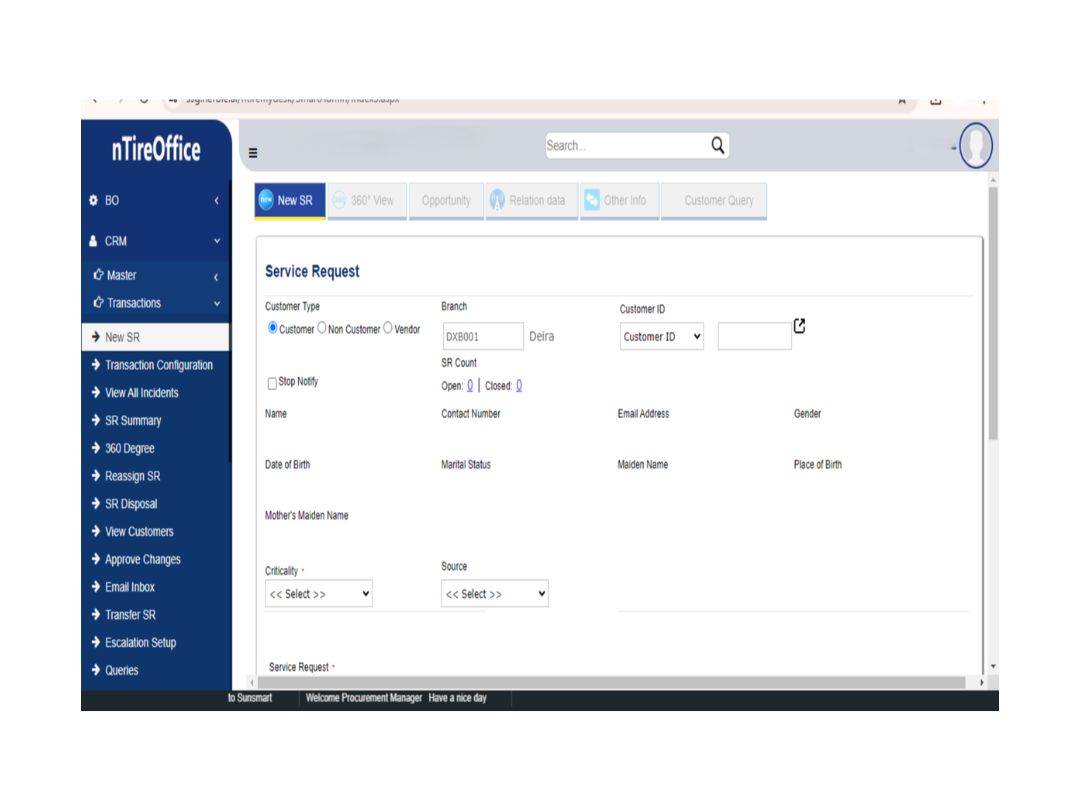
nTireCRM is 100% Audit Trail Enabled and Supports 162 Languages globally. nTireCRM offers enriched intelligent Business Dashboards and Reports of Graphical and Data that provides real-time visibility of all activities pertaining to CRM in addition to analytics for sustainable business goals. nTireCR...
See MoreHave you used nTireCRM before?
Share your insights for better experience
Brand: SunSmart
Founded Year: 2005
SunSmart Global Inc (SSG Technologies LLC, SunSmart Technologies Private Limited) is a niche Product Company with smart products in the spectrum of Artificial Intelligence, Mobility and Enterprise Software Solutions.
Looking for The Right Pricing?
Share your requirements and get a plan built around your business.
Price Available on Request
Get personalised nTireCRM pricing that fits your needs. Our team will connect with you.
Customer Data Management (CDM)
 Contact Management Account Management Customer Profiles Activity History Contact Segmentation
 Sales Management
Lead Management Sales Forecasting Sales Automation Workflow Automation and Management Opportunity & Pipeline Management Deal Management Quote Management Order Management Contract Management Territory Management Marketing Automation
Campaign Management Lead Nurturing Email Marketing Customer Journey Tracking Customer Segmentation Event-Triggered Workflows Automated Campaigns Data Sourcing / Integrations
Social Media Integration Third Party Integrations Email Marketing Tools Integration Marketing Tools Integration Data Import/Export Calendar Integration API Access eCommerce Integrations Interactive Voice Response (IVR) Integration Collaboration Tools
Task / Activity Management Team Communication Document Sharing & File Storage Omnichannel Support & Engagement Security & Compliance
Role-Based Access Control (RBAC) Audit Trail Data Encryption Backup & Disaster Recovery GDPR & Data Privacy AI & Machine Learning
Lead Scoring Predictive Analytics Chatbots Reporting & Analytics
Real Time Analytics Sales Performance Reports Forecasting & Trends Campaign Performance Custom Dashboards Customer Insights Performance Tracking Predictive Analytics Alerts & Notifications
Event-Triggered Notifications Custom Workflow Alerts System Errors/Failures Customer Interaction Alerts Workflow Trigger Alerts SLA Violations Lead Activity Alerts 

Watch the demo video to explore key features, real workflows, and how the software fits your business needs.
 Windows
  MacOS
MacOS  Desktop
  Mobile
  Perpetual
Small Business
Designed for startups and growing businesses
Medium Business
Built for business growth and flexibility
Enterprises
Designed for complex and large-scale business needs
4.7
Out of 5

Overall Rating
Based on
8 Verified Reviews
Rating Breakdown
91% Recommend this Product
Add ReviewUsers generally express high satisfaction with nTireCRM, praising its centralized data management, comprehensive CRM capabilities, and user-friendly interface that enhances collaboration across teams. The software is noted for its insightful analytics and effective workflow management, making it a valuable tool for improving customer relationships. However, some users report challenges during the initial setup, including complexity and slow customer support response times. Additionally, a lack of a mobile application and occasional technical glitches are mentioned as areas for improvement.
Pros
"CRM logs customer communications, ensuring all interactions are documented for quick reference."
"Easy to use and customer support is great. The SMS marketing, workflow, and pipeline management is so easy to do and keeps the record clean."
"The nTireCRM software assists with marketing by tracking the source and customers. It aids in improving the workflow and business processes' efficiency."
Cons
"Takes some to get introduced with it properly. Once you're aware how to use this software, after that you'll not face any issue."
"You need a proper guide to to install this. Takes some time to learn about this software."
"No mobile application available, they should introduce the app in further update."

Sep 25, 2017
Techjockey Verified
“Reporting and Configuration is Smooth”
Pros
We have been using nTire CRM from past few months and wanted to share our experience. The major feature that helped us is the Sales Pipeline report. Thats been a game changer for us.
Cons
It's slow, you have to wait for at least a minute for individual page to load.
Reason to switch
Pipeline report feature is helpful
Jul 14, 2021
Techjockey Verified
“Allows you to track time”
Pros
Sunsmart CRM Software is an eCommerce tool that helps you manage your business relationships and projects. The best feature about this software is that it allows you to track the time and ability of any organisation to identify promotions. This CRM software is good for project lead management and gives a method for determining the root cause of any problem.
Cons
You need a proper guide to to install this. Takes some time to learn about this software.
Reason to switch
It fits our budget and features are best suited for our business model.
Sep 22, 2021
Techjockey Verified
“Easy to use once you learn how to work with it.”
Pros
Easy to use and customer support is great. The SMS marketing, workflow, and pipeline management is so easy to do and keeps the record clean.
Cons
Takes some to get introduced with it properly. Once you're aware how to use this software, after that you'll not face any issue.
Reason to switch
Workflow and pipeline management was a huge task before using this software.

nTireCRM
Price On Request
Desktop
Mobile
Web based
On Premises
Windows
Mac OS
Bitrix24
₹ 2390
Desktop
Mobile
Web based
On Premises
Windows
Mac OS

Zoho CRM
₹ 1300
Desktop
Mobile
Web based
On Premises
Windows
Mac OS

Odoo CRM
₹ 760
Desktop
Mobile
Web based
On Premises
Windows
Mac OS

CrmOne
Price On Request
Desktop
Mobile
Web based
On Premises
Windows
Mac OS

Solid Performers CRM
₹ 500
Desktop
Mobile
Web based
On Premises
Windows
Mac OS

Kylas CRM
₹ 12999
Desktop
Mobile
Web based
On Premises
Windows
Mac OS

Zendesk Sell
Price On Request
Desktop
Mobile
Web based
On Premises
Windows
Mac OS

Cleomitra
₹ 999
Desktop
Mobile
Web based
On Premises
Windows
Mac OS

In-Sync CRM
₹ 5000
Desktop
Mobile
Web based
On Premises
Windows
Mac OS

HighLevel
Price On Request
Desktop
Mobile
Web based
On Premises
Windows
Mac OS
(0) Product(s) selected
Starting Price:
$99 /Month
Starting Price:
$19 /Agent/Month
Starting Price:
₹999 /Month ₹2,000
Starting Price:
₹5,000 /Month
Starting Price:
$97 /Month
Starting Price:
€300 /User/Year
Starting Price:
₹3,900 /Year ₹4,900

Starting Price:
₹1,299 /Month

Starting Price:
$10 /User/Month

Available
Price on Request

Starting Price:
₹350








nTireCRM CRM Software is compatible with Windows operating systems.
nTireCRM CRM Software app is not available.
nTireCRM CRM Software supports Web-Based.
nTireCRM CRM Software is typically used in All Industries.
nTireCRM CRM Software demo is available for free with Techjockey.com
nTireCRM CRM Software offers a free trial. However, the premium plan with advanced features available at Techjockey .
For nTireCRM CRM Software installation, insert the given CD/USB flash storage in your system and open the Setup Wizard to get started.
nTireCRM CRM Software helps with Lead Management,CRM,Lead Generation and Commission Management. It's a complete solution for KYC Management,Event Management,Inbound Call Center and Alerts & Notifications.
20,000+ Software Listed
Best Price Guranteed
Free Expert Consultation
2M+ Happy Customers
Terms and Condtions

Users with registered businesses can purchase goods from merchants on the platform to satisfy their business needs. Users are not permitted to utilize any products acquired through the platform for resale, advertising, business, or further distribution.
For each purchase made, users will receive a Tax Invoice (or 'GST invoice') that includes specific details such as:
the GSTIN of the user associated with their registered business, and
the specified Entity Name for their business.
It should be noted that not all products are eligible for GST Invoice. Only the products displayed by participating sellers with the 'GST-based Invoice Available' callout on the product description page would qualify.
Certain goods and services are not eligible to get a GST Invoice, including items with VAS, i.e., Value Added Services (e.g., Total Mobile Protection/Assured Buyback) and those involving an exchange offer at the time of purchase.
Users must ensure the accuracy of the GSTIN, and business entity name provided for the GST Invoice. Requests for corrections into GST Invoice would not be accommodated by Techjockey.com or any Seller, and any issues arising from user-provided information are the sole responsibility of users.
Techjockey.com is not liable for the GST Invoice or any associated input tax credit. To efficiently claim an input tax credit, users should select the registered place of business address as per the GST authority's data and follow the provisions of the GST Act and rules.
To claim an input tax credit, the delivery and billing addresses must match. Furthermore, input tax credits will not be granted if the delivery address and GSTIN on the invoice are from different states. In case of incorrect GST details provided during the order placement, the order will be canceled automatically.



