linkedin
PowerPOS logo
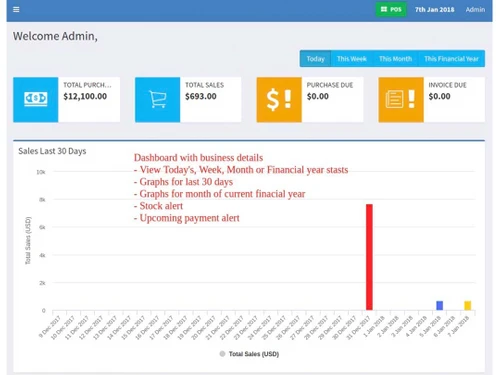
powerpos dashboard
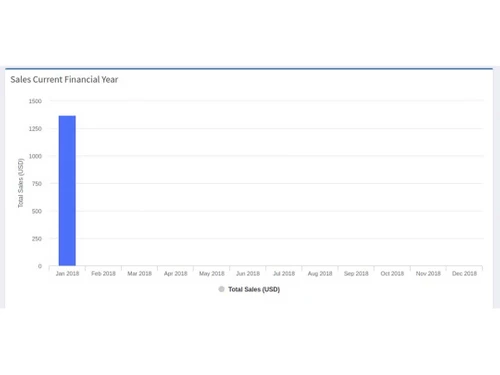
powerpos accounts
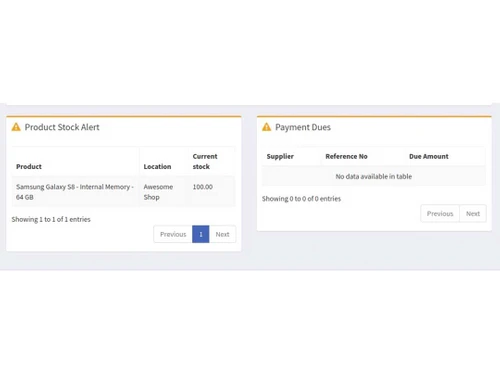
powerpos products

PowerPOS

Brand: PowerPOS

  • 4.1

  • 5 Ratings

PowerPOS is an all-in-one business management software that combines POS, inventory, and HR systems, offering comprehensive tools for seamless operation and scalability across multiple businesses.

See More

Have you used PowerPOS before?

Share your insights for better experience

Add a Review

Price Available on Request

Questions about pricing or customization? We’re here to help, just a click away.

100% Genuine
Products
Best Price
Guaranteed
Safe & Secure
Payment
  • Description

  • Pricing

  • Features

  • Specification

  • Review

  • Compare

  • Alternatives

  • FAQ

PowerPOS Software Overview

What is PowerPOS?

PowerPOS is a comprehensive business management software that integrates Point of Sale (POS), inventory management, and Human Resource (HR) systems into one platform. It offers tools for managing multiple businesses or shops, with separate inventory and accounting information for each.

The system includes features for user and role management, expense and sales reporting, and multi-currency support. PowerPOS also provides robust HR capabilities, including attendance tracking, payroll management, and project management. It supports scalable growth with customizable reporting and analytics, ensuring businesses of all sizes can streamline operations and enhance efficiency. Additionally, it is compatible with ZATCA requirements for invoicing and includes seamless integration with WooCommerce for online sales.

Why Choose PowerPOS Software?

  • Integrated Solutions: Combines POS, inventory, and HR systems into a single platform.
  • Customizable Reporting: Offers detailed analytics and reporting tools for better decision-making.
  • Scalable: Adapts to businesses of all sizes, from small enterprises to large organizations.
  • User-Friendly: Features an intuitive interface for easy staff training and use.
  • 24/7 Support: Provides round-the-clock customer support and regular updates.
  • Multi-Business Management: Supports multiple businesses with separate inventory and accounting information.
  • Advanced Security: Ensures data protection with SSL/TLS encryption and compliance with security standards.

Benefits of PowerPOS Platform

  • Point of Sale (POS): Efficient sales processing and order management.
  • Inventory Management: Real-time tracking, stock level alerts, and automated restocking.
  • User & Role Management: Customizable user roles and permissions.
  • Accounting & Bookkeeping: Manages transactions, generates financial reports, and handles budgeting.
  • HR Management: Attendance tracking, payroll processing, and leave management.
  • Sales Targets: Sets and tracks sales targets, and calculates commissions.
  • Project Management: Assigns tasks, tracks progress, and manages team communication.
  • Custom Reporting & Analytics: Provides insights into sales trends, inventory turnover, and employee performance.
  • Multi-Currency & Localization: Supports various currencies and languages.
  • Expense & Cash Register Reports: Tracks expenses and manages cash register details.
  • Zatca Compatible QR Codes: Generates invoices compliant with Zatca requirements.
  • CRM Integration: Manages customer relationships and interactions.
  • WooCommerce Integration: Syncs data between physical stores and online platforms.

Pricing of PowerPOS

PowerPOS price details are available on request at techjockey.com.

The pricing model is based on different parameters, including extra features, deployment type, and the total number of users. For further queries related to the product, you can contact our product team and learn more about the pricing and offers.

Read more

PowerPOS Pricing & Plans

Basic

Calculated Price

$ 1499 Exclusive of all taxes
    • Licenses

      Licenses
      Licenses
    • Monthly

      Monthly
      Monthly

Key Features

  • 1 Business Locations

  • 2 Users

  • Unlimited Products

  • 500 Invoices

  • 14 Trial Days

Advanced

Calculated Price

$ 1699 Exclusive of all taxes
    • Licenses

      Licenses
      Licenses
    • Monthly

      Monthly
      Monthly

Key Features

  • 1 Business Locations

  • 5 Users

  • Unlimited Products

  • Unlimited Invoices

  • Accounting Module/Connector Module

  • Essentials Module/30 Trial Days

Enterprise

Calculated Price

$ 1999 Exclusive of all taxes
    • Licenses

      Licenses
      Licenses
    • Monthly

      Monthly
      Monthly

Key Features

  • Unlimited Business Locations

  • Unlimited Users

  • Unlimited Products

  • Unlimited Invoices

  • Accounting Module/Connector Module

  • Essentials Module /Android & iOS app

  • Repairs Module /Human Resource Module

PowerPOS Features

  • icon_check Billing & Invoicing
    Generates and manages invoices and receipts efficiently, streamlining the payment process.
  • icon_check Inventory & Stock
    Tracks and manages inventory levels, helping prevent stockouts and overstock situations.
  • icon_check Accounting
    Handles financial transactions and record-keeping, providing insights into profitability and expenses.
  • icon_check Role Management
    Defines and controls user access levels and permissions, ensuring secure and appropriate access to system features.
  • icon_check Product Management
    Organizes and manages product details, including pricing, descriptions, and categories.
  • icon_check Sales Management
    Monitors and analyzes sales data to optimize performance and identify trends.
  • icon_check Email and SMS Notifications
    Sends automated notifications for transactions, promotions, and updates to keep customers informed.

PowerPOS Specifications

Supported Platforms
Windows Windows
Devices
Desktop Desktop Mobile Mobile
Deployment
Cloud-Based Cloud-Based
Suitable For
All Industries
Business Specific
All Businesses
Business Size
Small Business Startups Medium Business SMBs SMEs
Customer Support
Phone Email
Language
English
Training Resources
In Person

Explore the Best Alternative Solutions Similar to Your Business Size and Needs

PowerPOS Review

4.1

Out of 5

img

Overall Rating

Based on
5 Verified Ratings

Rating Breakdown

  • Features 4.2
  • Value for Money 3.8
  • Ease of Use 4.2
  • Customer Support 4.4

90% Recommend this Product

Add Review

Techjockey Trusted Reviews from Verified Users

No reviews are currently available for PowerPOS. Discover similar POS Software reviews

  • Logic ERP - POS Software

    4.8

    Whats great - Cloud-based SaaS platform with a modern, intuitive UI/UX that is easy to adopt and access from anywhere. read more

  • VPOS

    4.7

    Whats great - I like very most thing in this product are inventory management and stocks management. i loved it because it is very fast in ... read more

  • Peddle Plus One ERP

    4.5

    Whats great - Peddle Plus One ERP is fully loaded with features, has an easy-to-use interface, and is economically priced. The standout is ... read more

Compare PowerPOS With other POS Software

Products
Ratings
Pricing
Device Supported
Deployment
Supported Platforms
  • img

    PowerPOS

  • 4.1

  • Price On Request

  • Desktop

    Mobile

  • Web based

    On Premises

  • Windows

    Mac OS

  • img

    VPOS

  • 4.7

  • Price On Request

  • Desktop

    Mobile

  • Web based

    On Premises

  • Windows

    Mac OS

  • img

    Invoay SimplePOS

  • 4.5

  • ₹ 8988

  • Desktop

    Mobile

  • Web based

    On Premises

  • Windows

    Mac OS

  • img

    Bharat ZupPOS

  • 5

  • Price On Request

  • Desktop

    Mobile

  • Web based

    On Premises

  • Windows

    Mac OS

  • img

    Raho Free

  • 5

  • ₹ 2999

  • Desktop

    Mobile

  • Web based

    On Premises

  • Windows

    Mac OS

  • img

    Tally Shoper 9

  • 4.1

  • Price On Request

  • Desktop

    Mobile

  • Web based

    On Premises

  • Windows

    Mac OS

  • img

    Zilicius POS

  • 5

  • Price On Request

  • Desktop

    Mobile

  • Web based

    On Premises

  • Windows

    Mac OS

  • img

    Rain POS

  • 4.3

  • Price On Request

  • Desktop

    Mobile

  • Web based

    On Premises

  • Windows

    Mac OS

  • img

    LiquorPOS

  • 4.2

  • Price On Request

  • Desktop

    Mobile

  • Web based

    On Premises

  • Windows

    Mac OS

  • img

    Bravo POS

  • 4.2

  • Price On Request

  • Desktop

    Mobile

  • Web based

    On Premises

  • Windows

    Mac OS

(0) Product(s) selected

PowerPOS Alternatives

See All PowerPOS Alternatives

Available

Price on Request

Available

Price on Request

Available

Price on Request

Available

Price on Request
Available

Price on Request

Available

Price on Request

Available

Price on Request
Articles for PowerPOS

See All Related Articles

How much does PowerPOS Software Cost?

PowerPOS pricing is available upon request at techjockey.com.

Is there any PowerPOS Software App?

No, PowerPOS does not offer a mobile app.

Which operating system does PowerPOS Software Support?

PowerPOS supports Windows only.

Does PowerPOS offer a free trial?

No, PowerPOS does not offer a free trial period for evaluation.

How does PowerPOS Software Work?

PowerPOS software streamlines business operations by integrating POS, inventory management, HR functions, and accounting into a single platform, enhancing efficiency and decision-making.

Who are the potential users of PowerPOS Software?

Potential users of PowerPOS software include retail stores, restaurants, multi-location enterprises, and all industries seeking integrated POS, inventory, and HR management solutions.

Is there any free demo for PowerPOS Software?

Yes, PowerPOS free demo is available for users to explore the software’s features.

Is PowerPOS Software Free?

No, PowerPOS is not free as it requires a purchase or subscription for full access.

Does PowerPOS Software support multi-location operations?

Yes, PowerPOS supports multi-location management, allowing businesses to manage multiple sites from a single platform.

20,000+ Software Listed

Best Price Guranteed

Free Expert Consultation

2M+ Happy Customers

Terms and Condtions

close

Users with registered businesses can purchase goods from merchants on the platform to satisfy their business needs. Users are not permitted to utilize any products acquired through the platform for resale, advertising, business, or further distribution.

For each purchase made, users will receive a Tax Invoice (or 'GST invoice') that includes specific details such as:

  • the GSTIN of the user associated with their registered business, and

  • the specified Entity Name for their business.

It should be noted that not all products are eligible for GST Invoice. Only the products displayed by participating sellers with the 'GST-based Invoice Available' callout on the product description page would qualify.

Certain goods and services are not eligible to get a GST Invoice, including items with VAS, i.e., Value Added Services (e.g., Total Mobile Protection/Assured Buyback) and those involving an exchange offer at the time of purchase.

Users must ensure the accuracy of the GSTIN, and business entity name provided for the GST Invoice. Requests for corrections into GST Invoice would not be accommodated by Techjockey.com or any Seller, and any issues arising from user-provided information are the sole responsibility of users.

Techjockey.com is not liable for the GST Invoice or any associated input tax credit. To efficiently claim an input tax credit, users should select the registered place of business address as per the GST authority's data and follow the provisions of the GST Act and rules.

To claim an input tax credit, the delivery and billing addresses must match. Furthermore, input tax credits will not be granted if the delivery address and GSTIN on the invoice are from different states. In case of incorrect GST details provided during the order placement, the order will be canceled automatically.