linkedin
SanCCS Call Center Solution logo
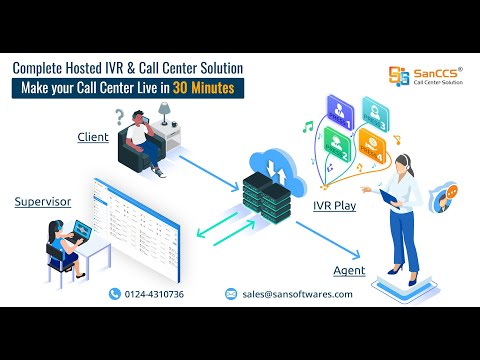
play SanCCS - Complete Call Hosted Call Center Solution, Dialer, CRM, IVR
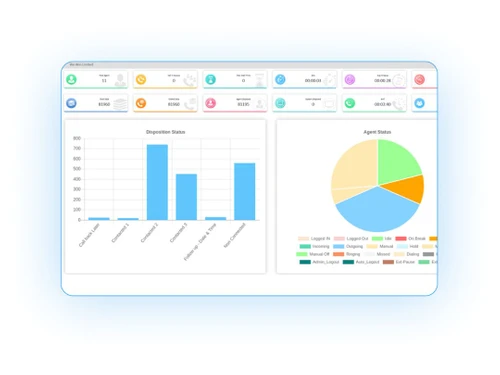
SanCCS Cloud Admin
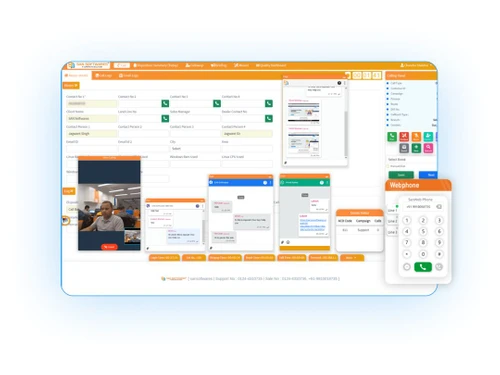
SanCCS Cloud Dialer

SanCCS Call Center Solution

Brand: SAN SOFTWARES

  • 5

  • 1 Rating & 1 Review

SanCCS Cloud is a call centre software providing customer engagement and support services to call centres, help desks, BPOs and other industry verticals. The call centre solution for sales service and insurance calling ensures workforce optimization through contact management and outbound & inbound call routing functionalities. This call centre solution has been built keeping the need of call...

See More

Have you used SanCCS Call Center Solution before?

Share your insights for better experience

Add a Review
Starting Price
₹1,799 excl.GST
₹ 2,123 incl. GST

View plans

offer Save upto 18%, Get GST Invoice on your business purchase T&C
offer Buy Now & Pay Later, Check offer on payment page.
Buy Now
100% Genuine
Products
Best Price
Guaranteed
Safe & Secure
Payment
  • Description

  • Pricing

  • Features

  • Specification

  • Review

  • Compare

  • Alternatives

  • FAQ

Starting at ₹1,799
Buy Now

SanCCS Call Center Solution Software Overview

What is SanCCS Cloud?

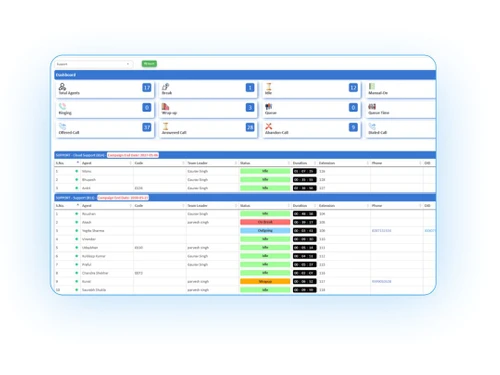
SanCCS Cloud is a call centre software providing customer engagement and support services to call centres, help desks, BPOs and other industry verticals. The call centre solution for sales service and insurance calling ensures workforce optimization through contact management and outbound & inbound call routing functionalities. This call centre solution has been built keeping the need of call agents in view and supports pre-defined ticketing responses, customer history & web widgets.

SanCCS cloud call centre dialer software supports three-way calling, VoIP gateways, trunking and web voicemail interface for seamless customer and caller interaction. The call centre software helps establish a high performing call centre support with its inbuilt remote extensions, automated attendant, blacklisting, and remote barging capabilities.

Why Use SanCCS Cloud?

  • Logging of incoming calls so that agents can sift through them for doing up follow up emails and ensure consistency in customer interactions
  • Call centre metrics for assessing agent’s efficiency, call trends and call volume
  • IVR system for handling high call volumes and collecting relevant information regarding customers’ issues
  • Multichannel forecasting for assigning the right skilled agents across departments
  • Three-way calling to make sure that all types of issues get resolved, as more than one agent is attending to calls always
  • Call barging for customer service upskilling and correcting rookie mistakes
  • DID or direct inward dialling for assigning especially skilled agents to specific calls

Benefits of SanCCS Cloud

  • User friendly SAN dialer for handling the customer lifecycle along with dashboard templates
  • Complete digitized recordings with utmost clarity
  • Call conferencing capabilities for putting together agents, managers and clients
  • Option for do not disturb and distinctive ringing
  • Detailed call records besides call forwarding with answer and call forwarding with no answer module
  • Automated agent gives calling teams an opportunity to focus on issues that require urgent resolution

Key Functionalities of SanCCS Cloud

  • Call routing (DID/ANI)
  • Unified agent desktop
  • Quality monitoring tools
  • Online agent monitoring
  • Caller ID popup
  • Direct inward system access
  • Flexible extension logic

How Does SanCCS Cloud Work?

The latest version of SanCCS Cloud is primarily used for call routing, quality monitoring, and direct inward system access. It has an intuitive interface and is simple to use. SanCCS Cloud can be easily integrated with your existing systems to ensure a smooth workflow. For more information, you can also refer to user manuals and take online SanCCS Cloud demo at Techjockey.com.

How to Use SanCCS Cloud?

Get started with SanCCS Cloud in 5 simple steps:

Step 1: Buy SanCCS Cloud installation key from techjockey.com

Step 2: Directly login through the official website (web-based)

Step 3: Sign up & create your account

Step 4: Add users & assign permissions

Step 5: Get started with SanCCS Cloud

What is the Price of SanCCS Cloud?

Price is available on our website. SanCCS Cloud price in India starts at ₹1799. SanCCS Cloud comes with multiple pricing plans and caters to the diverse customer base.

The price may vary based on factors like customization, additional features required, number of users, and the deployment type. For subscription-related details and offers on premium packages, please request a call back from our product experts.

Read more

SanCCS Call Center Solution Pricing & Plans

Starter

Calculated Price

1799 Exclusive of all taxes
    • Users

      Users
      Users
    • Monthly

      Monthly
      Monthly

Key Features

  • Automatic Call Distribution

  • Multilevel IVR

  • Seamless Integration

  • Agent Performance MI

  • Click to Call Integration

  • Self Designable Web based CRM

  • Remote Extensions

  • Automated Attendant

  • Blind/Call Transfer

  • Call conferencing

  • Music on Hold/Music on Transfer

  • Remote Office Support

  • Route by Caller ID

  • Voicemail to Email/Voicemail Groups

Premium

Calculated Price

1849 Exclusive of all taxes
    • Users

      Users
      Users
    • Monthly

      Monthly
      Monthly

Key Features

  • Automatic Call Distribution

  • Multilevel IVR

  • Agent Performance MI

  • Seamless Integration

  • Click to Call Integration

  • Self Designable Web based CRM

  • Remote Extensions

  • Automated Attendant

  • 1:1 WhatsApp Mapping

Pro

Calculated Price

2099 Exclusive of all taxes
    • Users

      Users
      Users
    • Monthly

      Monthly
      Monthly

Key Features

  • Automatic Call Distribution

  • Multilevel IVR

  • Agent Performance MI

  • Seamless Integration

  • Click to Call Integration

  • Self Designable Web based CRM

  • Remote Extensions

  • Automated Attendant

  • Agent Business WhatsApp Monitoring

SanCCS Call Center Solution Features

  • icon_check Automatic Call Distribution
    The call centre software makes it easy to route customer query calls to live support agents.
  • icon_check Multilevel IVR
    The module ensures that there is no limit to the number of calls that can be attended at a time for customer engagement.
  • icon_check Seamless Integration
    SanCCS Cloud supports SMS and email integration for campaign and outbound/inbound calls management.
  • icon_check Agent Performance MIS
    MIS reports help track the activities of a call centre - department wise, agent wise and date wise.
  • icon_check Click to Call Integration
    The feature connects customers to call agents at a click without dialing any number.
  • icon_check Self Designable Web based CRM
    The call center software solution can be accessed from any location on the web.
  • icon_check Remote Extensions
    The call centre software offers remote extensions for connecting the distributed workforce in remote locations with callers.
  • icon_check Automated Attendant
    Automated attendants manage calls through chatbots without intervention of a live agent.
  • icon_check Blind/Call Transfer
    Use the feature to transfer calls to another agent just in case the current agent is unable to resolve them.
  • icon_check Call Conference
    The IVR software supports call conferencing amongst clients, managers and customer support agents.
  • icon_check Music on Hold/Music on Transfer
    As a caller is on hold, SanCCS Cloud plays music in the background to keep the customer engaged.
  • icon_check Remote Office Support
    You can easily establish a virtual call centre to enable customer service teams.
  • icon_check Route by Caller ID
    It helps route calls based on caller ID with SanCCS cloud call center software solution.
  • icon_check Voicemail to Email/Voicemail Groups
    SanCCS Cloud provides omnichannel support for doing live chats, phone calls and emails.
  • icon_check Real Time Analytics and Report
    Call centre analytics gives insights into customer data for tracing customer journey & tracking call lifecycle.
  • icon_check Skill Based Routing
    Skill based routing helps assign customer calls to the agents skilled at handling those issues.
  • icon_check Third Party CRM Integration
    CRM integration provides quality monitoring tools tracking agents’ performance.
SanCCS Call Center Solution Demo Video play icon

Get SanCCS Call Center Solution Demo

Watch the demo video to explore key features, real workflows, and how the software fits your business needs.

Understand
Key Features
Personal
Demo Insights
Interactive
Demo Support

SanCCS Call Center Solution Specifications

Supported Platforms
Windows Windows iOS iOS Android Android
Devices
Desktop Desktop Mobile Mobile
Deployment
Cloud-Based Cloud-Based
Suitable For
All Industries
Business Specific
All Businesses
Business Size
Small Business Medium Business SMBs SMEs
Customer Support
Phone Email
Language
English
Training Resources
Videos

Explore the Best Alternative Solutions Similar to Your Business Size and Needs

SanCCS Call Center Solution Review

5

Out of 5

img

Overall Rating

Based on
1 Verified Review

Rating Breakdown

  • Features 5
  • Value for Money 5
  • Ease of Use 5
  • Customer Support 5

100% Recommend this Product

Add Review

gaurav

Executive

Industry: E-commerce User since: < 6 months

5

Reviewed on: Nov 22, 2021

Techjockey Verified

“VALUE FOR MONEY”

Pros

The platform is really user friendly. You can drive yourself into very deep technical details in only one click, allowing you to have more flexibility to processes. The dialing mode and CRM feature made our work more managable.

Cons

None.

Reason to switch

increase my productivity 80%

Compare SanCCS Call Center Solution With other Call Center Software

Products
Ratings
Pricing
Device Supported
Deployment
Supported Platforms
  • img

    SanCCS Call Center Solution

  • 5

  • ₹ 1799.00 excl. GST

  • Desktop

    Mobile

  • Web based

    On Premises

  • Windows

    Mac OS

  • img

    SanCCS

  • 5

  • ₹ 14990

  • Desktop

    Mobile

  • Web based

    On Premises

  • Windows

    Mac OS

  • img

    Freshcaller

  • 4.0

  • ₹ 1199

  • Desktop

    Mobile

  • Web based

    On Premises

  • Windows

    Mac OS

  • img

    MyOperator

  • 4.3

  • ₹ 2499

  • Desktop

    Mobile

  • Web based

    On Premises

  • Windows

    Mac OS

  • img

    VoiceCallingAI

  • 5

  • Price On Request

  • Desktop

    Mobile

  • Web based

    On Premises

  • Windows

    Mac OS

  • img

    DialDesk

  • 4.7

  • ₹ 15000

  • Desktop

    Mobile

  • Web based

    On Premises

  • Windows

    Mac OS

  • img

    CallerDesk

  • 4.1

  • Price On Request

  • Desktop

    Mobile

  • Web based

    On Premises

  • Windows

    Mac OS

  • img

    Ringover

  • 4.3

  • Price On Request

  • Desktop

    Mobile

  • Web based

    On Premises

  • Windows

    Mac OS

  • img

    Adversus

  • 4.5

  • Price On Request

  • Desktop

    Mobile

  • Web based

    On Premises

  • Windows

    Mac OS

(0) Product(s) selected

SanCCS Call Center Solution Alternatives

See All SanCCS Call Center Solution Alternatives

Starting Price:

₹999 /Monthly

Starting Price:

$21 /Yearly

Starting Price:

€100 /Yearly

Available

Price on Request

Starting Price:

₹1,299 /Monthly

Starting Price:

$79 /Yearly

Starting Price:

$49 /Monthly

Available

Price on Request

Available

Price on Request

Articles for SanCCS Call Center Solution

See All Related Articles

Which operating system does SanCCS Cloud support?

SanCCS Cloud is compatible with Windows, Mac, iOS and Android operating systems.

Is there any SanCCS Cloud app?

SanCCS Cloud app is available for Android and iOS.

What is the deployment type of SanCCS Cloud?

SanCCS Cloud supports web-based deployment type.

How much does SanCCS Cloud cost?

SanCCS Cloud pricing starts at Rs 2124 for Agent.

Who are the potential users of SanCCS Cloud?

SanCCS Cloud call centre software is typically used in BPOs, banks, healthcare, transportation and more.

Is there any free trial or demo for SanCCS Cloud?

SanCCS Cloud call centre software demo is available for free with techjockey.com.

Is SanCCS Cloud free?

SanCCS Cloud call centre software offers a free trial. However, the premium plan with advanced features is available at techjockey.com with exciting deals.

How can you download SanCCS Cloud?

SanCCS Cloud call centre software installation is not required, as it is web-based.?Just open the Setup Wizard to get started.

How does SanCCS Cloud work?

SanCCS Cloud call centre software helps with call routing, distribution, barging and management. It's a complete solution for direct inward system access and automated call distribution.

20,000+ Software Listed

Best Price Guranteed

Free Expert Consultation

2M+ Happy Customers

Terms and Condtions

close

Users with registered businesses can purchase goods from merchants on the platform to satisfy their business needs. Users are not permitted to utilize any products acquired through the platform for resale, advertising, business, or further distribution.

For each purchase made, users will receive a Tax Invoice (or 'GST invoice') that includes specific details such as:

  • the GSTIN of the user associated with their registered business, and

  • the specified Entity Name for their business.

It should be noted that not all products are eligible for GST Invoice. Only the products displayed by participating sellers with the 'GST-based Invoice Available' callout on the product description page would qualify.

Certain goods and services are not eligible to get a GST Invoice, including items with VAS, i.e., Value Added Services (e.g., Total Mobile Protection/Assured Buyback) and those involving an exchange offer at the time of purchase.

Users must ensure the accuracy of the GSTIN, and business entity name provided for the GST Invoice. Requests for corrections into GST Invoice would not be accommodated by Techjockey.com or any Seller, and any issues arising from user-provided information are the sole responsibility of users.

Techjockey.com is not liable for the GST Invoice or any associated input tax credit. To efficiently claim an input tax credit, users should select the registered place of business address as per the GST authority's data and follow the provisions of the GST Act and rules.

To claim an input tax credit, the delivery and billing addresses must match. Furthermore, input tax credits will not be granted if the delivery address and GSTIN on the invoice are from different states. In case of incorrect GST details provided during the order placement, the order will be canceled automatically.