linkedin
Freshcaller logo
play An admin's guide to setting up Freshcaller
play How to use a helpdesk and call center software together?
freshworks 360 dashboard

Freshcaller

Brand: Freshworks

  • 4.0

  • 3 Ratings

Freshcaller is a comprehensive call center solution, offering assistance to the businesses that aim to reach out to their customers via inbound or outbound calls. This cloud PBX system can also be used by the internal support and marketing team of a company to address the query of prospects and to understand their buying intent. Freshcaller cloud PBX system has a wide global reach and is fully cu...

See More

Have you used Freshcaller before?

Share your insights for better experience

Add a Review
Starting Price
₹1,199 excl.GST
₹ 1,415 incl. GST

View plans

100% Genuine
Products
Best Price
Guaranteed
Safe & Secure
Payment
  • Description

  • Pricing

  • Features

  • Specification

  • Review

  • Compare

  • Alternatives

  • FAQ

Starting at ₹1,199

Freshcaller Software Overview

What is Freshcaller?

Freshcaller is a comprehensive call center solution, offering assistance to the businesses that aim to reach out to their customers via inbound or outbound calls. This cloud PBX system can also be used by the internal support and marketing team of a company to address the query of prospects and to understand their buying intent.

Freshcaller cloud PBX system has a wide global reach and is fully customizable as per the need of your business. From setting business hours to adding greetings and queue messages, users can customize everything. Further, the multi-level IVR system of Freshcaller quickly connects the callers with an agent available at that time, ensuring faster resolution.

Freshcaller call management system converts your existing phone technology to an advanced routing and voice AI setup to empower your customer support and sales teams. Thy can work remotely or from office with many advanced features like number management, custom reporting, inbound call routing and supervisor’s control.

Unique Functionalities of Freshcaller Call Management System

  1. Centralized management of all inbound & outbound calls
  2. Simplified collaboration for faster issue resolution
  3. Reduced call abandonment with speedy replies
  4. Service level monitoring and customizable reports
  5. Omnichannel customer service experience

Pricing of Freshcaller Call Centre Software

  1. Growth: It charges ₹1,199 per user on monthly basis.
  2. Pro: It charges ₹3,399 per user on monthly basis.
  3. Enterprise: It charges ₹5,999 per user on monthly basis.

If you want to use the services offered by Freshcaller, send us a callback request.

Compatible Platforms of Freshcaller Call Management System

Freshcaller is a web-based software that can be accessed from any web browser on a desktop.

Useful Features of Freshcaller

Some Freshcaller features that make it stand out when compared to Freshcaller alternatives are:

About Freshcaller App

Freshcaller mobile app is available on both Android and iOS phones to stay connected with customers and provide support on the go. This decreases the chance of missed calls too. Use the same account for Freshcaller signup that you have and enable call routing, IVR, and smart escalations on your phone. Just enter your Freshcaller account URL and credentials in the app for Freshcaller login. Its main features include

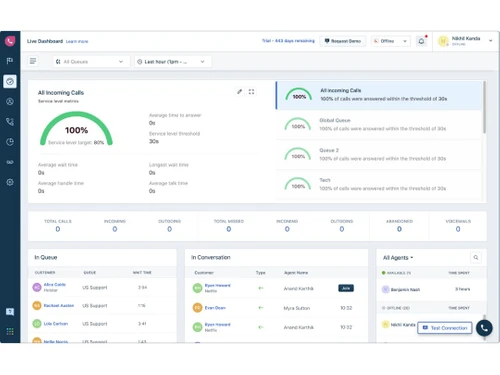
  1. Intuitive Dashboard: Freshcaller features an intuitive dashboard, enabling the managers and admins to view the list of customers who are waiting in the queue, on-going calls and the status of onboard agents in real-time.
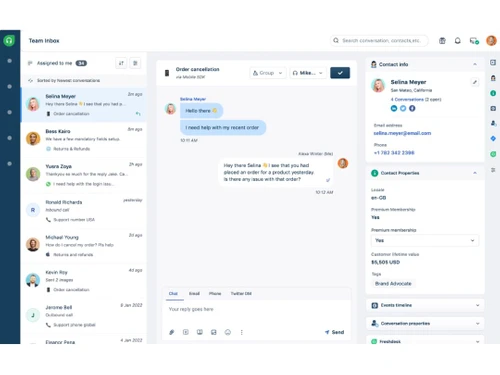
  2. A complete history of interaction with customers: The software enables its users to view a detailed history of the conversations between their agents and customers. This feature also helps the agents to get a glance at the previous conversations and offer a quick solution to similar problems.
  3. Call Masking: Freshcaller allows its users to mask their existing phone numbers with an alternative number while providing support across different regions.
  4. Supervisor Controls: Freshcaller features a wide variety of tools and resources for the supervisors and managers. This enables them to monitor all the conversations, barge into live calls and channelize the call queues as per their needs and requirements.
  5. Developer friendly UI library: The software helps its users deliver a consistent customer experience by offering them a developer-friendly UI library. They also get to integrate with external apps in a seamless manner.
    1. User friendly interface
    2. Making or receiving calls
    3. Viewing multiple incoming calls
    4. On-call functions like transferring calls, mute, hold
    5. Recording calls
    6. List of recent calls
    7. Navigation to other screens in app while on call
    8. Dialing saved phone contacts
    9. Set agent status by toggling between being online and offline
    10. Adding call notes to CRM lead entry
    11. Convert your important and unresolved calls as tickets in Freshdesk
    12. Viewing call summary
Read more

Freshworks Company Details

Founded Year:  2010

Freshworks provides businesses with SaaS customer engagement solutions.

Director/Founders Girish Mathrubootham, Shan Krishnasamy, Vijay Shankar
Company Size 1000+ Employees

Freshcaller Pricing & Plans

Growth

Calculated Price

1199 Exclusive of all taxes
    • Agent

      Agent
      Agent
    • Monthly

      Monthly
      Monthly

Key Features

  • Up to 2000 minutes/month included

  • Number Porting

  • Basic Call Queues

  • Warm Transfer

  • Pre-built Reports

Pro

Calculated Price

3399 Exclusive of all taxes
    • Agent

      Agent
      Agent
    • Monthly

      Monthly
      Monthly

Key Features

  • Up to 3000 minutes/month included

  • Holiday Routing

  • Advanced Call Metrics

  • Call Recording Opt-out

  • Routing Automation

Enterprise

Calculated Price

5999 Exclusive of all taxes
    • Agent

      Agent
      Agent
    • Monthly

      Monthly
      Monthly

Key Features

  • Up to 5000 minutes/month included

  • Speech Enabled IVR (Phone Trees)

  • Abandoned Call Metrics

  • Service Level Monitoring

  • Agent Extensions

Freshcaller Features

  • icon_check Call Recording Opt-out
    Freshcaller offers an IVR keypress that registers the customer’s choice, enabling them to opt-out from recording their phone
  • icon_check Agent Availability Report
    The intuitive dashboard by Freshcaller allows the users to check the availability of agents, current status, etc.
  • icon_check Abandoned Call Metrics
    Users can track the exact reasons behind call drops with the abandoned call metrics offered by the software.
  • icon_check Smart Answer Bot
    Freshcaller offers a smart answer bot known as Freddy. That is capable of giving instant answers round the clock.
  • icon_check Multilingual Support
    Agents can select the language of their choice from the profile settings page and provide adequate support to their customers.
  • icon_check Inbound Call Center
    The agents can offer a more contextual support to their callers as they get to view the caller names, their phone numbers.
  • icon_check Number Porting
    Freshcaller allows its users to continue their services with their old numbers. They can port numbers from regular service
  • icon_check Basic Call Queues
    Users can customize the flow of calls for a specific team and assign a particular number to them using the basic call queues
  • icon_check Wait Queues
    The wait queues feature of the software enables the customers to reserve a slot for them at times when the agent is busy with a
  • icon_check Voicemail
    Freshcaller enables its users to offer customized voicemail service (greetings, specific terms), enabling them to continue their
  • icon_check Warm Transfer
    By using Freshcaller, agents can provide detailed customer-related information to the new agent, by using the warm transfer
  • icon_check Call Recording
    Users can record the calls attended by their agents and use the data for further training, survey and quality checks.
  • icon_check IVR Facility
    The advanced IVR facility offered by the software enables its users to route the calls from their customers to their agents and
  • icon_check Call Monitoring
    Users can monitor live calls attended by their agents to assess the services that they offer to the callers.  
  • icon_check Fully Custom reports
    Freshcaller offers detailed reports to its users and their team. Users can filter out call details, status and other relevant
  • icon_check Call conferencing
    Agents can add a member from their team during a live call with a customer in order to avoid the hassles of call transferring and
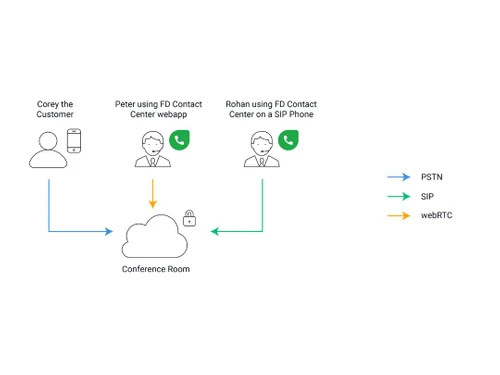
  • icon_check SIP Connections
    Freshcallers allows the agents to receive the calls from customers directly on their SIP devices.
  • icon_check Holiday Routing
    Users can continue with their services even during the holidays by planning out their schedules with the advanced holiday routing
  • icon_check Advanced Call Metrics
    Freshcaller enables its users to view and manage their call logs, call lifetime metrics and maintain all the billing-related
  • icon_check Call Barging
    With the call barging feature of the software, managers get the right to barge into a live call from the admin dashboard and
  • icon_check Call Center Agent Statuses
    The software automatically updates the agent’s status to After Call Work (AWC) post a call completion, enabling the agent to
  • icon_check Queue Callback
    With Freshcaller, you can allow your customers to send in a callback request during rush hours when all the agents are busy with
  • icon_check Omnichannel Routing
    The omnichannel routing feature of the software uses an intelligent routing algorithm to assign customer queries from different
  • icon_check Service Level Monitoring
    Admins can monitor the services offered by their agents and make necessary changes from anywhere across the globe by using the
  • icon_check Speech Enabled IVR
    Users can record IVR prompts and sync them with Freshcaller by using its inbuilt voice recording or text to speech feature.
  • icon_check Email, social, chat, phone channels
    The omnichannel customer support system allows agents to get connected to the customers over email.
  • icon_check Agent Scripts
    Freshcaller allows the agents to communicate with customers based on script-based replies for common queries. 
  • icon_check Email Bot & Chatbots
    Users get to contextually engage their customers with the help of email bots and chatbots offered by the software.
  • icon_check IP Whitelisting
    By enabling the IP Whitelisting feature of the software, users can restrict the logins within their support portal by mentioning
Freshcaller Demo Video play icon

Get Freshcaller Demo

Watch the demo video to explore key features, real workflows, and how the software fits your business needs.

Understand
Key Features
Personal
Demo Insights
Interactive
Demo Support

Freshcaller Specifications

Supported Platforms
Windows Windows iOS iOS Android Android
Devices
Desktop Desktop Mobile Mobile
Deployment
Cloud-Based Cloud-Based
Suitable For
Contact Center
Business Specific
All Businesses
Business Size
Small Business Medium Business SMBs SMEs
Customer Support
Email
Language
English
Training Resources
Videos

Explore the Best Alternative Solutions Similar to Your Business Size and Needs

Freshcaller Review

4.0

Out of 5

img

Overall Rating

Based on
3 Verified Ratings

Rating Breakdown

  • Features 4.1
  • Value for Money 3.6
  • Ease of Use 4.3
  • Customer Support 4.1

93% Recommend this Product

Add Review

Techjockey Trusted Reviews from Verified Users

No reviews are currently available for Freshcaller. Discover similar Call Center Software reviews

  • Acefone

    4.5

    Whats great - Many users appreciate Acefone’s customer service and responsiveness read more

  • DialDesk

    4.8

    Whats great - DialDesk supports all industry verticals, making it a versatile solution for various business needs. The 24/7 human support a... read more

  • Twilio

    4.6

    Whats great - I use Twilio to send text messages to my customers. The API is very easy to use, and I can send a text message to my customer... read more

Compare Freshcaller With other Call Center Software

Products
Ratings
Pricing
Device Supported
Deployment
Supported Platforms
  • img

    Freshcaller

  • 4.0

  • ₹ 1199.00 excl. GST

  • Desktop

    Mobile

  • Web based

    On Premises

  • Windows

    Mac OS

  • img

    MyOperator

  • 4.3

  • ₹ 2499

  • Desktop

    Mobile

  • Web based

    On Premises

  • Windows

    Mac OS

  • img

    VoiceCallingAI

  • 5

  • Price On Request

  • Desktop

    Mobile

  • Web based

    On Premises

  • Windows

    Mac OS

  • img

    SanCCS

  • 5

  • ₹ 14990

  • Desktop

    Mobile

  • Web based

    On Premises

  • Windows

    Mac OS

  • img

    DialDesk

  • 4.7

  • ₹ 15000

  • Desktop

    Mobile

  • Web based

    On Premises

  • Windows

    Mac OS

  • img

    CallerDesk

  • 4.1

  • Price On Request

  • Desktop

    Mobile

  • Web based

    On Premises

  • Windows

    Mac OS

  • img

    Ringover

  • 4.3

  • Price On Request

  • Desktop

    Mobile

  • Web based

    On Premises

  • Windows

    Mac OS

(0) Product(s) selected

Freshcaller Alternatives

See All Freshcaller Alternatives

Starting Price:

₹999 /Monthly

Starting Price:

$21 /Yearly

Starting Price:

€100 /Yearly

Starting Price:

₹1,299 /Monthly

Starting Price:

$79 /Yearly

Available

Price on Request

Starting Price:

$49 /Monthly

Available

Price on Request

Available

Price on Request

Available

Price on Request

Articles for Freshcaller

See All Related Articles

How is the call note feature of Freshcaller useful for its user’s business?

The call note feature of the software allows the agents to take detailed notes of all the calls attended by them. This note enables them and the fellow agents to offer a quick solution when faced with a similar problem.

What type of in-call actions are offered by Freshcaller?

The agents can put a live call on hold, mute it while transferring the call to another agent or searching for a relevant solution to the problem faced by the caller.

Can I get Freshcaller demo online?

Yes, Techjockey provides an online software demo for Freshcaller. You have to send us a request mentioning a preferred time and date to avail our demo service.

How is the team monitoring feature of Freshcaller useful for its users?

Users can supervise their teams and benchmark their performance on a regular basis, based on the kind of service they provide to the customers. Managers can efficiently track the problem areas and offer quick solutions to them.

Does Freshcaller have a mobile app?

Freshcaller does not have a mobile app as of now.

Is there any Freshcaller app?

Yes, Freshcaller has a mobile app for both Android and iOS phones.

How do you view voicemail transcripts in Freshcaller?

To view Freshcaller voicemail transcriptions, login to your Freshcaller account. Go to Call Metrics tab. If you see a voicemail transcription icon next to the number of a customer, click on it to open the call details section. Otherwise, you can click on the play recording icon to listen to the customer's message. For viewing all voicemail transcripts from a number, filter the call by the number and select call type as voicemail.

20,000+ Software Listed

Best Price Guranteed

Free Expert Consultation

2M+ Happy Customers

Terms and Condtions

close

Users with registered businesses can purchase goods from merchants on the platform to satisfy their business needs. Users are not permitted to utilize any products acquired through the platform for resale, advertising, business, or further distribution.

For each purchase made, users will receive a Tax Invoice (or 'GST invoice') that includes specific details such as:

  • the GSTIN of the user associated with their registered business, and

  • the specified Entity Name for their business.

It should be noted that not all products are eligible for GST Invoice. Only the products displayed by participating sellers with the 'GST-based Invoice Available' callout on the product description page would qualify.

Certain goods and services are not eligible to get a GST Invoice, including items with VAS, i.e., Value Added Services (e.g., Total Mobile Protection/Assured Buyback) and those involving an exchange offer at the time of purchase.

Users must ensure the accuracy of the GSTIN, and business entity name provided for the GST Invoice. Requests for corrections into GST Invoice would not be accommodated by Techjockey.com or any Seller, and any issues arising from user-provided information are the sole responsibility of users.

Techjockey.com is not liable for the GST Invoice or any associated input tax credit. To efficiently claim an input tax credit, users should select the registered place of business address as per the GST authority's data and follow the provisions of the GST Act and rules.

To claim an input tax credit, the delivery and billing addresses must match. Furthermore, input tax credits will not be granted if the delivery address and GSTIN on the invoice are from different states. In case of incorrect GST details provided during the order placement, the order will be canceled automatically.