linkedin
Saner AI logo
play Saner.ai - where you scale and utilize your knowledge
Saner AI-ADHD
Saner AI-scale and utilize

Saner AI

Brand: Saner AI

  • 4.2

  • 4 Ratings

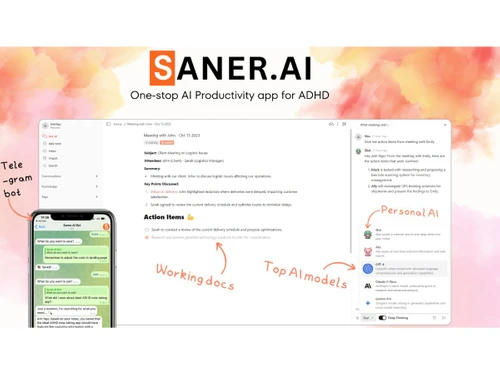
Saner AI is an AI-powered productivity and knowledge management tool designed to help users capture, organize, and retrieve information more efficiently.

See More

Have you used Saner AI before?

Share your insights for better experience

Add a Review
Starting Price
$12

View plans

100% Genuine
Products
Best Price
Guaranteed
Safe & Secure
Payment
  • Description

  • Pricing

  • Features

  • Specification

  • Review

  • FAQ

Starting at $12

Saner AI Software Overview

What is Saner AI?

Saner AI is a utility software and a note-taking software that helps users capture, organize, and manage information more efficiently. It combines smart note management, task organization, and AI-assisted search capabilities to turn scattered ideas, meeting notes, documents, and research into structured and actionable knowledge.

Built for professionals, students, creators, and teams, Saner AI simplifies daily workflows by helping users quickly store important information, retrieve notes instantly, and manage tasks from a single platform. Instead of manually sorting through files or endless documents, users can rely on AI-powered organization and contextual search to find exactly what they need within seconds.

Why Choose Saner AI?

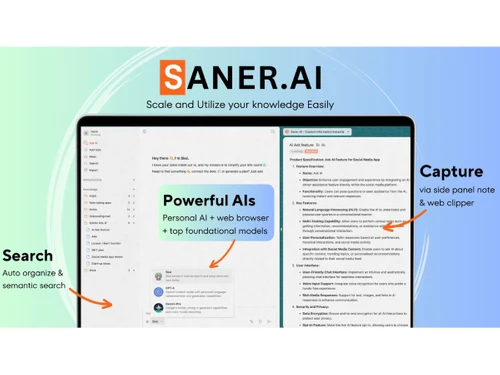
  • AI-Powered Organization: Automatically organizes notes, ideas, and documents for easier access and better productivity.
  • Smart Search Functionality: Quickly find important information, meeting notes, or saved content using contextual AI search.
  • Improved Productivity: Helps users manage tasks, track ideas, and reduce time spent searching through scattered files.
  • Centralized Knowledge Management: Store all your notes, research, and important information in one organized workspace.
  • User-Friendly Interface: Simple and intuitive design makes it easy for professionals, students, and teams to use daily.
  • Efficient Workflow Management: Streamlines brainstorming, project planning, and information management with intelligent automation.

Benefits of Saner AI

  • Saves Time: Quickly capture, organize, and retrieve notes or information without manually sorting through files.
  • Boosts Productivity: Helps users manage tasks, ideas, and workflows more efficiently from a single platform.
  • Reduces Information Overload: An AI-powered organization keeps notes, documents, and research structured and easy to access.
  • Improves Knowledge Management: Creates a centralized workspace for storing important information, meeting notes, and project details.
  • Enhances Collaboration: Makes it easier for teams to share knowledge, track updates, and stay aligned on projects.

Pricing

Saner AI pricing starts at USD 12 at techjockey.com. The pricing model is based on different parameters, including the amount of bandwidth you need, the number of servers you need, and the features you need. For further queries related to the product, you can contact our product team and learn more about the pricing and offers.

Read more

Saner AI Company Details

Founded Year:  2024

AI Knowledge Base, AI SaaS, AI, SaaS, Productivity App, AI Note Taking App, AI Personal Assistant, AI PKMS.

Director/Founders Giap Galvin
Company Size 1-100 Employees

Saner AI Pricing & Plans

Starter
Starting at $12
    • Licenses

      Licenses
      Licenses
    • Monthly

      Monthly
      Monthly

Key Features

  • 30 AI messages/day

  • 1000 Notes

  • PDF: 5MB/file

  • Storage: 5GB

  • 30 AI requests/day

  • Team support

  • Access to External AIs

Standard
Starting at $20
    • Licenses

      Licenses
      Licenses
    • Monthly

      Monthly
      Monthly

Key Features

  • Unlimited AI messages

  • Unlimited Notes

  • PDF: 10MB/file

  • Storage: 100GB

  • 100 AI requests/day

  • Founders support

  • Access to External AIs

Saner AI Features

  • icon_check AI-Powered Knowledge Management
    Automatically organizes notes, files, and ideas using semantic AI for faster access and structured insights.
  • icon_check Natural Language Search
    Find information easily by typing or speaking questions in plain English, powered by contextual AI understanding.
  • icon_check Automatic Tagging
    Uses AI to detect topics, keywords, and entities, assigning relevant tags to improve organization and retrieval.
  • icon_check Unified Workspace
    Central hub that combines tasks, notes, calendar, and documents into a single streamlined productivity dashboard.
  • icon_check Contextual Linking
    Intelligently connects related notes, tasks, and files to surface relationships and reduce information silos.
  • icon_check Voice-to-Text Capture
    Quickly record voice notes that are transcribed and categorized automatically for effortless idea collection.
  • icon_check Cross-Platform Synchronization
    Seamlessly syncs your notes, tasks, and reminders across web, mobile, and desktop for uninterrupted workflow.
  • icon_check AI Summarization
    Automatically summarizes long notes, meetings, or documents into concise key points to save time and effort.
  • icon_check Smart Notifications
    Sends reminders and actionable suggestions based on deadlines, priorities, or context detected by the AI.
  • icon_check Integrations
    Connects with Google Drive, Gmail, Slack, and other tools for unified capture and seamless collaboration.
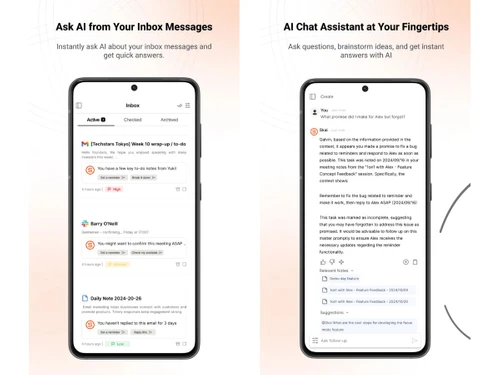
  • icon_check Personal AI Assistant (Skai)
    Acts as your intelligent assistant that can answer queries, summarize content, and manage your daily workflow.
  • icon_check Privacy and Data Security
    Protects user information with encryption and privacy-first policies while ensuring reliable cloud processing.
  • icon_check Customizable Workflows
    Lets users tailor categories, tags, and dashboards to match their unique productivity styles and preferences.
Saner AI Demo Video play icon

Get Saner AI Demo

Watch the demo video to explore key features, real workflows, and how the software fits your business needs.

Understand
Key Features
Personal
Demo Insights
Interactive
Demo Support

Saner AI Specifications

Supported Platforms
Windows Windows MacOS MacOS Linux Linux
Devices
Desktop Desktop
Deployment
Cloud-Based Cloud-Based
Suitable For
All Industries
Business Specific
All Businesses
Business Size
Small Business Startups Medium Business Enterprises
Customer Support
Email Communities
Language
English
Training Resources
Videos
AI Features
AI Integrated

Saner AI Review

4.2

Out of 5

img

Overall Rating

Based on
4 Verified Ratings

Rating Breakdown

  • Features 4.2
  • Value for Money 4.1
  • Ease of Use 4.7
  • Customer Support 3.8

80% Recommend this Product

Add Review

Techjockey Trusted Reviews from Verified Users

No reviews are currently available for Saner AI. Discover similar Note Taking Software reviews

  • Apple Notes

    4.3

    Whats great - The best part is that it is free to use. One of the best apps that Apple has put out there. read more

  • Microsoft OneNote

    4.4

    Whats great - I like how it offers cross-device synchronization. My notes can effortlessly sync across my laptop, phone, and tablet. read more

  • Amplenote

    4.4

    Whats great - The open API is great for developers. It gave me the freedom to integrate Roam with other tools. read more

Articles for Saner AI

See All Related Articles

How much does Saner AI cost?

Saner AI pricing starts at USD 12 at techjockey.com. Pricing is customised based on specific business needs.

Which operating system does Saner AI support?

Saner AI is primarily web-based and can be accessed on major operating systems, including Windows, macOS, and mobile devices through compatible browsers.

How does Saner AI work?

Saner AI uses artificial intelligence to help users capture, organize, search, and manage notes, tasks, and information more efficiently from a centralized platform.

Is Saner AI suitable for small businesses?

Yes, Saner AI is suitable for small businesses as it helps teams improve productivity, manage knowledge, and streamline workflows effectively.

Does Saner AI offer a free trial or a demo?

Saner AI may offer free trials or demos for users to explore its features and functionality before choosing a paid plan.

What features does Saner AI offer?

Saner AI offers AI-powered note-taking, smart search, task management, knowledge organization, workflow management, and productivity tools.

Is there a Saner AIApp?

Saner AI is accessible through web platforms, and app availability may vary depending on device compatibility and updates.

Who are the potential users of Saner AI?

Saner AI is designed for professionals, students, creators, teams, and businesses looking to improve organization and productivity.

How secure is Saner AI?

Saner AI focuses on maintaining user data privacy and secure information management through a protected digital infrastructure.

What is Saner AI used for?

Saner AI is used for note-taking, task management, knowledge organization, productivity improvement, and AI-powered information retrieval.

20,000+ Software Listed

Best Price Guranteed

Free Expert Consultation

2M+ Happy Customers

Terms and Condtions

close

Users with registered businesses can purchase goods from merchants on the platform to satisfy their business needs. Users are not permitted to utilize any products acquired through the platform for resale, advertising, business, or further distribution.

For each purchase made, users will receive a Tax Invoice (or 'GST invoice') that includes specific details such as:

  • the GSTIN of the user associated with their registered business, and

  • the specified Entity Name for their business.

It should be noted that not all products are eligible for GST Invoice. Only the products displayed by participating sellers with the 'GST-based Invoice Available' callout on the product description page would qualify.

Certain goods and services are not eligible to get a GST Invoice, including items with VAS, i.e., Value Added Services (e.g., Total Mobile Protection/Assured Buyback) and those involving an exchange offer at the time of purchase.

Users must ensure the accuracy of the GSTIN, and business entity name provided for the GST Invoice. Requests for corrections into GST Invoice would not be accommodated by Techjockey.com or any Seller, and any issues arising from user-provided information are the sole responsibility of users.

Techjockey.com is not liable for the GST Invoice or any associated input tax credit. To efficiently claim an input tax credit, users should select the registered place of business address as per the GST authority's data and follow the provisions of the GST Act and rules.

To claim an input tax credit, the delivery and billing addresses must match. Furthermore, input tax credits will not be granted if the delivery address and GSTIN on the invoice are from different states. In case of incorrect GST details provided during the order placement, the order will be canceled automatically.