linkedin
SmartTouch POS logo
play SmartTouch POS: Automated restaurant & shop
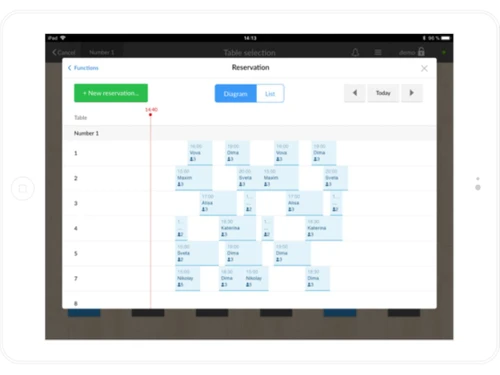
smarttouch pos-dashboard
smarttouch pos-receipt

SmartTouch POS

Brand: SmartTouch Pos

  • 4.4

  • 3 Ratings & 3 Reviews

SmartTouch POS is a cloud-based business automation solutions for food businesses and retail stores. This POS system will track all your sale records, manage chains of establishments, and empower you to control every business aspect remotely. With this POS software for restaurants and retail stores, you can manage profits & expenses, run discount offers and create a profitable menu items and ...

See More

Have you used SmartTouch POS before?

Share your insights for better experience

Add a Review
Starting Price
₹840

View plans

100% Genuine
Products
Best Price
Guaranteed
Safe & Secure
Payment
  • Description

  • Pricing

  • Features

  • Specification

  • Review

  • Compare

  • Alternatives

  • FAQ

Starting at ₹840

SmartTouch POS Software Overview

What is SmartTouch POS?

SmartTouch POS is a cloud-based business automation solutions for food businesses and retail stores. This POS system will track all your sale records, manage chains of establishments, and empower you to control every business aspect remotely. With this POS software for restaurants and retail stores, you can manage profits & expenses, run discount offers and create a profitable menu items and product catalogue.

SmartTouch point of sales system is easy to use, has a robust design, and compatible with mobile devices. It saves time by eliminating repetitive manual tasks and keeps you on top of your business processes. This cloud-based technology ensures unrivalled security for your data.

SmartTouch POS for restaurants is the one-stop solution to take care of your order processing, including kitchen order management and inventory tracking. The best part is you can control your entire business from anywhere, even your tablet or phone. It also helps manage cash registers, bills and performance reports. SmartTouch acts like a mobile terminal to manage orders quickly and accurately.

Who Can Use SmartTouch POS System?

  • Restaurants
  • Franchises
  • Cafe
  • Food Outlets
  • Bakeries
  • Bar
  • Food trucks, etc

Compatible Platforms for SmartTouch POS Software?

  • Windows
  • Android
  • iOS
  • Web based

Why Choose SmartTouch POS Software?

  • User-friendly graphical interface which is easy to operate
  • Mobile/ Tablet based terminal for the waiter, chefs, and delivery boys
  • Automated report generation and sharing with managers
  • Administration panel for accounting, reports, and analytics
  • Remote sales control and tracking
  • eMenu for quick order processing and payment
  • Loyalty and pre-order apps for clients
  • Cloud-based data processing for additional security and reliability
  • Easy integration with third-party apps

How does the SmartTouch POS System Work?

The latest version of SmartTouch POS software is primarily used for comprehensive order processing, kitchen management, and inventory tracking. It has an intuitive interface and is simple to use. SmartTouch point of sales system can be easily integrated with your existing systems to ensure a smooth workflow. For more information, you can also refer to user manuals and take an online SmartTouch demo at Techjockey.com.

How to Use SmartTouch Software?

Get started with SmartTouch in 5 simple steps:

  • Step 1: Buy SmartTouch subscription key from Techjockey.com
  • Step 2: Install SmartTouch on your device or directly log in through the official website
  • Step 3: Sign up & create your account
  • Step 4: Add users & assign permissions
  • Step 5: Get started with SmartTouch

What is the Price of SmartTouch?

SmartTouch price is available on request at Techjockey.com. SmartTouch POS system comes with multiple pricing plans and caters to a diverse customer base.

SmartTouch software price may vary based on customization, additional features required, the number of users, and the deployment type. For subscription-related details and offers on premium packages, please request a call back from our product experts.

Read more

SmartTouch Pos Company Details

Founded Year:  2015

SmartTouch POS is cloud based software to automate your food and trading business.

Director/Founders Rajal Mehta's
Company Size 1-100 Employees

SmartTouch POS Pricing & Plans

Lite
Starting at ₹5040
  • Options

    • Quantity

      Quantity
      Quantity
    • Yearly (Year(s))

      Yearly (Year(s))
      Yearly (Year(s))

Key Features

  • Billing & Invoicing

  • Sales Management

  • Schemes & Offers

  • Order Management

  • Inventory Management

  • Mobile POS

  • Loyalty Management

Basic
Starting at ₹7560
  • Options

    • Quantity

      Quantity
      Quantity
    • Yearly (Year(s))

      Yearly (Year(s))
      Yearly (Year(s))

Key Features

  • Billing & Invoicing

  • Sales Management

  • Schemes & Offers

  • Order Management

  • Inventory Management

  • Mobile POS

  • Email Support

  • Loyalty Management

Standard
Starting at ₹16800
  • Options

    • Quantity

      Quantity
      Quantity
    • Yearly (Year(s))

      Yearly (Year(s))
      Yearly (Year(s))

Key Features

  • Billing & Invoicing

  • Sales Management

  • Schemes & Offers

  • Order Management

  • Inventory Management

  • Mobile POS

  • Loyalty Management

  • Email Support

  • Mobile Support

Professional
Starting at ₹31080
  • Options

    • Quantity

      Quantity
      Quantity
    • Yearly (Year(s))

      Yearly (Year(s))
      Yearly (Year(s))

Key Features

  • Billing & Invoicing

  • Sales Management

  • Schemes & Offers

  • Order Management

  • Inventory Management

  • Mobile POS

  • Loyalty Management

  • Email Support

  • Mobile Support

SmartTouch POS Features

  • icon_check Inventory Management
    Manage the stock and flow of raw materials across multiple locations through a single dashboard.
  • icon_check Mobile POS
    SmartTouch POS system helps manage point of sale functions through mobile with mPOS functionalities.
  • icon_check Membership Management
    Provide premium membership to your loyal client and reward them with the membership management module.
  • icon_check Warehouse Management
    Locate all warehouses and the stock status through a single dashboard on SmartTouch POS.
  • icon_check Loyalty Management
    BonusMe app of SmartTouch POS system helps drive business from your loyal retail customers.
  • icon_check Email Support
    If you have any trouble or queries, you can connect SmartTouch POS through email.
  • icon_check Mobile Support
    SmartTouch customer care offers mobile support through instant chat and calls to all its customers.
  • icon_check Billing & Invoicing
    Create GST invoices and generate GST compliant bills in seconds with SmartTouch POS.
  • icon_check Sales Management
    manage entire sales operations of your multiple locations remotely and generate valuable reports.
  • icon_check Schemes & Offers
    Create and manage multiple schemes, offers, and combos to boost sales and revenue.
  • icon_check Order Management
    Process your order four times faster with an all-in-one SmartTouch POS system.
SmartTouch POS Demo Video play icon

Get SmartTouch POS Demo

Watch the demo video to explore key features, real workflows, and how the software fits your business needs.

Understand
Key Features
Personal
Demo Insights
Interactive
Demo Support

SmartTouch POS Specifications

Supported Platforms
Ubuntu Ubuntu Windows Windows MacOS MacOS Linux Linux
Devices
Desktop Desktop
Deployment
Cloud-Based Cloud-Based
Suitable For
Hospitality Retail Automobiles
Business Specific
Automobile Restaurants Coffee Shops
Business Size
Small Business Startups Medium Business SMBs
Customer Support
Phone Email
Language
English
Training Resources
Videos

Explore the Best Alternative Solutions Similar to Your Business Size and Needs

SmartTouch POS Reviews

4.4

Out of 5

img

Overall Rating

Based on
3 Verified Reviews

Rating Breakdown

  • Features 4.5
  • Value for Money 4.3
  • Ease of Use 4.4
  • Customer Support 4.5

96% Recommend this Product

Add Review

RITESH MEHTA

User

4.6

Reviewed on: Dec 4, 2018

Techjockey Verified

“Offers best ”

Pros

This is a sort of sustenance truck that can deal with the offers of our organizations that would give an incredible market lead by observing on the closeout of that business.

Cons

NO CONS

darshanmurthy aradhya

User

4.5

Reviewed on: Aug 21, 2018

Techjockey Verified

“excellent service ”

Pros

Could not fault the service provided. It was not only fast delivery but when I received my key they were extremely helpful in giving me a step by step guide.?

Cons

N/A

Thakur Singh

User

4.2

Reviewed on: Aug 14, 2018

Techjockey Verified

“I am highly highly satisfied with the service”

Pros

Perfect, I had installed the software half an hour after purchasing it!! Great service

Cons

N/A

Compare SmartTouch POS With other POS Software

Products
Ratings
Pricing
Device Supported
Deployment
Supported Platforms
  • img

    SmartTouch POS

  • 4.4

  • Price On Request

  • Desktop

    Mobile

  • Web based

    On Premises

  • Windows

    Mac OS

  • img

    VPOS

  • 4.7

  • Price On Request

  • Desktop

    Mobile

  • Web based

    On Premises

  • Windows

    Mac OS

  • img

    Invoay SimplePOS

  • 4.5

  • ₹ 8988

  • Desktop

    Mobile

  • Web based

    On Premises

  • Windows

    Mac OS

  • img

    Bharat ZupPOS

  • 5

  • Price On Request

  • Desktop

    Mobile

  • Web based

    On Premises

  • Windows

    Mac OS

  • img

    Raho Free

  • 5

  • ₹ 2999

  • Desktop

    Mobile

  • Web based

    On Premises

  • Windows

    Mac OS

  • img

    Tally Shoper 9

  • 4.1

  • Price On Request

  • Desktop

    Mobile

  • Web based

    On Premises

  • Windows

    Mac OS

  • img

    Zilicius POS

  • 5

  • Price On Request

  • Desktop

    Mobile

  • Web based

    On Premises

  • Windows

    Mac OS

  • img

    Rain POS

  • 4.3

  • Price On Request

  • Desktop

    Mobile

  • Web based

    On Premises

  • Windows

    Mac OS

  • img

    LiquorPOS

  • 4.2

  • Price On Request

  • Desktop

    Mobile

  • Web based

    On Premises

  • Windows

    Mac OS

  • img

    Bravo POS

  • 4.2

  • Price On Request

  • Desktop

    Mobile

  • Web based

    On Premises

  • Windows

    Mac OS

(0) Product(s) selected

SmartTouch POS Alternatives

See All SmartTouch POS Alternatives

Available

Price on Request

Available

Price on Request

Available

Price on Request

Available

Price on Request
Available

Price on Request
Available

Price on Request

Available

Price on Request
Articles for SmartTouch POS

See All Related Articles

Which operating system does SmartTouch support?

SmartTouch POS system is compatible with Windows, iOS, and Android operating systems.

Is there any SmartTouch app?

SmartTouch POS app is available for Android and iOS devices.

What is the deployment type of SmartTouch?

SmartTouch point of sales solution supports both on server and cloud deployment.

How much does SmartTouch cost?

SmartTouch POS software pricing is available at techjockey.com with exciting deals.

Who are the potential users of SmartTouch?

SmartTouch POS solution is typically used in the food business, retail, and service sectors.

Is there any free trial or demo for SmartTouch?

SmartTouch POS system demo is available for free with techjockey.com.

Is SmartTouch free?

SmartTouch POS offers a free trial. However, the Lite plan with premium features can be ordered from techjockey.com.

How can you download SmartTouch?

For SmartTouch POS system installation, download the installation file in your system and open the Setup Wizard to get started.

How does SmartTouch work?

SmartTouch POS solution helps with quick payment processing, order delivery, and inventory management. It's a complete solution for food order processing, remote location management, and kitchen management.

20,000+ Software Listed

Best Price Guranteed

Free Expert Consultation

2M+ Happy Customers

Terms and Condtions

close

Users with registered businesses can purchase goods from merchants on the platform to satisfy their business needs. Users are not permitted to utilize any products acquired through the platform for resale, advertising, business, or further distribution.

For each purchase made, users will receive a Tax Invoice (or 'GST invoice') that includes specific details such as:

  • the GSTIN of the user associated with their registered business, and

  • the specified Entity Name for their business.

It should be noted that not all products are eligible for GST Invoice. Only the products displayed by participating sellers with the 'GST-based Invoice Available' callout on the product description page would qualify.

Certain goods and services are not eligible to get a GST Invoice, including items with VAS, i.e., Value Added Services (e.g., Total Mobile Protection/Assured Buyback) and those involving an exchange offer at the time of purchase.

Users must ensure the accuracy of the GSTIN, and business entity name provided for the GST Invoice. Requests for corrections into GST Invoice would not be accommodated by Techjockey.com or any Seller, and any issues arising from user-provided information are the sole responsibility of users.

Techjockey.com is not liable for the GST Invoice or any associated input tax credit. To efficiently claim an input tax credit, users should select the registered place of business address as per the GST authority's data and follow the provisions of the GST Act and rules.

To claim an input tax credit, the delivery and billing addresses must match. Furthermore, input tax credits will not be granted if the delivery address and GSTIN on the invoice are from different states. In case of incorrect GST details provided during the order placement, the order will be canceled automatically.