USA
USA UAE
UAESmall Business
Designed for startups and growing businesses


See More



Brand: Rao Information Technology
Have you used SuperSee before?
Share your insights for better experience
View plans
 Save upto 18%, Get GST Invoice on your business purchase T&C Buy Now & Pay Later, Check offer on payment page.
 Brand: Rao Information Technology
Founded Year: 2016
Rao IT helps organizations and educational institutions transform operations into intelligent, data-driven systems. As a Google Cloud Partner and Intel AI Solutions Provider, we deliver secure, scalable tools that combine edge computing, computer vision, and cloud-native automation.
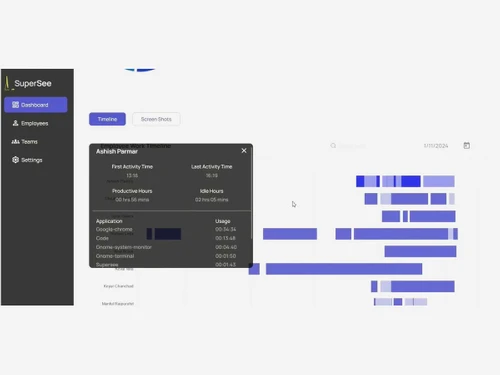
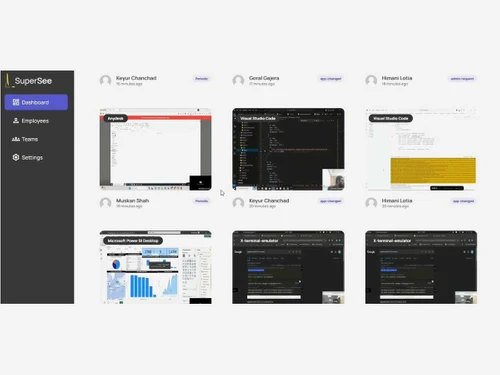
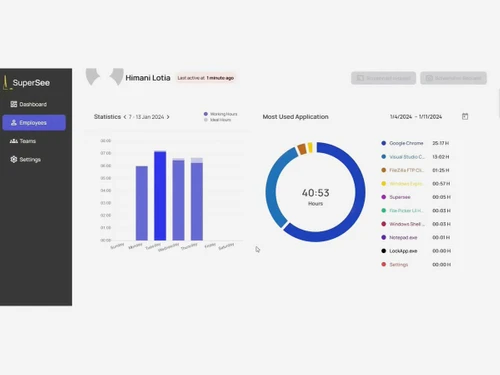
 Live Screen Monitoring Screen Recording Activity Tracking Time Tracking Productivity Analysis Keystroke Logging Attendance Monitoring Alerts & Notifications Reporting & Analytics Data Security User Behavior Insights Timesheet Management Employee Management Performance Management
  Windows
  MacOS
MacOS  Linux
Linux  Desktop
  Cloud-Based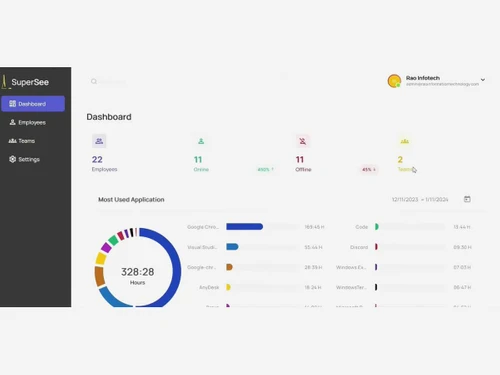
Small Business
Designed for startups and growing businesses
Medium Business
Built for business growth and flexibility
Enterprises
Designed for complex and large-scale business needs
Techjockey Trusted Reviews from Verified Users
No reviews are currently available for SuperSee. Discover similar Employee Monitoring Software reviews
WorkTime
Whats great - Great piece of kit with support team that’s a lifesaver and their response time is super fast. Major plus for me. read more
Mera Work
Whats great - User-friendly interface read more

DeskTrack
Whats great - Best DeskTrack Employee Monitoring Software, I am using nearly 1 year. support is good, our employees' activities are tracked... read more

SuperSee
₹ 2500.00 excl. GST
Desktop
Mobile
Web based
On Premises
Windows
Mac OS
DeskTrack
Price On Request
Desktop
Mobile
Web based
On Premises
Windows
Mac OS

WorkWitness
Price On Request
Desktop
Mobile
Web based
On Premises
Windows
Mac OS

We360 ai
₹ 399
Desktop
Mobile
Web based
On Premises
Windows
Mac OS
Mera Work
₹ 325
Desktop
Mobile
Web based
On Premises
Windows
Mac OS

Time Champ
₹ 200
Desktop
Mobile
Web based
On Premises
Windows
Mac OS

Twib
₹ 199
Desktop
Mobile
Web based
On Premises
Windows
Mac OS

Hoverwatch
Price On Request
Desktop
Mobile
Web based
On Premises
Windows
Mac OS

TheOneSpy
Price On Request
Desktop
Mobile
Web based
On Premises
Windows
Mac OS

WorkTrack
₹ 299
Desktop
Mobile
Web based
On Premises
Windows
Mac OS

TeamTrace
Price On Request
Desktop
Mobile
Web based
On Premises
Windows
Mac OS
(0) Product(s) selected
Starting Price:
₹65 /Month
Starting Price:
$30 /Month
Starting Price:
$29 /Month
Starting Price:
₹299 /Month

Starting Price:
$10 /Month

Starting Price:
$21 /Month

Starting Price:
₹1,730 /Year

Starting Price:
$33 /3Months

Starting Price:
$8 /User/Month

Starting Price:
$4 User/Month
SuperSee is an employee monitoring software that assists businesses with monitoring employee activity, work hours, and productivity in a straightforward and structured manner.
SuperSee pricing starts at INR 2,500 per year on Techjockey.
Yes, SuperSee can monitor the activities offline and synchronize data automatically when the internet connection is regained without any significant data being lost.
Businesses, managers, and teams that work remotely or in offices in need of greater insight into employee performance use SuperSee.
SuperSee has a free trial, and to continue, you must sign up. It is necessary to choose a paid plan depending on your business needs and features.
SuperSee is open-source and requires users to create an account to view its dashboard, employee data, and team activities.
SuperSee supports various operating systems, such as Windows, macOS, and Linux, and can be used in a variety of environments.
SuperSee employee tracking, work time tracking, and reporting help businesses monitor performance and manage the team more efficiently.
SuperSee is integrated with a range of tools, enabling businesses to interlink workflows and integrate employee data with other business applications.
SuperSee offers customer support services to assist users in installation, troubleshooting, and using so they can easily cope with the monitoring of employees.
20,000+ Software Listed
Best Price Guranteed
Free Expert Consultation
2M+ Happy Customers
Terms and Condtions

Users with registered businesses can purchase goods from merchants on the platform to satisfy their business needs. Users are not permitted to utilize any products acquired through the platform for resale, advertising, business, or further distribution.
For each purchase made, users will receive a Tax Invoice (or 'GST invoice') that includes specific details such as:
the GSTIN of the user associated with their registered business, and
the specified Entity Name for their business.
It should be noted that not all products are eligible for GST Invoice. Only the products displayed by participating sellers with the 'GST-based Invoice Available' callout on the product description page would qualify.
Certain goods and services are not eligible to get a GST Invoice, including items with VAS, i.e., Value Added Services (e.g., Total Mobile Protection/Assured Buyback) and those involving an exchange offer at the time of purchase.
Users must ensure the accuracy of the GSTIN, and business entity name provided for the GST Invoice. Requests for corrections into GST Invoice would not be accommodated by Techjockey.com or any Seller, and any issues arising from user-provided information are the sole responsibility of users.
Techjockey.com is not liable for the GST Invoice or any associated input tax credit. To efficiently claim an input tax credit, users should select the registered place of business address as per the GST authority's data and follow the provisions of the GST Act and rules.
To claim an input tax credit, the delivery and billing addresses must match. Furthermore, input tax credits will not be granted if the delivery address and GSTIN on the invoice are from different states. In case of incorrect GST details provided during the order placement, the order will be canceled automatically.