 USA
USA UAE
UAESmall Business
Designed for startups and growing businesses


See More





Brand: Acquire
Acquire is a customer communication platform that helps businesses manage live chat, video calls, voice calls, co-browsing, and screen sharing for sales and support.
See MoreHave you used Acquire before?
Share your insights for better experience
View plans
 Save upto 18%, Get GST Invoice on your business purchase T&C Buy Now & Pay Later, Check offer on payment page.
 Brand: Acquire
Founded Year: 2018
Acquire is a unified customer engagement platform that brings all communication, interactions, channels, and tools under one roof.
 Live Chat Video Call Voice Call Unified Workspace Multilingual Support AI Chatbot AI Auto Suggestion Knowledge Base SLAs & Queue Prioritization Audit Logs Custom roles Sentiment Analysis Custom Reports Dedicated Account Manager

Watch the demo video to explore key features, real workflows, and how the software fits your business needs.
 Ubuntu
  Windows
  iOS
iOS  Android MacOS
  Desktop
  Mobile
  Cloud-Based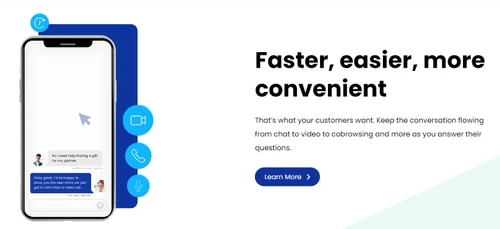
Small Business
Designed for startups and growing businesses
Medium Business
Built for business growth and flexibility
Enterprises
Designed for complex and large-scale business needs
4.1
Out of 5

Overall Rating
Based on
6 Verified Ratings
Rating Breakdown
95% Recommend this Product
Add ReviewTechjockey Trusted Reviews from Verified Users
No reviews are currently available for Acquire. Discover similar Live Chat Software reviews

MirrorFly
Whats great - Adapatable chat SDK suite. With its user-intuitive in-app capabilities primed for practical application, the suite becomes ex... read more

C-Zentrix CZ Chat
Whats great - I was just all over the place after launching my new website. I had taken care of all the necessary do’s and don’ts but then ... read more

ClickDesk
Whats great - I like that the integrated chat is bundled with the help desk. Other companies up charge for this service and it can get a li... read more

Acquire
₹ 3500.00 excl. GST
Desktop
Mobile
Web based
On Premises
Windows
Mac OS

Freshchat
₹ 1499
Desktop
Mobile
Web based
On Premises
Windows
Mac OS

Chatwoot
Price On Request
Desktop
Mobile
Web based
On Premises
Windows
Mac OS

Zoho SalesIQ
₹ 500
Desktop
Mobile
Web based
On Premises
Windows
Mac OS

Charla
Price On Request
Desktop
Mobile
Web based
On Premises
Windows
Mac OS

PlugtoChat
₹ 8143
Desktop
Mobile
Web based
On Premises
Windows
Mac OS

Tiledesk
Price On Request
Desktop
Mobile
Web based
On Premises
Windows
Mac OS

Botbiz
Price On Request
Desktop
Mobile
Web based
On Premises
Windows
Mac OS

Tawk.to
Price On Request
Desktop
Mobile
Web based
On Premises
Windows
Mac OS

Astrachat
Price On Request
Desktop
Mobile
Web based
On Premises
Windows
Mac OS

My LiveChat
Price On Request
Desktop
Mobile
Web based
On Premises
Windows
Mac OS
(2) Product(s) selected
Starting Price:
$19 /month
Starting Price:
$6 /Month
Starting Price:
€25
Available
Price on Request
Available
Price on Request
Starting Price:
$15 /Month

Available
Price on Request

Available
Price on Request

Starting Price:
$29 /month

Starting Price:
$49 /Month

Available
Price on Request





These are some of the key features of Acquire: One Way Video Call Speech Recognition Live Call Recording Instant File Sharing Statistics and Analytics Extensions and Plugins CRM & Analytics and more.
Acquire has the following typical customers: Startups, Enterprises, Agencies, SMEs, and others.
Now you can easily manage your contacts by adding them one by one or by uploading your contacts file to the software.
Acquire is a task management software that gathers responses from the surveys using customer service chatbot and create reports to act on.
Yes, Acquire does. You do not have to hire expensive agents for night shifts as it provides 24×7 support across the globe, Acquire never sleeps.
Yes, you will get a demo of Acquire.
Acquire is a live chat and client management software that provides solutions for customer support including live video assistance, voice calls, text chat, and co-browsing.
Acquire is ideal for e-commerce businesses, SaaS companies, financial institutions, sales teams, and customer support teams that need to deliver real-time customer communication and support across multiple channels.
Acquire enables businesses to engage with customers through live chat, video calls, voice calls, and co-browsing to improve support, boost sales, and generate business analytics.
Acquire pricing details are available on request on techjockey.com.
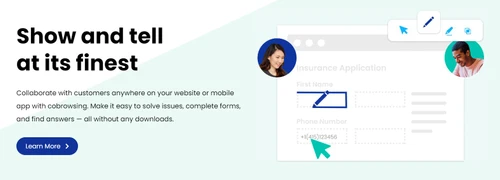
Yes, Acquire offers a co-browsing feature that allows agents to view the exact web pages their visitors are on to provide personalized, real-time assistance.
Yes, the Acquire software includes an AI Chatbot feature to help automate customer support and engagement on your website.
Yes, Acquire's platform supports direct communication with customers through its live video assistance, one-way video call, and voice call features.
The Unified Workspace is a feature in Acquire that consolidates different customer communication channels into a single interface for agents to manage interactions efficiently.
Yes, the software includes a multilingual support feature, enabling businesses to engage with customers from different regions in their native language.
20,000+ Software Listed
Best Price Guranteed
Free Expert Consultation
2M+ Happy Customers
Terms and Condtions

Users with registered businesses can purchase goods from merchants on the platform to satisfy their business needs. Users are not permitted to utilize any products acquired through the platform for resale, advertising, business, or further distribution.
For each purchase made, users will receive a Tax Invoice (or 'GST invoice') that includes specific details such as:
the GSTIN of the user associated with their registered business, and
the specified Entity Name for their business.
It should be noted that not all products are eligible for GST Invoice. Only the products displayed by participating sellers with the 'GST-based Invoice Available' callout on the product description page would qualify.
Certain goods and services are not eligible to get a GST Invoice, including items with VAS, i.e., Value Added Services (e.g., Total Mobile Protection/Assured Buyback) and those involving an exchange offer at the time of purchase.
Users must ensure the accuracy of the GSTIN, and business entity name provided for the GST Invoice. Requests for corrections into GST Invoice would not be accommodated by Techjockey.com or any Seller, and any issues arising from user-provided information are the sole responsibility of users.
Techjockey.com is not liable for the GST Invoice or any associated input tax credit. To efficiently claim an input tax credit, users should select the registered place of business address as per the GST authority's data and follow the provisions of the GST Act and rules.
To claim an input tax credit, the delivery and billing addresses must match. Furthermore, input tax credits will not be granted if the delivery address and GSTIN on the invoice are from different states. In case of incorrect GST details provided during the order placement, the order will be canceled automatically.


