linkedin
Ulysses logo
play Ulysses: A Writing App That Rocks! Your Essential Guide
ulysses-sharing
ulysses-library

Ulysses

Brand: Ulysses

  • 4.1

  • 5 Ratings & 1 Review

Ulysses is a robust writing app. It's designed for writers of all levels, offering features to improve productivity and writing quality. The app is highly customizable and comes with a variety of formats to meet different needs.

See More

Have you used Ulysses before?

Share your insights for better experience

Add a Review
Starting Price
$6

View plans

100% Genuine
Products
Best Price
Guaranteed
Safe & Secure
Payment
  • Description

  • Pricing

  • Features

  • Specification

  • Review

  • Compare

  • Alternatives

  • FAQ

Starting at $6

Ulysses Software Overview

What is Ulysses?

Ulysses is a writing application crafted to cater to the diverse writing needs of individuals and teams alike. Beyond its basic functionality, Ulysses empowers users to organise their thoughts, craft compelling narratives, and refine their work with ease. It's a versatile tool that integrates seamlessly with various workflows, making it a valuable asset for writers, bloggers, students, and professionals across a wide range of industries.

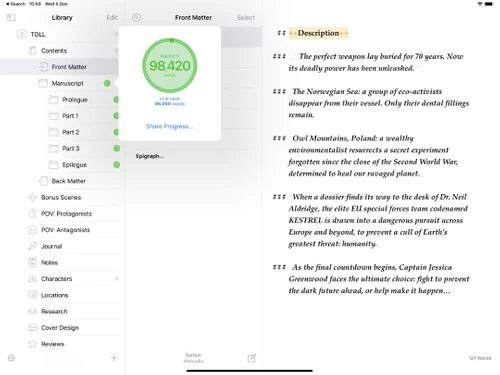
Ulysses provides a foundation for effective writing by combining intuitive features like folders, markdown support, and real-time preview. This combination fosters a streamlined writing experience, allowing users to visualise their work as they write. Moreover, Ulysses extends its functionality to encompass essential writing tools like direct publishing, progress tracking, and advanced formatting options. These features contribute to a comprehensive writing environment, empowering users to produce high-quality content.

Why Choose Ulysses?

  • Adaptable Functionality: Ulysses seamlessly adapts to diverse writing styles and user preferences. From crafting concise blog posts to composing long-form manuscripts, Ulysses offers the necessary tools and flexibility for every writing need.
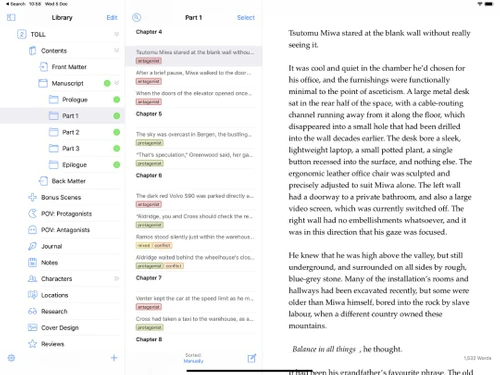
  • Streamlined Organisation: Ulysses simplifies project management and organisation with its intuitive folder structure. Users can easily create, manage, and access their projects, ensuring their writing remains organised and easily accessible.
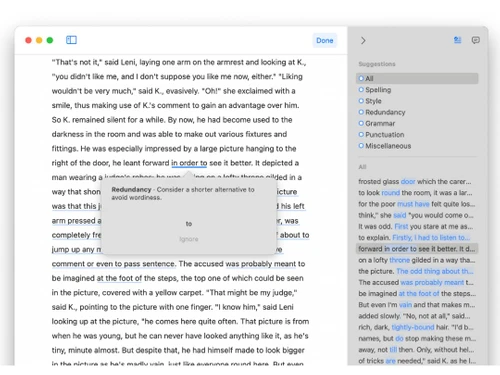
  • Enhanced Writing Quality: Ulysses features a range of advanced formatting options, enabling writers to fine-tune the presentation of their work. From precise text alignment and font choices to intricate headings and lists, Ulysses empowers users to achieve the desired aesthetic and clarity.
  • Seamless Integration: Ulysses integrates seamlessly with essential writing tools and platforms. The app offers direct publishing to popular platforms like WordPress and Medium, allowing writers to share their work effortlessly.
  • User-Friendly Interface: Ulysses boasts an intuitive and user-friendly interface, making it accessible to writers of all skill levels. The app's ease of use minimises distractions, allowing writers to focus on their craft without encountering unnecessary technical hurdles.
  • Collaborative Writing Environment: Ulysses fosters a collaborative writing environment, empowering writers to work together on shared projects. This collaborative functionality facilitates brainstorming, editing, and feedback, leading to higher-quality outputs.

Benefits of Ulysses Note Taking Software

  • Increased Productivity: Ulysses streamlines the writing process, maximising workflow efficiency and minimising distractions. The app's focus on organisation and streamlined features empowers writers to work more effectively, increasing their overall productivity.
  • Improved Writing Quality: Ulysses provides a rich set of tools and features designed to enhance the quality of writing. The app's diverse formatting options, real-time preview, and markdown support encourage writers to refine their content and craft impactful narratives.
  • Facilitated Collaboration: Ulysses fosters a collaborative environment by enabling writers to work together seamlessly on shared projects. The app's shared project capabilities streamline communication, feedback, and editing, leading to more effective collaboration.
  • Streamlined Organisation: Ulysses provides a structured and organised framework for managing writing projects. The app's folder system and library management tools enable users to organise their content efficiently, ensuring their writing is readily accessible and easy to navigate.

Pricing of Ulysses

Ulysses pricing starts at $6 and is available at techjockey.com.

The pricing model is based on different parameters, including the amount of bandwidth you need, the number of servers you need, and the features you need. For further queries related to the product, you can contact our product team and learn more about the pricing and offers.

Read more

Ulysses Company Details

Founded Year:  2011

The Ultimate Writing App for Mac, iPad and iPhone.

Director/Founders Marcus Fehn, Max Seelemann
Company Size 1-100 Employees

Ulysses Pricing & Plans

Monthly Plan
Starting at $6
    • Licenses

      Licenses
      Licenses
    • Monthly

      Monthly
      Monthly

Key Features

  • Ulysses on all your Macs, iPads and iPhones

  • Full, seamless iCloud synchronization

  • Frequent improvements, feature additions , bug fix

  • Share Ulysses with up to five other family members

Yearly Plan
Starting at $40
    • Licenses

      Licenses
      Licenses
    • Yearly

      Yearly
      Yearly

Key Features

  • Ulysses on all your Macs, iPads and iPhones

  • Full, seamless iCloud synchronization

  • Frequent improvements, feature additions , bug fix

  • Share Ulysses with up to five other family members

Ulysses Features

Primary Features

  • icon_check Templates
    Use pre-built layouts for meetings, journals, and more.
  • icon_check Annotations
    Mark up images or PDFs with comments and highlights.
  • icon_check Version History
    Access previous versions of notes to track changes.
  • icon_check Bookmarks
    Mark important notes for easy access later.
  • icon_check Voice Notes
    Record audio notes directly within the app.
  • icon_check Offline Access
    View and edit notes without an internet connection.
  • icon_check Text Formatting
    Style text with bold, italics, headers, bullet points, and more.
  • icon_check Search Functionality
    Quickly locate notes with a powerful keyword search.
  • icon_check Tagging and Labelling
    Add tags for easy note categorization and retrieval.
  • icon_check File Attachments
    Attach files to notes for richer, more detailed information.
  • icon_check Web Clipper
    Save content from the web directly to your notes.
  • icon_check To-do lists
    Create and check off tasks within your notes.
  • icon_check Reminders
    Set alerts to stay on top of important notes and tasks.
  • icon_check Hierarchy Management
    Organize notes with folders and subfolders.

Search and Retrieval

  • icon_check Full-Text Search with Filters
    Find notes using keywords and advanced filters.
  • icon_check Activity History
    View a timeline of recent changes and updates.
  • icon_check OCR (Optical Character Recognition)
    Search text within images or scanned files.
  • icon_check NLP-based Search
    Search intuitively using natural language queries.

Collaboration

  • icon_check Note Sharing
    Share notes with collaborators or external viewers.
  • icon_check Commenting and Feedback
    Add comments and feedback on shared notes.
  • icon_check Real Time Editing
    Edit notes simultaneously with team members.
  • icon_check Permissions Control
    Control who can view or edit each note.

Customization & Personalization

  • icon_check Themes and Colour Options
    Choose dark, light, or custom themes.
  • icon_check Custom Fonts and Styles
    Personalize text with unique fonts and styles.
  • icon_check Quick Access Widgets
    Add widgets for instant note access from the home screen.
  • icon_check End-to-End Encryption
    Secure notes with encryption for privacy.

Security and Privacy

  • icon_check Password Protection
    Lock individual notes with a password.
  • icon_check Note Recovery
    Restore deleted notes easily within the app.
  • icon_check Biometric Login
    Use fingerprint or facial recognition for secure access.
  • icon_check Version Control
    Revert to previous note versions if needed.

Alerts & Notifications

  • icon_check Email Notifications
    Receive email updates for note changes or tasks.
  • icon_check Customizable Reminders
    Set personalized reminders for notes or tasks.
  • icon_check Due Date Notifications
    Receive alerts before a task’s due date.
  • icon_check Snooze Reminders
    Delay reminders to focus and prioritize.
  • icon_check Event Reminders
    Link notes with events and get timely reminders.
  • icon_check Push Notifications
    Get instant alerts on mobile and desktop.
  • icon_check Calendar Alerts
    Sync with your calendar to schedule reminders.

Administrative Features

  • icon_check User Access Management
    Control user roles and permissions.
  • icon_check Auto Backup
    Automatically save notes to prevent data loss.
  • icon_check Import Notes
    Easily import notes from other platforms.
  • icon_check Export Notes
    Export notes as PDFs, DOCX, or HTML.
  • icon_check Access Logs
    Track access history for shared notes.

Integrations

  • icon_check Add-Ons
    Extend functionality with plugins and add-ons.
  • icon_check Third Party Integration
    Connect with Google Drive, Dropbox, and more.
  • icon_check API Access
    Use APIs to integrate with custom tools or apps.
  • icon_check Calendar Integration
    Sync notes with your calendar events.
  • icon_check API Integration
    Connect with other apps using the note-taking app's API.

AI Capabilities

  • icon_check Voice-to-Text
    Convert audio recordings into written text.
  • icon_check Image Recognition
    Detect text or objects within images.
  • icon_check Summarisation
    Generate summaries of long notes or articles.
  • icon_check Smart Recommendations
    Suggested tags or related notes based on content.
  • icon_check Content Generation
    Use AI to brainstorm or draft note content.
Ulysses Demo Video play icon

Get Ulysses Demo

Watch the demo video to explore key features, real workflows, and how the software fits your business needs.

Understand
Key Features
Personal
Demo Insights
Interactive
Demo Support

Ulysses Specifications

Supported Platforms
iOS iOS MacOS MacOS
Devices
Desktop Desktop Mobile Mobile iPad iPad
Deployment
Perpetual Perpetual
Suitable For
All Industries
Business Specific
All Businesses
Business Size
Small Business Startups Medium Business Enterprises SMBs SMEs MSMBs MSMEs Freelancers
Customer Support
Email Communities
Language
English
Training Resources
Videos

Explore the Best Alternative Solutions Similar to Your Business Size and Needs

Ulysses Review

4.1

Out of 5

img

Overall Rating

Based on
1 Verified Review

Rating Breakdown

  • Features 4.1
  • Value for Money 4.2
  • Ease of Use 4.2
  • Customer Support 4.1

90% Recommend this Product

Add Review

Ulysses Video Review

youtubeVideoId

4.3

“Ulysses App Review - Is Ulysses App Worth Your Money in 2026?”

Review by: GigaBits

Compare Ulysses With other Note Taking Software

Products
Ratings
Pricing
Device Supported
Deployment
Supported Platforms
  • img

    Ulysses

  • 4.1

  • Price On Request

  • Desktop

    Mobile

  • Web based

    On Premises

  • Windows

    Mac OS

  • img

    GoodNotes

  • 4.6

  • Price On Request

  • Desktop

    Mobile

  • Web based

    On Premises

  • Windows

    Mac OS

  • img

    Evernote

  • 4.4

  • ₹ 449

  • Desktop

    Mobile

  • Web based

    On Premises

  • Windows

    Mac OS

  • img

    Turbo AI

  • 4.5

  • ₹ 339

  • Desktop

    Mobile

  • Web based

    On Premises

  • Windows

    Mac OS

  • img

    Notability

  • 4.5

  • Price On Request

  • Desktop

    Mobile

  • Web based

    On Premises

  • Windows

    Mac OS

  • img

    Obsidian

  • 4.4

  • Price On Request

  • Desktop

    Mobile

  • Web based

    On Premises

  • Windows

    Mac OS

  • img

    Microsoft OneNote

  • 4.3

  • Price On Request

  • Desktop

    Mobile

  • Web based

    On Premises

  • Windows

    Mac OS

  • img

    Joplin

  • 4.2

  • Price On Request

  • Desktop

    Mobile

  • Web based

    On Premises

  • Windows

    Mac OS

  • img

    Zoho Notebook

  • 4.2

  • ₹ 99

  • Desktop

    Mobile

  • Web based

    On Premises

  • Windows

    Mac OS

  • img

    Notein

  • 4.4

  • Price On Request

  • Desktop

    Mobile

  • Web based

    On Premises

  • Windows

    Mac OS

  • img

    Apple Notes

  • 4.3

  • Price On Request

  • Desktop

    Mobile

  • Web based

    On Premises

  • Windows

    Mac OS

(0) Product(s) selected

Ulysses Alternatives

See All Ulysses Alternatives

Starting Price:

€3 /Month

Starting Price:

$5 /Seat/Month

Starting Price:

$6 /Month

Starting Price:

$15 /Month

Nebo

4.3

Available

Price on Request

Starting Price:

$2 /Month

Articles for Ulysses

See All Related Articles

Which operating system does Ulysses Software Support?

Ulysses supports iOS and macOS operating systems.

Is there any Ulysses App?

Ulysses is available as an app on iOS devices.

How much does Ulysses Software Platform Cost?

Ulysses pricing starts at $6 at techjockey.com. Contact techjockey.com for detailed pricing information on Ulysses. Pricing is customised based on specific business needs.

Who are the potential users of Ulysses Software?

Ulysses is ideal for freelancers, writers, students, and anyone who needs a versatile note-taking and writing tool. It helps them enhance their productivity and workflow.

Does Ulysses offer a free trial or a demo?

Contact techjockey.com to explore trial options for Ulysses. They can provide information about available testing periods.

Is Ulysses suitable for small businesses?

Yes, Ulysses is suitable for small businesses. It can help streamline workflows and improve communication for teams.

How secure is Ulysses?

Ulysses does not explicitly mention security features. However, it likely utilises standard encryption for user data protection and security protocols for secure data storage that many writing and note-taking apps use..

How does Ulysses software Work?

Ulysses allows users to create and edit documents, organise folders and subfolders, use Markdown syntax, and utilise real-time previews and multiple format compatibility. It facilitates direct publishing, progress tracking, keyword tagging, advanced formatting, and version control..

What features does Ulysses offer?

Ulysses offers features including folders and subfolders, Markdown syntax, real-time preview, multi-format compatibility, direct publishing, progress tracking, keyword tagging, advanced formatting, version control, and library management. You can contact our product experts for more information.

20,000+ Software Listed

Best Price Guranteed

Free Expert Consultation

2M+ Happy Customers

Terms and Condtions

close

Users with registered businesses can purchase goods from merchants on the platform to satisfy their business needs. Users are not permitted to utilize any products acquired through the platform for resale, advertising, business, or further distribution.

For each purchase made, users will receive a Tax Invoice (or 'GST invoice') that includes specific details such as:

  • the GSTIN of the user associated with their registered business, and

  • the specified Entity Name for their business.

It should be noted that not all products are eligible for GST Invoice. Only the products displayed by participating sellers with the 'GST-based Invoice Available' callout on the product description page would qualify.

Certain goods and services are not eligible to get a GST Invoice, including items with VAS, i.e., Value Added Services (e.g., Total Mobile Protection/Assured Buyback) and those involving an exchange offer at the time of purchase.

Users must ensure the accuracy of the GSTIN, and business entity name provided for the GST Invoice. Requests for corrections into GST Invoice would not be accommodated by Techjockey.com or any Seller, and any issues arising from user-provided information are the sole responsibility of users.

Techjockey.com is not liable for the GST Invoice or any associated input tax credit. To efficiently claim an input tax credit, users should select the registered place of business address as per the GST authority's data and follow the provisions of the GST Act and rules.

To claim an input tax credit, the delivery and billing addresses must match. Furthermore, input tax credits will not be granted if the delivery address and GSTIN on the invoice are from different states. In case of incorrect GST details provided during the order placement, the order will be canceled automatically.