linkedin
Unicenta logo
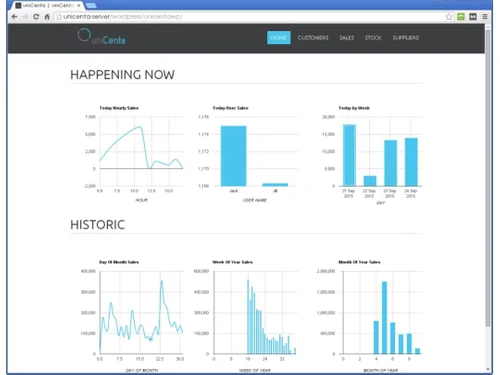
play uniCenta WEB Reports
unicenta-Administration
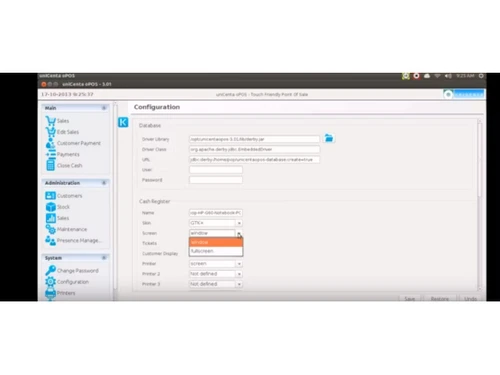
unicenta-configuration

Unicenta

Brand: UniCenta oPOS

  • 4.3

  • 6 Ratings

Unicenta is an advanced POS solution for small and medium scale enterprises, that is being used in Retail or Food & Beverage sectors. This open-source program supports multiple peripheral devices such as scanners, cash drawers, printers, customer displays, weighing scales, etc. Organizations can utilize the software for quick billing and inventory management. The system can be used to accommo...

See More

Have you used Unicenta before?

Share your insights for better experience

Add a Review

Price Available on Request

Questions about pricing or customization? We’re here to help, just a click away.

100% Genuine
Products
Best Price
Guaranteed
Safe & Secure
Payment
  • Description

  • Pricing

  • Features

  • Specification

  • Review

  • Compare

  • Alternatives

  • FAQ

Unicenta Software Overview

What is Unicenta?

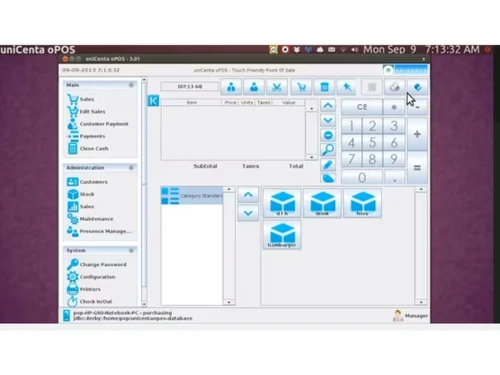
Unicenta is an advanced POS solution for small and medium scale enterprises, that is being used in Retail or Food & Beverage sectors. This open-source program supports multiple peripheral devices such as scanners, cash drawers, printers, customer displays, weighing scales, etc. Organizations can utilize the software for quick billing and inventory management.

The system can be used to accommodate multiple payment handling options. It supports Layaway management and enables business houses to temporarily hold or recall a transaction at any time. Enterprises can also maintain separate customer account profiles in the same way. 

Restaurant and bars can automate their order routing to the integrated kitchen and warehouse displays. Unicenta POS also helps you with item stock monitoring, multiple warehouse management, supply chain organization, inventory loss prevention and vendor management.

How does Unicenta POS software facilitate enhanced workforce management?

  1. Access Levels: Managers can define multiple user roles and groups. They can assign employees accordingly and modify access rights or privileges at any time.
  2. Time Management: The program can be configured to record employee working hours, attendance, shifts, and holidays. Managers can also track employees’ login status.
  3. Employee Information: With a comprehensive employee database, enterprises can monitor active and non-active staff, and customize security to block any unauthorized access.
  4. Secured Log-Ins: Enterprises can integrate the POS software with RFID devices and Dallas Keys, ensuring authentic user log-ins.
  5. Performance Management: The performance management system documents sales values garnered by each employee. It also provides logs of sales failures, with reasons per employee and dates.
  6. Security Cards: Enterprises can generate security cards from the available templates or import ID card formats from external suppliers. They can also incorporate employee images on the generated cards for additional security provisions.

Unicenta pricing 

Unicenta POS software pricing is available on request. To know more about the solution, feel free to request a callback. Our product experts will get back to you as per the date and time mentioned in your callback request.

Compatible Platforms of Unicenta

Unicenta POS an be installed and run on the following platforms:

  1. Windows: XP, Vista, 7, 8, 8.1 and 10.
  2. Linux: Ubuntu, Debian, Mint, and others.
  3. Mac OS X 10.6 and later versions

Benefits of Unicenta POS

  1. Payment Handling: With this POS software, businesses can accommodate multiple payment options, including cash, card, loyalty card, promotional discounts, VIP tickets, and more. They can also receive partial-payments or pre-payments from individual clients.  
  2. Split Receipts: Restaurants or bars can use the POS solution to split bills. They can receive separate payments from individual members with a group against a single order. 
  3. Multiple Warehouse Monitoring: Businesses can manage multiple warehouses with Unicenta. They can maintain detailed stocks of received items, adjust transfers and monitor sales. 
Read more

UniCenta oPOS Company Details

Founded Year:  2010

UniCenta provides a wide range of software, barcode scanning, POS, web reporting and account management services.

Director/Founders UniCenta oPOS
Company Size 1-100 Employees

Unicenta Pricing & Plans

Looking for The Right Pricing?

Share your requirements and get a plan built around your business.

  • Define your business needs
  • Get customised pricing
  • Choose features that fit your workflow

Price Available on Request

Get personalised Unicenta pricing that fits your needs. Our team will connect with you.

Unicenta Features

  • icon_check Customer Management
     Business houses can categorize and monitor individual customers according to predefined metrics, such as purchase history,
  • icon_check Sales Tracking
    Employees can monitor the stock levels of individual products, generate receipts, process refunds and override scheduled prices
  • icon_check Discount Management
    Counter managers can apply any percentage of discounts to a specific customer. They can either opt for total ticket discounts or
  • icon_check Ordering Automation
     Transaction managers can handover their current servers to another team member at any time as per their convenience.
  • icon_check Restaurant POS
    Unicenta with its restaurant mode feature, allows owners to get access to multiple Table and Floor plans. They can also opt for
  • icon_check Ecommerce Management
    With the REST APIs, business owners can integrate their virtual stores and eCommerce websites within Unicenta POS, managing
  • icon_check Inventory Management
    Unicenta Point of Sale solution offers robust inventory management options like loss prevention, stock level monitoring,
  • icon_check Barcode Scanning
    Retail stores can integrate internationally accredited external barcodes, including GS1 EAN-8, EAN-13, UPC-E, UPC-A and Code 128
  • icon_check Customer Accounts
    Businesses can maintain customer databases containing contact details, transaction history, notes, along with core customer
  • icon_check Pricing Management
    Authorized managers can override the selling price of any item, at any time, on this POS portal.
Unicenta Demo Video play icon

Get Unicenta Demo

Watch the demo video to explore key features, real workflows, and how the software fits your business needs.

Understand
Key Features
Personal
Demo Insights
Interactive
Demo Support

Unicenta Specifications

Supported Platforms
Ubuntu Ubuntu Windows Windows MacOS MacOS Linux Linux
Devices
Desktop Desktop
Deployment
Cloud-Based Cloud-Based Perpetual Perpetual
Suitable For
All Industries
Business Specific
All Businesses
Business Size
Small Business Startups Medium Business Enterprises SMBs SMEs
Customer Support
Email
Language
English

Explore the Best Alternative Solutions Similar to Your Business Size and Needs

Unicenta Review

4.3

Out of 5

img

Overall Rating

Based on
6 Verified Ratings

Rating Breakdown

  • Features 4.6
  • Value for Money 3.9
  • Ease of Use 4.5
  • Customer Support 4.5

88% Recommend this Product

Add Review

Techjockey Trusted Reviews from Verified Users

No reviews are currently available for Unicenta. Discover similar POS Software reviews

  • Logic ERP - POS Software

    4.8

    Whats great - Cloud-based SaaS platform with a modern, intuitive UI/UX that is easy to adopt and access from anywhere. read more

  • VPOS

    4.7

    Whats great - I like very most thing in this product are inventory management and stocks management. i loved it because it is very fast in ... read more

  • Peddle Plus One ERP

    4.5

    Whats great - Peddle Plus One ERP is fully loaded with features, has an easy-to-use interface, and is economically priced. The standout is ... read more

Compare Unicenta With other POS Software

Products
Ratings
Pricing
Device Supported
Deployment
Supported Platforms
  • img

    Unicenta

  • 4.3

  • Price On Request

  • Desktop

    Mobile

  • Web based

    On Premises

  • Windows

    Mac OS

  • img

    VPOS

  • 4.7

  • Price On Request

  • Desktop

    Mobile

  • Web based

    On Premises

  • Windows

    Mac OS

  • img

    Invoay SimplePOS

  • 4.5

  • ₹ 8988

  • Desktop

    Mobile

  • Web based

    On Premises

  • Windows

    Mac OS

  • img

    Bharat ZupPOS

  • 5

  • Price On Request

  • Desktop

    Mobile

  • Web based

    On Premises

  • Windows

    Mac OS

  • img

    Raho Free

  • 5

  • ₹ 2999

  • Desktop

    Mobile

  • Web based

    On Premises

  • Windows

    Mac OS

  • img

    Tally Shoper 9

  • 4.1

  • Price On Request

  • Desktop

    Mobile

  • Web based

    On Premises

  • Windows

    Mac OS

  • img

    Zilicius POS

  • 5

  • Price On Request

  • Desktop

    Mobile

  • Web based

    On Premises

  • Windows

    Mac OS

  • img

    Rain POS

  • 4.3

  • Price On Request

  • Desktop

    Mobile

  • Web based

    On Premises

  • Windows

    Mac OS

  • img

    LiquorPOS

  • 4.2

  • Price On Request

  • Desktop

    Mobile

  • Web based

    On Premises

  • Windows

    Mac OS

  • img

    Bravo POS

  • 4.2

  • Price On Request

  • Desktop

    Mobile

  • Web based

    On Premises

  • Windows

    Mac OS

(0) Product(s) selected

Unicenta Alternatives

See All Unicenta Alternatives

Available

Price on Request

Available

Price on Request

Available

Price on Request

Available

Price on Request
Available

Price on Request

Available

Price on Request
Available

Price on Request
Articles for Unicenta

See All Related Articles

Is the Unicenta Point of Sale solution available in multiple languages?

Yes, besides English, Unicenta POS is available in Spanish, German, Mexican, French and more. It can also be customized to support Right To Left scripts like Arabic, Chinese, etc.

Who can use Unicenta POS software?

The point of sale solution is appropriate for specialist stores, general stores, bars and clubs, restaurants, cafes etc.

Is Unicenta POS also available for an online demo?

Yes, you can request an online demo of Unicenta. Our in-house executives will get back to you in real-time.

How can I install Unicenta POS?

Step.1>Download Installer File for Unicenta POS> Double Click on the file> Click Run. Step.2>Select Installation Language> Click OK. Step.3>Select Java Runtime> Click OK

Is Unicenta POS also has a mobile app?

No, Unicenta POS is not yet available as a mobile app form.

What are the system requirements for installing Unicenta POS?

RAM: Minimum 512MB Hard Disk: Minimum 70MB out of the available space

20,000+ Software Listed

Best Price Guranteed

Free Expert Consultation

2M+ Happy Customers

Terms and Condtions

close

Users with registered businesses can purchase goods from merchants on the platform to satisfy their business needs. Users are not permitted to utilize any products acquired through the platform for resale, advertising, business, or further distribution.

For each purchase made, users will receive a Tax Invoice (or 'GST invoice') that includes specific details such as:

  • the GSTIN of the user associated with their registered business, and

  • the specified Entity Name for their business.

It should be noted that not all products are eligible for GST Invoice. Only the products displayed by participating sellers with the 'GST-based Invoice Available' callout on the product description page would qualify.

Certain goods and services are not eligible to get a GST Invoice, including items with VAS, i.e., Value Added Services (e.g., Total Mobile Protection/Assured Buyback) and those involving an exchange offer at the time of purchase.

Users must ensure the accuracy of the GSTIN, and business entity name provided for the GST Invoice. Requests for corrections into GST Invoice would not be accommodated by Techjockey.com or any Seller, and any issues arising from user-provided information are the sole responsibility of users.

Techjockey.com is not liable for the GST Invoice or any associated input tax credit. To efficiently claim an input tax credit, users should select the registered place of business address as per the GST authority's data and follow the provisions of the GST Act and rules.

To claim an input tax credit, the delivery and billing addresses must match. Furthermore, input tax credits will not be granted if the delivery address and GSTIN on the invoice are from different states. In case of incorrect GST details provided during the order placement, the order will be canceled automatically.