linkedin
wAnywhere logo
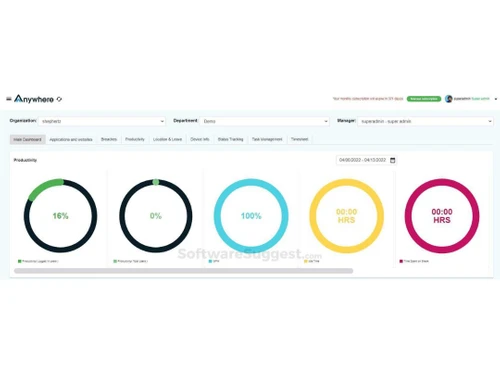
wAnywhere Dashboard
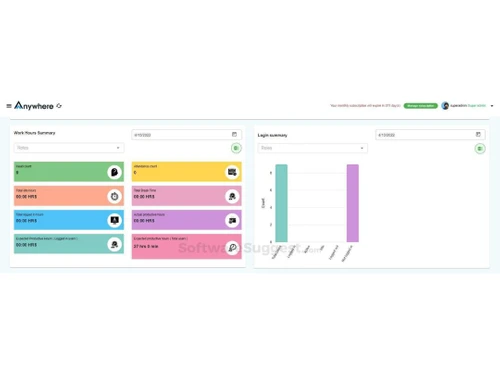
wAnywhere Monitor
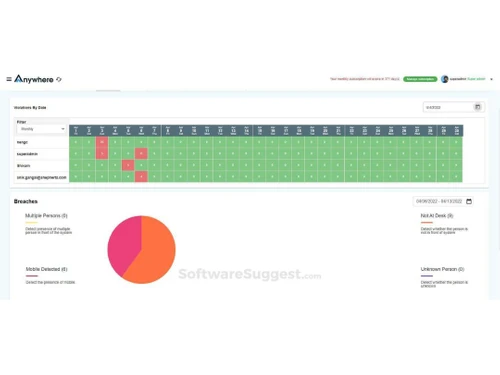
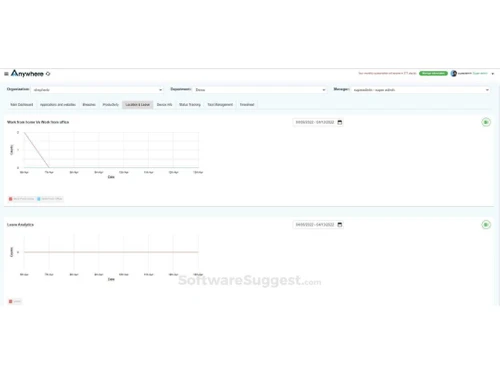
wAnywhere Reporting

wAnywhere

Brand: wAnywhere

  • 4.4

  • 6 Ratings & 2 Reviews

Revolutionize workforce management with a versatile platform offering seamless attendance tracking, leave management, and performance monitoring.

See More

Have you used wAnywhere before?

Share your insights for better experience

Add a Review
Starting Price
$6

View plans

100% Genuine
Products
Best Price
Guaranteed
Safe & Secure
Payment
  • Description

  • Pricing

  • Features

  • Specification

  • Review

  • Compare

  • Alternatives

  • FAQ

Starting at $6

wAnywhere Software Overview

What is wAnywhere Software?

wAnywhere is an AI-based work-from-home solution to address remote work challenges across sectors/industries like BPO, IT, freelancers, and startups. This employee monitoring software offers a comprehensive platform for productivity monitoring, security, collaboration, and engagement. This software provides a centralized and efficient system, features, and benefits for managing remote teams.

It offers notable key functions like productivity monitoring with automatic time tracking, comprehensive visualization, and reporting. The platform helps in smooth communication and collaboration through enterprise-grade secured video conferencing and chat. It gives a competitive edge to the workforce with productivity-enhancing apps and features to keep teams engaged, motivated, and connected. The software has AI-based security and compliance measures to create a location-agnostic secured environment for remote work.

wAnywhere tracks and maximizes productivity, provides a flexible and secure environment for hybrid working, drives cost savings in real estate, energy, and commutation, and strengthens organizational culture through motivation and gamification. It offers data-driven insights, intuitive visualizations, and comprehensive reporting. With its AI-powered security features, wAnywhere ensures compliance and confidentiality in a remote work setting, providing a holistic and easy-to-implement solution for businesses looking to optimize their remote work processes.

Why Choose wAnywhere?

  • AI-Based Solution: Revolutionize remote work with AI-powered solutions to enhance productivity, security, and collaboration from anywhere.
  • Productivity Monitoring: Maximize efficiency by monitoring work habits, idle time, breaks, and app usage, offering insights for improved productivity.
  • Security and Compliance: Ensure a secure work environment with AI-based security and compliance and protect confidential data.
  • Collaboration: Foster seamless collaboration with enterprise-grade video conferencing, chat, and collaboration tools for effective communication.
  • Apps and Tools: Empower the workforce with a suite of productivity-enhancing apps and essential tools within a unified desktop for optimal efficiency.
  • Engagement: Overcome the challenges of hybrid work by boosting team engagement through innovative features like gamification and wellness programs.
  • Location Agnostic Workspace: Establish a flexible and secure workspace with AI and work from anywhere while reducing costs.

Benefits of wAnywhere Employee Monitoring Solution

  • Holistic and comprehensive approach.
  • AI-powered tracking and detection.
  • Simple and easy-to-setup configuration.
  • Enable your team to work with wAnywhere within minutes.
  • Substantially decrease work-from-anywhere expenses.
  • Compatibility with major platforms: Mac, Windows, and Linux.
  • Inbuilt collaborative tools like wAnywhere Connect and seamless integration with popular tools.

wAnywhere Pricing

wAnywhere employee monitoring software pricing starts at USD 6 at techjockey.com.

The pricing model is based on different parameters, including extra features, deployment type, and total users. For further queries related to the product, you can contact our product team and learn more about the pricing and offers.

Read more

wAnywhere Company Details

Founded Year:  2010

wAnywhere is an AI-based remote employee monitoring & desktop time tracking software to ensure security & boost productivity. The solution provides detailed Productivity details, prevents Security violations, Collaboration and multiple Apps which increase the productivity.

Director/Founders wAnywhere
Company Size 1-100 Employees

wAnywhere Pricing & Plans

Standard
Key Features
  • Dashboard
  • Activity Monitor
  • Status Management
  • Configuration
  • Reporting
Starting at $6
    • Users

      Users
      Users
    • Monthly

      Monthly
      Monthly

Key Features

  • Dashboard

  • Activity Monitor

  • Status Management

  • Configuration

  • Reporting

wAnywhere Features

  • icon_check Live Monitoring
    Maximize and track productivity with automatic time monitoring from employee time tracking software.
  • icon_check Employee Monitoring
    Enhance productivity and efficiency by monitoring employees' activities with advanced employee monitoring solutions.
  • icon_check Dashboards
    Get a comprehensive overview of key metrics and data through the software’s intuitive and user-friendly dashboard.
  • icon_check Activity Monitor
    Track and analyze employee activities in real-time for optimal workflow management and performance with the software.
  • icon_check Status Management
    Efficiently manage and monitor the status of employees and insights into their availability and workload of the software.
  • icon_check Reporting
    Generate detailed reports and analytics on employee performance and activities using the software’s robust reporting tools.
  • icon_check Configuration
    Customize the software based on organizational needs with flexible configuration for an effective employee monitoring system.
  • icon_check Time Tracking
    Precisely monitor & record employees' work hours with time tracking features for accurate payroll and performance assessment.
  • icon_check Time & Attendance
    Streamline attendance tracking and management for accuracy and compliance with time and attendance features.
  • icon_check Chat & Video Conferencing
    Develop seamless communication and collaboration among teams through integrated chat and video conferencing support.

wAnywhere Specifications

Supported Platforms
Ubuntu Ubuntu Windows Windows MacOS MacOS
Devices
Desktop Desktop Mobile Mobile
Deployment
Cloud-Based Cloud-Based
Suitable For
All Industries
Business Specific
All Businesses
Business Size
Small Business Medium Business Enterprises SMBs SMEs MSMBs MSMEs
Customer Support
Email Communities
Language
English Español
Training Resources
Videos
AI Features
AI Integrated

Explore the Best Alternative Solutions Similar to Your Business Size and Needs

wAnywhere Reviews

4.4

Out of 5

img

Overall Rating

Based on
2 Verified Reviews

Rating Breakdown

  • Features 4.3
  • Value for Money 4.5
  • Ease of Use 4.2
  • Customer Support 4.6

90% Recommend this Product

Add Review

Shubham linkedin_verify

Lead

Industry: Software Development

5

Reviewed on: Mar 20, 2025

Techjockey Verified

“A Reliable Solution for Time Management”

We needed a time-tracking solution to boost efficiency, and wAnywhere delivered. It provides accurate tracking and useful analytics that help optimize workflows.

Pros

The flexibility of tracking across different devices and the detailed reports are highly valuable. It promotes transparency while ensuring productivity.

Cons

The occasional sync issues can be frustrating. A quicker customer support response time would also be appreciated.

Reason to switch

It keeps everyone aligned with their schedules, helping us meet deadlines more efficiently while ensuring fair tracking of work hours.

Aakansha Ghorai

Product Manager

Industry: Banking

4.5

Reviewed on: Oct 4, 2024

Techjockey Verified

“Great All-in-One Work Platform!”

wAnywhere has been a great addition to our work setup. It combines project management, communication, and performance tracking in one easy-to-use platform. The intuitive interface makes it simple for our team to collaborate, even from different locations. We especially love the built-in task management features, which keep everything organized.

Pros

wAnywhere is very adaptable to different team structures and needs. Whether you have a small group or a large, distributed team, the platform provides enough flexibility to accommodate different working styles.

Cons

The platform is feature-rich, which can be a bit overwhelming at first, but with a little time, it becomes second nature. Overall, WAnywhere is a solid solution for any team!

Switched from CleverControl

Compare wAnywhere With other Employee Monitoring Software

Products
Ratings
Pricing
Device Supported
Deployment
Supported Platforms
  • img

    wAnywhere

  • 4.4

  • Price On Request

  • Desktop

    Mobile

  • Web based

    On Premises

  • Windows

    Mac OS

  • img

    DeskTrack

  • 4.9

  • Price On Request

  • Desktop

    Mobile

  • Web based

    On Premises

  • Windows

    Mac OS

  • img

    WorkWitness

  • 4.8

  • Price On Request

  • Desktop

    Mobile

  • Web based

    On Premises

  • Windows

    Mac OS

  • img

    We360 ai

  • 5

  • ₹ 399

  • Desktop

    Mobile

  • Web based

    On Premises

  • Windows

    Mac OS

  • img

    Mera Work

  • 4.9

  • ₹ 325

  • Desktop

    Mobile

  • Web based

    On Premises

  • Windows

    Mac OS

  • img

    Time Champ

  • 4.7

  • ₹ 200

  • Desktop

    Mobile

  • Web based

    On Premises

  • Windows

    Mac OS

  • img

    Hoverwatch

  • 4.4

  • Price On Request

  • Desktop

    Mobile

  • Web based

    On Premises

  • Windows

    Mac OS

  • img

    Twib

  • 4.7

  • ₹ 199

  • Desktop

    Mobile

  • Web based

    On Premises

  • Windows

    Mac OS

  • img

    TheOneSpy

  • 4.2

  • Price On Request

  • Desktop

    Mobile

  • Web based

    On Premises

  • Windows

    Mac OS

  • img

    WorkTrack

  • 4.1

  • ₹ 299

  • Desktop

    Mobile

  • Web based

    On Premises

  • Windows

    Mac OS

  • img

    TeamTrace

  • 4.9

  • Price On Request

  • Desktop

    Mobile

  • Web based

    On Premises

  • Windows

    Mac OS

(0) Product(s) selected

wAnywhere Alternatives

See All wAnywhere Alternatives

Starting Price:

$30 /Month

Starting Price:

$29 /Month

Starting Price:

₹299 /Month

Starting Price:

$4 User/Month

Starting Price:

$8 /User/Month

Articles for wAnywhere

See All Related Articles

Which operating system does the wAnywhere Software support?

wAnywhere Software is compatible with Windows and macOS device systems.

Is there any wAnywhere app?

wAnywhere app is not available on Android and iOS devices.

What is the deployment type of the wAnywhere Software?

wAnywhere Software supports web-based deployment.

How much does the wAnywhere cost?

wAnywhere software pricing starts at USD 6 at techjockey.com.

Who are the potential users of the wAnywhere Software?

wAnywhere is a versatile tool suitable for businesses of all sizes and industries seeking to monitor and enhance the productivity of their remote employees while maintaining data security.

Is there any free trial or demo for wAnywhere?

wAnywhere demo is available for free with techjockey.com.

Is the wAnywhere Software free?

wAnywhere Software System does not offer a free trial.

How can you download the wAnywhere?

wAnywhere Software’s installation is not required, as it is web-based. Just open the Setup Wizard to get started.

How does wAnywhere work?

wAnywhere is an innovative AI-powered desktop monitoring and time-tracking software designed to enhance security and productivity in remote work environments. It operates by continuously analyzing the real-time activities of remote employees, ensuring adherence to company policies, and optimizing overall workflow efficiency.

20,000+ Software Listed

Best Price Guranteed

Free Expert Consultation

2M+ Happy Customers

Terms and Condtions

close

Users with registered businesses can purchase goods from merchants on the platform to satisfy their business needs. Users are not permitted to utilize any products acquired through the platform for resale, advertising, business, or further distribution.

For each purchase made, users will receive a Tax Invoice (or 'GST invoice') that includes specific details such as:

  • the GSTIN of the user associated with their registered business, and

  • the specified Entity Name for their business.

It should be noted that not all products are eligible for GST Invoice. Only the products displayed by participating sellers with the 'GST-based Invoice Available' callout on the product description page would qualify.

Certain goods and services are not eligible to get a GST Invoice, including items with VAS, i.e., Value Added Services (e.g., Total Mobile Protection/Assured Buyback) and those involving an exchange offer at the time of purchase.

Users must ensure the accuracy of the GSTIN, and business entity name provided for the GST Invoice. Requests for corrections into GST Invoice would not be accommodated by Techjockey.com or any Seller, and any issues arising from user-provided information are the sole responsibility of users.

Techjockey.com is not liable for the GST Invoice or any associated input tax credit. To efficiently claim an input tax credit, users should select the registered place of business address as per the GST authority's data and follow the provisions of the GST Act and rules.

To claim an input tax credit, the delivery and billing addresses must match. Furthermore, input tax credits will not be granted if the delivery address and GSTIN on the invoice are from different states. In case of incorrect GST details provided during the order placement, the order will be canceled automatically.