linkedin
APS Payroll logo
play APS Overview Video
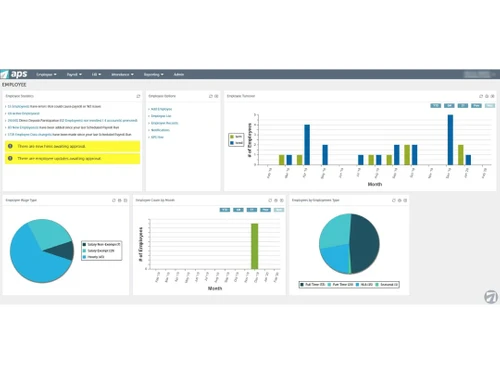
APS Payroll employee dashboard
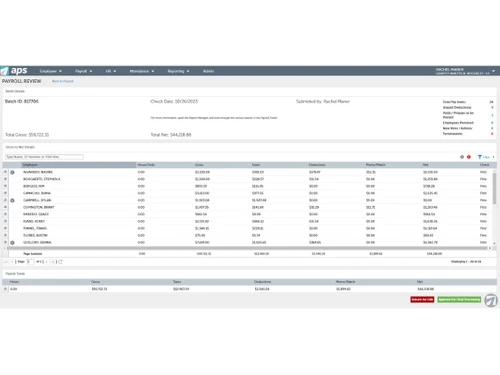
APS Payroll review and release process

APS Payroll

Brand: Automatic Payroll Systems

  • 4.3

  • 6 Ratings

APS Payroll is an all-in-one HR and payroll management software that helps companies handle salaries, taxes, and employee benefits easily.

See More

Have you used APS Payroll before?

Share your insights for better experience

Add a Review

Price Available on Request

Questions about pricing or customization? We’re here to help, just a click away.

100% Genuine
Products
Best Price
Guaranteed
Safe & Secure
Payment
  • Description

  • Pricing

  • Features

  • Specification

  • Review

  • Compare

  • Alternatives

  • FAQ

APS Payroll Software Overview

What is APS Payroll?

APS Payroll is a cloud-based business software that simplifies payroll and HR tasks for all types of organizations. It automates everything from calculating salaries to managing compliance, helping HR teams save time and reduce manual work.

As a reliable HR and payroll software, APS Payroll supports direct deposits, tax filing, leave management, and detailed reporting. It ensures every payroll run is compliant with company rules and government laws.

Why Choose APS Payroll?

  • Simple Payroll Automation: Automates salary processing and ensures accurate payments every time.
  • Complete HR Solution: Handles everything from payroll to attendance, compliance, and reporting.
  • Tax-Ready System: Automatically calculates TDS, PF, and PT deductions for error-free compliance.
  • Faster Salary Transfers: Supports direct deposits and bank transfers with just one click.

Benefits of APS Payroll

  • Time-Saving Automation: Reduces manual work by automating payroll, tax filing, and attendance.
  • Accurate Salary Calculations: Ensures correct deductions and timely payments every month.
  • Better Employee Experience: Gives staff quick access to salary slips, taxes, and leave records.
  • Enhanced HR Efficiency: Streamlines HR tasks, saving time for strategic planning.

APS Payroll Pricing

APS Payroll pricing starts from USD 6 per employee, per month at Techjockey.com. The pricing model is based on different parameters, including extra features, deployment type, and the total number of users. For further queries related to the product, you can contact our product team and learn more about the pricing and offers.

Read more

Automatic Payroll Systems Company Details

Founded Year:  1996

A workforce management technology and services company.

Director/Founders Aaron Johnson
Company Size 101-500 Employees

APS Payroll Pricing & Plans

Looking for The Right Pricing?

Share your requirements and get a plan built around your business.

  • Define your business needs
  • Get customised pricing
  • Choose features that fit your workflow

Price Available on Request

Get personalised APS Payroll pricing that fits your needs. Our team will connect with you.

APS Payroll Features

Payroll Management

  • icon_check Overtime Management
    Calculates extra working hours automatically.
  • icon_check Automated Payroll
    Processes employee pay quickly and without errors.
  • icon_check Direct Bank Transfers
    Transfers salaries directly to employee accounts
  • icon_check Off-Cycle Payroll Processing
    Handles bonus or correction payments easily.
  • icon_check Multiple Pay Rates and Schedules
    Supports varied pay structures.
  • icon_check Bonus and Incentive Management
    Tracks and pays bonuses on time
  • icon_check Expense Reimbursements
    Manages employee expense claims
  • icon_check Tax Deductions
    Applies TDS and other taxes automatically
  • icon_check Employee Benefits Management
    Administers insurance, allowances, and perks.
  • icon_check Variable Pay & Commission Management
    Manages variable pay and commissions accurately.
  • icon_check Gratuity Calculation
    Calculates gratuity as per Indian statutory requirements.

Compliance Management

  • icon_check Income Tax (TDS) Management
    Ensures correct deduction and reporting
  • icon_check Provident Fund (PF) Compliance
    Handles PF contributions accurately.
  • icon_check Professional Tax (PT) Compliance
    Manages PT records as per state rules.
  • icon_check Labour Welfare Fund (LWF) Management
    Manages LWF deductions for eligible employees.
  • icon_check Employee State Insurance (ESI) Compliance
    Tracks and manages ESI contributions.

Time, Attendance & Leave Management

  • icon_check Leave & Absence Management
    Tracks employee leaves and approvals
  • icon_check Sick Leave and Vacation Tracking
    Manages medical and paid leaves
  • icon_check Attendance Tracking
    Records working hours through biometric or online logs.
  • icon_check Holiday & Leave Calendar
    Displays company holidays and leave balances.
  • icon_check Leave Policy Customization
    Customizable leave policies to suit company rules.

Employee Self-Service (ESS)

  • icon_check Income Tax Planner
    Helps employees plan and manage tax savings
  • icon_check Payslip Access
    Allows employees to download salary slips anytime.
  • icon_check Expense Claims
    Submits and tracks reimbursement requests easily.

Employee Lifecycle Management

  • icon_check Employee Database
    Maintains complete employee records in one place
  • icon_check Document Management
    Stores HR and payroll documents securely.
  • icon_check Employee Shift Scheduling
    Manages shift timings and rotations.
  • icon_check F&F Settlement
    Automates final settlements upon employee exit.

Banking Integration & Payment Processing

  • icon_check Bank Transfer Files
    Creates ready-to-upload files for bank payments.
  • icon_check Cheque Processing
    Handles cheque-based payroll if needed.
  • icon_check Direct Deposit Scheduling
    Sets automatic deposit schedules
  • icon_check Multi-Bank Support
    Integrates with multiple banks for payroll.

Automation and Customization

  • icon_check Alerts & Notifications
    Sends reminders for payroll and compliance tasks
  • icon_check API Access
    Connects easily with third-party applications
  • icon_check Scheduled Payroll Processing
    Runs payroll automatically on fixed dates
  • icon_check Custom Payroll Rules and Policies
    Configures company-specific payroll settings.
  • icon_check Configurable Workflows & Approvals
    Set workflows for approvals in payroll.

Security and Data Privacy

  • icon_check User Access Management
    Restricts data access based on roles.
  • icon_check Two-Factor Authentication (2FA)
    Adds an extra layer of security.
  • icon_check Data Backup and Recovery
    Keeps payroll data safe and restorable.
  • icon_check Encrypted Data Transmission
    Secures data during transfer
  • icon_check Audit Logs and Monitoring
    Tracks and logs activities for audit compliance.

Integrations

  • icon_check API Integration
    Connects APS with existing company systems
  • icon_check Performance Management
    Links performance and payroll data
  • icon_check Payment Gateway
    Integrates secure payment processing tools
  • icon_check Biometric Integration
    Syncs attendance data for accuracy
  • icon_check Accounting Software
    Updates payroll expenses automatically.
  • icon_check HRMS
    Combines HR and payroll data in one place
  • icon_check Third Party Integration
    Integrates with third-party software solutions.

Reporting and Analytics

  • icon_check Payroll Reports
    Provides detailed pay summaries and breakdowns
  • icon_check Compliance Reports
    Generates reports for audits and tax filings
  • icon_check Leave and Attendance Reports
    Tracks employee availability trends
  • icon_check Employee Master Report
    Offers insights into workforce and cost metrics
APS Payroll Demo Video play icon

Get APS Payroll Demo

Watch the demo video to explore key features, real workflows, and how the software fits your business needs.

Understand
Key Features
Personal
Demo Insights
Interactive
Demo Support

APS Payroll Specifications

Supported Platforms
Ubuntu Ubuntu Windows Windows MacOS MacOS Linux Linux
Devices
Desktop Desktop
Deployment
Cloud-Based Cloud-Based
Suitable For
All Industries
Business Specific
All Businesses
Business Size
Small Business Startups Medium Business Enterprises
Customer Support
Email Communities
Language
English
Training Resources
Videos

Explore the Best Alternative Solutions Similar to Your Business Size and Needs

APS Payroll Review

4.3

Out of 5

img

Overall Rating

Based on
6 Verified Ratings

Rating Breakdown

  • Features 4
  • Value for Money 4.5
  • Ease of Use 4.1
  • Customer Support 4.7

86% Recommend this Product

Add Review

Techjockey Trusted Reviews from Verified Users

No reviews are currently available for APS Payroll. Discover similar Payroll Software reviews

  • Spine Payroll Software

    4.4

    Whats great - Pay Slip Employee Muster read more

  • UnboxPayroll

    4.9

    Whats great - Easy to use and understand. read more

  • Paysquare

    4.3

    Whats great - I’ve been very happy with Paysquare because it takes care of payroll in a reliable way. read more

Compare APS Payroll With other Payroll Software

Products
Ratings
Pricing
Device Supported
Deployment
Supported Platforms
  • img

    APS Payroll

  • 4.3

  • Price On Request

  • Desktop

    Mobile

  • Web based

    On Premises

  • Windows

    Mac OS

  • img

    PagarBook

  • 4.2

  • ₹ 499

  • Desktop

    Mobile

  • Web based

    On Premises

  • Windows

    Mac OS

  • img

    TankhaPay

  • 4.9

  • ₹ 40

  • Desktop

    Mobile

  • Web based

    On Premises

  • Windows

    Mac OS

  • img

    PayWise

  • 4.5

  • ₹ 300

  • Desktop

    Mobile

  • Web based

    On Premises

  • Windows

    Mac OS

  • img

    Zoho Payroll

  • 3.8

  • ₹ 1250

  • Desktop

    Mobile

  • Web based

    On Premises

  • Windows

    Mac OS

  • img

    ADP Vista

  • 4.2

  • Price On Request

  • Desktop

    Mobile

  • Web based

    On Premises

  • Windows

    Mac OS

  • img

    QuickBooks Payroll

  • 4.2

  • Price On Request

  • Desktop

    Mobile

  • Web based

    On Premises

  • Windows

    Mac OS

  • img

    RazorpayX Payroll

  • 3.9

  • ₹ 29988

  • Desktop

    Mobile

  • Web based

    On Premises

  • Windows

    Mac OS

  • img

    Papaya Global

  • 4.6

  • Price On Request

  • Desktop

    Mobile

  • Web based

    On Premises

  • Windows

    Mac OS

  • img

    UnboxPayroll

  • 4.8

  • ₹ 2000

  • Desktop

    Mobile

  • Web based

    On Premises

  • Windows

    Mac OS

  • img

    HivePayroll

  • 4.9

  • ₹ 1499

  • Desktop

    Mobile

  • Web based

    On Premises

  • Windows

    Mac OS

(2) Product(s) selected

APS Payroll Alternatives

See All APS Payroll Alternatives

Available

Price on Request

Starting Price:

₹10 /Month

Available

Price on Request

Warp

4.3

Starting Price:

$25 /Employee/Month

Articles for APS Payroll

See All Related Articles

How much does APS Payroll cost?

APS Payroll pricing starts from USD 6 per employee, per month at Techjockey.com. The cost varies based on features, user count, and plan type for this business software.

How does APS Payroll work?

It automates payroll processing, tax calculations, and employee benefits while ensuring compliance with HR policies.

Who uses APS Payroll?

It's used by HR departments, finance teams, and organizations that need a reliable system for employee payments.

Can APS Payroll handle tax compliance automatically?

Yes, it manages TDS, PF, and PT compliance as per local and national regulations.

Does APS Payroll support direct salary deposits?

Yes, it allows direct bank transfers and scheduled deposits for fast payments.

20,000+ Software Listed

Best Price Guranteed

Free Expert Consultation

2M+ Happy Customers

Terms and Condtions

close

Users with registered businesses can purchase goods from merchants on the platform to satisfy their business needs. Users are not permitted to utilize any products acquired through the platform for resale, advertising, business, or further distribution.

For each purchase made, users will receive a Tax Invoice (or 'GST invoice') that includes specific details such as:

  • the GSTIN of the user associated with their registered business, and

  • the specified Entity Name for their business.

It should be noted that not all products are eligible for GST Invoice. Only the products displayed by participating sellers with the 'GST-based Invoice Available' callout on the product description page would qualify.

Certain goods and services are not eligible to get a GST Invoice, including items with VAS, i.e., Value Added Services (e.g., Total Mobile Protection/Assured Buyback) and those involving an exchange offer at the time of purchase.

Users must ensure the accuracy of the GSTIN, and business entity name provided for the GST Invoice. Requests for corrections into GST Invoice would not be accommodated by Techjockey.com or any Seller, and any issues arising from user-provided information are the sole responsibility of users.

Techjockey.com is not liable for the GST Invoice or any associated input tax credit. To efficiently claim an input tax credit, users should select the registered place of business address as per the GST authority's data and follow the provisions of the GST Act and rules.

To claim an input tax credit, the delivery and billing addresses must match. Furthermore, input tax credits will not be granted if the delivery address and GSTIN on the invoice are from different states. In case of incorrect GST details provided during the order placement, the order will be canceled automatically.