linkedin
Autodraft logo
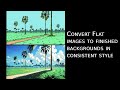
play How to convert flat backgrounds to final output with Autodraft Ai
autodraft-project
autodraft-prompt

Autodraft

Brand: All Bots Technologies

  • 4.2

  • 3 Ratings

AutoDraft AI is an artificial intelligence-based legal document automation solution. It allows users to create personalised contracts, agreements, and business documents in real-time using an easy-to-use question-and-answer interface.

See More

Have you used Autodraft before?

Share your insights for better experience

Add a Review
Starting Price
₹833 excl.GST
₹ 983 incl. GST

View plans

offer Save upto 18%, Get GST Invoice on your business purchase T&C
offer Buy Now & Pay Later, Check offer on payment page.
Buy Now
100% Genuine
Products
Best Price
Guaranteed
Safe & Secure
Payment
  • Description

  • Pricing

  • Features

  • Specification

  • Review

  • Compare

  • Alternatives

  • FAQ

  • Questions

Starting at ₹833
Buy Now

Autodraft Software Overview

What is Autodraft AI?

AutoDraft AI is an artificial intelligence animation software designed to automate and simplify document creation, particularly for legal, business, and marketing needs. It generates contracts, proposals, emails, and other text-based content by analyzing user inputs and applying predefined templates or compliance rules.

The platform helps professionals save time while ensuring accuracy and adherence to industry standards. Ideal for lawyers, entrepreneurs, and corporate teams, AutoDraft AI streamlines workflows by turning complex drafting tasks into quick, AI-assisted processes.

What are the Core Features of Autodraft AI?

  • AI-Powered Document Drafting: By using the software and entering predetermined data, users can create legal or business documents without the need for manual drafting, as smart algorithms capable of understanding specific instructions will maintain accuracy.
  • Customizable Templates: Business users in need of corporate documents can find pre-prepared templates designed for common procedures, making them easy to modify as required or include terms for a specific transaction.
  • Compliance & Legal Safeguards: Important changes to documents to address industry regulations, risks, and standards under Indian law are incorporated by default, including applicable clauses to mitigate external compliance risks while automatically updating guidelines for documents as needed.
  • Collaborative Editing: Real-time editing enables multiple users to leave comments, and add/modify drafts, ensuring version control is maintained. Thus, seamless collaboration across the legal, management, and external stakeholder teams is possible.
  • E-Signature Integration: Permitting approvals and execution of documents within the platform supports streamlined processes. Signing files digitally enhances efficiency alongside robust verification and audit trail capabilities for maintaining signed documents’ legal authenticity and validity.
  • User-Friendly Dashboard: Finally, intuitive interfaces allow for simple searching, categorizing, and tracking progress on the secured and stored documents, which enhances document retrieval.

Why Businesses Choose Autodraft AI?

  • Saves Time & Reduces Costs: AutoDraft AI cuts the time spent drafting documents from hours to just minutes, greatly lowering legal costs associated with hiring lawyers for contracts through document automation.
  • Minimizes Legal Risks: It assists in avoiding expensive mistakes or penalties for non-compliance by ensuring documents and policies are within compliance thresholds through its proprietary checks for Indian laws.
  • Improves Operational Efficiency: Issue escalations and negotiations speed up with accelerated document approvals as the platform’s template library and AI-based suggestions help create uniform documents throughout the departments with no discrepancies.
  • Enhances Collaboration: Legal, HR, and management can now work together seamlessly on different geographies with remote editing, commenting, real-time version collaboration, and robust document control, which makes it perfect for distributed workforces.
  • Simplifies Digital Workflows: Documents can be securely stored, kept, e-signed, and archived all in one platform, enabling comprehensive document management from drafting to signing to storing.
  • Scalable for Growth: Businesses, whether startups or enterprises expanding or shrinking, will appreciate AutoDraft AI, as there is no need to hire additional staff to handle the increased number of documents.

Similar Products to Autodraft AI

Some of the similar products to AutoDraft AI are Animaker, Animation Desk, VideoScribe, and more.

AutoDraft AI Pricing

AutoDraft AI pricing starts from INR 833 per month at tecjockey.com. You can also get in touch with the experts at Techjockey.com for more information.

Pricing Plans:

  • Base: INR 833/month
  • Pro: INR 3,333/month
Read more

All Bots Technologies Company Details

Founded Year:  2023

Autodraft is a cutting-edge platform that leverages custom-trained Ai models to streamline various aspects of animation production such as Characters, Objects, and Art style consistencies.

Director/Founders Jay Parmar, Sachin Patil
Company Size 1-100 Employees

Autodraft Pricing & Plans

Base

Calculated Price

833 Exclusive of all taxes
    • Licenses

      Licenses
      Licenses
    • Monthly

      Monthly
      Monthly

Key Features

  • 1000 credits per month

  • AI Character Generator

  • AI Video Generator

  • AI Voice Overs

  • AI Magic Tools

  • AI Image Generator

  • AI Voice Cloning

  • 4K Download

Pro

Calculated Price

3333 Exclusive of all taxes
    • Licenses

      Licenses
      Licenses
    • Monthly

      Monthly
      Monthly

Key Features

  • 4000 credits per month

  • AI Character Generator

  • AI Video Generator

  • AI Voice Overs

  • AI Magic Tools

  • AI Image Generator

  • AI Voice Cloning

  • 4K Download

Autodraft Features

  • icon_check AI Background Generator
    Generate detailed cartoon-style backgrounds from text prompts to suit scene context.
  • icon_check AI Character Creation
    Create custom characters from text descriptions or prompts - no drawing needed.
  • icon_check Automatic Lip-Sync
    Characters speak and emote naturally: 100+ expressions + lip-sync from AI-generated voice.
  • icon_check Drag-and-Drop Timeline Editor
    Arrange scenes, timing, audio, animations and effects via a simple timeline editor.
  • icon_check Export in HD / 4K Quality
    Final animations can be exported in high resolution - ready for YouTube, social media, etc.
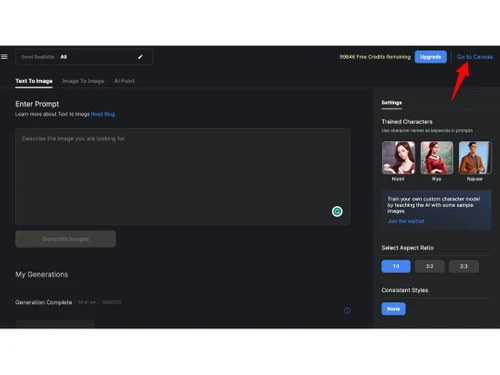
  • icon_check Text to Image
    Generate stunning animation backgrounds from simple text prompts, ensuring consistent quality across projects.
  • icon_check Storyboard to Image
    Upload storyboard references to create detailed backgrounds quickly, giving animators precise control over their output.
  • icon_check Sketch to Image
    Transform rough sketches into polished, high-quality backgrounds, allowing artists to refine ideas swiftly.
  • icon_check Image Stylization
    Apply consistent styles to reference images to match your project's aesthetic effortlessly.
  • icon_check Templates
    Access over 100 consistent style templates to maintain a cohesive look across animations.
  • icon_check AI Voice Overs
    Enhance animations with lifelike AI-generated voiceovers, adding depth to your storytelling.​
  • icon_check Real-Time Collaboration
    Work seamlessly with team members in real-time, enhancing communication and efficiency during project development.
  • icon_check Layer Management
    Organize and manage different elements of your animation effectively, streamlining the editing process.
  • icon_check Chroma Key
    Easily remove backgrounds from images or videos, facilitating the integration of various elements into your animations.
  • icon_check Flat Color to Image
    Convert flat-colored images into vibrant, stylized backgrounds, controlling both structure and color for tailored results.
Autodraft Demo Video play icon

Get Autodraft Demo

Watch the demo video to explore key features, real workflows, and how the software fits your business needs.

Understand
Key Features
Personal
Demo Insights
Interactive
Demo Support

Autodraft Specifications

Supported Platforms
Ubuntu Ubuntu Windows Windows MacOS MacOS Linux Linux
Devices
Desktop Desktop
Deployment
Cloud-Based Cloud-Based
Suitable For
All Industries
Business Specific
All Businesses
Business Size
Small Business Startups Medium Business Enterprises SMBs SMEs MSMBs MSMEs
Customer Support
Email Communities Forums
Language
English
Training Resources
Videos
AI Features
AI Integrated

Explore the Best Alternative Solutions Similar to Your Business Size and Needs

Autodraft Review

4.2

Out of 5

img

Overall Rating

Based on
3 Verified Ratings

Rating Breakdown

  • Features 4.1
  • Value for Money 4.1
  • Ease of Use 4.5
  • Customer Support 4

100% Recommend this Product

Add Review

Techjockey Trusted Reviews from Verified Users

No reviews are currently available for Autodraft. Discover similar Animation Software reviews

  • Animaker

    4.5

    Whats great - I started using Animaker because of a sudden influx of assignments during my career’s initial video editing career. Today, th... read more

  • VideoScribe

    4.4

    Whats great - First of all, Videoscribe is great for making animated presentations. Just in case, you forgot to save the recent changes, wo... read more
  • Autodesk Maya

    4.8

    Whats great - Autodesk Maya is the best tool to convert your ideas into reality. You have a lot of possibilies with this software. If you w... read more

Compare Autodraft With other Animation Software

Products
Ratings
Pricing
Device Supported
Deployment
Supported Platforms
  • img

    Autodraft

  • 4.2

  • ₹ 833.00 excl. GST

  • Desktop

    Mobile

  • Web based

    On Premises

  • Windows

    Mac OS

  • img

    Autodesk Maya

  • 4.7

  • ₹ 16520

  • Desktop

    Mobile

  • Web based

    On Premises

  • Windows

    Mac OS

  • img

    VideoScribe

  • 4.4

  • Price On Request

  • Desktop

    Mobile

  • Web based

    On Premises

  • Windows

    Mac OS

  • img

    LottieFiles

  • 4.3

  • Price On Request

  • Desktop

    Mobile

  • Web based

    On Premises

  • Windows

    Mac OS

  • img

    Jitter

  • 4.4

  • Price On Request

  • Desktop

    Mobile

  • Web based

    On Premises

  • Windows

    Mac OS

  • img

    Animation Desk

  • 4.6

  • Price On Request

  • Desktop

    Mobile

  • Web based

    On Premises

  • Windows

    Mac OS

  • img

    Immersity AI

  • 4.3

  • Price On Request

  • Desktop

    Mobile

  • Web based

    On Premises

  • Windows

    Mac OS

  • img

    Toonly

  • 4.4

  • Price On Request

  • Desktop

    Mobile

  • Web based

    On Premises

  • Windows

    Mac OS

  • img

    ImagetoCartoon

  • 4.3

  • Price On Request

  • Desktop

    Mobile

  • Web based

    On Premises

  • Windows

    Mac OS

  • img

    Lordicon

  • 4.5

  • Price On Request

  • Desktop

    Mobile

  • Web based

    On Premises

  • Windows

    Mac OS

  • img

    Deepmotion

  • 4.6

  • Price On Request

  • Desktop

    Mobile

  • Web based

    On Premises

  • Windows

    Mac OS

(2) Product(s) selected

Autodraft Alternatives

See All Autodraft Alternatives

Starting Price:

$240 /User/Year

Starting Price:

$16

Starting Price:

$15 /Month
Starting Price:

$69 /Quantity $99

SAVE UPTO 30%

Starting Price:

$11 /Month

Starting Price:

$10 /Month

Starting Price:

$70 /Licenses

Articles for Autodraft

See All Related Articles

How much does AutoDraft AI cost?

The initial price of AutoDraft AI is INR 833/month.

Who uses AutoDraft AI?

The major users of AutoDraft AI are Legal Professionals, Realtors & Brokers, Startups & SMEs, Freelancers & Consultants, Educational Institutions, and more.

How does AutoDraft AI work?

AutoDraft AI uses artificial intelligence (AI), machine learning (ML), and natural language processing (NLP) to automate document creation, review, and customization of business and legal documents.

Is AutoDraft AI safe to use?

Yes, AutoDraft AI is safe, but as with any legal tool powered by AI, its dependability and safety are based on several parameters, such as handling data, compliance, and management by the user.

Is AutoDraft AI free or paid?

AutoDraft does not offer a free plan. The starting pricing plan starts from INR 833/month.

Autodraft Questions

A:

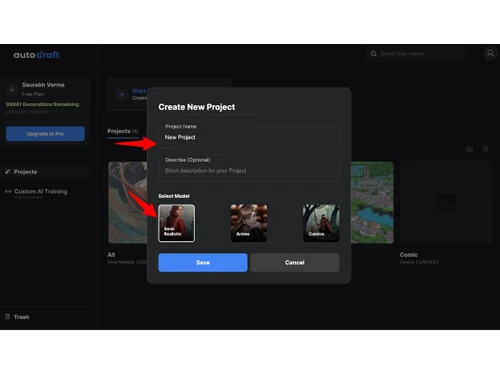
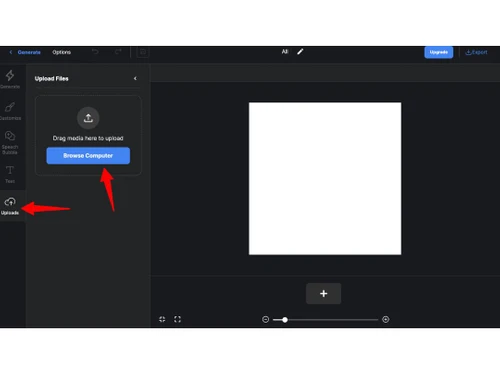
To use Autodraft AI's Image to Image AI Generator to create an anime-style image from a photo, you'll need to upload your photo, select the 'Anime' style, and refine your prompt for the best results.

Gurmaan Singh Jul 20, 2025
A:

Yes, it's possible to receive a copyright claim or strike on YouTube if you use copyrighted material from Autodraft AI.

Deepak Jul 21, 2025
Q:

how to make my own characters in autodraft ai?

Aryesh Seth Jul 16, 2025
A:

To create your own characters in Autodraft AI, navigate to the 'Create Animation & Voiceover' section, select 'AI Character,' and input a descriptive prompt detailing your character's features.

Bikram Sarkar Jul 18, 2025
A:

To train a custom model in Autodraft AI, you'll need a dataset comprising images that represent the specific characters, styles, or scenarios you wish the AI to learn.

Niraj Jul 20, 2025
Q:

What payment methods are supported in Autodraft AI?

mayank aggarwal Jul 11, 2025
A:

Autodraft AI supports standard online payment methods, including credit and debit cards. However, specific details about accepted payment options like PayPal or bank transfers are not explicitly mentioned on their official website.

Savad Mk Jul 19, 2025
See All Autodraft Questions

20,000+ Software Listed

Best Price Guranteed

Free Expert Consultation

2M+ Happy Customers

Terms and Condtions

close

Users with registered businesses can purchase goods from merchants on the platform to satisfy their business needs. Users are not permitted to utilize any products acquired through the platform for resale, advertising, business, or further distribution.

For each purchase made, users will receive a Tax Invoice (or 'GST invoice') that includes specific details such as:

  • the GSTIN of the user associated with their registered business, and

  • the specified Entity Name for their business.

It should be noted that not all products are eligible for GST Invoice. Only the products displayed by participating sellers with the 'GST-based Invoice Available' callout on the product description page would qualify.

Certain goods and services are not eligible to get a GST Invoice, including items with VAS, i.e., Value Added Services (e.g., Total Mobile Protection/Assured Buyback) and those involving an exchange offer at the time of purchase.

Users must ensure the accuracy of the GSTIN, and business entity name provided for the GST Invoice. Requests for corrections into GST Invoice would not be accommodated by Techjockey.com or any Seller, and any issues arising from user-provided information are the sole responsibility of users.

Techjockey.com is not liable for the GST Invoice or any associated input tax credit. To efficiently claim an input tax credit, users should select the registered place of business address as per the GST authority's data and follow the provisions of the GST Act and rules.

To claim an input tax credit, the delivery and billing addresses must match. Furthermore, input tax credits will not be granted if the delivery address and GSTIN on the invoice are from different states. In case of incorrect GST details provided during the order placement, the order will be canceled automatically.