linkedin
Vyond logo
play What is Vyond - Vyond Demo
Vyond
Vyond

Vyond

Brand: GoAnimate

  • 4.3

  • 4 Ratings & 1 Review

Vyond is a web-based animation making software that is suitable for all industry types. Users get access to a massive media library consisting of multiple characters, designs, templates and images which helps them in video creation. With this animated video software, users can create animated GIFs and MP4 videos, which can be shared with multiple media platforms like Captivate, Storyline, etc. Th...

See More

Have you used Vyond before?

Share your insights for better experience

Add a Review
Starting Price
$99

View plans

100% Genuine
Products
Best Price
Guaranteed
Safe & Secure
Payment
  • Description

  • Pricing

  • Features

  • Specification

  • Review

  • Compare

  • Alternatives

  • FAQ

Starting at $99

Vyond Software Overview

What is Vyond?

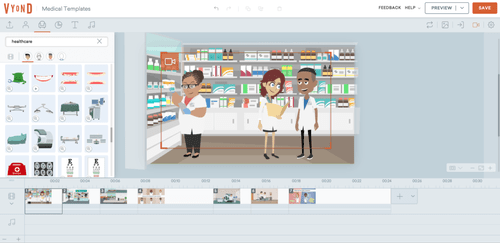
Vyond is a web-based animation making software that is suitable for all industry types. Users get access to a massive media library consisting of multiple characters, designs, templates and images which helps them in video creation. With this animated video software, users can create animated GIFs and MP4 videos, which can be shared with multiple media platforms like Captivate, Storyline, etc. The drag and drop controls offered by the animation making software allows users to make changes within a video in real-time. Moreover, Vyond animation software is compatible with various learning management systems and social media platforms, making it easy for users to create videos for training and marketing purposes. Most importantly, Vyond follows a strict data protection policy and is compatible with multiple data protection protocols all around the globe.  

How does Vyond animation software influence employee communication?

  1. Vyond whiteboard animation software features a wide variety of tools and resources that can be used to create professional-looking videos in real-time. 
  2. Videos created via Vyond can be shared globally and translated into multiple languages. Thus, allowing an organization to channelize their business ideas, make important announcements or plan a project.
  3. Vyond can be termed as the best animation software, as it features a friendly user interface. It also ensures that editing or adjusting certain parameters within a video is no more a tiresome process.
  4. Videos created via Vyond increase the engagement level within an organization, as the customizable templates offered by the software helps convey an idea convincingly. 

Pricing of Vyond Animation making Software

Vyond price is available at USD 99 at techjockey.com 

Send us a callback request in case you want to get more information related to Vyond pricing. 

Compatible Platforms for Vyond Animated Videos Software

Vyond is a web-based solution that is compatible with Microsoft Windows and Mac OS platforms.

What are the benefits of using Vyond Animation Software?

  1. Inbuilt Library: Vyond 2D animation software has inbuilt design templates that can be customized as well. Users can add in colors, voice, text and music as per their choice.
  2. Import MP4: Users can import live-action videos, add in text and graphics over them or overlay the imported video with another one. They can create demos, tutorials or plan out a project with ease.
  3. Customized Character Creator: With the help of Vyond 3D animation software, users can add characters within their videos. They can customize the clothing and appearance of the character as per their choice. The color and design of side props can also be changed to make the video more interesting and appealing for the viewers. 
  4. Automated Lip Sync: Users can record their own voice and sync them with the characters within their videos. 
  5. Penetration Tests and Monitoring: Vyond whiteboard animation software undergoes regular vulnerability tests, periodic internal tests, AWS own independent tests and 24/7 monitoring.    
Read more

Vyond Pricing & Plans

Starter
Key Features
  • Access to AI avatars and tools
  • 650+ high quality text to speech voices
  • Screen and webcam recording
  • 10,000 credits per user, per month
  • Whiteboard
  • Contemporary
Starting at $99
    • Users

      Users
      Users
    • Licenses

      Licenses
      Licenses

Key Features

  • Access to AI avatars and tools

  • 650+ high quality text to speech voices

  • Screen and webcam recording

  • 10,000 credits per user, per month

  • Whiteboard

  • Contemporary

Vyond Features

  • icon_check Multiple animation styles
    Support for animated, mixed-media, and photorealistic video styles for varied use-cases.
  • icon_check Character creator
    Customize characters’ outfits, expressions, and poses to match your narrative.
  • icon_check Automatic lip sync
    Characters automatically sync mouth movements to dialogue or voiceovers.
  • icon_check Instant language translation
    Translate videos into 70–80+ languages automatically for global audiences.
  • icon_check Team collaboration tools
    Shareable projects, version history, and group workspaces for team content creation.
  • icon_check Responsive Support
    Cloud-hosted platform with secure project storage and support resources.
  • icon_check Video Collaboration Tools
    By using Vyond, users can access a wide variety of video collaboration tools, using which they can make dynamic videos for the
  • icon_check Make animated social posts
    With Vyond, users can make powerful social media content to improve their conversion rates and expand their market reach.
  • icon_check Whiteboard Animation Videos
    The software can be used as a whiteboard video maker to explain any concept or idea in detail.
  • icon_check User Management
    Vyond features a friendly user interface, enabling its users to operate it in a hassle-free manner.
  • icon_check Branding
    The animated videos software focuses on a concept-based branding strategy through whiteboard animation videos, training sessions,
  • icon_check Live Chat
    Vyond offers adequate support to its customers over emails and live chats.
  • icon_check Security
    The software abides by data protection standards to ensure that the user’s data is stored in a safe and secure manner.
Vyond Demo Video play icon

Get Vyond Demo

Watch the demo video to explore key features, real workflows, and how the software fits your business needs.

Understand
Key Features
Personal
Demo Insights
Interactive
Demo Support

Vyond Specifications

Supported Platforms
Windows Windows iOS iOS Android Android Linux Linux
Devices
Desktop Desktop Mobile Mobile Tablet Tablet iPad iPad
Deployment
Cloud-Based Cloud-Based
Suitable For
Media House
Business Specific
Media
Business Size
Individual Small Business Startups Medium Business SMBs SMEs MSMBs
Customer Support
Email Live Chat Communities Forums
Language
English
Training Resources
Live Online Webinars Documentation Videos
Technology
Next Generation

Explore the Best Alternative Solutions Similar to Your Business Size and Needs

Vyond Review

4.3

Out of 5

img

Overall Rating

Based on
1 Verified Review

Rating Breakdown

  • Features 4.2
  • Value for Money 4.7
  • Ease of Use 4.1
  • Customer Support 4.1

92% Recommend this Product

Add Review

Vyond Video Review

youtubeVideoId

4.1

“Vyond Review: WATCH THIS BEFORE YOU BUY VYOND! ”

Review by: How to Digital

Compare Vyond With other Animation Software

Products
Ratings
Pricing
Device Supported
Deployment
Supported Platforms
  • img

    Vyond

  • 4.3

  • Price On Request

  • Desktop

    Mobile

  • Web based

    On Premises

  • Windows

    Mac OS

  • img

    Autodesk Maya

  • 4.7

  • ₹ 16520

  • Desktop

    Mobile

  • Web based

    On Premises

  • Windows

    Mac OS

  • img

    Autodraft

  • 4.2

  • ₹ 833

  • Desktop

    Mobile

  • Web based

    On Premises

  • Windows

    Mac OS

  • img

    VideoScribe

  • 4.4

  • Price On Request

  • Desktop

    Mobile

  • Web based

    On Premises

  • Windows

    Mac OS

  • img

    LottieFiles

  • 4.3

  • Price On Request

  • Desktop

    Mobile

  • Web based

    On Premises

  • Windows

    Mac OS

  • img

    Jitter

  • 4.4

  • Price On Request

  • Desktop

    Mobile

  • Web based

    On Premises

  • Windows

    Mac OS

  • img

    Animation Desk

  • 4.6

  • Price On Request

  • Desktop

    Mobile

  • Web based

    On Premises

  • Windows

    Mac OS

  • img

    Immersity AI

  • 4.3

  • Price On Request

  • Desktop

    Mobile

  • Web based

    On Premises

  • Windows

    Mac OS

  • img

    Toonly

  • 4.4

  • Price On Request

  • Desktop

    Mobile

  • Web based

    On Premises

  • Windows

    Mac OS

  • img

    ImagetoCartoon

  • 4.3

  • Price On Request

  • Desktop

    Mobile

  • Web based

    On Premises

  • Windows

    Mac OS

  • img

    Lordicon

  • 4.5

  • Price On Request

  • Desktop

    Mobile

  • Web based

    On Premises

  • Windows

    Mac OS

(0) Product(s) selected

Vyond Alternatives

See All Vyond Alternatives

Starting Price:

$240 /User/Year

Starting Price:

$16

Starting Price:

$15 /Month
Starting Price:

$69 /Quantity $99

SAVE UPTO 30%

Starting Price:

$11 /Month

Starting Price:

$10 /Month

Starting Price:

$70 /Licenses

Articles for Vyond

See All Related Articles

How is the camera tool offered by Vyond animation software useful for its users?

Users can experiment with the camera angle and add pan zoom with the help of the camera tool offered by Vyond animation software.

What type of privacy shield compliance is offered by Vyond?

The software is designed in compliance with Swiss-US and EU-US Privacy Shield Frameworks.

Can I get a demo of Vyond animation software?

Yes, Techjockey provides an online demo for Vyond whiteboard animation software to both beginners and professionals.

Can I import images of my choice within Vyond?

You can import multiple images and company logos as per your needs. You can give them a professional look by adding exit and enter effects within them.

Does Vyond have a mobile app?

Vyond does not have a mobile app as of now.

How much does Vyond cost?

Vyond price is available at USD 99 at techjockey.com 

20,000+ Software Listed

Best Price Guranteed

Free Expert Consultation

2M+ Happy Customers

Terms and Condtions

close

Users with registered businesses can purchase goods from merchants on the platform to satisfy their business needs. Users are not permitted to utilize any products acquired through the platform for resale, advertising, business, or further distribution.

For each purchase made, users will receive a Tax Invoice (or 'GST invoice') that includes specific details such as:

  • the GSTIN of the user associated with their registered business, and

  • the specified Entity Name for their business.

It should be noted that not all products are eligible for GST Invoice. Only the products displayed by participating sellers with the 'GST-based Invoice Available' callout on the product description page would qualify.

Certain goods and services are not eligible to get a GST Invoice, including items with VAS, i.e., Value Added Services (e.g., Total Mobile Protection/Assured Buyback) and those involving an exchange offer at the time of purchase.

Users must ensure the accuracy of the GSTIN, and business entity name provided for the GST Invoice. Requests for corrections into GST Invoice would not be accommodated by Techjockey.com or any Seller, and any issues arising from user-provided information are the sole responsibility of users.

Techjockey.com is not liable for the GST Invoice or any associated input tax credit. To efficiently claim an input tax credit, users should select the registered place of business address as per the GST authority's data and follow the provisions of the GST Act and rules.

To claim an input tax credit, the delivery and billing addresses must match. Furthermore, input tax credits will not be granted if the delivery address and GSTIN on the invoice are from different states. In case of incorrect GST details provided during the order placement, the order will be canceled automatically.