linkedin
Marionette logo
play Marionette Studio Animation Demo Reel 2019
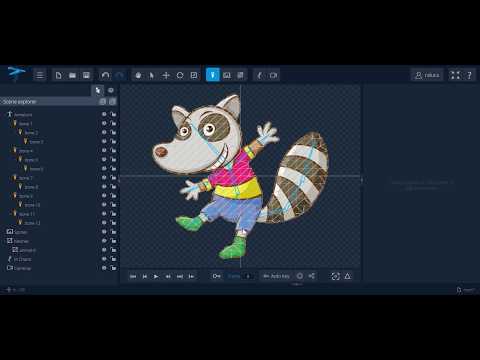
play Using skinning and automatic mesh generation
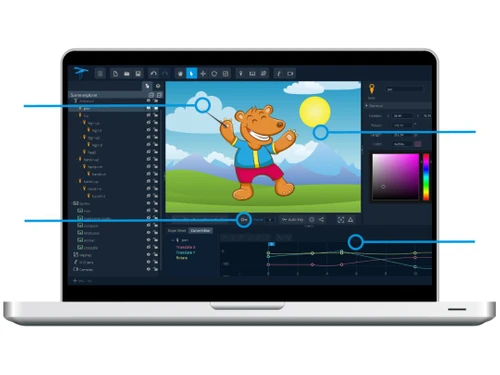
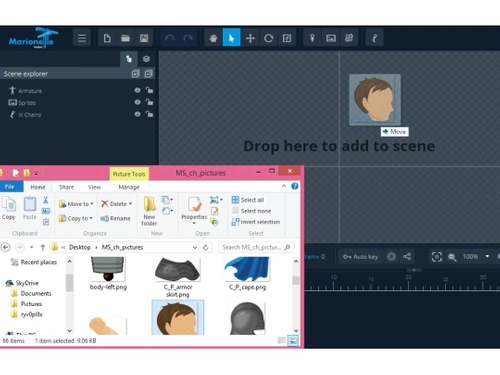
marionette scene

Marionette

Brand: Marionette Studio

  • 4.2

  • 5 Ratings

Marionette is a powerful animation software designed for creating 2D animations with advanced features like weight painting, natural deformations, and automatic weights calculation. It is suitable for media houses, small businesses, startups, and enterprises.

See More

Have you used Marionette before?

Share your insights for better experience

Add a Review
Starting Price
$11

View plans

100% Genuine
Products
Best Price
Guaranteed
Safe & Secure
Payment
  • Description

  • Pricing

  • Features

  • Specification

  • Review

  • Compare

  • Alternatives

  • FAQ

Starting at $11

Marionette Software Overview

What is Marionette?

Marionette is a sophisticated 2D animation software designed to empower artists and animators with a comprehensive set of tools for bringing their creative visions to life. It provides advanced features such as weight painting, animation FX, natural deformations, and automatic weights calculation, enabling users to create intricate and realistic animations. The software also simplifies the animation process with an intuitive interface and automated functionalities.

Marionette caters to a wide range of users, from individual artists and small businesses to large media houses and enterprises, seeking to produce high-quality 2D animations. Its versatile platform support, spanning Windows, macOS, Linux, and Ubuntu, ensures accessibility for users across different operating systems. The user-friendly interface simplifies the animation process, making it accessible to both beginners and experienced animators.

Why Choose Marionette Animation Software?

Let's face it, the animation world is brimming with software choices. So, why pick Marionette? Here's the breakdown:

  • Animation Powerhouse: Marionette is more than just basic animation software. It offers advanced tools like weight painting, letting you control the way characters deform and move with unprecedented realism. Think of it like giving your characters real bones and muscles! Features like natural deformations and automatic weights calculation further streamline the process, allowing you to focus on the creative aspects of your animation.
  • Works Everywhere: Whether you're a Mac devotee, a Windows wizard, or a Linux loyalist, Marionette has you covered. Its cross-platform compatibility means you're not tied to a specific operating system. This flexibility is a huge plus for collaborative projects and diverse teams.
  • Easy to Learn, Powerful to Use: Marionette strikes the perfect balance between ease of use and advanced functionality. The intuitive interface welcomes newcomers, while the robust feature set empowers seasoned animators to push their creative boundaries.
  • Scalability for Growth: Whether you're a small startup or a large enterprise, Marionette can adapt to your needs. It's designed to handle projects of any scale, making it a smart investment for businesses looking to grow.
  • Support That's Got Your Back: Learning new software can be daunting, but Marionette offers comprehensive support resources. From customer service to training materials and video tutorials, you'll have everything you need to master the software quickly.

Benefits of Marionette ANimation Software

Choosing the right animation software can make or break your project. Here's how Marionette can benefit your workflow:

  • Elevate Your Animation Quality: Marionette empowers you to create professional-grade animations. Its advanced features give you fine-grained control over every detail, from subtle character movements to dynamic special effects. The result? Animations that are polished, professional, and truly captivating.
  • Boost Your Efficiency: Time is money, especially in the fast-paced world of animation. Marionette's automated features and intuitive interface streamline your workflow, saving you valuable time and effort. You can focus on bringing your creative vision to life, not wrestling with complicated software.
  • Freedom to Choose Your Platform: With Marionette, you're not tied down to a specific operating system. Its broad platform support gives you the freedom to work on your preferred platform, whether it's Windows, macOS, Linux, or Ubuntu.
  • Scale Up Seamlessly: As your business grows, your animation needs will evolve. Marionette is built to scale, allowing you to handle larger and more complex projects without skipping a beat.
  • Learn and Grow with Ease: Marionette provides a wealth of learning resources to help you get up to speed quickly. From helpful documentation to video tutorials and responsive customer support, you'll have all the tools you need to master the software and maximize its potential.

Pricing of Marionette

Marionette pricing starts at $11 at techjockey.com.

The pricing model is based on different parameters, including the amount of bandwidth you need, the number of servers you need, and the features you need. For further queries related to the product, you can contact our product team and learn more about the pricing and offers.

Read more

Marionette Pricing & Plans

STARTER
Starting at $11
    • Monthly

      Monthly
      Monthly

Key Features

  • Scenes-5

  • Camera-SD

  • Shared player

  • Bone rigging

  • Layer ordering

  • Image opacity

  • Dopesheet

  • Keyframes

PRO
Starting at $37
    • Monthly

      Monthly
      Monthly

Key Features

  • Scenes-Unlimited

  • Camera-HD

  • Shared player

  • Bone rigging

  • Layer ordering

  • Image opacity

  • Dopesheet

  • Keyframes

Marionette Features

  • icon_check 2D Animation
    Create professional 2D animations.
  • icon_check Weight Painting
    Control character deformation precisely.
  • icon_check Animation FX
    Add dynamic special effects to animations.
  • icon_check Cloud storage & collaboration
    Save projects online and collaborate/receive feedback with teammates easily.
  • icon_check Bone rigging system
    Define a skeleton of bones on images to create skeletal character animations.
  • icon_check Keyframe Animation Tools
    Set keyframes and animate object transformations over time.
  • icon_check Inverse kinematics support
    Animate natural chained bone movements with IK constraints.
  • icon_check Automatic Mesh Generation
    Generate character meshes automatically for faster deformation.
  • icon_check Natural Deformations
    Achieve realistic character movements.
  • icon_check Automatic Weights Calculation
    Quickly calculate character weights.
  • icon_check Rendering
    High-quality rendering for your animations.
  • icon_check Import/Export Management
    Easily manage your animation files.
  • icon_check Layers
    Organize your animation projects efficiently.
Marionette Demo Video play icon

Get Marionette Demo

Watch the demo video to explore key features, real workflows, and how the software fits your business needs.

Understand
Key Features
Personal
Demo Insights
Interactive
Demo Support

Marionette Specifications

Supported Platforms
Ubuntu Ubuntu Windows Windows MacOS MacOS Linux Linux
Devices
Desktop Desktop
Deployment
Cloud-Based Cloud-Based
Suitable For
Media House
Business Specific
Media
Business Size
Small Business Startups Medium Business Enterprises
Customer Support
Phone Email Communities
Language
English
Training Resources
Documentation Videos

Explore the Best Alternative Solutions Similar to Your Business Size and Needs

Marionette Review

4.2

Out of 5

img

Overall Rating

Based on
5 Verified Ratings

Rating Breakdown

  • Features 4.5
  • Value for Money 3.9
  • Ease of Use 4.2
  • Customer Support 4.3

88% Recommend this Product

Add Review

Techjockey Trusted Reviews from Verified Users

No reviews are currently available for Marionette. Discover similar Animation Software reviews

  • Animaker

    4.5

    Whats great - I started using Animaker because of a sudden influx of assignments during my career’s initial video editing career. Today, th... read more

  • VideoScribe

    4.4

    Whats great - First of all, Videoscribe is great for making animated presentations. Just in case, you forgot to save the recent changes, wo... read more
  • Autodesk Maya

    4.8

    Whats great - Autodesk Maya is the best tool to convert your ideas into reality. You have a lot of possibilies with this software. If you w... read more

Compare Marionette With other Animation Software

Products
Ratings
Pricing
Device Supported
Deployment
Supported Platforms
  • img

    Marionette

  • 4.2

  • Price On Request

  • Desktop

    Mobile

  • Web based

    On Premises

  • Windows

    Mac OS

  • img

    Autodesk Maya

  • 4.7

  • ₹ 16520

  • Desktop

    Mobile

  • Web based

    On Premises

  • Windows

    Mac OS

  • img

    Autodraft

  • 4.2

  • ₹ 833

  • Desktop

    Mobile

  • Web based

    On Premises

  • Windows

    Mac OS

  • img

    VideoScribe

  • 4.4

  • Price On Request

  • Desktop

    Mobile

  • Web based

    On Premises

  • Windows

    Mac OS

  • img

    LottieFiles

  • 4.3

  • Price On Request

  • Desktop

    Mobile

  • Web based

    On Premises

  • Windows

    Mac OS

  • img

    Jitter

  • 4.4

  • Price On Request

  • Desktop

    Mobile

  • Web based

    On Premises

  • Windows

    Mac OS

  • img

    Animation Desk

  • 4.6

  • Price On Request

  • Desktop

    Mobile

  • Web based

    On Premises

  • Windows

    Mac OS

  • img

    Immersity AI

  • 4.3

  • Price On Request

  • Desktop

    Mobile

  • Web based

    On Premises

  • Windows

    Mac OS

  • img

    Toonly

  • 4.4

  • Price On Request

  • Desktop

    Mobile

  • Web based

    On Premises

  • Windows

    Mac OS

  • img

    ImagetoCartoon

  • 4.3

  • Price On Request

  • Desktop

    Mobile

  • Web based

    On Premises

  • Windows

    Mac OS

  • img

    Lordicon

  • 4.5

  • Price On Request

  • Desktop

    Mobile

  • Web based

    On Premises

  • Windows

    Mac OS

(2) Product(s) selected

Marionette Alternatives

See All Marionette Alternatives

Starting Price:

$240 /User/Year

Starting Price:

$49

Starting Price:

$16

Starting Price:

$15 /Month
Starting Price:

$69 /Quantity $99

SAVE UPTO 30%

Starting Price:

$10 /Month

Starting Price:

$70 /Licenses

Articles for Marionette

See All Related Articles

How much does Marionette Software Platform Cost?

Marionette software pricing starts at $11 at techjockey.com.

Which operating system does Marionette Software Support?

Marionette software supports Windows, MacOS, Linux, and Ubuntu.

How does Marionette software Work?

Marionette helps animators create 2D animations efficiently using features like weight painting, animation FX, natural deformations, and automatic weights calculation. It streamlines the animation workflow, simplifying complex tasks and enhancing productivity for artists.

Does Marionette offers a free trial or a demo?

A demo of this (Marionette) is available at techjockey.com.

What features does Marionette offer?

Marionette offers features like 2D animation, weight painting, animation FX, natural deformations, automatic weights calculation, rendering, import/export management, layers, and more. You can contact our product experts for more information.

Is Marionette suitable for small businesses?

Yes, Marionette is suitable for small businesses, especially those in media or creative fields. Its affordable pricing and features for 2D animation make it accessible and valuable for smaller teams or independent animators.

Who are the potential users of Marionette Software?

Marionette is tailored for individual animators, media houses, and small to medium-sized businesses involved in content creation, advertising, or entertainment. Its features empower them to produce professional-grade 2D animations efficiently.

How secure is Marionette?

While specific security features aren't detailed, using Marionette on secure operating systems (Windows, MacOS, Linux, Ubuntu) and implementing general cybersecurity best practices enhances the protection of your projects and data. You can contact our product experts for more information.

20,000+ Software Listed

Best Price Guranteed

Free Expert Consultation

2M+ Happy Customers

Terms and Condtions

close

Users with registered businesses can purchase goods from merchants on the platform to satisfy their business needs. Users are not permitted to utilize any products acquired through the platform for resale, advertising, business, or further distribution.

For each purchase made, users will receive a Tax Invoice (or 'GST invoice') that includes specific details such as:

  • the GSTIN of the user associated with their registered business, and

  • the specified Entity Name for their business.

It should be noted that not all products are eligible for GST Invoice. Only the products displayed by participating sellers with the 'GST-based Invoice Available' callout on the product description page would qualify.

Certain goods and services are not eligible to get a GST Invoice, including items with VAS, i.e., Value Added Services (e.g., Total Mobile Protection/Assured Buyback) and those involving an exchange offer at the time of purchase.

Users must ensure the accuracy of the GSTIN, and business entity name provided for the GST Invoice. Requests for corrections into GST Invoice would not be accommodated by Techjockey.com or any Seller, and any issues arising from user-provided information are the sole responsibility of users.

Techjockey.com is not liable for the GST Invoice or any associated input tax credit. To efficiently claim an input tax credit, users should select the registered place of business address as per the GST authority's data and follow the provisions of the GST Act and rules.

To claim an input tax credit, the delivery and billing addresses must match. Furthermore, input tax credits will not be granted if the delivery address and GSTIN on the invoice are from different states. In case of incorrect GST details provided during the order placement, the order will be canceled automatically.