linkedin
Droplr logo
play Droplr: Get work done faster!
droplr
droplr

Droplr

Brand: Droplr

  • 4.3

  • 6 Ratings

Droplr is a cloud-based screen recording application with screenshot options and a file-sharing tool for collaboration.

See More

Have you used Droplr before?

Share your insights for better experience

Add a Review
Starting Price
$8

View plans

100% Genuine
Products
Best Price
Guaranteed
Safe & Secure
Payment
  • Description

  • Pricing

  • Features

  • Specification

  • Review

  • Compare

  • Alternatives

  • FAQ

Starting at $8

Droplr Software Overview

What is Droplr?

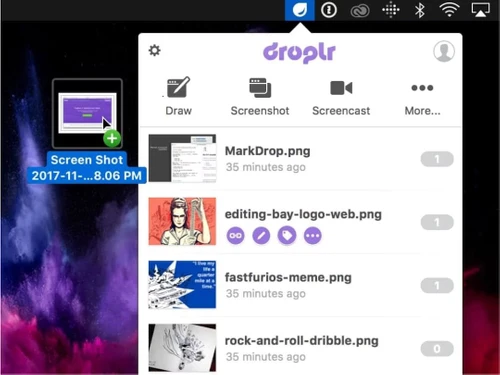
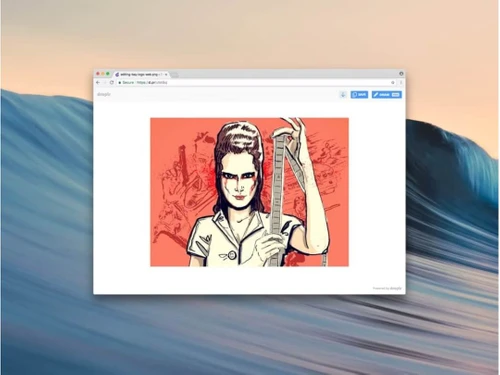
Droplr is an innovative screen recording and screenshot-capturing application. It is designed to smoothly capture screen content and recording and help it to share it. It automatically saves the screenshots and screen recordings to the cloud and generates shareable tiny URL links copied to the clipboard for access. The application has an intuitive interface that makes it easy to capture screenshots of desired length, annotate screenshots, edit images, and access saved files. It supports integration across platforms like Mac, Windows, Chrome, etc.

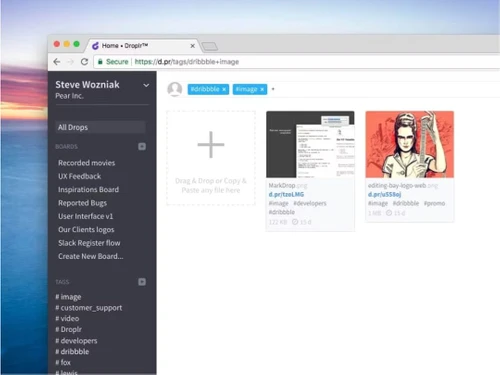
Droplr allows users to capture screenshots, record screens in HD or as GIFs, and annotate images directly within the app. The user can capture the entire screen or specific areas and has the option to capture video and webcam additional footage. It gives unlimited cloud storage and eliminates desktop clutter. It provides a built-in file uploader that supports up to 10GB of file uploads. The URL shortener simplifies sharing by generating tiny URLs. The application comes with analytics that offers insights into link activity for sharing. Through annotations, users can add text, shapes, and highlights to enhance their screenshots.

Why choose Droplr Screen Recording Software?

  • Quickly capture screenshots: The user can instantly take screenshots of your screen or selected areas for visual communication.
  • Record screen videos: It can create HD or GIF screen recordings of the screen content for tutorials, presentations, or sharing screen activity.
  • Annotate images: Add text, shapes, and highlights to screenshots through the annotation tool to emphasize important details or instructions.
  • Share files easily: Allows the user to upload files to the cloud and generate short URLs for hassle-free sharing.
  • Remote Work: Share screen recordings or annotated visuals directly via Slack or email, improving remote team collaboration and clarity.
  • Bug Reporting: Capture and annotate screenshots or record screen issues to provide developers with clear, actionable insights during software testing.

Benefits of Droplr Screen Recording Software

  • Reduces Complexity: It simplifies the process of capturing, annotating, and sharing screen information.
  • Increases Accessibility: Provides cloud storage and short URLs for easy access and sharing of files.
  • Enhances Communication: Improves clarity with annotated images and videos for detailed explanations to the users.
  • Time-Saving: Automates screenshot and screen recording workflows, instantly generating shareable cloud links.
  • Storge: Eliminates local storage mess by providing cloud storage saving all files directly to the cloud.
  • Enhanced Collaboration: Helps in smooth sharing of annotated visuals and recordings for better team communication.
  • Platform Flexibility: Available for Mac, Windows, Chrome, and iOS, ensuring accessibility across devices.
  • Quality Presentations: Enables HD recordings with webcam overlays for polished and personalized presentations.

Pricing of Droplr Screen Recording Software

Droplr pricing starts at $8. Droplr comes with multiple pricing plans and caters to the diverse customer base.

For subscription-related details and offers on premium packages, please request a call back from our product experts.

Read more

Droplr Company Details

Founded Year:  2012

Capture and share a screenshot or screen recording instantly. No need to save files: it’s in the cloud! Perfect for customer support and product management.

Director/Founders Levi Nunnink and Josh Bryant
Company Size 1-100 Employees

Droplr Pricing & Plans

Pro Plus
Starting at $8
    • Licenses

      Licenses
      Licenses
    • Monthly

      Monthly
      Monthly

Key Features

  • Annotate & Markups

  • Blurring tool

  • Screen Recorder

  • Click analytics

Team
Starting at $9
    • Users

      Users
      Users
    • Monthly

      Monthly
      Monthly

Key Features

  • All features of Pro Plus +

  • Team controls

  • Customization

  • Team analytics

Droplr Features

  • icon_check Screenshots Capture
    Enables capturing entire screen or selected areas for visual documentation and clear communication.
  • icon_check Video Recording
    Allows creating detailed HD or GIF recordings for tutorials, presentations, or sharing screen activity.
  • icon_check Link Sharing
    Simplifies sharing content by generating short URLs, making access convenient for recipients.
  • icon_check Annotations
    Enhances images with text, shapes, and highlights, ensuring important details are easily communicated.
  • icon_check File Management
    Manages workflow by uploading files directly to the cloud for easy access and sharing.
  • icon_check Integration
    Works smoothly with other tools and platforms, enhancing productivity and efficiency.
  • icon_check Team Collaboration
    Helps in teamwork by sharing visual content and feedback swiftly, improving remote collaboration.
  • icon_check Security
    Protects your data with secure cloud storage, ensuring that your information is always safe.
  • icon_check Analytics
    Provides insights into usage patterns and performance, helping you optimize your workflow.
Droplr Demo Video play icon

Get Droplr Demo

Watch the demo video to explore key features, real workflows, and how the software fits your business needs.

Understand
Key Features
Personal
Demo Insights
Interactive
Demo Support

Droplr Specifications

Supported Platforms
Windows Windows iOS iOS MacOS MacOS
Devices
Desktop Desktop
Deployment
Cloud-Based Cloud-Based
Suitable For
All Industries
Business Specific
All Businesses
Business Size
Small Business Medium Business SMBs
Customer Support
Forums
Language
English
Training Resources
Documentation Videos

Explore the Best Alternative Solutions Similar to Your Business Size and Needs

Droplr Review

4.3

Out of 5

img

Overall Rating

Based on
6 Verified Ratings

Rating Breakdown

  • Features 4.5
  • Value for Money 4.0
  • Ease of Use 4.3
  • Customer Support 4.2

86% Recommend this Product

Add Review

Techjockey Trusted Reviews from Verified Users

No reviews are currently available for Droplr. Discover similar Screen Recording Software reviews

  • GOM CAM Screen Recording

    4.8

    Whats great - So easy to use, not only for simply recording your pc screen also you can add text, underline it, add webcams. So useful for ... read more

  • Camtasia

    4.6

    Whats great - Have made great videos for my youtube channel and the overall experience is great read more

  • DU Recorder

    4.4

    Whats great - Edit all your recordings with this recorder. Equally easy is cropping and linking together of the different fragments. read more

Compare Droplr With other Screen Recording Software

Products
Ratings
Pricing
Device Supported
Deployment
Supported Platforms
  • img

    Droplr

  • 4.3

  • Price On Request

  • Desktop

    Mobile

  • Web based

    On Premises

  • Windows

    Mac OS

  • img

    Camtasia

  • 4.5

  • ₹ 7099

  • Desktop

    Mobile

  • Web based

    On Premises

  • Windows

    Mac OS

  • img

    ScreenPal

  • 4.2

  • Price On Request

  • Desktop

    Mobile

  • Web based

    On Premises

  • Windows

    Mac OS

  • img

    Fraps

  • 4.3

  • Price On Request

  • Desktop

    Mobile

  • Web based

    On Premises

  • Windows

    Mac OS

  • img

    Fluvid

  • 4.2

  • Price On Request

  • Desktop

    Mobile

  • Web based

    On Premises

  • Windows

    Mac OS

  • img

    Screen Studio

  • 4.3

  • Price On Request

  • Desktop

    Mobile

  • Web based

    On Premises

  • Windows

    Mac OS

  • img

    Macro Recorder

  • 4.1

  • ₹ 9376

  • Desktop

    Mobile

  • Web based

    On Premises

  • Windows

    Mac OS

  • img

    TechSmith Snagit

  • 4.6

  • ₹ 1499

  • Desktop

    Mobile

  • Web based

    On Premises

  • Windows

    Mac OS

(0) Product(s) selected

Droplr Alternatives

See All Droplr Alternatives

Starting Price:

$3 /Month

Starting Price:

$37 /Quantity

Articles for Droplr

See All Related Articles

Who are the potential users of Droplr?

Droplr is ideal for professionals in design, media, remote work, customer support, and software development.

Is a demo available for Droplr?

Yes, users can request a demo on the Droplr website or www.techjockey.com to explore its features and workflow.

On which operating systems can Droplr run?

Droplr is available for Mac, Windows, iOS, Chrome Extension, and Chromebook.

How can users annotate screenshots using Droplr?

Droplr provides tools to add text, highlights, arrows, circles, and boxes directly to screenshots.

What type of files can users upload to Droplr Screen Recording Software?

Users can upload any file type up to 10GB, like documents, images, and videos.

Can I use Droplr to capture full webpage screenshots?

Yes, Droplr has a feature that allows capturing full webpage screenshots with a single click.

Can Droplr record webcam alongside screen?

Yes, Droplr allows users to integrate webcam footage with screen recordings.

How can a user upload files to Droplr Screen Recording Software?

A user can drag and drop files into Droplr for automatic uploading to cloud storage.

Can Droplr integrate with other applications?

Yes, Droplr integrates with Slack, email, project management tools, and bug-reporting platforms for seamless workflows.

What file formats are supported for downloading screen recordings on Droplr?

Screen recordings can be downloaded in WebM, MPEG-4, or PNG formats, depending on user preferences.

How much does Droplr cost?

Droplr pricing starts at $8 at techjockey.com.

20,000+ Software Listed

Best Price Guranteed

Free Expert Consultation

2M+ Happy Customers

Terms and Condtions

close

Users with registered businesses can purchase goods from merchants on the platform to satisfy their business needs. Users are not permitted to utilize any products acquired through the platform for resale, advertising, business, or further distribution.

For each purchase made, users will receive a Tax Invoice (or 'GST invoice') that includes specific details such as:

  • the GSTIN of the user associated with their registered business, and

  • the specified Entity Name for their business.

It should be noted that not all products are eligible for GST Invoice. Only the products displayed by participating sellers with the 'GST-based Invoice Available' callout on the product description page would qualify.

Certain goods and services are not eligible to get a GST Invoice, including items with VAS, i.e., Value Added Services (e.g., Total Mobile Protection/Assured Buyback) and those involving an exchange offer at the time of purchase.

Users must ensure the accuracy of the GSTIN, and business entity name provided for the GST Invoice. Requests for corrections into GST Invoice would not be accommodated by Techjockey.com or any Seller, and any issues arising from user-provided information are the sole responsibility of users.

Techjockey.com is not liable for the GST Invoice or any associated input tax credit. To efficiently claim an input tax credit, users should select the registered place of business address as per the GST authority's data and follow the provisions of the GST Act and rules.

To claim an input tax credit, the delivery and billing addresses must match. Furthermore, input tax credits will not be granted if the delivery address and GSTIN on the invoice are from different states. In case of incorrect GST details provided during the order placement, the order will be canceled automatically.