linkedin
Everything logo
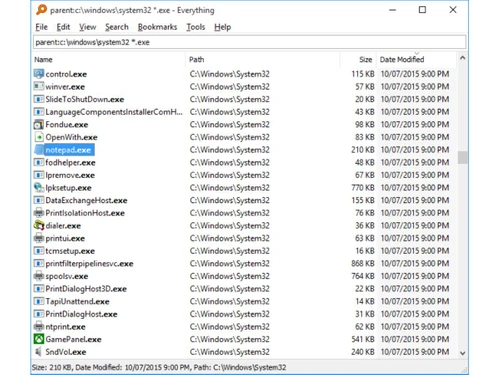
Everything-overview
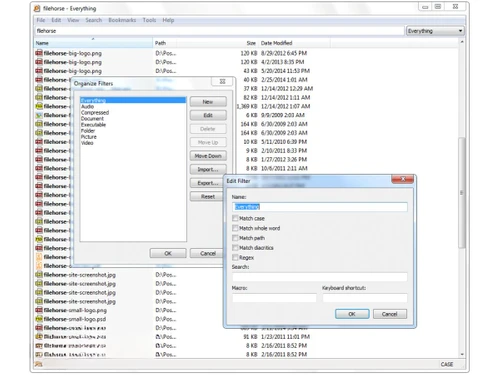
Everything-filters
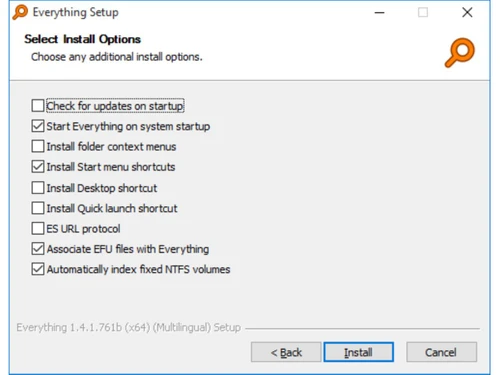
Everything-setup

Everything

Brand: Voidtools

  • No Ratings & Reviews

Everything helps you instantly find files and folders on your PC with lightning-fast, real-time indexing and a lightweight design for effortless searching.

See More

Have you used Everything before?

Share your insights for better experience

Add a Review

Free Forever

Get started immediately at no cost. Upgrade anytime if your business demand more.

100% Genuine
Products
Best Price
Guaranteed
Safe & Secure
Payment
  • Description

  • Pricing

  • Features

  • Specification

  • Review

  • Compare

  • Alternatives

  • FAQ

Everything Software Overview

What is Everything?

Everything is a high-performance desktop search utility designed for the Windows operating system. Its primary function is to locate files and folders by name almost instantaneously. Unlike traditional search tools that can be slow and resource-intensive, everything works by creating a lightweight index of all file and folder names on your local or network-attached NTFS and ReFS volumes. This indexing process is exceptionally fast, often cataloging an entire hard drive in just a few seconds.

The software is renowned for its minimal system footprint, consuming very little CPU and memory resources during operation. It runs quietly in the background, continuously monitoring the filesystem for changes and updating its index in real-time. This ensures that search results are always current, reflecting the exact state of your drives without requiring manual re-scans. Its clean, simple user interface makes it accessible to all users, while its powerful feature set provides the depth required by technical professionals and power users.

Why Choose Everything?

  • Unparalleled Speed: The most compelling reason to choose everything is its search speed. Results appear as you type, eliminating the frustrating delays associated with native operating system search functions. This instant feedback loop allows users to find what they need in a fraction of the time.
  • Minimal Resource Usage: The application is engineered for efficiency. It uses a very small amount of RAM and CPU power, ensuring it does not slow down your system, even while indexing or performing real-time updates. The installation file itself is remarkably small.
  • Real-Time Updates: everything keeps its index perfectly synchronized with your filesystem. Any file or folder that is created, deleted, moved, or renamed is immediately reflected in the index, guaranteeing that your search results are always accurate and up-to-date.
  • Clean and Simple Interface: The user interface is straightforward and uncluttered. It presents a search bar and a results pane, making it incredibly easy to use without a learning curve. This simplicity belies a powerful engine capable of handling complex queries.
  • Portability: A portable version is available, allowing you to run everything directly from a USB drive or network location without any installation. This is ideal for IT support staff, system administrators, and users who work across multiple machines.

Advanced Features of Everything

  • Advanced Search Syntax: Users can construct highly specific queries using Boolean operators (AND, OR, NOT), wildcards (*, ?), regular expressions (Regex), and searches based on file attributes like size, date, and path.
  • Content Searching: Everything can search within file contents using the content: search function. File contents are not indexed, so content searches are slower than filename searches.
  • HTTP and ETP Server: Everything supports optional HTTP and ETP/FTP server plugins that allow users to search and access indexed files over a network.
  • Customization and Integration: The interface is highly customizable, allowing users to add, remove, and rearrange columns in the results view. It also supports command-line operations, enabling integration with scripts and other applications for automated tasks.
  • Bookmarks and Filters: You can save frequently used searches as bookmarks for one-click access. Filters can also be created to permanently include or exclude certain file types, paths, or attributes from all search results.

Key Capabilities of Everything

  • Rapid File Indexing: The foundational capability is its ability to read the Master File Table (MFT) of an NTFS volume directly. This method allows it to build a complete database of every file and folder name in seconds, rather than hours.
  • Instantaneous Query Processing: Once the index is built, the search engine can query this compact database in real-time. It retrieves and displays matching results as fast as the user can type, even with millions of files indexed.
  • Filesystem Monitoring: The application leverages the USN Journal on NTFS volumes to detect changes. This is a highly efficient method for tracking file modifications, creations, and deletions without having to constantly re-scan the entire drive.
  • Advanced Query Engine: The system that processes user input is robust, supporting a rich syntax that includes logical operators, wildcards, macros, and regular expressions, enabling precise control over search criteria.

How to Use Everything?

  1. Download and Install: Visit the official voidtools website to download the appropriate version. You can choose between a full installer, a lite installer, or a portable version that requires no installation. The setup is quick and clean.
  2. Initial Indexing: Upon its first launch, everything will perform an initial scan of your drives. This process is incredibly fast and typically completes in under a minute, even on systems with hundreds of thousands of files.
  3. Start Searching: The main window features a prominent search box. Simply start typing the name, or part of the name, of the file or folder you are looking for. Results will begin to appear instantly in the pane below.
  4. Refine Your Search: To find files containing multiple keywords, just type them separated by a space. You can use a vertical bar to search for files matching either term.
  5. Interact with Results: The results list functions just like Windows Explorer. You can double-click to open a file, right-click for a context menu with options like Copy, Delete, and Properties, or drag and drop files directly from the results window.

Everything Pricing

Everything is available for free on techjockey.com.

The pricing model is based on different parameters, including extra features, deployment type, and the total number of users. For further queries related to the product, you can contact our product team and learn more about the pricing and offers.

Read more

Voidtools Company Details

Founded Year:  2004

Voidtools is the developper of the Everything Search Engine.

Director/Founders David Carpenter
Company Size 1-100 Employees

Everything Pricing & Plans

This Product is Available Free Forever.

Start instantly with no fees, no subscriptions, and no commitments.

  • Full access to basic version available
  • No credit card or sign-up required

Free Forever Plan

Get started immediately at no cost. Upgrade anytime if your business demand more.

Free Forever

Everything Features

  • icon_check File Search
    Finds files and folders immediately as you type using a highly optimized filename index database.
  • icon_check Real-Time Indexing
    Automatically updates search results when files are created, renamed, or deleted on indexed drives.
  • icon_check Lightweight Performance
    Uses minimal CPU and memory resources while maintaining extremely fast search speeds.
  • icon_check Advanced Search Filters
    Supports operators, wildcards, and filters to narrow results based on file attributes or paths.
  • icon_check Regex Search Support
    Enables complex queries using regular expressions for advanced users and developers.
  • icon_check Network Drive Indexing
    Allows indexing of network folders and mapped drives for centralized file discovery.
  • icon_check Custom Sorting
    Sort results by name, date modified, size, or other attributes for easier navigation.
  • icon_check Preview and Thumbnails
    Displays file previews and thumbnails to help identify content quickly.
  • icon_check HTTP and ETP Server
    Provides remote search access through web browsers or external applications via server mode.
  • icon_check Command Line Interface
    Supports CLI commands for automation, scripting, and integration with workflows.
  • icon_check Bookmarks
    Allows saving frequently used searches for quick future access.
  • icon_check Shell Integration
    Integrates with Windows Explorer context menus for fast search within selected folders.
  • icon_check Customizable UI
    Offers configurable fonts, colors, columns, and layout preferences for personalized workflows.
  • icon_check SDK and API Access
    Developers can integrate Everything search functionality into their own software tools.

Everything Specifications

Supported Platforms
Windows Windows
Devices
Desktop Desktop
Deployment
Perpetual Perpetual
Suitable For
All Industries
Business Specific
All Businesses
Business Size
Individual Small Business Startups Medium Business Enterprises
Customer Support
Email
Language
English

Explore the Best Alternative Solutions Similar to Your Business Size and Needs

Everything Review

Techjockey Trusted Reviews from Verified Users

No reviews are currently available for Everything. Discover similar Utility Software reviews

  • Booky

    4.6

    Whats great - Booky.io has a clean and minimal layout. It's perfect for keeping my most-used links all in one place. The drag-and-drop make... read more

  • Defencebyte Computer Opmitizer

    4.1

    Whats great - Really I am happy now after using defencebyte Computer optimizer, My Pc performance boost after using defencebyte Computer op... read more

  • VMware

    4.5

    Whats great - Vmware offers a wide variety of management tools and features to help with both the initial configuration and ongoing adminis... read more

Compare Everything With other Utility Software

Products
Ratings
Pricing
Device Supported
Deployment
Supported Platforms
  • img

    Everything

  • FREE

  • Desktop

    Mobile

  • Web based

    On Premises

  • Windows

    Mac OS

  • img

    Truecaller

  • 4.2

  • ₹ 84

  • Desktop

    Mobile

  • Web based

    On Premises

  • Windows

    Mac OS

  • img

    WizTree

  • 4.3

  • Price On Request

  • Desktop

    Mobile

  • Web based

    On Premises

  • Windows

    Mac OS

  • img

    RestoreX360

  • 5

  • ₹ 1499

  • Desktop

    Mobile

  • Web based

    On Premises

  • Windows

    Mac OS

  • img

    Xplorer

  • 4.1

  • Price On Request

  • Desktop

    Mobile

  • Web based

    On Premises

  • Windows

    Mac OS

  • img

    CHIRP

  • 4.3

  • Price On Request

  • Desktop

    Mobile

  • Web based

    On Premises

  • Windows

    Mac OS

  • img

    IrfanView

  • 4.0

  • Price On Request

  • Desktop

    Mobile

  • Web based

    On Premises

  • Windows

    Mac OS

  • img

    Opal

  • 4.3

  • Price On Request

  • Desktop

    Mobile

  • Web based

    On Premises

  • Windows

    Mac OS

(0) Product(s) selected

Everything Alternatives

See All Everything Alternatives
SAVE UPTO 24%

Starting Price:

$25 /Quantity

Available

Price on Request

Available

Price on Request

Starting Price:

$12 /License

Opal

4.3

Starting Price:

$20 /Month

Available

Price on Request

Articles for Everything

See All Related Articles

What does Everything do?

Everything is a utility software designed to instantly locate files and folders on your computer by name, providing quick search results and real-time updates.

How much does Everything cost?

Everything is available for free on techjockey.com.

What are the main features of Everything?

Key features of Everything include a small installation file, a clean and simple user interface, quick filename indexing, rapid searching capabilities, minimal resource usage, and real-time updating of its index.

Is there a free trial for Everything?

Everything is not offered as a trial; it is available as a complete, free-to-download utility directly from the voidtools website.

Who can use Everything?

Everything can be used by anyone who needs to quickly and efficiently locate files and folders on their computer, from casual users to power users seeking an instant search solution.

How can I download Everything?

You can download Everything from the voidtools website, with options for an installer, portable zip versions, and a lite installer, all available in 64-bit editions for both stable and beta releases.

Does Everything offer different versions or editions?

Yes, Everything offers different versions, including a stable release (e.g., 1.4.1.1032) and a beta release (e.g., 1.5.0.1418b), along with a Lite Installer option for a more minimal setup.

What languages does Everything support?

Everything supports a wide range of languages, including English (Australia, UK, US), Spanish (Spain, Venezuela), Hebrew, Korean, Russian, Turkish, Uzbek, and Simplified Chinese, among others.

Is Everything available in a portable version?

Yes, Everything is available as a portable zip file, allowing users to run the application without installation, which is convenient for use on multiple machines or from a USB drive.

21,000+ Software Listed

Best Price Guranteed

Free Expert Consultation

5M+ Happy Customers

Terms and Condtions

close

Users with registered businesses can purchase goods from merchants on the platform to satisfy their business needs. Users are not permitted to utilize any products acquired through the platform for resale, advertising, business, or further distribution.

For each purchase made, users will receive a Tax Invoice (or 'GST invoice') that includes specific details such as:

  • the GSTIN of the user associated with their registered business, and

  • the specified Entity Name for their business.

It should be noted that not all products are eligible for GST Invoice. Only the products displayed by participating sellers with the 'GST-based Invoice Available' callout on the product description page would qualify.

Certain goods and services are not eligible to get a GST Invoice, including items with VAS, i.e., Value Added Services (e.g., Total Mobile Protection/Assured Buyback) and those involving an exchange offer at the time of purchase.

Users must ensure the accuracy of the GSTIN, and business entity name provided for the GST Invoice. Requests for corrections into GST Invoice would not be accommodated by Techjockey.com or any Seller, and any issues arising from user-provided information are the sole responsibility of users.

Techjockey.com is not liable for the GST Invoice or any associated input tax credit. To efficiently claim an input tax credit, users should select the registered place of business address as per the GST authority's data and follow the provisions of the GST Act and rules.

To claim an input tax credit, the delivery and billing addresses must match. Furthermore, input tax credits will not be granted if the delivery address and GSTIN on the invoice are from different states. In case of incorrect GST details provided during the order placement, the order will be canceled automatically.