linkedin
ARES Commander logo
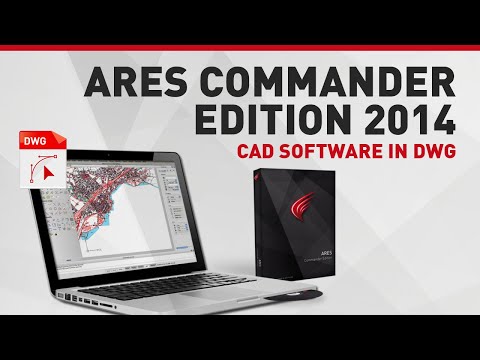
play ARES Commander Edition 2014 | CAD Software in DWG
ares commander-dashboard
ares commander-properties

ARES Commander

Brand: Graebert

  • 4.0

  • 4 Ratings

ARES Commander allows users to create and edit 2D and 3D drawings in the DWG format, offering features for drafting, design, and collaboration across various operating systems.

See More

Have you used ARES Commander before?

Share your insights for better experience

Add a Review
Starting Price
₹25,000 excl.GST
₹ 29,500 incl. GST

View plans

offer Save upto 18%, Get GST Invoice on your business purchase T&C
offer Buy Now & Pay Later, Check offer on payment page.
Buy Now
100% Genuine
Products
Best Price
Guaranteed
Safe & Secure
Payment
  • Description

  • Pricing

  • Features

  • Specification

  • Review

  • Compare

  • Alternatives

  • FAQ

Starting at ₹25,000
Buy Now

ARES Commander Software Overview

What is ARES Commander?

ARES Commander is a versatile CAD software designed for professionals in engineering, architecture, and construction. It supports 2D and 3D drafting, allowing users to create, modify, and annotate technical drawings with precision. The software offers a range of advanced tools, including customizable workspaces, dynamic blocks, and extensive file compatibility, making it a powerful solution for complex design tasks.

ARES Commander is available across multiple platforms, including Windows, macOS, and Linux, and integrates seamlessly with cloud services like Google Drive and OneDrive for efficient collaboration. It supports DWG file format, ensuring compatibility with other CAD software. Additionally, its cost-effective licensing options and intuitive user interface make it accessible for both small businesses and large enterprises.

Why Choose ARES Commander Software?

  • Trinity of CAD: It combines desktop, mobile, and cloud capabilities, allowing users to work seamlessly across different platforms and devices.
  • Cost-Effective: It is significantly cheaper than competitors like AutoCAD, offering similar functionalities at a fraction of the price.
  • User-Friendly Interface: The software features a familiar interface for those accustomed to CAD programs, ensuring a smooth learning curve and easy navigation.
  • Native DWG Support: It fully supports DWG files, enabling users to create and modify drawings without the need for file conversions.
  • Advanced Productivity Tools: It includes various tools designed to enhance efficiency in design tasks, helping users complete projects faster.
  • BIM Compatibility: It supports Building Information Modeling (BIM), making it suitable for modern architectural and engineering projects.
  • Multi-Platform Access: Users can access their work on Windows, macOS, and Linux, as well as through mobile devices and cloud services.
  • API Support: The software offers extensive API capabilities for developers to customize and extend its functionalities according to specific needs.
  • Simultaneous Use on Multiple Devices: One license allows installation on multiple computers, enabling users to switch between devices easily.

Benefits of ARES Commander Software

  • Flexible Licensing Options: It offers both perpetual and subscription licenses, allowing users to choose a payment model that best fits their needs.
  • Customizable Tool Palettes: Users can personalize their workspace by customizing tool palettes and importing layouts from other CAD programs, enhancing efficiency.
  • BIM Integration: The software supports the import of BIM models such as Revit and IFC, enabling users to extract 2D drawings and relevant data for better project management.
  • Advanced 3D Modeling Capabilities: It includes robust 3D solid modeling tools, allowing for detailed and complex design work.
  • Multi-Language Support: The software is available in multiple languages, making it accessible to a global audience and accommodating diverse user preferences.
  • Cloud Collaboration Features: It facilitates real-time collaboration through cloud integration, enabling teams to work together on projects regardless of location.
  • API for Custom Development: The software provides a powerful API that allows developers to create custom applications or integrate with existing systems, enhancing functionality.
  • Efficient Command Optimization: It optimizes frequently used commands, allowing users to complete tasks more quickly and efficiently.
  • Strong Community Support: Users benefit from a supportive community and extensive documentation, which can help resolve issues and enhance learning.

Pricing of ARES Commander

ARES Commander price in India starts at INR 25,000 per year at techjockey.com.

The pricing model is based on different parameters, including extra features, deployment type, and the total number of users. For further queries related to the product, you can contact our product team and learn more about the pricing and offers.

Read more

Graebert Company Details

Founded Year:  1977

Graebert is a multicultural research and development company located in Berlin.

Director/Founders Graebert
Company Size 1-100 Employees

ARES Commander Pricing & Plans

ARES Commander(Standalone)

Calculated Price

₹ 68000 Exclusive of all taxes
    • Licenses (Perpetual)

      Licenses (Perpetual)
      Licenses (Perpetual)
    • Seat

      Seat
      Seat

Key Features

  • Native DWG support (any version)

  • All 2D drafting and 3D modeling features

  • Works with Windows, Mac & Linux

  • Same user can use different computers

  • Use Dynamic Blocks

  • BIM to CAD features to generate

  • 2D drawings from Revit or IFC files

ARES Commander(With Trinity)

Calculated Price

₹ 25000 Exclusive of all taxes
    • Licenses

      Licenses
      Licenses
    • Yearly

      Yearly
      Yearly

Key Features

  • All features of the Standalone Version

  • All ARES Trinity collaboration features

  • Sync files across users and devices

  • Invite guest users with free View-only link and co

  • Markups, Comments, Version History

  • Connect with Google Drive, Box, Dropbox, OneDrive

  • Maps service

ARES Commander Features

  • icon_check Read and Modify
    Enables users to easily view and edit CAD files, providing flexibility to make changes directly within the software.
  • icon_check Cloud Storage
    Offers seamless integration with cloud services, allowing users to store, access, and manage files from anywhere.
  • icon_check Share View-Only Link
    Enables secure sharing of CAD drawings through view-only links, allowing reviews without edit access.
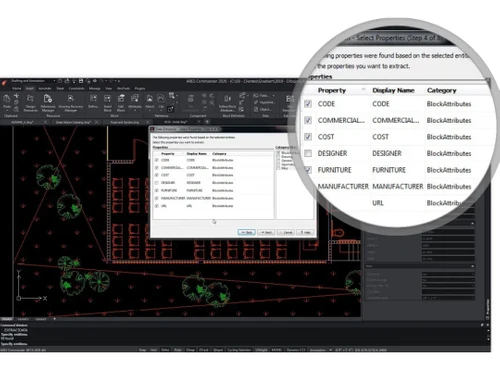
  • icon_check Block Attributes Manager
    Simplifies the management and editing of block attributes, streamlining the process of updating design elements.
  • icon_check 3D Modeling
    Provides powerful tools for creating and editing 3D models, supporting complex designs in engineering and architecture.
  • icon_check 2D and 3D HELIXs
    Supports the creation of 2D and 3D helical shapes, useful for designing spirals, springs, and similar structures.
  • icon_check Import/Export Management
    Enables easy import and export of files in different formats for smooth data exchange with other CAD systems.
  • icon_check Usability Improvements
    Continuous enhancements in the user interface and functionality improve workflow efficiency and overall user experience.
  • icon_check Multi Editing Tools
    Offers advanced multi-editing capabilities, enabling users to apply changes to multiple objects simultaneously.
  • icon_check Document Conversation
    Converts CAD documents between different formats, ensuring flexibility in sharing and collaborating across various platforms.
  • icon_check Native DWG File Support
    Ensures maximum compatibility by allowing you to open, edit, and save drawings in the latest DWG format without any data loss.
  • icon_check 2D Drafting Tools
    Provides a familiar set of professional tools for technical drawing, including layers, blocks, and complex geometric entities.
  • icon_check 3D Solid Modeling
    Enables the creation of complex 3D shapes and surface models using advanced boolean operations and direct editing tools fast.
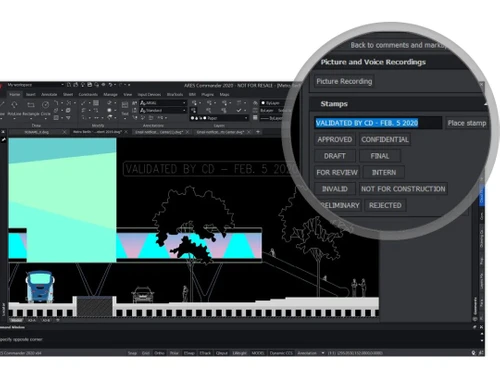
  • icon_check Voice Annotations
    Records and attaches voice notes directly to your DWG files via ARES Touch to provide clear verbal instructions to your team.
  • icon_check Cross-Platform Operating
    Runs natively on Windows, macOS, and several Linux distributions, giving you the freedom to choose your preferred hardware now.
ARES Commander Demo Video play icon

Get ARES Commander Demo

Watch the demo video to explore key features, real workflows, and how the software fits your business needs.

Understand
Key Features
Personal
Demo Insights
Interactive
Demo Support

ARES Commander Specifications

Supported Platforms
Windows Windows iOS iOS Android Android MacOS MacOS Linux Linux
Devices
Desktop Desktop Mobile Mobile Tablet Tablet iPad iPad
Deployment
Cloud-Based Cloud-Based Perpetual Perpetual
Suitable For
All Industries
Business Specific
All Businesses
Business Size
Small Business Startups Medium Business Enterprises SMBs SMEs MSMBs MSMEs
Customer Support
Phone Email Live Chat Communities
Language
English
Integration
API Integration
Training Resources
Documentation Videos

Explore the Best Alternative Solutions Similar to Your Business Size and Needs

ARES Commander Review

4.0

Out of 5

img

Overall Rating

Based on
4 Verified Ratings

Rating Breakdown

  • Features 4.5
  • Value for Money 4.2
  • Ease of Use 3.8
  • Customer Support 3.7

90% Recommend this Product

Add Review

Techjockey Trusted Reviews from Verified Users

No reviews are currently available for ARES Commander. Discover similar CAD Software reviews

  • Tinkercad

    4.9

    Whats great - One of the best experiences I had with Tinkercad is its ability to provide primitive shapes that I could easily drag out, man... read more

  • Autocad Mechanical

    4.6

    Whats great - As same as customary autocad I like all the visual enhancements in most recent form, for the most part I like the best approa... read more
  • Autodesk Autocad Mobile App

    4.6

    Whats great - AutoCAD portable (once in the past AutoCAD 360) is a simple to utilize drawing and drafting application from Autodesk. It tha... read more

Compare ARES Commander With other CAD Software

Products
Ratings
Pricing
Device Supported
Deployment
Supported Platforms
  • img

    ARES Commander

  • 4.0

  • ₹ 25000.00 excl. GST

  • Desktop

    Mobile

  • Web based

    On Premises

  • Windows

    Mac OS

  • img

    ARES Mechanical

  • 4.3

  • ₹ 33000

  • Desktop

    Mobile

  • Web based

    On Premises

  • Windows

    Mac OS

  • img

    ARES Touch

  • 4.2

  • Price On Request

  • Desktop

    Mobile

  • Web based

    On Premises

  • Windows

    Mac OS

  • img

    Solid Edge

  • 4.6

  • Price On Request

  • Desktop

    Mobile

  • Web based

    On Premises

  • Windows

    Mac OS

  • img

    Autodesk AutoCAD

  • 4.7

  • ₹ 16520

  • Desktop

    Mobile

  • Web based

    On Premises

  • Windows

    Mac OS

  • img

    Siemens NX

  • 4.7

  • ₹ 623869

  • Desktop

    Mobile

  • Web based

    On Premises

  • Windows

    Mac OS

  • img

    AutoCAD LT

  • 4.4

  • ₹ 4720

  • Desktop

    Mobile

  • Web based

    On Premises

  • Windows

    Mac OS

  • img

    CADMATE

  • 4.3

  • ₹ 25000

  • Desktop

    Mobile

  • Web based

    On Premises

  • Windows

    Mac OS

  • img

    progeCAD

  • 4.3

  • Price On Request

  • Desktop

    Mobile

  • Web based

    On Premises

  • Windows

    Mac OS

  • img

    MicroStation

  • 4.1

  • ₹ 121046

  • Desktop

    Mobile

  • Web based

    On Premises

  • Windows

    Mac OS

  • img

    Visao

  • 4.1

  • Price On Request

  • Desktop

    Mobile

  • Web based

    On Premises

  • Windows

    Mac OS

(0) Product(s) selected

ARES Commander Alternatives

See All ARES Commander Alternatives

Starting Price:

€12 /Month

Available

Price on Request

Starting Price:

$38 /Seat/Month

Starting Price:

$15 /Month

Starting Price:

$70 /License

QCAD

4.5

Starting Price:

€41 /Quantity

Starting Price:

$70 /License

Starting Price:

$100 /Quantity

What is the cost of ARES Commander Software?

ARES Commander price in India starts at INR 25,000 per year at techjockey.com.

Is there a mobile app available for ARES Commander Software?

Yes, ARES Commander has a mobile app called ARES Touch for Android and iOS devices.

Which operating systems are compatible with ARES Commander Software?

ARES Commander is compatible with Windows, MacOS, iOS, Android and Linux operating systems.

Does ARES Commander Software offer a free trial?

Yes, ARES Commander offers a free trial for users to explore its features before purchasing.

How does ARES Commander Software function?

ARES Commander functions as a CAD software for creating and editing 2D and 3D designs, with cloud integration and collaborative tools.

Who are the typical users of ARES Commander Software?

Typical users of ARES Commander include architects, engineers, designers, and professionals in construction and manufacturing industries.

Is there a free demo available for ARES Commander Software?

Yes, ARES Commander offers a free demo to showcase its capabilities and features.

Is ARES Commander Software available for free?

ARES Commander is not free but offers a free trial; full access requires a paid subscription.

Can ARES Commander handle large CAD files?

Yes, ARES Commander is optimized to handle large and complex CAD files efficiently.

Does ARES Commander support DWG file format?

Yes, ARES Commander fully supports DWG file format, ensuring compatibility with other CAD software.

20,000+ Software Listed

Best Price Guranteed

Free Expert Consultation

2M+ Happy Customers

Terms and Condtions

close

Users with registered businesses can purchase goods from merchants on the platform to satisfy their business needs. Users are not permitted to utilize any products acquired through the platform for resale, advertising, business, or further distribution.

For each purchase made, users will receive a Tax Invoice (or 'GST invoice') that includes specific details such as:

  • the GSTIN of the user associated with their registered business, and

  • the specified Entity Name for their business.

It should be noted that not all products are eligible for GST Invoice. Only the products displayed by participating sellers with the 'GST-based Invoice Available' callout on the product description page would qualify.

Certain goods and services are not eligible to get a GST Invoice, including items with VAS, i.e., Value Added Services (e.g., Total Mobile Protection/Assured Buyback) and those involving an exchange offer at the time of purchase.

Users must ensure the accuracy of the GSTIN, and business entity name provided for the GST Invoice. Requests for corrections into GST Invoice would not be accommodated by Techjockey.com or any Seller, and any issues arising from user-provided information are the sole responsibility of users.

Techjockey.com is not liable for the GST Invoice or any associated input tax credit. To efficiently claim an input tax credit, users should select the registered place of business address as per the GST authority's data and follow the provisions of the GST Act and rules.

To claim an input tax credit, the delivery and billing addresses must match. Furthermore, input tax credits will not be granted if the delivery address and GSTIN on the invoice are from different states. In case of incorrect GST details provided during the order placement, the order will be canceled automatically.