linkedin
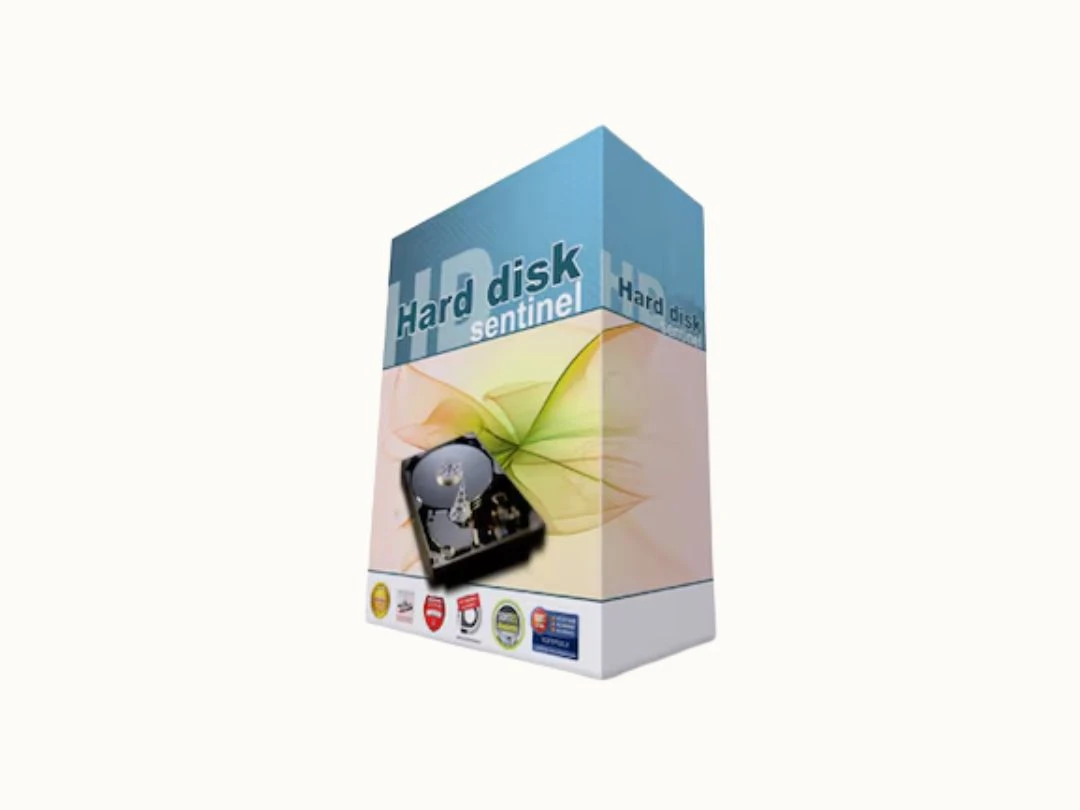
Hard Disk Sentinel logo
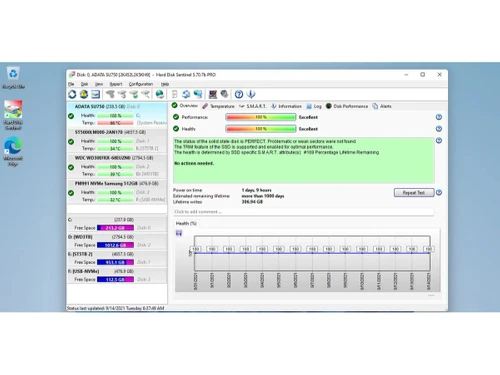
Hard Disk Sentinel-dashboard
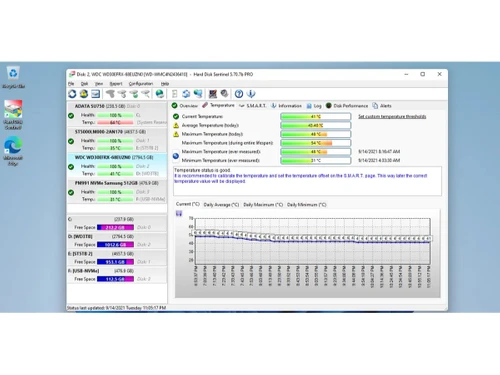
Hard Disk Sentinel-temperature info
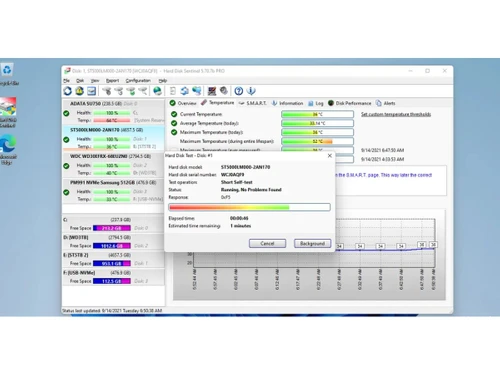
Hard Disk Sentinel-test

Hard Disk Sentinel

Brand: Hard Disk Sentinel

  • No Ratings & Reviews

Hard Disk Sentinel is a multi-OS disk monitoring and diagnostic software that helps users monitor drive health, detect potential issues, and prevent data loss across various storage devices.

See More

Have you used Hard Disk Sentinel before?

Share your insights for better experience

Add a Review
Starting Price
$22

View plans

100% Genuine
Products
Best Price
Guaranteed
Safe & Secure
Payment
  • Description

  • Pricing

  • Features

  • Specification

  • Review

  • Compare

  • Alternatives

  • FAQ

Starting at $22

Hard Disk Sentinel Software Overview

What is Hard Disk Sentinel?

Hard Disk Sentinel (HDSentinel) is a sophisticated, multi-OS utility software designed for the comprehensive monitoring and analysis of various storage devices. Its primary objective is to find, test, diagnose, and repair storage drive issues while continuously reporting on health, performance degradations, and potential failures. The software provides users with complete textual descriptions, actionable tips, and detailed reports about the status of their storage hardware.

A key strength of Hard Disk Sentinel is its extensive compatibility. It eliminates the need for multiple verification tools by offering a single, unified solution for a wide array of devices, including:

  • Internal Hard Disk Drives (HDD) and Solid State Drives (SSD)
  • Hybrid Drives (SSHD) and NVMe SSDs
  • External USB and e-SATA connected drives
  • Disks within RAID arrays and Network Attached Storage (NAS) units
  • Specialized hardware like LTO tape drives, industrial micro SD cards, and eMMC devices

Why Choose Hard Disk Sentinel?

Choosing Hard Disk Sentinel is a proactive step towards robust data protection and hardware longevity. The software is engineered to prevent catastrophic data loss by identifying potential drive failures before they occur. Licenses are lifetime purchases, including free updates to all future versions at no additional cost. Its highly sensitive disk health rating system is exceptionally perceptive, capable of detecting even minor problems that other tools might miss.

The core of its predictive power lies in its deep analysis of S.M.A.R.T. (Self-Monitoring, Analysis and Reporting Technology) data. By examining critical values and tracking their decline over time, HDSentinel can accurately forecast drive failure. This allows users or administrators to take preventative measures, such as replacing the drive and backing up data, well in advance.

Furthermore, the Professional version enhances this protection with scheduled and automatic (on-problem) disk backup options. This feature provides a crucial safety net, safeguarding valuable data not only from hardware failure but also from threats like malware or accidental deletion.

Advanced Features of Hard Disk Sentinel

  • Comprehensive S.M.A.R.T. Analysis: The software goes beyond basic S.M.A.R.T. readouts, offering detailed analysis and explanations for every attribute, making complex data understandable.
  • Real-time Performance Monitoring: It measures disk transfer speeds in real time, which can be used for benchmarking or to detect performance degradations that may indicate an impending failure.
  • Customizable Alerts and Reports: Users can configure a wide range of alerts (email, sound, network message) to be notified of any detected issues. Detailed reports can be generated automatically to track drive health over time.
  • Advanced Diagnostic Functions: The application includes specialized functions such as Quick Fix, Device Specific Information, Extended S.M.A.R.T., and FARM log access for in-depth troubleshooting and analysis.
  • Automated Actions: HDSentinel can be configured to perform appropriate actions when an error is found or an unexpected behavior is detected. This includes launching an automatic backup, sending alerts, or even initiating a system shutdown to prevent data corruption.
  • Industry-Standard Data Destruction: Beyond monitoring, the Professional and Enterprise versions include secure data wiping capabilities, allowing users to permanently and safely erase sensitive data from a drive before disposal or repurposing.

Key Capabilities of Hard Disk Sentinel

  • Continuous Health Verification: Hard Disk Sentinel runs as a background service, constantly inspecting the S.M.A.R.T. status of all connected drives without impacting system performance. It provides an at-a-glance health percentage and detailed textual description of the drive's condition.
  • Temperature Monitoring: Overheating is a primary cause of drive failure. The software actively monitors drive temperatures and logs historical data, helping to identify cooling issues before they cause permanent damage.
  • Disk Surface Testing: It includes various disk test methods to intensively verify the storage surface. These tests can find and fix potential problems by identifying and reallocating bad sectors and reinforcing weaker areas to improve stability.
  • Enterprise-Grade Management: The Hard Disk Sentinel Enterprise version allows for the centralized, remote monitoring and management of disk status across an entire network of computers, making it an invaluable tool for system administrators.

How to Use Hard Disk Sentinel?

Hard Disk Sentinel is designed for both ease of use and powerful functionality. Upon installation, the software automatically detects all compatible storage devices within the system and immediately begins monitoring. The main interface presents a clear, intuitive overview of each drive, displaying critical information such as health percentage, temperature, and a summary of its condition.

The software operates autonomously in the background, verifying drive status by inspecting S.M.A.R.T. data. If a problem is detected, it instantly notifies the user through a configured alert. For deeper analysis, users can navigate through different tabs to view detailed S.M.A.R.T. attributes, performance graphs, temperature logs, and initiate manual disk tests. The application provides clear, plain-language explanations and tips, empowering users of all technical levels to understand the health of their storage and take appropriate action.

Hard Disk Sentinel Pricing

Hard Disk Sentinel price starts at USD 22 at techjockey.com.

The pricing model is based on different parameters, including extra features, deployment type, and the total number of users. For further queries related to the product, you can contact our product team and learn more about the pricing and offers.

Read more

Hard Disk Sentinel Pricing & Plans

Standard
Starting at $22
    • Licenses (One Time)

      Licenses (One Time)
      Licenses (One Time)

Key Features

  • Display hard disk / SSD health and free space deta

  • Support IDE/SATA/SCSI/SAS/USB/NVMe drives

  • Display status on tray, disk icons, desktop

  • Run as Application or Service

Professional
Starting at $33
    • Licenses (One Time)

      Licenses (One Time)
      Licenses (One Time)

Key Features

  • Display hard disk / SSD health and free space deta

  • Support IDE/SATA/SCSI/SAS/USB/NVMe drives

  • Display status on tray, disk icons, desktop

  • Run as Application or Service

  • Hardware short/extended disk tests

Enterprise
Starting at $220
    • Licenses

      Licenses
      Licenses

Key Features

  • Display hard disk / SSD health and free space deta

  • Support IDE/SATA/SCSI/SAS/USB/NVMe drives

  • Display status on tray, disk icons, desktop

  • Run as Application or Service

  • Hardware short/extended disk tests

Hard Disk Sentinel Features

  • icon_check Health Monitoring
    Continuously tracks HDD and SSD health using S.M.A.R.T. attributes to detect degradation early.
  • icon_check Temperature Monitoring
    Displays real-time and historical temperature data to prevent overheating and hardware damage.
  • icon_check Performance Analysis
    Measures read/write speeds and transfer rates to identify performance bottlenecks or disk issues.
  • icon_check Predictive Failure Alerts
    Uses intelligent algorithms to warn users about potential disk failures before data loss occurs.
  • icon_check Surface Testing Tools
    Performs destructive and non-destructive surface scans to locate and repair weak sectors.
  • icon_check Automatic Backup
    Supports scheduled backups to local drives, LAN servers, or remote servers via FTP.
  • icon_check Detailed Disk Information
    Provides complete hardware details including firmware, buffer size, and transfer modes.
  • icon_check Data Analysis
    Interprets vendor-specific S.M.A.R.T. values and converts them into health and performance scores.
  • icon_check Logging & Reporting
    Maintains detailed logs of disk events, errors, and health changes with graphical statistics.
  • icon_check Alerts & Notifications
    Sends alerts via email, sound, or scripts when disk health or temperature changes.
  • icon_check Remote Monitoring
    Allows monitoring of disk status remotely through network or web browser access.
  • icon_check Shutdown Protection
    Automatically shuts down systems when critical disk problems or overheating are detected.
  • icon_check Acoustic & Power Management
    Adjusts disk power and noise settings to balance performance, energy use, and lifespan.

Hard Disk Sentinel Specifications

Supported Platforms
Windows Windows
Devices
Desktop Desktop
Deployment
Perpetual Perpetual
Suitable For
All Industries
Business Specific
All Businesses
Business Size
Small Business Startups Medium Business Enterprises
Customer Support
Email Communities
Language
English
Training Resources
Videos

Explore the Best Alternative Solutions Similar to Your Business Size and Needs

Hard Disk Sentinel Review

Techjockey Trusted Reviews from Verified Users

No reviews are currently available for Hard Disk Sentinel. Discover similar Utility Software reviews

  • Booky

    4.6

    Whats great - Booky.io has a clean and minimal layout. It's perfect for keeping my most-used links all in one place. The drag-and-drop make... read more

  • Defencebyte Computer Opmitizer

    4.1

    Whats great - Really I am happy now after using defencebyte Computer optimizer, My Pc performance boost after using defencebyte Computer op... read more

  • VMware

    4.5

    Whats great - Vmware offers a wide variety of management tools and features to help with both the initial configuration and ongoing adminis... read more
Compare Hard Disk Sentinel With other Utility Software

Products
Ratings
Pricing
Device Supported
Deployment
Supported Platforms
  • img

    Hard Disk Sentinel

  • Price On Request

  • Desktop

    Mobile

  • Web based

    On Premises

  • Windows

    Mac OS

  • img

    Truecaller

  • 4.2

  • ₹ 84

  • Desktop

    Mobile

  • Web based

    On Premises

  • Windows

    Mac OS

  • img

    WizTree

  • 4.3

  • Price On Request

  • Desktop

    Mobile

  • Web based

    On Premises

  • Windows

    Mac OS

  • img

    RestoreX360

  • 5

  • ₹ 1499

  • Desktop

    Mobile

  • Web based

    On Premises

  • Windows

    Mac OS

  • img

    Xplorer

  • 4.1

  • Price On Request

  • Desktop

    Mobile

  • Web based

    On Premises

  • Windows

    Mac OS

  • img

    CHIRP

  • 4.3

  • Price On Request

  • Desktop

    Mobile

  • Web based

    On Premises

  • Windows

    Mac OS

  • img

    IrfanView

  • 4.0

  • Price On Request

  • Desktop

    Mobile

  • Web based

    On Premises

  • Windows

    Mac OS

  • img

    Opal

  • 4.3

  • Price On Request

  • Desktop

    Mobile

  • Web based

    On Premises

  • Windows

    Mac OS

(0) Product(s) selected

Hard Disk Sentinel Alternatives

See All Hard Disk Sentinel Alternatives
SAVE UPTO 24%

Starting Price:

$25 /Quantity

Available

Price on Request

Available

Price on Request

Starting Price:

$12 /License

Opal

4.3

Starting Price:

$20 /Month

Available

Price on Request

Articles for Hard Disk Sentinel

See All Related Articles

What does Hard Disk Sentinel do?

Hard Disk Sentinel is a multi-OS SSD and HDD monitoring and analysis software designed to find, test, diagnose, and repair hard disk drive problems, reporting on health, performance degradations, and failures to prevent data loss. It monitors various storage devices including SSDs, HDDs, SSHDs, NVMe SSDs, RAID arrays, and NAS drives.

How much does Hard Disk Sentinel cost?

Hard Disk Sentinel price starts at USD 22 at techjockey.com.

What are the main features of Hard Disk Sentinel?

Hard Disk Sentinel's main features include monitoring, diagnosing, and repairing various storage devices, displaying health, temperature, and S.M.A.R.T. values, and measuring real-time disk transfer speeds. It also offers Quick Fix, Device Specific Information, Extended S.M.A.R.T., FARM log functions, and in the Professional version, scheduled and automatic disk backup options.

Is there a free trial for Hard Disk Sentinel?

Yes, a trial version of Hard Disk Sentinel is available for download, allowing users to evaluate its features before purchasing.

Who can use Hard Disk Sentinel?

Hard Disk Sentinel can be used by anyone concerned with data protection and preventing storage device failures, including individuals, businesses, and IT professionals managing various internal, external, SSD, HDD, SSHD, RAID, and NAS drives.

How does Hard Disk Sentinel prevent data loss?

Hard Disk Sentinel prevents data loss by employing a highly sensitive disk health rating system that detects even minor disk problems, and its Professional version offers scheduled and automatic disk backup options to safeguard against failure, malware, or accidental deletion.

What types of storage devices does Hard Disk Sentinel monitor?

Hard Disk Sentinel monitors a wide range of storage devices including HDDs, SSDs, SSHDs, NVMe SSDs, RAID arrays, external RAID boxes, industrial (micro) SD cards, NAS drives, pendrives, LTO tape drives, and eMMC devices.

How does Hard Disk Sentinel detect disk problems?

Hard Disk Sentinel detects disk problems by running in the background and continuously verifying SSD/HDD health status through inspecting S.M.A.R.T. (Self-Monitoring, Analysis and Reporting Technology) values, warning the user and performing actions if errors or unexpected behavior are detected.

What is the significance of S.M.A.R.T. monitoring in Hard Disk Sentinel?

S.M.A.R.T. (Self-Monitoring, Analysis and Reporting Technology) monitoring is significant in Hard Disk Sentinel because it allows the software to continuously inspect critical values of disk drives, predict potential HDD failures, and report on the overall health and temperature status.

21,000+ Software Listed

Best Price Guranteed

Free Expert Consultation

5M+ Happy Customers

Terms and Condtions

close

Users with registered businesses can purchase goods from merchants on the platform to satisfy their business needs. Users are not permitted to utilize any products acquired through the platform for resale, advertising, business, or further distribution.

For each purchase made, users will receive a Tax Invoice (or 'GST invoice') that includes specific details such as:

  • the GSTIN of the user associated with their registered business, and

  • the specified Entity Name for their business.

It should be noted that not all products are eligible for GST Invoice. Only the products displayed by participating sellers with the 'GST-based Invoice Available' callout on the product description page would qualify.

Certain goods and services are not eligible to get a GST Invoice, including items with VAS, i.e., Value Added Services (e.g., Total Mobile Protection/Assured Buyback) and those involving an exchange offer at the time of purchase.

Users must ensure the accuracy of the GSTIN, and business entity name provided for the GST Invoice. Requests for corrections into GST Invoice would not be accommodated by Techjockey.com or any Seller, and any issues arising from user-provided information are the sole responsibility of users.

Techjockey.com is not liable for the GST Invoice or any associated input tax credit. To efficiently claim an input tax credit, users should select the registered place of business address as per the GST authority's data and follow the provisions of the GST Act and rules.

To claim an input tax credit, the delivery and billing addresses must match. Furthermore, input tax credits will not be granted if the delivery address and GSTIN on the invoice are from different states. In case of incorrect GST details provided during the order placement, the order will be canceled automatically.