USA
USA UAE
UAESmall Business
Designed for startups and growing businesses

See More


Brand: Digitkode Software
A comprehensive billing software solution designed to streamline invoicing processes for businesses.
See MoreHave you used InvoiceTemple before?
Share your insights for better experience
Brand: Digitkode Software
Founded Year: 2012
InvoiceTemple let the small business owners, medium & large size companies to create professional invoices in minutes and save their valuable time. Over 40,000+ Small business owners trust InvoiceTemple.
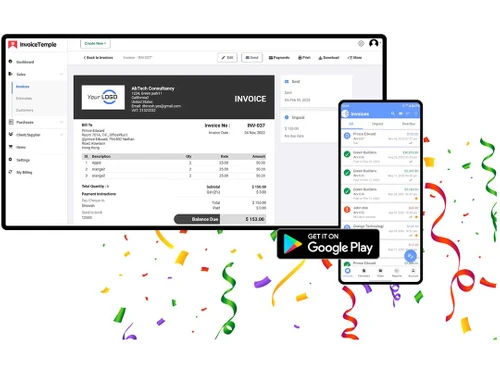
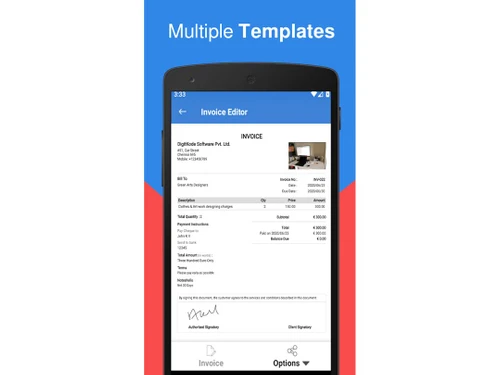
 Templates Convert Estimate to Invoice Track Invoice Status Invoice Editor Auto Sync
  Windows
  Android Windows(Phone)
  Linux
Linux  Desktop
  Mobile
  Tablet
  iPad
iPad  Cloud-Based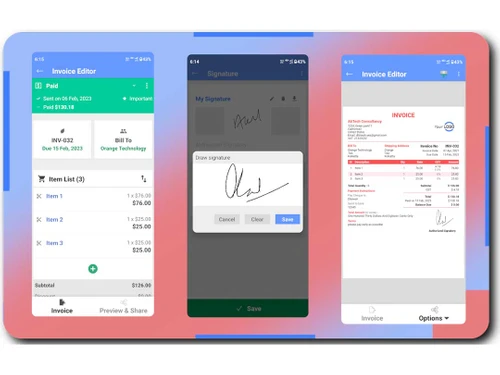
Small Business
Designed for startups and growing businesses
Medium Business
Built for business growth and flexibility
Enterprises
Designed for complex and large-scale business needs
4.6
Out of 5

Overall Rating
Based on
3 Verified Reviews
Rating Breakdown
94% Recommend this Product
Add ReviewCustomers generally appreciate InvoiceTemple for its user-friendly interface and efficiency in creating and managing invoices, with many highlighting its time-saving capabilities, especially with the mobile version. Users value the customizable templates and the ability to preview invoices before sending. However, some users have noted limitations, such as the inability to add images in specific areas of the invoice. Overall, the sentiment is positive, with many recommending the product for its simplicity and effectiveness.

Mar 22, 2024
Techjockey Verified
“Best invoicing experience”
Pros
It is very simple to use and has no complications with in-app experiences. The user interface of this application is simple and easy to navigate, even for someone like me who is not very tech-savvy. Creating an invoice was a breeze with the step-by-step process and customizable templates. I was able to add my company logo, business information, and even personalized messages to my clients, giving my invoices a professional touch.
Cons
I personally like to add cut images in my invoices at the footer or header. But it's not available in this app.
Reason to switch
Easy to handle
Mar 20, 2024
Techjockey Verified
“My Savior Of Time”
Pros
We can preview the edited invoice before the final confirmation. Invoice Temple is totally a time savior for me. The invoice generator application also has a mobile version, which was extremely helpful for me to create and send invoices on the go. I no longer needed to wait till I reached my office to send an invoice, and this definitely saved me a lot of time and effort. I really love this app for my work.
Cons
Nothing to mention. Actually it is way too smooth to use.
Reason to switch
Budget Friendly
Mar 15, 2024
Techjockey Verified
“Best invoice app tried so far”
I recently used the Invoice Temple application for my small business and was pleasantly surprised by its efficiency and user-friendliness. The application offers a partially free version with the option to upgrade to a paid subscription for additional features, and I found this to be a great selling point.
Pros
We can use it for free too.
Cons
NO CONS
Reason to switch
The old ones I used were very complicated.

InvoiceTemple
Price On Request
Desktop
Mobile
Web based
On Premises
Windows
Mac OS

Vyapar Billing Software
Price On Request
Desktop
Mobile
Web based
On Premises
Windows
Mac OS
Raseed
Price On Request
Desktop
Mobile
Web based
On Premises
Windows
Mac OS

InvoiceZy
₹ 99
Desktop
Mobile
Web based
On Premises
Windows
Mac OS

KaroSauda
₹ 1999
Desktop
Mobile
Web based
On Premises
Windows
Mac OS

Billing Fast
₹ 3588
Desktop
Mobile
Web based
On Premises
Windows
Mac OS

Apna Billbook
₹ 6998
Desktop
Mobile
Web based
On Premises
Windows
Mac OS

Swipe - Billing Software
₹ 2796
Desktop
Mobile
Web based
On Premises
Windows
Mac OS

Petpooja Invoice
₹ 5000
Desktop
Mobile
Web based
On Premises
Windows
Mac OS

Billing Buddy
₹ 5000
Desktop
Mobile
Web based
On Premises
Windows
Mac OS

Asli Bill
₹ 7000
Desktop
Mobile
Web based
On Premises
Windows
Mac OS
(0) Product(s) selected





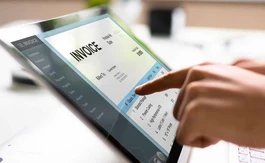
InvoiceTemple is compatible with Android, Windows (Desktop and Phone), and Linux device systems.
InvoiceTemple app is available for mobile and tablet devices.
InvoiceTemple supports web-based deployment.
InvoiceTemple pricing starts at $ 5 on techjockey.com.
InvoiceTemple benefits businesses of all sizes, from small enterprises to large corporations, by streamlining invoicing processes and simplifying financial management tasks.
InvoiceTemple platform demo is available for free with techjockey.com.
Yes InvoiceTemple is available for free.
InvoiceTemple does not offer a free trial.
Since InvoiceTemple supports web-based deployment there is no need for software installation. Just open the setup wizard and get started.
InvoiceTemple simplified invoicing and financial management tasks with its user-friendly interface, automated features, and seamless integration across mobile and web platforms.
20,000+ Software Listed
Best Price Guranteed
Free Expert Consultation
2M+ Happy Customers
Terms and Condtions

Users with registered businesses can purchase goods from merchants on the platform to satisfy their business needs. Users are not permitted to utilize any products acquired through the platform for resale, advertising, business, or further distribution.
For each purchase made, users will receive a Tax Invoice (or 'GST invoice') that includes specific details such as:
the GSTIN of the user associated with their registered business, and
the specified Entity Name for their business.
It should be noted that not all products are eligible for GST Invoice. Only the products displayed by participating sellers with the 'GST-based Invoice Available' callout on the product description page would qualify.
Certain goods and services are not eligible to get a GST Invoice, including items with VAS, i.e., Value Added Services (e.g., Total Mobile Protection/Assured Buyback) and those involving an exchange offer at the time of purchase.
Users must ensure the accuracy of the GSTIN, and business entity name provided for the GST Invoice. Requests for corrections into GST Invoice would not be accommodated by Techjockey.com or any Seller, and any issues arising from user-provided information are the sole responsibility of users.
Techjockey.com is not liable for the GST Invoice or any associated input tax credit. To efficiently claim an input tax credit, users should select the registered place of business address as per the GST authority's data and follow the provisions of the GST Act and rules.
To claim an input tax credit, the delivery and billing addresses must match. Furthermore, input tax credits will not be granted if the delivery address and GSTIN on the invoice are from different states. In case of incorrect GST details provided during the order placement, the order will be canceled automatically.