USA
USA UAE
UAESmall Business
Designed for startups and growing businesses

See More




Brand: NCH Software
Express Invoice is designed to streamline billing and manage customer payments. Whether running a small business or freelancing, this software enables you to create, customize, and send invoices efficiently.
See MoreHave you used Express Invoice before?
Share your insights for better experience
Brand: NCH Software
Founded Year: 1993
NCH Software develops customized software solutions for Windows, Mac, Android, and other portable devices.
 Track Account Customer Management Print Resolution Invoicing Billing Import & Export Reports Tax Management Integration Invoice Template Customize invoices

Watch the demo video to explore key features, real workflows, and how the software fits your business needs.
 Windows
  iOS
iOS  Android MacOS
  Desktop
  Mobile
  Tablet
  iPad
iPad  Perpetual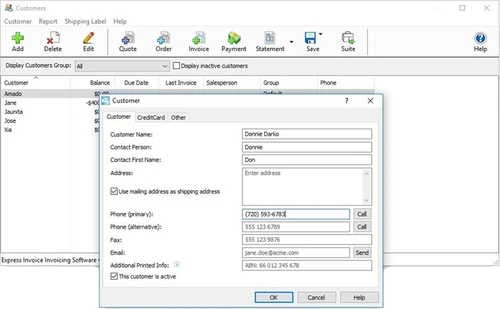
Small Business
Designed for startups and growing businesses
Medium Business
Built for business growth and flexibility
Enterprises
Designed for complex and large-scale business needs
3.8
Out of 5

Overall Rating
Based on
10 Verified Reviews
Rating Breakdown
75% Recommend this Product
Add ReviewCustomers generally appreciate Express Invoice for its efficient payment tracking and user-friendly interface, making invoicing straightforward and less error-prone. Many users highlight its affordability and offline functionality as significant advantages for small to mid-sized businesses. However, common complaints include limited customization options for invoice templates and inadequate customer support, which can hinder the overall experience. While the software meets basic invoicing needs effectively, users express a desire for enhanced reporting features and better integration capabilities with other tools.

Sep 2, 2024
Techjockey Verified
“A Good Invoice System for Quick Payment Tracking”
Express Invoice does a fantastic job when it comes to managing payments and tracking overdue invoices. The reminders feature ensures that I never miss out on collecting payments. However, the software could use more robust reporting features to give a clearer view of overall financial health. Right now, it feels somewhat basic in that regard.
Pros
The best thing about Express Invoice is how it helps you keep track of payments and send out reminders for overdue invoices. I’ve found it incredibly useful in keeping the cash flow smooth, as I no longer have to manually check which clients haven’t paid.
Cons
While it’s great for tracking payments, the software sometimes feels a bit limited when it comes to reporting. I would like to see more options for generating detailed reports about my invoicing and overall finances.
Reason to switch
Previous software didn’t match the needs of my business.
Jul 16, 2024
Techjockey Verified
“Helpful Billing Tool, But More Customization Would Be Great”
Express Invoice is well-organized, and I appreciate that the key tools are right there on the main screen. It’s made invoicing more efficient. However, I wish it offered more in terms of customization, especially for creating unique templates. The limited options might not meet the needs of businesses looking for more tailored designs.
Pros
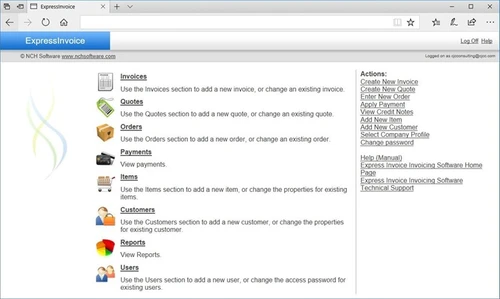
The Express Invoice interface is laid out well. Most of the frequently used tools, like invoicing and payment tracking, are available on the main screen, making it easy to access. I like that it’s straightforward to use once you get going.
Cons
The customization options are somewhat lacking, especially when it comes to setting up invoices and quotes. I used to be able to create my own templates in a previous software, but Express Invoice doesn’t have the same level of flexibility.
Reason to switch
Invoice2go stopped working on my system, so I had to look for an alternative that was more compatible with current operating systems.
Sep 2, 2024
Techjockey Verified
“Great Pricing for Small Businesses, But Customer Support Lags”
Express Invoice offers excellent value for small businesses looking for affordable invoicing software
Pros
Express Invoice is budget-friendly, and for a small business like mine, the pricing is a major advantage. The software helps us get invoices out on time, and the templates are convenient for creating bills linked directly to our payment system. It’s also fast and responsive, which saves time.
Cons
The biggest issue I’ve had with this software is customer support. Whenever I run into a problem, it’s hard to get a timely response from the support team.
Reason to switch
The switch was driven by price, as Express Invoice offered more features for less cost compared to Zoho invoice.

Express Invoice
Price On Request
Desktop
Mobile
Web based
On Premises
Windows
Mac OS

Vyapar Billing Software
Price On Request
Desktop
Mobile
Web based
On Premises
Windows
Mac OS
Raseed
Price On Request
Desktop
Mobile
Web based
On Premises
Windows
Mac OS
InvoiceZy
₹ 99
Desktop
Mobile
Web based
On Premises
Windows
Mac OS

KaroSauda
₹ 1999
Desktop
Mobile
Web based
On Premises
Windows
Mac OS

Billing Fast
₹ 3588
Desktop
Mobile
Web based
On Premises
Windows
Mac OS

Apna Billbook
₹ 6998
Desktop
Mobile
Web based
On Premises
Windows
Mac OS

Swipe - Billing Software
₹ 2796
Desktop
Mobile
Web based
On Premises
Windows
Mac OS

Petpooja Invoice
₹ 5000
Desktop
Mobile
Web based
On Premises
Windows
Mac OS

Billing Buddy
₹ 5000
Desktop
Mobile
Web based
On Premises
Windows
Mac OS

Asli Bill
₹ 7000
Desktop
Mobile
Web based
On Premises
Windows
Mac OS
(0) Product(s) selected


A free version is available for home users and small businesses with one user.
Express Invoice supports Windows, macOS, Android, and iOS.
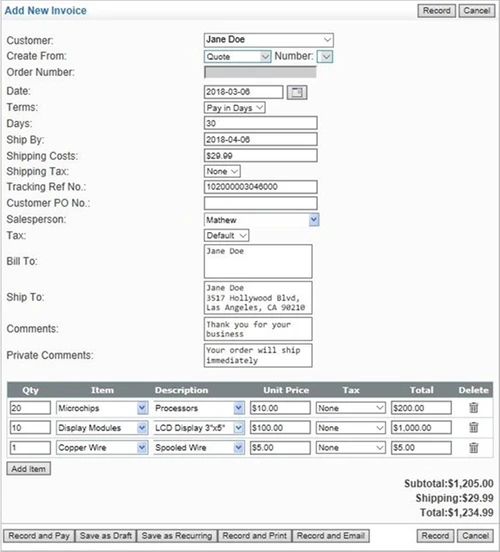
Yes, it allows the automation of recurring invoices and statements.
Yes, it supports multiple tax rates for different countries.
You can sync and access your data between desktop and mobile devices.
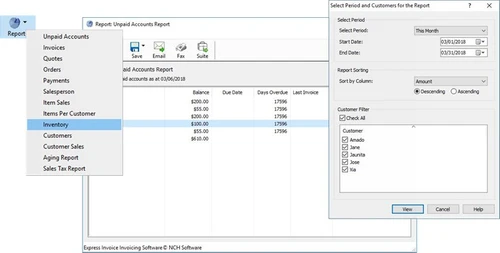
You can generate reports on sales, payments, customer activity, inventory, and more.
Yes, it integrates with Inventoria for inventory management.
Yes, you can use Express Invoice software on your Android devices.
To import customer records into Express Invoice on Mac, follow the steps given below:
0 0
You can generate several reports with Express Invoice, like accounts receivable reports, unpaid invoice reports, sales summaries and detailed transaction histories etc.
0 0
To import data from a .csv file in Express Invoice, follow the steps given below:
0 0
The annual license fee for Express invoice is $195/ year.
0 0
Yes, Express Invoice's mobile app, which is accessible through the App Store, supports Apple platforms, including the iPhone and iPad.
0 0
20,000+ Software Listed
Best Price Guranteed
Free Expert Consultation
2M+ Happy Customers
Terms and Condtions

Users with registered businesses can purchase goods from merchants on the platform to satisfy their business needs. Users are not permitted to utilize any products acquired through the platform for resale, advertising, business, or further distribution.
For each purchase made, users will receive a Tax Invoice (or 'GST invoice') that includes specific details such as:
the GSTIN of the user associated with their registered business, and
the specified Entity Name for their business.
It should be noted that not all products are eligible for GST Invoice. Only the products displayed by participating sellers with the 'GST-based Invoice Available' callout on the product description page would qualify.
Certain goods and services are not eligible to get a GST Invoice, including items with VAS, i.e., Value Added Services (e.g., Total Mobile Protection/Assured Buyback) and those involving an exchange offer at the time of purchase.
Users must ensure the accuracy of the GSTIN, and business entity name provided for the GST Invoice. Requests for corrections into GST Invoice would not be accommodated by Techjockey.com or any Seller, and any issues arising from user-provided information are the sole responsibility of users.
Techjockey.com is not liable for the GST Invoice or any associated input tax credit. To efficiently claim an input tax credit, users should select the registered place of business address as per the GST authority's data and follow the provisions of the GST Act and rules.
To claim an input tax credit, the delivery and billing addresses must match. Furthermore, input tax credits will not be granted if the delivery address and GSTIN on the invoice are from different states. In case of incorrect GST details provided during the order placement, the order will be canceled automatically.