linkedin
PayU logo
play PayU Offers Engine: How to create offers using PayU Offers Engine?
PayU Payment Option
PayU Growth

PayU

Brand: Naspers Group

  • 4.1

  • 11 Ratings & 11 Reviews

Elevate your payment processing with PayU Payment Gateway's advanced features like multi-currency support, seamless integration, and robust security measures.

See More

Have you used PayU before?

Share your insights for better experience

Add a Review

Price Available on Request

Questions about pricing or customization? We’re here to help, just a click away.

100% Genuine
Products
Best Price
Guaranteed
Safe & Secure
Payment
  • Description

  • Pricing

  • Features

  • Specification

  • Review

  • Compare

  • Alternatives

  • FAQ

  • Questions

PayU Software Overview

What is PayU Payment Gateway?

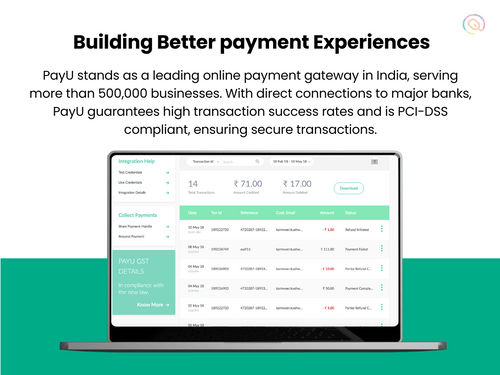
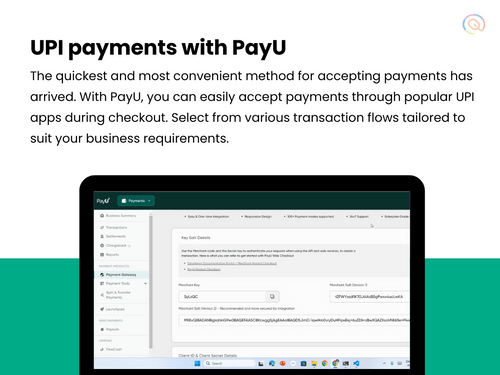
PayU Payment Gateway is India’s most versatile payment processing solution for diverse needs of businesses. It provides a secure platform for handling online transactions, supporting various payment methods such as credit/debit cards, UPI, net banking, and digital wallets.

The user-friendly dashboard of PayU allows businesses to manage and track their transactions effortlessly. With its intuitive interface, businesses can easily navigate through the system, making payment processing and reconciliation straightforward.

PayU is designed to integrate seamlessly with numerous platforms and systems, helping businesses expand their operations with minimal hassle. It also offers a range of plugins and APIs, ensuring smooth connectivity with your existing infrastructure.

Why Choose PayU Payment Gateway?

PayU stands out for its seamless integration, robust security features, and comprehensive support for multiple payment methods. Here are the key reasons why users choose PayU:

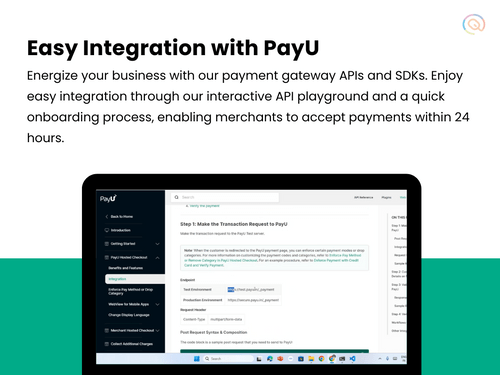
  • Easy Integration & Setup: PayU provides simple and quick integration options with detailed documentation and SDKs, making it easy to set up and start processing payments immediately.
  • Advanced Security Measures: PayU employs stringent security protocols, including PCI-DSS compliance and advanced encryption, ensuring your transactions are secure and protected against fraud.
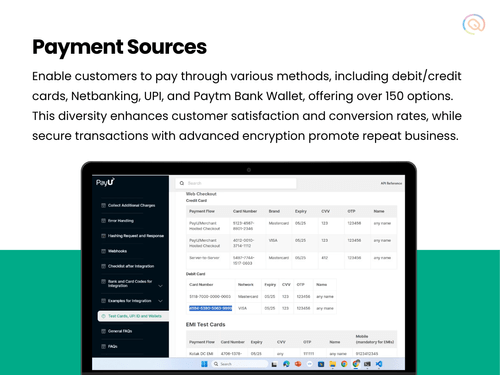
  • Support for Multiple Payment Methods: PayU supports 150+ payment methods, including credit/debit cards, UPI, net banking, and popular digital wallets, catering to the diverse preferences of your customers.
  • Comprehensive Analytics: PayU provides detailed payment analytics and reports, helping you gain valuable insights into your transaction history and financial performance.
  • Global Reach: With multi-currency support, PayU enables you to accept payments from customers around the world, expanding your business's reach and potential.

Additional Features of PayU Payment Gateway

PayU offers a range of advanced features to streamline your payment processing tasks. These include:

  • No-code payments: PayU boasts no-code payments, which means you can integrate their payment processing functionalities into your website or app without extensive coding knowledge.
  • Split settlements: PayU's split settlements functionality allows you to distribute a single customer payment amongst multiple recipients.
  • Native OTP: PayU's native OTP functionality adds an extra layer of security to online transactions.  
  • Get Instant refunds- within 5 minutes: PayU's instant refund feature allows you to process and credit customer refunds within 5 minutes. This significantly improves the customer experience, especially in cases of order cancellations or returns.
  • Subscription Management: PayU offers robust subscription management tools, allowing you to create flexible plans and collect recurring payments effortlessly.
  • Instant retry: Automatically redirects declined payments to other providers for processing.
  • Analytics and Reporting: Advanced analytics and reporting tools to help businesses monitor performance and make informed decisions.

Pricing Of PayU payment Gateway

PayU charges 2% for local transactions with Visa, Mastercard, and similar methods, and 3% for international and premium card transactions. There's an 18% GST on all transactions, with no setup fees. Custom pricing and dedicated account managers are available for larger businesses.

Read more

Naspers Group Company Details

Founded Year:  2002

PayU is a Netherlands-based payment service provider to online merchants. The company was founded in 2002, and is headquartered in Hoofddorp.

Director/Founders Laurent le Moal
Company Size 1000+ Employees

PayU Pricing & Plans

Looking for The Right Pricing?

Share your requirements and get a plan built around your business.

  • Define your business needs
  • Get customised pricing
  • Choose features that fit your workflow

Price Available on Request

Get personalised PayU pricing that fits your needs. Our team will connect with you.

PayU Features

Core Functionalities

  • icon_check Multi Currency Support
    Accept payments from all over the world with different currencies
  • icon_check Multi-Language Checkout
    The ability to process payments and display information in multiple languages.
  • icon_check Split Payments
    Split payment in a payment gateway allows a single payment transaction to be divided and distributed to multiple recipients, such
  • icon_check Loyalty Management
    Loyalty management in payment gateways involves integrating features that allow businesses to reward and retain customers through
  • icon_check Dedicated POS
    Dedicated POS Payments in a payment gateway allow merchants to process payments independently using hardware and software. It
  • icon_check Pre-onboarding Assistance
    Helping businesses with the process of setting up a merchant account and integrating payment processing into their business.
  • icon_check Branding & Customization
    The ability to customize the look and feel of the payment process to match your brand.
  • icon_check Currency Conversion
    The ability to process payments in different currencies and automatically convert them to your desired currency.
  • icon_check Coupons and Offers Engine
    A Coupons and Offers creation feature within a payment gateway allows merchants to directly design and manage discount promotions
  • icon_check Mobile Responsiveness
    Ensuring that the payment process is optimized for mobile devices.
  • icon_check Payment Links
    Payment processing solutions that don't require a website. payments can be made through a link by sending it via SMS, Email etc.
  • icon_check Guest Checkout
    Allowing customers to make purchases without creating an account.
  • icon_check Store Creation
    Tools and features to create an online store within the payment gateway app
  • icon_check Landing Page Creation
    The landing page creation feature in a payment gateway allows users to create custom web pages for initiating and processing
  • icon_check Instant Settlements
    The process of settling transactions with your bank account instantly
  • icon_check Automated Reconciliation
    Automatic reconciliation uses software to match transactions between your bank and accounting records, saving time and minimizing
  • icon_check Dedicated Account Manager
    A payment gateway's dedicated account manager provides one-on-one assistance for any questions or problems you may have.

Payment Methods

  • icon_check QR Code Based Payments
    A QR code payment method is a way to make payments using a smartphone by scanning a special type of barcode called a QR code.
  • icon_check Digital Wallet
    It is an electronic device or online service that allows individuals to make electronic transactions.
  • icon_check UPI
    Unified Payments Interface is an instant real-time payment system developed by NPCI to facilitate inter-bank transactions through
  • icon_check Debit / Credit Cards
    Accept various payment methods, including credit cards, debit cards,
  • icon_check Net Banking
    It is a convenient and secure way for customers to manage their bank accounts and perform financial transactions over the
  • icon_check Cardless EMI
    Cardless EMI is similar to traditional EMI but doesn't require a credit or debit card. It's facilitated through a partnership
  • icon_check Buy Now, Pay Later (BNPL)
    Buy Now, Pay Later (BNPL) in a payment gateway is a feature that allows customers to purchase items immediately but pay for them
  • icon_check Cryptocurrency
    The ability to accept payments in cryptocurrency.
  • icon_check ACH Payments
    ACH or Automated Clearing House payments, are electronic money transfers between banks and credit unions through a computer

Subscription Management

  • icon_check Reccuring Payments
    Recurring payments, also known as subscription payments, auto-debit, or automatic payments, occur when a customer authorizes a
  • icon_check Proration
    Proration is a billing model that adjusts a customer's bill to reflect changes to their plan during a billing cycle.
  • icon_check Dunning
    Dunning refers to the process of communicating with customers to collect overdue payments.

Administrative Features

  • icon_check Tax Management
    Tax management involves automatically calculating, applying, and handling taxes during transactions.
  • icon_check Invoice Generation
    Automatically creates invoices for transactions, saving time and reducing errors. It includes all necessary details such as the
  • icon_check Reporting & Analytics
    Tools that allow merchants to track their payment activity, generate reports, and gain insights into their sales data.
  • icon_check User Access Management
    User, role, and access management in a payment gateway are ways to control who can access what features and data in the system
  • icon_check Merchant Portal
    A web interface that allows merchants to manage their payment accounts, view transactions, and access other features.

Security Features

  • icon_check Two-Factor Authentication (2FA)
    Two-factor authentication in a payment gateway adds an extra layer of security by requiring users to verify their identity
  • icon_check Fraud Detection & Prevention
    Systems that analyze transactions for suspicious patterns to identify and block fraudulent activity.
  • icon_check PCI DSS Compliance
    Ensures a business adheres to Payment Card Industry Data Security Standards to protect cardholder information.
  • icon_check Tokenization
    Replaces sensitive data (like credit card numbers) with a unique identifier (token) for secure storage and processing.
  • icon_check Risk Management
    Managing risks in payment gateways involves identifying, assessing, and minimizing potential issues associated with processing
  • icon_check Multi-Factor Authentication (MFA)
    Multi-Factor Authentication (MFA) refers to an authentication process that requires two or more verification factors to gain
  • icon_check Automatic Device Recognition
    Automatic device recognition is a security feature used by payment gateways to identify and authenticate devices that initiate

Integrations Supported

  • icon_check SDK Integration
    SDK integration in a payment gateway platform involves incorporating the payment gateway's software development kit (SDK) into
  • icon_check CRM Integration
    CRM integration with a payment gateway connects a CRM system to a payment gateway, allowing businesses to merge customer data
  • icon_check API Integration
    Integrating an API into a payment gateway platform connects your website or app to securely process payments, handle
  • icon_check E-Commerce Integration
    E-commerce integration in a payment gateway platform means connecting the payment system with an online store.
  • icon_check POS Integration
    A hardware and software solution used in retail environments to process sales transactions, manage inventory, and handle customer
  • icon_check Order Management
    Order management is the process of handling customer orders from placement to delivery. It's a crucial part of a business's
  • icon_check Third Party Integration
    Integrating a 3rd party plugin into a payment gateway platform allows you to accept payments directly on your site without

Alerts & Notifications

  • icon_check Transaction Notifications
    Tells you about transactions happening on your system, such as when a payment is successful or fails.
  • icon_check Security Alerts
    An alert that warns you about potential security threats, such as suspicious activities or attempts to hack into the system.
  • icon_check Downtime Alerts
    A message that tells you when the payment system is not working or is down. It helps you know immediately when there’s a
  • icon_check Discrepancy Alerts
    A notification that notifies you when there are inconsistencies or mismatches in transaction details, such as differences in
  • icon_check Custom Event Notifications
    Personalized messages set up to alert you about specific events or actions that you consider important, such as a high-value
PayU Demo Video play icon

Get PayU Demo

Watch the demo video to explore key features, real workflows, and how the software fits your business needs.

Understand
Key Features
Personal
Demo Insights
Interactive
Demo Support

PayU Specifications

Supported Platforms
Windows Windows iOS iOS Android Android MacOS MacOS
Devices
Desktop Desktop Mobile Mobile
Deployment
Cloud-Based Cloud-Based
Suitable For
All Industries
Business Specific
All Businesses
Business Size
Small Business Startups Medium Business Enterprises SMEs MSMBs MSMEs
Customer Support
Email Live Chat Communities
Language
English
Integration
API Integration
Training Resources
Documentation Videos

Explore the Best Alternative Solutions Similar to Your Business Size and Needs

Small Business

Designed for startups and growing businesses

BillDesk

3.6

MaxelPay

4.3

UnPay

4.3

See More

Enterprises

Designed for complex and large-scale business needs

PayG

3.7

Cashfree

4.3

airpay

4.2

See More

PayU Reviews

4.1

Out of 5

img

Overall Rating

Based on
11 Verified Reviews

Rating Breakdown

  • Features 4.3
  • Value for Money 4.1
  • Ease of Use 4.0
  • Customer Support 4.0

85% Recommend this Product

Add Review

Pros

  • "PayU supports most payment options like debit/credit cards, UPI, and net banking. It’s easy to integrate into websites and is user-friendly."

    SUNIL KUMARJul 4, 2024

  • "PayU is quick, easy, and secure, with good authentication steps. It’s efficient with minimal downtime."

    Nandini Gupta Jul 4, 2024

  • "PayU is very easy to use and integrates smoothly with many payment options. The payouts are timely, and there are no setup costs, which is fantastic."

    Dillibabu Jul 3, 2024

Cons

  • "The account activation process took six months and was very confusing. The wait time was too long."

    Kulwant Jul 5, 2024

  • "Payment failures and refund issues are a concern, with deductions happening but not reaching the merchant."

    SUNIL KUMARJul 4, 2024

  • "The new version has some issues, with error pages popping up more frequently as transaction volumes increase."

    Nandini Gupta Jul 4, 2024

PayU Video Review

youtubeVideoId

4.3

“PayU Review - Benefits of PayU for Your Business”

Review by: The Inventar

Chinmay rout

Accountant

Industry: SAAS User since: 1-2 years

4.2

Reviewed on: Aug 5, 2024

Techjockey Verified

“A Payment Solution That Fits My Growing Needs”

PayU has become my go-to payment gateway because of its wide range of supported payment methods and currencies. It’s been very effective in helping me manage both local and international payments. Even though I wish the fees were lower, the overall experience has been positive. The interface is simple to use, which was a big relief when I first set it up. Refunds could be faster, but that’s a minor issue in the grand scheme of things.

Pros

PayU’s ability to accept multiple currencies really stood out to me. Since I have international customers, this feature was a big plus. The payment tracking on the dashboard is very clear, so I don’t feel lost when reviewing my sales.

Cons

One thing I don’t like is the fees they charge. I feel like the processing fee is a bit high compared to other platforms I’ve used. Another downside is that refunds can take a while to process, which can frustrate some of my customers.

Switched from WePay

Reason to switch

The switch to PayU was mainly driven by its ability to handle international payments, which was something my previous payment provider struggled with.

NITYANAND PATHAK

Accountant

Industry: Accounting User since: 1-2 years

4

Reviewed on: Jul 9, 2024

Techjockey Verified

“PayU’s Payment Integration Made My Business Much Easier”

PayU made my online business run smoother by offering a wide range of payment options. I like that it supports UPI, credit cards, and even wallet payments. The integration process went smoothly, and it was simple enough to use without requiring deep technical knowledge.

Pros

One of the best things about PayU is the variety of payment options it offers. It allowed me to offer my customers different ways to pay, and that made things more flexible. I noticed a lot more successful payments since I switched. The interface is clean and easy to navigate, so I wasn’t constantly worrying about any missed payments or failed transactions.

Cons

While it works well, I found that there are times when it takes a bit longer to settle payments, especially on weekends. I also wish their customer service was faster, as sometimes I have to wait longer to get help when something goes wrong.

Switched from Zoho Payments

Reason to switch

I switched because PayU felt more user-focused, and I liked the way it displayed the transaction details in a clear and understandable way.

Kulwant

User

Industry: E-commerce User since: 1-2 years

4

Reviewed on: Jul 5, 2024

Techjockey Verified

“Not Worth the Wait”

PayU has low commission fees, but the long and confusing activation process was a big letdown.

Pros

The commission fee is low, around 2.5%.

Cons

The account activation process took six months and was very confusing. The wait time was too long.

Switched from Instamojo

Reason to switch

I was looking for lower commission fees, but the long activation time was disappointing.

See All PayU Reviews

Compare PayU With other Payment Gateway

Products
Ratings
Pricing
Device Supported
Deployment
Supported Platforms
  • img

    PayU

  • 4.1

  • Price On Request

  • Desktop

    Mobile

  • Web based

    On Premises

  • Windows

    Mac OS

  • img

    airpay

  • 4.2

  • Price On Request

  • Desktop

    Mobile

  • Web based

    On Premises

  • Windows

    Mac OS

  • img

    Touras

  • 4.0

  • Price On Request

  • Desktop

    Mobile

  • Web based

    On Premises

  • Windows

    Mac OS

  • img

    UnPay

  • 4.3

  • Price On Request

  • Desktop

    Mobile

  • Web based

    On Premises

  • Windows

    Mac OS

  • img

    Razorpay

  • 4.4

  • Price On Request

  • Desktop

    Mobile

  • Web based

    On Premises

  • Windows

    Mac OS

  • img

    Cashfree

  • 4.3

  • Price On Request

  • Desktop

    Mobile

  • Web based

    On Premises

  • Windows

    Mac OS

  • img

    Paytm for Business

  • 4.2

  • Price On Request

  • Desktop

    Mobile

  • Web based

    On Premises

  • Windows

    Mac OS

  • img

    Verifone

  • 4.4

  • Price On Request

  • Desktop

    Mobile

  • Web based

    On Premises

  • Windows

    Mac OS

  • img

    PayDollar

  • 4.5

  • ₹ 10000

  • Desktop

    Mobile

  • Web based

    On Premises

  • Windows

    Mac OS

  • img

    Worldline

  • 3.9

  • Price On Request

  • Desktop

    Mobile

  • Web based

    On Premises

  • Windows

    Mac OS

  • img

    Stripe

  • 3.8

  • Price On Request

  • Desktop

    Mobile

  • Web based

    On Premises

  • Windows

    Mac OS

(0) Product(s) selected

PayU Alternatives

See All PayU Alternatives

Available

Price on Request

Available

Price on Request

Available

Price on Request

Available

Price on Request

Starting Price:

$25 /Month

Available

Price on Request

Available

Price on Request

Available

Price on Request

Articles for PayU

See All Related Articles

What is PayU Payment Gateway?

PayU Payment Gateway is a comprehensive payment processing solution that supports various payment methods and provides robust security features.

How do I integrate PayU Payment Gateway with my website?

PayU offers detailed documentation, SDKs, and plugins for various platforms, making integration quick and easy.

Is PayU secure?

Yes, PayU employs advanced security measures including PCI-DSS compliance and encryption to ensure the safety of your transactions.

What payment methods does PayU support?

PayU supports credit/debit cards, UPI, net banking, and digital wallets.

Can I accept international payments with PayU?

Yes, PayU supports multi-currency transactions, allowing you to accept payments from customers worldwide.

Does PayU offer recurring payment options?

Yes, PayU provides support for setting up and managing recurring payments for subscription-based services.

Is there a mobile app for PayU?

Yes, PayU offers a mobile app available on both Android and iOS devices.

What is the setup fee for PayU Payment Gateway?

PayU does not charge any setup fee. You only pay for the transactions you process.

PayU Questions

A:

To integrate PayUmoney Payment Gateway In WooCommerce, there are three steps. They are as follows:

To install the plugin, follow the steps given below:

  • Open the official website of PayU
  • Navigate to the ‘Developers’ section
  • Scroll down and find the WooCommerce plug-in integraion
  • Download the latest version of the plug-in
  • Login to your website as wordpress admin
  • Navigate to Plug-ins > Add new > Choose file
  • Select the zip file that you downloaded
  • Click on Install and activate the plug-in

To configure the plug-in, follow the steps given below;

  • Login to your website as WordPress admin
  • Click on WooCommerce > Settings > Checkout
  • Click on the PayU money plug-in
  • Input the required details which you can find in the integration Details section on your PayU money dashboard.

To test the Integration, follow the steps given below:

  • After adding the required details in the previous step, select the gateway mode as ‘Sandbox’
  • You can test payments in the PayU money test environments
  • In the integration Details section on your PayU money dashboard, you can use the test card details to do a test transaction
  • When you wish to go live, select the gateway mode as ‘production’
  • Select the return page as ‘My Account’
  • Click on Save
Mohammad Shabbir Sep 28, 2024
A:

To download a PayU report for all payment links, follow the steps given below:

  • Open your PayU account
  • Press on the Generate Report tab
  • Select a date range for the report
  • Choose the data fields and filters
  • Select the format of the file (CSV or XLSX)
  • Hit Download & Share
  • A dialog box will confirm that the report is generated
  • Press Share and enter the email address of the recipient
  • Hit Share again
Chhavi Pamnani Sep 28, 2024
A:

With the help of the gateway plugin PayU India, one can utilize WooCommerce to accept payments via PayU. Payments can be easily accepted by credit card and direct payments using any of the linked banks. The customer is directed to PayU to complete a secure payment once the order has been processed.

VINAY KUMAR Sep 28, 2024
A:

From the PayU dashboard, one may access a variety of details about the created payment links, such as the payment link's name, creation date, description, amount, and status, as well as options to copy, share, and disable the link.

Pranab Jyoti Sep 28, 2024
A:

After registering, CCAvenue claims to review and authorize accounts in an hour. The process includes registration on the CCAvenue website, verification of credentials, and receiving an email containing the Payment Gateway Integration Kit for activation. After the account activation, companies can start handling transactions.

However, accounts aren't enabled until all necessary paperwork is received. The full procedure needs to be finished within seven days of CCAvenue's official permission.

Arjun Sep 28, 2024
See All PayU Questions

20,000+ Software Listed

Best Price Guranteed

Free Expert Consultation

2M+ Happy Customers

Terms and Condtions

close

Users with registered businesses can purchase goods from merchants on the platform to satisfy their business needs. Users are not permitted to utilize any products acquired through the platform for resale, advertising, business, or further distribution.

For each purchase made, users will receive a Tax Invoice (or 'GST invoice') that includes specific details such as:

  • the GSTIN of the user associated with their registered business, and

  • the specified Entity Name for their business.

It should be noted that not all products are eligible for GST Invoice. Only the products displayed by participating sellers with the 'GST-based Invoice Available' callout on the product description page would qualify.

Certain goods and services are not eligible to get a GST Invoice, including items with VAS, i.e., Value Added Services (e.g., Total Mobile Protection/Assured Buyback) and those involving an exchange offer at the time of purchase.

Users must ensure the accuracy of the GSTIN, and business entity name provided for the GST Invoice. Requests for corrections into GST Invoice would not be accommodated by Techjockey.com or any Seller, and any issues arising from user-provided information are the sole responsibility of users.

Techjockey.com is not liable for the GST Invoice or any associated input tax credit. To efficiently claim an input tax credit, users should select the registered place of business address as per the GST authority's data and follow the provisions of the GST Act and rules.

To claim an input tax credit, the delivery and billing addresses must match. Furthermore, input tax credits will not be granted if the delivery address and GSTIN on the invoice are from different states. In case of incorrect GST details provided during the order placement, the order will be canceled automatically.