USA
USA UAE
UAESmall Business
Designed for startups and growing businesses


See More





Brand: Pelagian
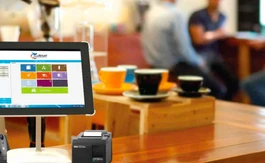
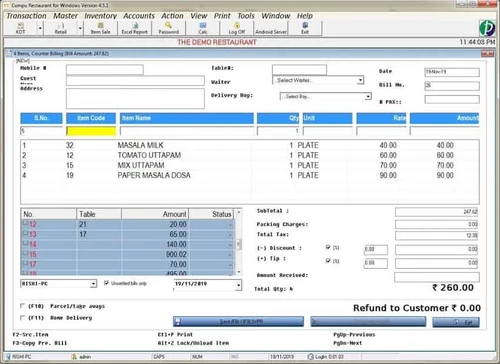
Pelagian is a restaurant billing software, which is used by restaurants, sweet shops, bars, bakery, fast food corners, and more for faster and secure billing. It ensures billing even without a KOT system and provides day wise report for the available stock, item-wise sales, and daily sales. Pelagian restaurant billing system can be used across different outlets for multiple kitchen printing, m...
See MoreHave you used Pelagian Restaurant Billing Software before?
Share your insights for better experience
Brand: Pelagian
Founded Year: 1992
Pelagian
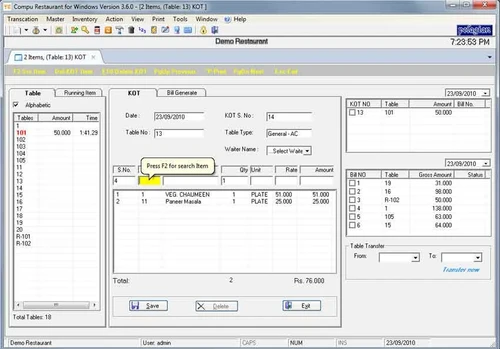
 Table Management Menu Management KOT Management Point of Sale (POS) GST Ready Guest Management Inventory Management Recipe Management Barcode Management Discount Management Sales Analysis Counter Billing Home Delivery Entry Sales Reports Purchases Dine In Restaurant, Bar Fast Food, Sweet Shop Multiple Kitchen Printing

Watch the demo video to explore key features, real workflows, and how the software fits your business needs.
 Windows
  Desktop
  Perpetual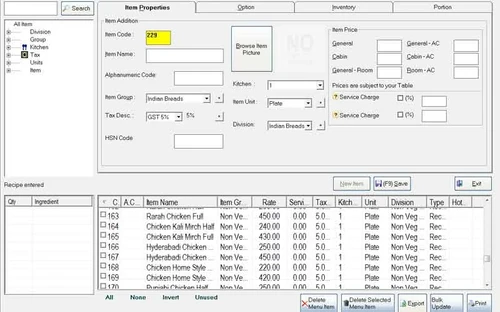
Small Business
Designed for startups and growing businesses
Medium Business
Built for business growth and flexibility
Enterprises
Designed for complex and large-scale business needs
4.7
Out of 5

Overall Rating
Based on
7 Verified Reviews
Rating Breakdown
92% Recommend this Product
Add ReviewCustomers consistently praise Pelagian Restaurant Billing Software for its user-friendly interface and the significant operational improvements it brings to their businesses. Many users highlight the proactive customer support and the software's effectiveness in optimizing restaurant operations, including billing and inventory management. While the overall sentiment is positive, with high recommendations and satisfaction, there are no notable complaints or limitations mentioned, indicating a strong user experience across various roles and company sizes.
Pros
"Pelagian is a very trusted software in the industry. We got recommended through an acquaintance, and we are glad we made the switch."
"It has an android app where guests can place orders and it raises KOT tickets directly from there."
Cons
"The software works smoothly and the customer support is top of the class. No problem as such."
"Nothing as of now. Our experience with Pelagian has been great."
"None that we can write here. We raise all the issues we found to the support team and solve it in record time. It is a good software."

Jun 30, 2021
Techjockey Verified
“Pelagian restaurant software for hassle-free billing”
Pros
The software let us improve our operations significantly. The software is GST ready, which is very convenient. The GST rates are applied as per restaurant requirements. Pelagian Restaurant Billing also splits KOT as per the items.
Cons
The software works smoothly and the customer support is top of the class. No problem as such.
Reason to switch
Limitations on customization, and there was no bulk SMS sending feature for marketing.
Jan 19, 2021
Techjockey Verified
“Easy to use, our employees have learnt using Pelagian quickly”
Pros
Pelagian Restaurant POS is an easy to use software. Its features are good, and learning how to use the software is a matter of minutes. Our staff performs bookkeeping, inventory, billing, etc. easily with Pelagian. Their after-sale service is also top quality. Very responsive and helpful.
Cons
Nothing as of now. Our experience with Pelagian has been great.
Reason to switch
Food Hub has limited kitchen and table management features. It was costing our business.
Sep 25, 2020
Techjockey Verified
“Easy interface makes Pelagian a preferred choice”
Pros
Right from the get go, we got a complete detailed information about what the software can do and how to use it. To add to a long list of benefits, there customer service team is proactive.
Cons
No complaints whatsoever.
Reason to switch
Poor functionality and an unresponsive customer support team.

Pelagian Restaurant Billing Software
₹ 9999.00 excl. GST
Desktop
Mobile
Web based
On Premises
Windows
Mac OS

Sinca
₹ 4236
Desktop
Mobile
Web based
On Premises
Windows
Mac OS
BillByteKOT
₹ 1999
Desktop
Mobile
Web based
On Premises
Windows
Mac OS

DSO Restaurant
₹ 6999
Desktop
Mobile
Web based
On Premises
Windows
Mac OS

Bridge Restaurant Billing Software
Price On Request
Desktop
Mobile
Web based
On Premises
Windows
Mac OS
Petpooja
₹ 10000
Desktop
Mobile
Web based
On Premises
Windows
Mac OS

Ciferon POS
₹ 7499
Desktop
Mobile
Web based
On Premises
Windows
Mac OS

eRe4u
₹ 4000
Desktop
Mobile
Web based
On Premises
Windows
Mac OS

Limetray
Price On Request
Desktop
Mobile
Web based
On Premises
Windows
Mac OS

Digirestro
₹ 8000
Desktop
Mobile
Web based
On Premises
Windows
Mac OS

Captain App
Price On Request
Desktop
Mobile
Web based
On Premises
Windows
Mac OS
(0) Product(s) selected
The restaurant billing software is ideal for handling inventory stock and items as well as pilferage in it of any kind.
Pelagian restaurant software lets you manage both employee records and payroll with ease.
Pelagian is GST compliant and you can prepare GST compliant invoices with ease.
Sales reports, purchase amount summaries, inventory details and credit sales report can easily be generated with Pelagian.
Free demo support is provided by Techjockey to help you make an informed buying decision.
20,000+ Software Listed
Best Price Guranteed
Free Expert Consultation
2M+ Happy Customers
Terms and Condtions

Users with registered businesses can purchase goods from merchants on the platform to satisfy their business needs. Users are not permitted to utilize any products acquired through the platform for resale, advertising, business, or further distribution.
For each purchase made, users will receive a Tax Invoice (or 'GST invoice') that includes specific details such as:
the GSTIN of the user associated with their registered business, and
the specified Entity Name for their business.
It should be noted that not all products are eligible for GST Invoice. Only the products displayed by participating sellers with the 'GST-based Invoice Available' callout on the product description page would qualify.
Certain goods and services are not eligible to get a GST Invoice, including items with VAS, i.e., Value Added Services (e.g., Total Mobile Protection/Assured Buyback) and those involving an exchange offer at the time of purchase.
Users must ensure the accuracy of the GSTIN, and business entity name provided for the GST Invoice. Requests for corrections into GST Invoice would not be accommodated by Techjockey.com or any Seller, and any issues arising from user-provided information are the sole responsibility of users.
Techjockey.com is not liable for the GST Invoice or any associated input tax credit. To efficiently claim an input tax credit, users should select the registered place of business address as per the GST authority's data and follow the provisions of the GST Act and rules.
To claim an input tax credit, the delivery and billing addresses must match. Furthermore, input tax credits will not be granted if the delivery address and GSTIN on the invoice are from different states. In case of incorrect GST details provided during the order placement, the order will be canceled automatically.