linkedin
Pleo logo
play What is Pleo?
Pleo dashboard
Pleo track

Pleo

Brand: Pleo Technologies

  • 4.2

  • 5 Ratings & 1 Review

Pleo is an expense management,mnt software helps businesses automate spending, track receipts, and manage company expenses efficiently. It offers smart company cards, real-time expense reporting, and integrations with accounting software.

See More

Have you used Pleo before?

Share your insights for better experience

Add a Review
Starting Price
$45

View plans

100% Genuine
Products
Best Price
Guaranteed
Safe & Secure
Payment
  • Description

  • Pricing

  • Features

  • Specification

  • Review

  • Compare

  • Alternatives

  • FAQ

Starting at $45

PleoSoftware Overview

What is Pleo?

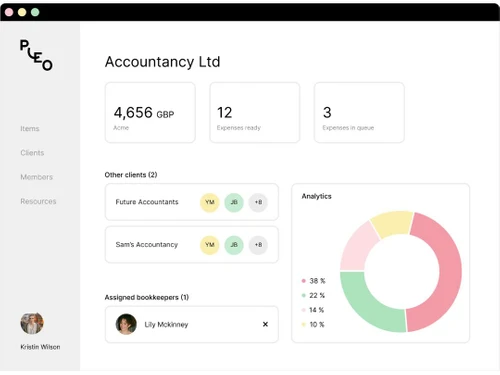
Pleo is an expense management software designed to simplify business spending and financial tracking. It provides smart company cards for employees, automated expense reporting, and eliminates manual reimbursement processes. Businesses can set spending limits, capture receipts in real time, and gain better visibility into company expenses.

This expense management software integrates seamlessly with accounting software like Xero, QuickBooks, and Sage, ensuring smooth financial management. It helps companies reduce paperwork, enhance compliance, and improve financial efficiency. With Pleo, businesses can streamline expense approvals, categorize transactions, and generate detailed spending reports effortlessly.

Why Choose Pleo Expense Management Software?

  • Automated Expense Management : Pleo automates expense tracking, reducing manual work and eliminating traditional reimbursement processes.
  • Smart Company Cards : Businesses can issue prepaid or credit cards with customizable spending limits for employees, ensuring controlled spending.
  • Seamless Accounting Integration : It integrates with leading accounting software like Xero, QuickBooks, and Sage, ensuring smooth financial reconciliation.
  • Real-Time Expense Tracking : Get instant updates on company spending, categorize expenses, and capture receipts digitally.
  • Enhanced Compliance & Security : Pleo ensures compliance with financial regulations, offering fraud detection and secure transactions.
  • User-Friendly Interface : The software is easy to use, with a mobile app and intuitive dashboard for effortless expense management.
  • Detailed Financial Insights : Gain valuable analytics and reports to make informed financial decisions and optimize budget planning.

Benefits of Pleo Expense Management Software

  • Multi-Currency Support : Pleo allows businesses to manage expenses in multiple currencies, making it ideal for international companies and remote teams.
  • Customizable Approval Workflows : Businesses can set up multi-level approval processes to ensure better financial control and accountability.
  • Mileage & Travel Expense Tracking : Employees can log mileage and travel expenses easily, ensuring accurate reimbursements and budget tracking.
  • Subscription Management : Helps businesses track and manage recurring payments for software subscriptions, reducing unwanted or forgotten charges.
  • VAT & Tax Compliance : Automatically extracts VAT data from receipts, simplifying tax filing and compliance with financial regulations.
  • Flexible Spending Rules : Allows businesses to create specific spending rules based on departments, projects, or individual employees.
  • AI-Powered Expense Categorization : Uses machine learning to categorize expenses intelligently, saving time on manual data entry.
  • Instant Virtual Cards : Generate virtual cards instantly for online transactions, reducing the risk of fraud and unauthorized spending.

Pleo Pricing

Pleo price in India starts at $45 at techjockey.com.

The pricing model is based on different parameters, including extra features, deployment type, and the total number of users. For further queries related to the product, you can contact our product team and learn more about the pricing and offers.

Read more

Pleo Pricing & Plans

Essential (3 users included)
Key Features
  • Reimbursements
  • Mileage and Per Diem
  • Flexible card limits
  • Vendor cards
  • Recurring vendor management
  • Automated review flows
Starting at $45
    • Quantity

      Quantity
      Quantity
    • Monthly

      Monthly
      Monthly

Key Features

  • Reimbursements

  • Mileage and Per Diem

  • Flexible card limits

  • Vendor cards

  • Recurring vendor management

  • Automated review flows

Pleo Features

  • icon_check Integrations
    Seamlessly connects with accounting software like Xero, QuickBooks, and Sage for effortless financial management.
  • icon_check Multi-entity
    Supports businesses with multiple subsidiaries, allowing centralized expense tracking across different entities.
  • icon_check Reimbursement
    Enables quick and hassle-free reimbursements for employees who pay out-of-pocket expenses.
  • icon_check Smart Cards
    Provides physical and virtual company cards with customizable spending limits for better expense control.
  • icon_check Invoices
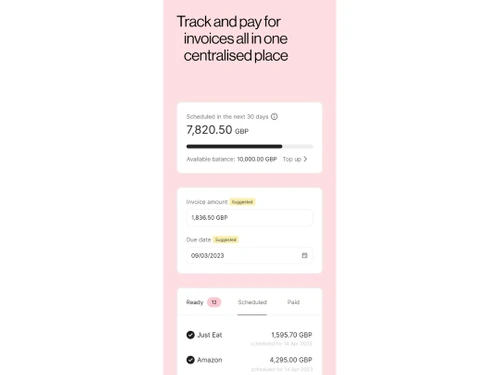
    Streamlines invoice processing by capturing, categorizing, and approving supplier invoices digitally.
  • icon_check Marketing
    Helps track and manage marketing-related expenses, ensuring budget optimization and cost control.
  • icon_check Expense Management
    Automates expense tracking, categorization, and reporting to simplify financial workflows.
Pleo Demo Video play icon

Get Pleo Demo

Watch the demo video to explore key features, real workflows, and how the software fits your business needs.

Understand
Key Features
Personal
Demo Insights
Interactive
Demo Support

Pleo Specification

Supported Platforms
Ubuntu Ubuntu Windows Windows iOS iOS Android Android MacOS MacOS Linux Linux
Devices
Desktop Desktop Mobile Mobile
Deployment
Web-Based Web-Based
Suitable For
All Industries
Business Specific
All Businesses
Business Size
Small Business Medium Business Enterprises SMBs SMEs MSMBs MSMEs
Customer Support
Email Live Chat Forums
Language
English français Deutsche Español

Explore the Best Alternative Solutions Similar to Your Business Size and Needs

Pleo Review

4.2

Out of 5

img

Overall Rating

Based on
1 Verified Review

Rating Breakdown

  • Features 4.2
  • Value for Money 4.5
  • Ease of Use 3.9
  • Customer Support 4.4

86% Recommend this Product

Add Review

Pleo Video Review

youtubeVideoId

4.3

“Pleo Fintech Honest Review - Watch Before Using”

Review by: Smart Format

Compare Pleo With other Expense Management Software

Products
Ratings
Pricing
Device Supported
Deployment
Supported Platforms
  • img

    Pleo

  • 4.2

  • Price On Request

  • Desktop

    Mobile

  • Web based

    On Premises

  • Windows

    Mac OS

  • img

    Zoho Expense

  • 4.8

  • ₹ 199

  • Desktop

    Mobile

  • Web based

    On Premises

  • Windows

    Mac OS

  • img

    Amadeus Cytric

  • 4.2

  • Price On Request

  • Desktop

    Mobile

  • Web based

    On Premises

  • Windows

    Mac OS

  • img

    Brex

  • 4

  • Price On Request

  • Desktop

    Mobile

  • Web based

    On Premises

  • Windows

    Mac OS

  • img

    CashBook

  • 4.1

  • Price On Request

  • Desktop

    Mobile

  • Web based

    On Premises

  • Windows

    Mac OS

  • img

    Klipit Bizpro

  • 4.1

  • Price On Request

  • Desktop

    Mobile

  • Web based

    On Premises

  • Windows

    Mac OS

  • img

    eXBA

  • 4.2

  • ₹ 150

  • Desktop

    Mobile

  • Web based

    On Premises

  • Windows

    Mac OS

  • img

    Costipro

  • 4.7

  • ₹ 2376

  • Desktop

    Mobile

  • Web based

    On Premises

  • Windows

    Mac OS

(0) Product(s) selected

Pleo Alternatives

See All Pleo Alternatives

Starting Price:

$12 /Month

Available

Price on Request

Starting Price:

₹350 /month

Peko

4.3

Available

Price on Request

Articles for Pleo

See All Related Articles

How much does Pleo Software cost?

Pleo's pricing in India starts at $45 on TechJockey.com.

Does Pleo Software have a mobile app?

Yes, Pleo has a mobile app available for both Android and iOS devices.

Which operating systems support Pleo Expense Management Software?

Pleo is compatible with Ubuntu, Linux, Windows, macOS, Android, and iOS.

Is there a free trial available for Pleo Software?

Yes, Pleo Expense Management Software offers a free trial for new users to explore its features.

How does Pleo Expense Management Software work?

Pleo automates expense management by providing smart company cards, real-time tracking, and seamless integrations.

Who uses Pleo Software?

Businesses of all sizes, finance teams, and employees handling company expenses can benefit from Pleo.

Can I request a free demo of Pleo Software?

Yes, Pleo offers a free demo upon request to showcase its functionalities.

Is Pleo Software available for free?

Pleo has a free trial, but full access requires a paid subscription.

Can Pleo be used for international transactions?

Yes, Pleo Expense Management Software supports multiple currencies, making it suitable for international transactions and global businesses.

Does Pleo support integrations with ERP systems?

Yes, Pleo integrates with ERP and accounting software like Xero, QuickBooks, and Sage for seamless financial management.

20,000+ Software Listed

Best Price Guranteed

Free Expert Consultation

2M+ Happy Customers

Terms and Condtions

close

Users with registered businesses can purchase goods from merchants on the platform to satisfy their business needs. Users are not permitted to utilize any products acquired through the platform for resale, advertising, business, or further distribution.

For each purchase made, users will receive a Tax Invoice (or 'GST invoice') that includes specific details such as:

  • the GSTIN of the user associated with their registered business, and

  • the specified Entity Name for their business.

It should be noted that not all products are eligible for GST Invoice. Only the products displayed by participating sellers with the 'GST-based Invoice Available' callout on the product description page would qualify.

Certain goods and services are not eligible to get a GST Invoice, including items with VAS, i.e., Value Added Services (e.g., Total Mobile Protection/Assured Buyback) and those involving an exchange offer at the time of purchase.

Users must ensure the accuracy of the GSTIN, and business entity name provided for the GST Invoice. Requests for corrections into GST Invoice would not be accommodated by Techjockey.com or any Seller, and any issues arising from user-provided information are the sole responsibility of users.

Techjockey.com is not liable for the GST Invoice or any associated input tax credit. To efficiently claim an input tax credit, users should select the registered place of business address as per the GST authority's data and follow the provisions of the GST Act and rules.

To claim an input tax credit, the delivery and billing addresses must match. Furthermore, input tax credits will not be granted if the delivery address and GSTIN on the invoice are from different states. In case of incorrect GST details provided during the order placement, the order will be canceled automatically.