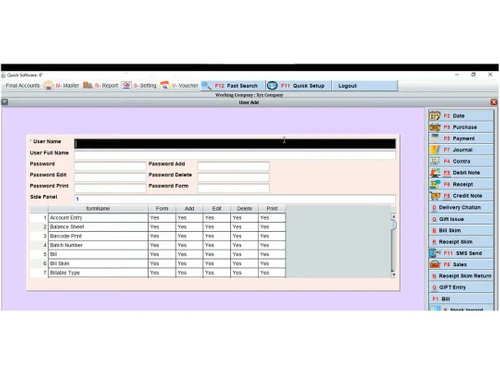
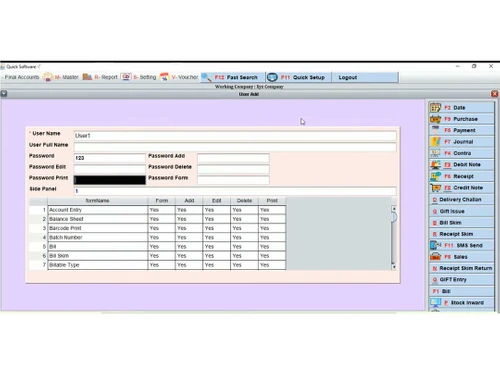
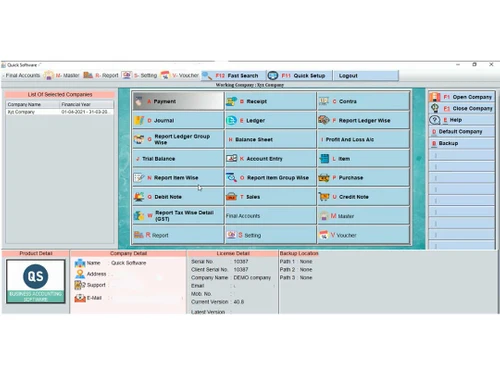
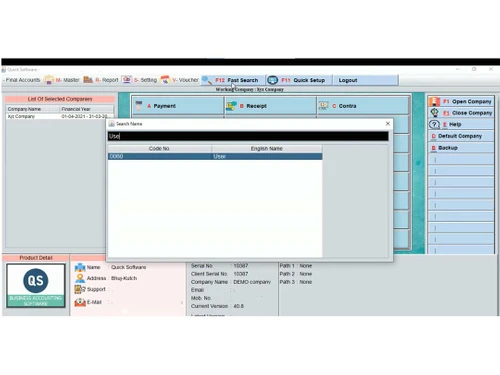
linkedin
QS Billing Software logo
play QS - _ | How to _ learn Sales Entry. step by step | Hindi | Video Tutorial
qs billing
qsbilling users

QS Billing Software

Brand: Quick Software

  • 4.5

  • 3 Ratings

QS Billing Software is a comprehensive solution that streamlines billing processes with advanced automation, accurate invoicing, and customizable reporting, empowering businesses to enhance efficiency and accuracy in their financial operations.

See More

Have you used QS Billing Software before?

Share your insights for better experience

Add a Review
Starting Price
₹6,000 excl.GST
₹ 7,080 incl. GST

View plans

offer Save upto 18%, Get GST Invoice on your business purchase T&C
offer Buy Now & Pay Later, Check offer on payment page.
Buy Now
100% Genuine
Products
Best Price
Guaranteed
Safe & Secure
Payment
  • Description

  • Pricing

  • Features

  • Specification

  • Review

  • Compare

  • Alternatives

  • FAQ

Starting at ₹6,000
Buy Now

QS Billing Software Overview

What is QS Billing Software?

QS Billing Software is a powerful tool designed to help your business thrive with its smart features and user-friendly interface. With the ability to work offline, you won't have to worry about interrupted billing processes, and the multi-core business engine ensures efficient performance even during peak hours.

Create professional and attractive invoices that reflect your brand identity with over 20 pre-designed GST/Non-GST invoice templates in various sizes. This software simplifies invoice generation, reducing operator workload by up to 43% during busy periods.

Experience the flexibility of generating multi-rates and multi-item invoices effortlessly. The software automatically calculates GST and cash amounts for sale bills, eliminating the need for manual calculations and supporting invoices with multiple tax rates.

Gain valuable insights into your business performance through the software's comprehensive range of business reports. These reports provide detailed information to help you make informed decisions and understand your business better. Export your data in PDF or Excel format for easy reference and archiving. The software lets you directly email PDF documents, streamlining your communication with customers and stakeholders.

Why Choose QS Billing?

QS Billing Software is ideal for small and medium-sized businesses across various industries that require efficient and streamlined billing processes. It simplifies the billing and invoicing tasks, reducing manual efforts, and saving time. The offline functionality ensures uninterrupted billing, even with poor internet connectivity. QS Billing Software helps businesses maintain accurate financial records, comply with tax regulations, and gain valuable insights into their performance. It is a user-friendly solution that empowers companies to manage their billing processes effectively, enhance customer satisfaction, and drive growth.

Benefits of QS Billing and Invoicing Software

  • QS Billing Software works without an internet connection, ensuring uninterrupted billing operations even in areas with limited or no connectivity.
  • The software's one-click invoice generation feature reduces operator workload, saving valuable time during peak hours and streamlining the billing process.
  • Generate invoices with multiple rates and items, allowing for flexible and accurate billing based on specific customer requirements.
  • The software automatically calculates GST and cash amounts for sales bills, eliminating the need for manual calculations and ensuring accurate and compliant tax calculations.
  • Access a wide range of business reports that provide valuable insights into your business performance, helping you make informed decisions and optimize your operations for better profitability.

Pricing of QS Billing Software

QS billing platform pricing starts at INR 6,000 at techjockey.com.

The overall pricing model is based on different factors such as personalization, extra features required, total users, and the deployment type. Please feel free to request a call from our product experts if you want to learn more about our subscription plans or premium package deals.

Read more

Quick Software Company Details

Founded Year:  2010

Quick Software" is a company that stands for innovation and progress. It has been operating in India since 2010 and has imprinted its footprint in many cities.

Director/Founders Quick Software
Company Size 1-100 Employees

QS Billing Software Pricing & Plans

QS Billing Software
Key Features
  • Sales Invoice
  • General Ledger
  • Item Master
  • Expense Management
  • Tax Management / GST
  • Billing & Invoicing
  • Purchase Order
  • Calculates GST

Calculated Price

6000 Exclusive of all taxes
    • Users (One time)

      Users (One time)
      Users (One time)

Key Features

  • Sales Invoice

  • General Ledger

  • Item Master

  • Expense Management

  • Tax Management / GST

  • Billing & Invoicing

  • Purchase Order

  • Calculates GST

QS Billing Software Features

  • icon_check Dashboards
    Get a comprehensive business overview with real-time insights and key metrics.
  • icon_check Sales Invoice
    Create professional and customized invoices easily to streamline your billing process.
  • icon_check General Ledger
    Maintain accurate and organized financial records with a centralized ledger for efficient bookkeeping.
  • icon_check Item Master
    Manage inventory effectively by maintaining a master list of items with data such as stock levels, pricing, & descriptions.
  • icon_check Expense Management
    Track and manage your business expenses efficiently to maintain a clear view of your financial health.
  • icon_check Tax Management / GST
    Stay compliant with tax regulations and simplify tax management with built-in GST calculations and reporting.
  • icon_check Billing & Invoicing
    Generate accurate and professional invoices for seamless billing and invoicing operations.
  • icon_check Purchase Order
    Streamline your procurement process by creating and managing purchase orders for smooth supplier transactions.
  • icon_check Calculates GST
    Automate GST calculations for sales and purchases to ensure accurate and hassle-free tax calculations.
  • icon_check GST-Ready Invoicing
    Create professional, GST-compliant tax invoices and proforma bills for your customers with automated tax calculations.
  • icon_check Barcode Label Printing
    Design and print custom barcode stickers for your products to speed up the checkout process in your retail storefront.
  • icon_check Inventory Tracking
    Monitor your stock levels in real-time and receive automatic alerts when items fall below your defined reorder quantity.
  • icon_check Integrated POS Interface
    Utilize a fast point-of-sale screen designed for high-speed billing in supermarkets, pharmacies, and clothing stores.
  • icon_check Bulk Data Import
    Effortlessly migrate your existing product and customer lists from Excel into the software using a simple upload feature.
  • icon_check Credit Limit Management
    Set specific credit limits for your customers to prevent excessive outstanding balances and improve your cash flow today.
QS Billing Software Demo Video play icon

Get QS Billing Software Demo

Watch the demo video to explore key features, real workflows, and how the software fits your business needs.

Understand
Key Features
Personal
Demo Insights
Interactive
Demo Support

QS Billing Software Specifications

Supported Platforms
Windows Windows
Devices
Desktop Desktop
Deployment
Perpetual Perpetual
Suitable For
All Industries
Business Specific
All Businesses
Business Size
Small Business Startups Medium Business Enterprises SMBs SMEs MSMEs
Customer Support
Phone Email
Language
English
Integration
API Integration
Training Resources
Live Online Documentation Videos
Technology
Next Generation

Explore the Best Alternative Solutions Similar to Your Business Size and Needs

QS Billing Software Review

4.5

Out of 5

img

Overall Rating

Based on
3 Verified Ratings

Rating Breakdown

  • Features 4.3
  • Value for Money 4.8
  • Ease of Use 4.1
  • Customer Support 5

93% Recommend this Product

Add Review

Techjockey Trusted Reviews from Verified Users

No reviews are currently available for QS Billing Software. Discover similar Billing And Invoicing Software reviews

  • Vyapar Billing Software

    4.6

    Whats great - You can do all your business transactions through Vyapar software. There is no need to carry account books everywhere or main... read more

  • Jhattse

    5.0

    Whats great - It is easy to use, low cost, in budget software, and provide very good features and multi-store setup. read more

  • myBillBook

    4.6

    Whats great - This app has made billing very easy and quick. It has mobile and desktop app both, with automatic data transfer. i will recom... read more

Compare QS Billing Software With other Billing And Invoicing Software

Products
Ratings
Pricing
Device Supported
Deployment
Supported Platforms
  • img

    QS Billing Software

  • 4.5

  • ₹ 6000.00 excl. GST

  • Desktop

    Mobile

  • Web based

    On Premises

  • Windows

    Mac OS

  • img

    Raseed

  • 4.5

  • Price On Request

  • Desktop

    Mobile

  • Web based

    On Premises

  • Windows

    Mac OS

  • img

    InvoiceZy

  • 4.5

  • ₹ 99

  • Desktop

    Mobile

  • Web based

    On Premises

  • Windows

    Mac OS

  • img

    KaroSauda

  • 4.0

  • ₹ 1999

  • Desktop

    Mobile

  • Web based

    On Premises

  • Windows

    Mac OS

  • img

    Billing Fast

  • 4.6

  • ₹ 3588

  • Desktop

    Mobile

  • Web based

    On Premises

  • Windows

    Mac OS

  • img

    Apna Billbook

  • 4.2

  • ₹ 6998

  • Desktop

    Mobile

  • Web based

    On Premises

  • Windows

    Mac OS

  • img

    Petpooja Invoice

  • 4.2

  • ₹ 5000

  • Desktop

    Mobile

  • Web based

    On Premises

  • Windows

    Mac OS

  • img

    Billing Buddy

  • 4.1

  • ₹ 5000

  • Desktop

    Mobile

  • Web based

    On Premises

  • Windows

    Mac OS

  • img

    Asli Bill

  • 4.0

  • ₹ 7000

  • Desktop

    Mobile

  • Web based

    On Premises

  • Windows

    Mac OS

(0) Product(s) selected
QS Billing Software Alternatives

See All QS Billing Software Alternatives

Starting Price:

$10 /Month

Starting Price:

₹999 /Year

Articles for QS Billing Software

See All Related Articles

Which operating system does QS Billing Software support?

QS Billing Software is compatible with macOS and Windows.

Is there any QS Billing Software app?

QS Billing Software app is not available for mobile devices.

What is the deployment type of the QS Billing System?

QS Billing system supports web deployment.

How much does QS Billing Software cost?

QS Billing Software pricing starts at Rs 6000 at techjockey.com.

Who are the potential users of QS Billing Software?

QS Billing Software can be used by construction business managers, contractors and subcontractors, architects and engineers.

Is there any free trial or demo for QS Billing and Invoicing Software?

The QS Billing and invoicing software demo is free with techjockey.com.

Is QS Billing Software free?

QS Billing Software offers a free trial. However, the premium plan with advanced features starts at Rs. 6000. at techjockey.com.

How can you download QS Billing Software?

QS Billing Software installation is not required, as it is web-based. Just open the Setup Wizard to get started.

How does QS Billing Software work?

QS Billing Software helps create sales invoices, maintain sales registers, customize bill formats, etc. It's a complete solution for managing sales and billings.

20,000+ Software Listed

Best Price Guranteed

Free Expert Consultation

2M+ Happy Customers

Terms and Condtions

close

Users with registered businesses can purchase goods from merchants on the platform to satisfy their business needs. Users are not permitted to utilize any products acquired through the platform for resale, advertising, business, or further distribution.

For each purchase made, users will receive a Tax Invoice (or 'GST invoice') that includes specific details such as:

  • the GSTIN of the user associated with their registered business, and

  • the specified Entity Name for their business.

It should be noted that not all products are eligible for GST Invoice. Only the products displayed by participating sellers with the 'GST-based Invoice Available' callout on the product description page would qualify.

Certain goods and services are not eligible to get a GST Invoice, including items with VAS, i.e., Value Added Services (e.g., Total Mobile Protection/Assured Buyback) and those involving an exchange offer at the time of purchase.

Users must ensure the accuracy of the GSTIN, and business entity name provided for the GST Invoice. Requests for corrections into GST Invoice would not be accommodated by Techjockey.com or any Seller, and any issues arising from user-provided information are the sole responsibility of users.

Techjockey.com is not liable for the GST Invoice or any associated input tax credit. To efficiently claim an input tax credit, users should select the registered place of business address as per the GST authority's data and follow the provisions of the GST Act and rules.

To claim an input tax credit, the delivery and billing addresses must match. Furthermore, input tax credits will not be granted if the delivery address and GSTIN on the invoice are from different states. In case of incorrect GST details provided during the order placement, the order will be canceled automatically.